Forward received emails
Forward received mail to confirmed addresses by rules, and read why each message was or was not forwarded.
Notix can send a copy of each email your inboxes receive on to another address, a webhook, or both. You set this up with forwarding rules: a rule says which receiving addresses to forward and where to.
How it works
- Someone emails an address your team receives on, such as
acme-support@inbound.usenotix.devorbilling@inbound.acme.com. - Notix stores the message in your shared inbox and sends the
email.receivedwebhook event. - If a forwarding rule matches the address, Notix sends a copy to each confirmed forwarding address on the rule, from your own domain, with Reply-To set to the original sender.
Forwarding never holds up receiving. The message is in your inbox and your webhook has it before any forward is sent.
Before you start
- A verified sending domain, such as
acme.com. Forwards are normal emails sent from your own domain, never as the original sender: pretending to be someone else's address fails SPF, DKIM and DMARC and gets mail rejected. See Add a domain. - An address that receives. Every inbox gets a Notix address straight away, such as
acme-support@inbound.usenotix.dev. You can also receive on your own domain, such asbilling@inbound.acme.com. See Receiving emails and Custom receiving domains. - A team admin. Only admins can change forwarding, in the console or with a full access API key an admin made.
What a forward looks like
- From your own address, named after the sender and the rule ("Chidi Okafor via Billing"). Never the original sender's address.
- Reply-To the original sender, when Notix could confirm them.
- Subject, text and HTML as they arrived, unless the rule forwards as a forwarded message. Links and images are not tracked, and images in the HTML load from wherever the original sender put them, so opening a forward can tell the sender it was read.
- Attachments, when the virus check passed and they fit in one email: at most 10 files, 7 MB each and 10 MB in total. Otherwise the forward goes without them and lists them at the end. Inline images (
cid:images) arrive as ordinary attachments. - A one-click stop forwarding link, which mail apps show as Unsubscribe. Using it removes that address from your team's forwarding and tells your admins. The link sits in the forward's headers, so anyone who gets a copy of the forward, or is passed it on, can use it. An admin can add the address again.
When Notix cannot confirm who sent a message (DMARC did not pass, or the spam check could not tell), the forward still goes, but its subject starts with [Unverified sender], the sender's display name is left out, and there is no Reply-To.
Set up forwarding
Add a forwarding address
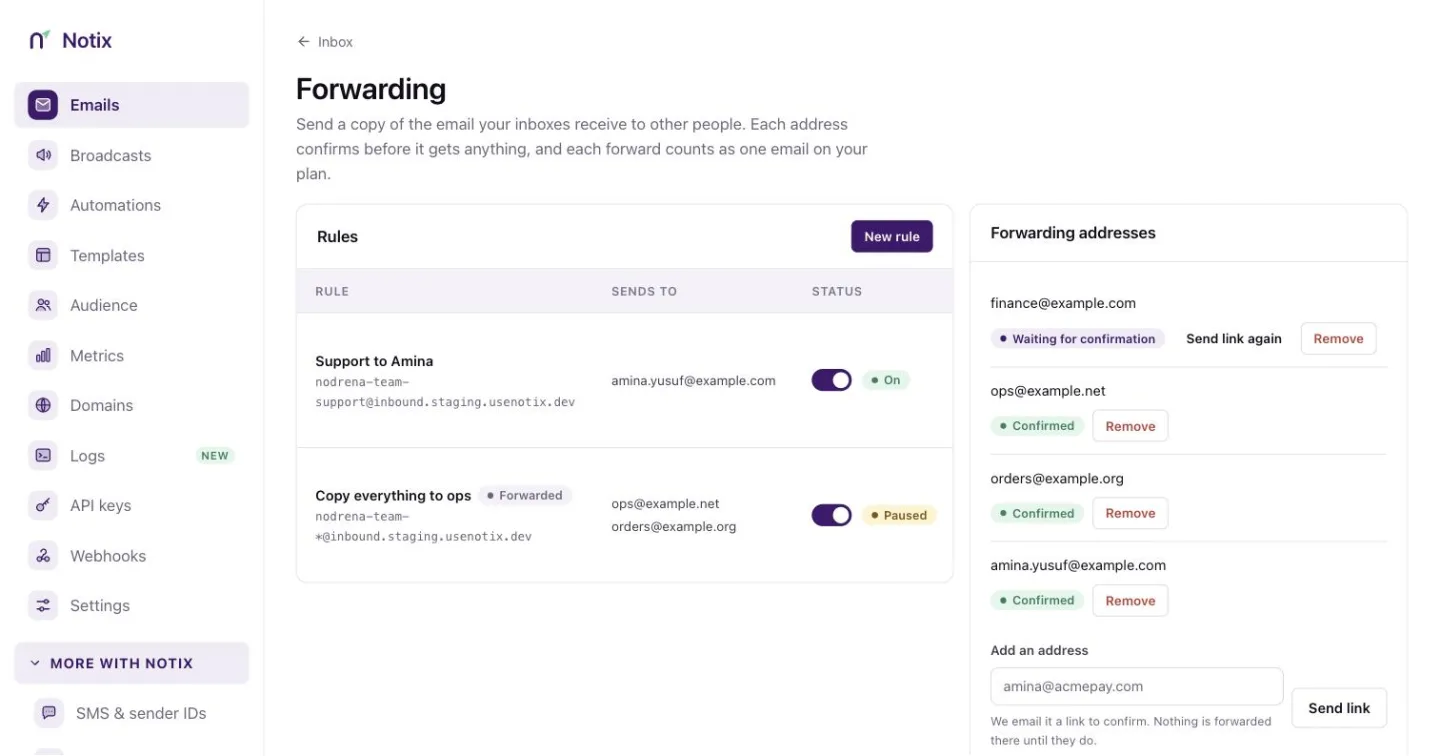
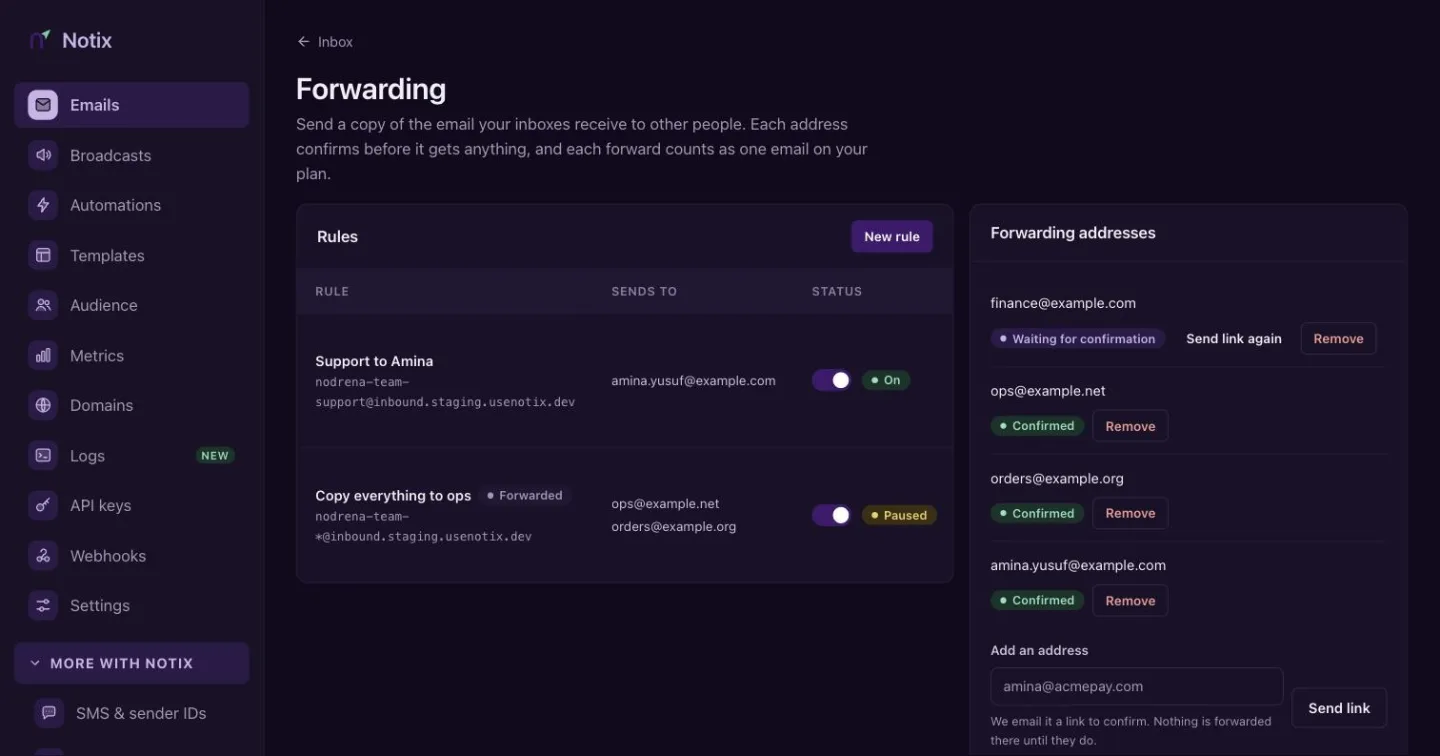
Open Inbox, then Forwarding, and add the address under Forwarding addresses. It gets nothing until someone who reads it confirms: Notix emails it a link that works once, for 24 hours, and tells your team's admins when it is confirmed.
With the API:
curl -X POST https://app.usenotix.dev/api/v1/forwarding-destinations \ -H "Authorization: Bearer $NOTIX_API_KEY" \ -H "Content-Type: application/json" \ -d '{"email":"amina@acme.com"}'{ "destination": { "id": "clx9f2k3l0002qz8a7b6c5d4e", "email": "amina@acme.com", "status": "PENDING", "verifiedAt": null, "expiresAt": "2026-10-06T10:00:00.000Z", "lastSentAt": "2026-10-05T10:00:00.000Z", "createdAt": "2026-10-05T10:00:00.000Z" }, "confirmationSent": true }Adding the same address again sends a new link while it is waiting. One address gets at most one link a minute and three an hour from your team, even if you remove it and add it again, and five a day from every team on Notix together. A confirmed address can be used by every rule of your team.
Create a rule
Press New rule, or use the API. The pattern says which receiving addresses the rule forwards:
Pattern Matches acme-support@inbound.usenotix.devThat address only. orders-*@inbound.acme.comAddresses that start with orders-.*@inbound.acme.comEvery address on the domain. In the console, tick Forward every email on inbound.acme.com; with the API, send "confirmCatchAll": true.On the shared Notix domain, a pattern must match one of your inbox addresses. On your own receiving domain every address is received, so any address, prefix or catch-all on it works once the domain is receiving. A prefix or catch-all there needs a From address, so whoever writes to your domain never chooses the address your forwards come from, and every admin gets an email when such a rule is created or widened.
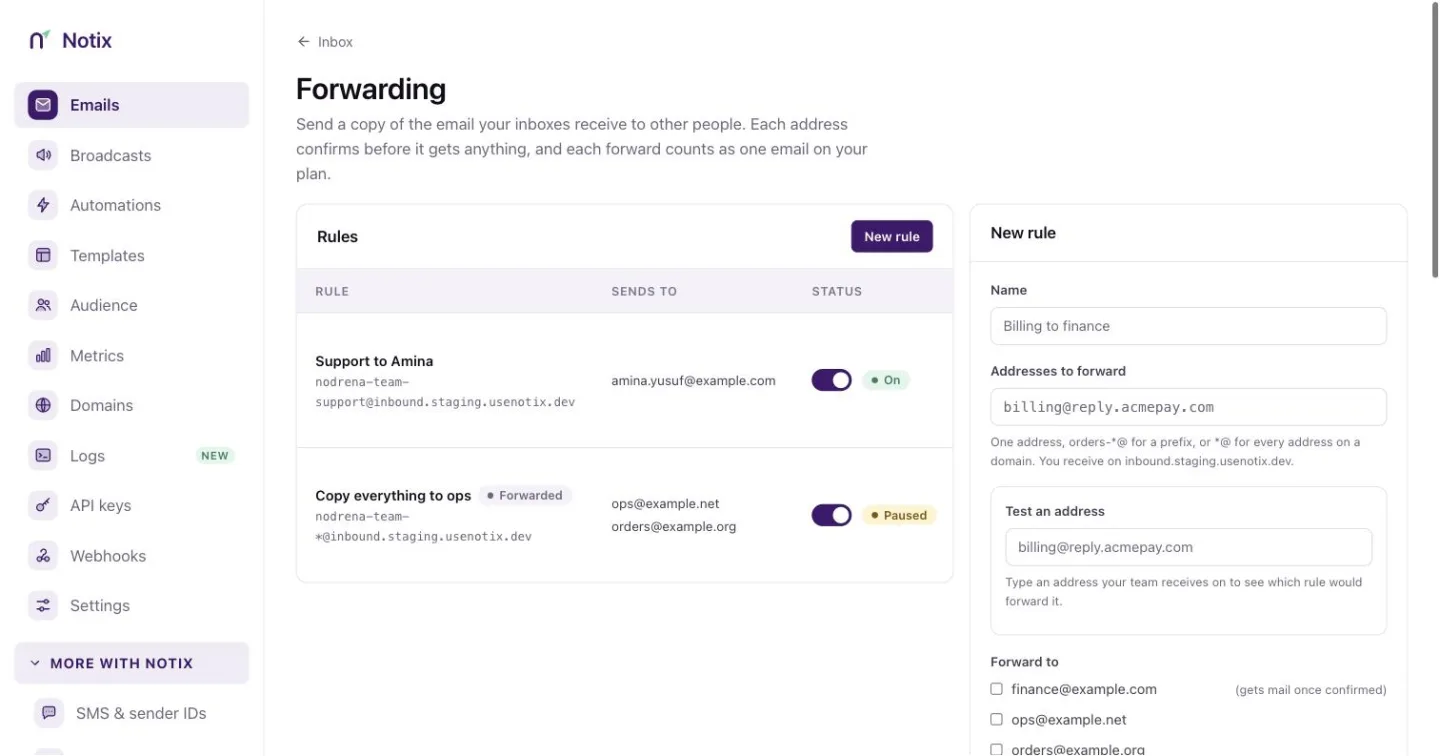
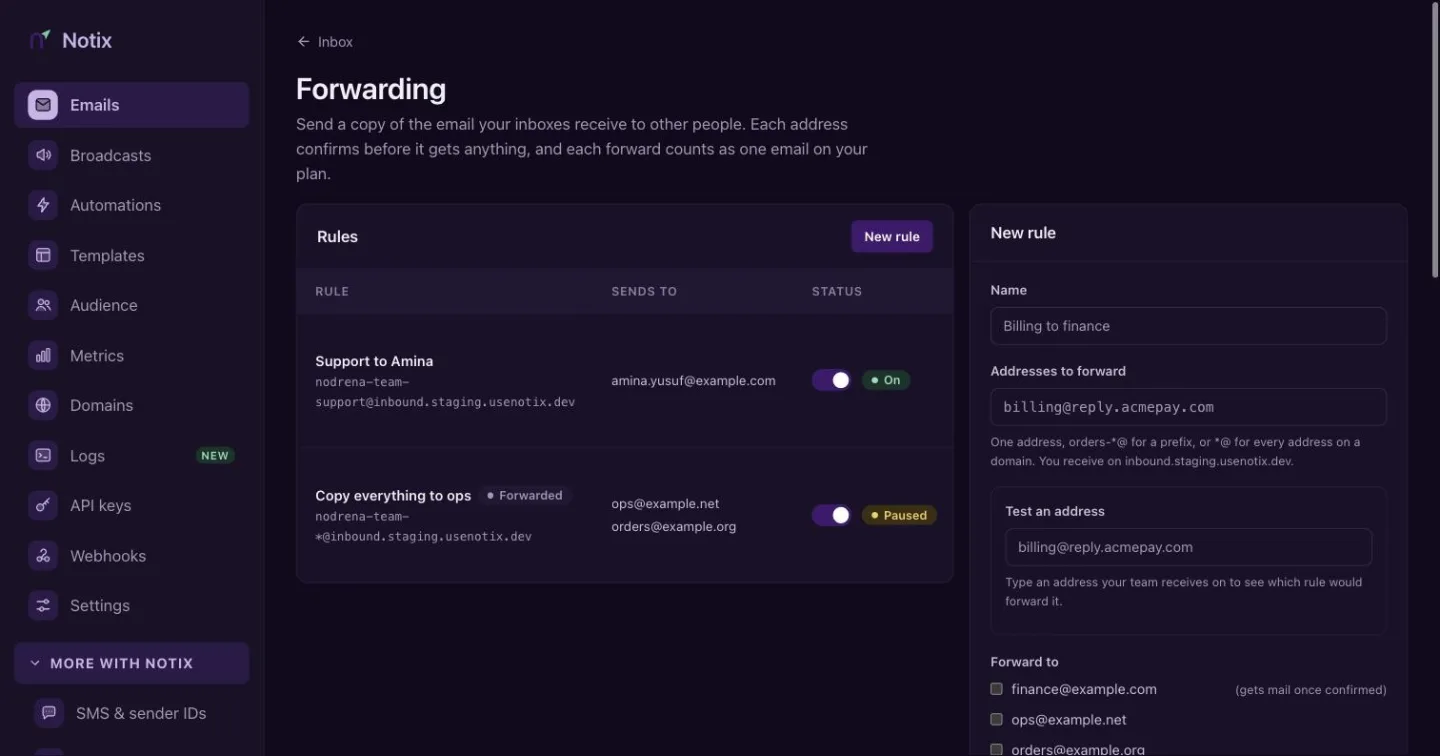
A new rule. The tester under the pattern shows which of your addresses it would forward. curl -X POST https://app.usenotix.dev/api/v1/forwarding-rules \ -H "Authorization: Bearer $NOTIX_API_KEY" \ -H "Content-Type: application/json" \ -d '{ "name": "Support to Amina", "pattern": "acme-support@inbound.usenotix.dev", "destinationIds": ["clx9f2k3l0002qz8a7b6c5d4e"], "fromAddress": "support@acme.com", "priority": 10 }'{ "id": "clx9f2k3l0001qz8a7b6c5d4e", "name": "Support to Amina", "pattern": "acme-support@inbound.usenotix.dev", "patternType": "EXACT", "receivingDomain": "inbound.usenotix.dev", "destinations": [{ "id": "clx9f2k3l0002qz8a7b6c5d4e", "email": "amina@acme.com", "status": "VERIFIED" }], "webhookId": null, "fromAddress": "support@acme.com", "subjectPrefix": null, "allowChaining": false, "passthrough": true, "note": null, "active": true, "priority": 10, "paused": false, "pausedAt": null, "pauseReason": null, "createdAt": "2026-10-05T10:05:00.000Z", "updatedAt": "2026-10-05T10:05:00.000Z" }fromAddressmust be on one of your verified sending domains. Leave it out only when the receiving address itself is on one. Rules are tried from the lowestpriority; the first rule that is on and matches forwards the message. Add"webhookId"to also send each matching message to one of your webhooks, and"subjectPrefix": "[Acme]"to mark forwarded subjects.As received, or as a forwarded message
By default a rule forwards each message exactly as it arrived (
"passthrough": true). Set"passthrough": falseto send it the way an email client forwards: an optional note from your team on top, then a Forwarded message block, then the original email. The subject getsFwd:in front unless it already starts withFwd:orFW:, and attachments go either way. In the console, tick Show as a forwarded message on the rule and type the note.curl -X PATCH https://app.usenotix.dev/api/v1/forwarding-rules/clx9f2k3l0001qz8a7b6c5d4e \ -H "Authorization: Bearer $NOTIX_API_KEY" \ -H "Content-Type: application/json" \ -d '{"passthrough": false, "note": "For the accounts team. Please check the total."}'As received, Amina gets the email as Chidi wrote it, with the subject
Invoice 4471 is wrong. As a forwarded message, she getsFwd: Invoice 4471 is wrong:For the accounts team. Please check the total. ---------- Forwarded message --------- From: Chidi Okafor <chidi@gmail.com> Date: Mon, 05 Oct 2026 10:04:09 +0000 Subject: Invoice 4471 is wrong To: acme-support@inbound.usenotix.dev Hello, the total on invoice 4471 is wrong.The note is plain text of up to 2,000 characters. When Notix could not confirm the sender, the block shows their address only, marked
(unverified sender), never the name they wrote; the[Unverified sender]subject and the Reply-To rules above still apply. If the block would make the email too large to send, it goes as received instead. Send"passthrough": trueto go back.Test an address
Check which rule an address would use before you rely on it. The console has the same tester on the Forwarding page.
curl -X POST https://app.usenotix.dev/api/v1/forwarding-rules/test \
  -H "Authorization: Bearer $NOTIX_API_KEY" \
  -H "Content-Type: application/json" \
  -d '{"address":"acme-support@inbound.usenotix.dev"}'
Every forwarding endpoint, with its fields and answers, is in the Forwarding API reference.
Read the forward log
Every forward, and every message a rule did not forward, is in the rule's log with a reason. Open it from the rule in the console, or:
curl "https://app.usenotix.dev/api/v1/forwarding-rules/clx9f2k3l0001qz8a7b6c5d4e/log?limit=20" \
  -H "Authorization: Bearer $NOTIX_API_KEY"
| Reason | What happened |
|---|---|
SPAM or VIRUS | The message failed the spam or virus check. It stays in the inbox's Spam view. |
LOOP_HEADER | The message carries X-Notix-Forwarded, so a Notix rule already forwarded it. |
AUTO_REPLY | An out-of-office reply, bounce or list message. |
DUPLICATE | The same Message-ID was forwarded by this rule in the last 24 hours. |
RULE_PAUSED | The rule is paused. |
NOT_VERIFIED | The forwarding address has not confirmed yet. |
OWN_RECEIVING_DOMAIN | The address is on a domain you also receive on. |
DOMAIN_NOT_RECEIVING | The rule is on your own receiving domain, which stopped receiving before the message was forwarded. |
RATE_LIMITED | Still over a limit after about 15 minutes of retries: 30 messages a minute for the rule, 60 forwards for the domain or 120 for the team. |
ATTACHMENTS_TOO_LARGE | Forwarded, without its attachments, which were too large for one email. |
Loops and floods
Forwarding is built so it cannot run away:
- every forward carries the header
X-Notix-Forwarded, and a message with it is never forwarded again; - automatic replies are never forwarded;
- forwarding to an address on a domain you also receive on is refused unless the rule has
"allowChaining": true; - a rule that forwards more than 100 messages in 10 minutes is paused, and your team's admins get an email and a notice in the console. Look at its log, then resume it in the console or with
PATCH /v1/forwarding-rules/{id}and{"paused": false}; - over a rate limit, a forward waits and is tried again for about 15 minutes before the log records it as
RATE_LIMITED; - forwards are sent from their own small share of the sending queue, so a large broadcast or a burst of API email does not hold them back for long, and forwards cannot crowd out your other email.
Because a message that already carries X-Notix-Forwarded is never forwarded, anyone who sends you email can stop it being forwarded by adding that header. Treat forwarding as a convenience, not a guarantee that a copy arrives.
Keys and team changes
Deleting an API key pauses the rules that key created, and your admins are told. Pausing a key does not pause its rules: they keep forwarding until you delete the key or pause the rules yourself.
When a member leaves the team, Notix pauses the rules they made (in the console or with their keys) and sends every address they added back to waiting, so it needs confirming again before anything is forwarded to it. Any confirmation link they sent stops working. When an admin becomes a member, the rules they made are paused. Your admins get an email that names the rules and addresses. Resume a rule or send a link again only for addresses you know and trust. A rule you resume becomes yours. Notix also checks every 10 minutes for rules still on whose maker is no longer an admin, and pauses them.
Admins are also emailed when a key creates, deletes, re-routes or resumes a rule, and when an address is confirmed.
Billing
Receiving and storing email costs nothing extra. Each forward is one email to one address and counts against your plan exactly like an email you send with POST /v1/emails: a rule with two addresses sends two emails per message. Forwards show apart from your other emails on the billing page.
Bounces and complaints
Bounces and spam complaints on forwards do not count toward your sending domain's reputation pause, because a forward passes on mail someone else wrote. Forwarding has its own check at the same limits: if 4% of your team's forwards over 7 days hard-bounce, or 0.08% are marked as spam (with at least 5 complaints), after at least 200 forwards, Notix pauses every forwarding rule of your team and emails your admins. Your other sending carries on. Remove the addresses that bounce or complain, then resume the rules. After you resume, the check starts again from the next day (UTC), so the bounces that caused the pause do not pause the rules a second time.
Forwards also do not count toward the number of emails a sending domain has sent when Notix works out that domain's bounce and complaint rates. They are still billed. See Domain health and pauses.
Retention and personal data
The original .eml of a received message is deleted 30 days after it arrives. The forward log keeps who a message was forwarded to and a reason code, never the message itself, and is kept for 90 days, even after the rule is deleted. An address that never confirms is removed 7 days after its link expired.
Forwarded email is written by other people and often holds personal data. Forward only to people who need it, and remove addresses when someone leaves your team. Deleting a forwarding address takes it off every rule at once.