Personalisation
Put each contact's own details in a broadcast, with fallbacks.
Personalisation puts each contact's own details into a broadcast. Use built-in fields like {{firstName}} and {{email}}, plus your own variables such as {{company}}, {{plan}} or {{registrationCode}}.
How it works
- Register variables on the contact book. Add the names you want to use, such as
companyorplan. - Store values on each contact. Save them in the console, by CSV import or through the API.
- Use the variables in a broadcast. Choose that contact book for the broadcast and put the variables in the subject or the body.
- Send. Notix fills in each contact's own value when it renders the email.
Variables you can use
These built-in variables are always there in a broadcast:
{{email}}{{firstName}}{{lastName}}{{notix_unsubscribe_url}}
Your own variables come from the contact book's variable list.
Every broadcast must have an unsubscribe link. Use {{notix_unsubscribe_url}}, which is different for each person, as the link:
<a href="{{notix_unsubscribe_url}}">Unsubscribe</a>
Register a variable on the contact book before you use it in a broadcast. Variable names may contain only letters, numbers and underscores.
Set it up in the console
Add variables to the contact book
Open Contacts. When you create a book with + New, list your variables under Variables, separated by commas:
company, plan, registrationCodeFor a book you already have, use Edit in the book's More actions menu.
Add values to your contacts
Save a value for each variable on each contact. You can type it in the contact editor, import it as a CSV column with the same name, or send it through the API in
properties.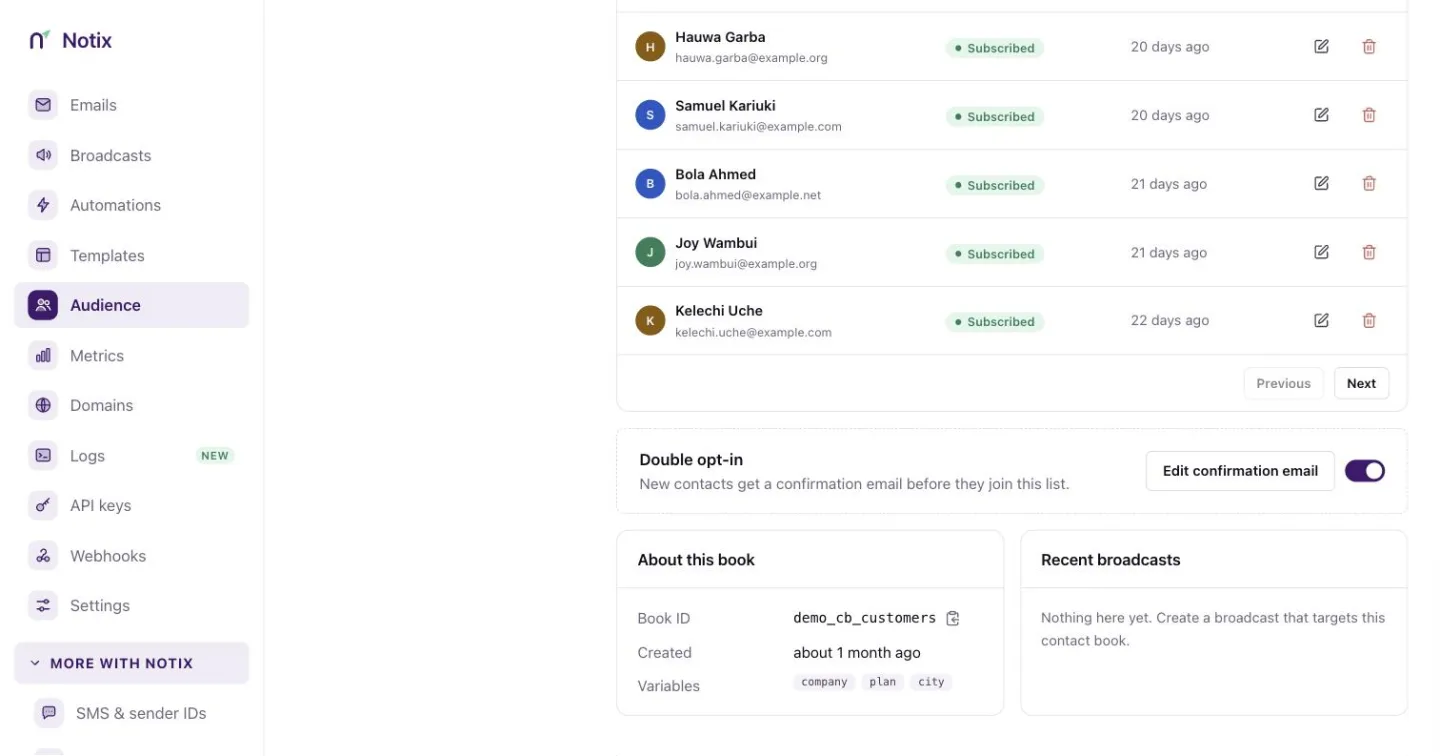
A contact book. Each contact holds its own values for the book's variables. Put the variables in the broadcast
Open or create a broadcast and choose the contact book that holds the variables. Then use them in the subject or the body:
Subject: Welcome to {{company}}

Hi {{firstName}},

You are on the {{plan}} plan.
Your registration code is {{registrationCode}}.
The broadcast editor suggests the book's variables as you type.
Before you send, the review screen checks every contact. If some have no value for a variable the email uses, it says how many. See Broadcasts.
A contact with these values:
{
  "email": "jane@example.com",
  "firstName": "Jane",
  "lastName": "Doe",
  "properties": {
    "company": "Acme",
    "plan": "Pro",
    "registrationCode": "WELCOME-2026"
  }
}
gets "Welcome to Acme" as the subject.
Fallback values
If a value might be empty, give a fallback:
Hi {{firstName,fallback=there}},
This shows there when the contact has no first name.
Through the API
Create a contact book with variables:
curl -X POST https://app.usenotix.dev/api/v1/contactBooks \
  -H "Authorization: Bearer $NOTIX_API_KEY" \
  -H "Content-Type: application/json" \
  -d '{
    "name": "Customers",
    "variables": ["company", "plan", "registrationCode"]
  }'
Add a contact with values:
curl -X POST https://app.usenotix.dev/api/v1/contactBooks/cb_123/contacts \
  -H "Authorization: Bearer $NOTIX_API_KEY" \
  -H "Content-Type: application/json" \
  -d '{
    "email": "jane@example.com",
    "firstName": "Jane",
    "properties": {
      "company": "Acme",
      "plan": "Pro",
      "registrationCode": "WELCOME-2026"
    }
  }'
Create a broadcast that uses them:
curl -X POST https://app.usenotix.dev/api/v1/broadcasts \
  -H "Authorization: Bearer $NOTIX_API_KEY" \
  -H "Content-Type: application/json" \
  -d '{
    "name": "Welcome campaign",
    "from": "Acme <hello@acme.com>",
    "subject": "Welcome to {{company}}",
    "contactBookId": "cb_123",
    "html": "<p>Hi {{firstName,fallback=there}}, your plan is {{plan}}.</p><p><a href=\"{{notix_unsubscribe_url}}\">Unsubscribe</a></p>"
  }'
import { Notix } from "notix-js";

const notix = new Notix(process.env.NOTIX_API_KEY);

await notix.broadcasts.create({
  name: "Welcome campaign",
  from: "Acme <hello@acme.com>",
  subject: "Welcome to {{company}}",
  contactBookId: "cb_123",
  html: '<p>Hi {{firstName,fallback=there}}, your plan is {{plan}}.</p><p><a href="{{notix_unsubscribe_url}}">Unsubscribe</a></p>',
});
See Create a contact book, Add a contact and Create a broadcast.
Good habits
| Habit | Why it helps |
|---|---|
| Register variables before you import | CSV columns and API properties line up with the book. |
| Keep variable names short and plain | Emails are easier to read and change later. |
| Use fallbacks for optional values | No awkward gaps when a contact is missing a value. |
| Test with a small segment first | You see the filled-in email before the whole list does. |