
Skip the ramp and mailbox providers will treat your traffic as suspicious, often before you learn what broke.
TL;DR:
- Proper IP warming depends on increasing sending volume no more than 1.5 times every few days, typically over six to eight weeks, depending on provider policies.
- Ensuring SPF, DKIM, and DMARC authentication pass before warming minimizes rejection risks and accelerates trust-building.
- Warming is essential when provisioning a new dedicated IP, migrating to a new provider, launching a new subdomain, or reactivating after a long pause.
- During warm-up, focus on sending to engaged recipients with relevant content, maintaining a consistent cadence, and sharing suppression lists across campaigns.
- Monitoring complaint rates, bounces, deferrals, and inbox placement signals in real time is critical to avoiding reputation damage and adjusting volume.
Table of Contents
- What is IP warming and why it matters for deliverability
- When you must warm an IP (triggers and exceptions)
- Key principles before you start: authentication, hygiene, and segmentation
- Step-by-step warm-up schedule and example ramps
- Best practices during warm-up: content, cadence, and suppression
- Monitoring, metrics, and alarms to protect reputation
- Common mistakes and how to recover from a stalled warm-up
- Operational checklist for safer IP warming
- Practitioner perspective: conservative ramp or faster migration?
- Getting your warm-up right with Notix
- FAQ
- Sources
What is IP warming and why it matters for deliverability
Mailbox providers have no sending history to judge a brand-new or long-dormant IP, so they default to caution: low initial acceptance, spam-folder placement, or outright throttling until the address proves itself. IP warming is the deliberate process of sending gradually increasing volume from that IP so inbox providers can build a trust profile around it, according to AWS SES documentation.
Delivery and deliverability are not the same thing. A message can be accepted by a receiving server and still land in spam, which means acceptance rates alone never tell the full story.
IP reputation and domain reputation work together rather than independently:
- A clean IP paired with a weak or unauthenticated domain still gets filtered.
- A strong domain history can offset some early IP uncertainty, but never replaces a proper warm-up.
- Mailbox providers increasingly weight domain-level signals alongside IP-level ones when deciding where mail lands.
When you must warm an IP (triggers and exceptions)
Certain changes reset your sending history and require a deliberate ramp:
- Provisioning a new dedicated IP address for the first time.
- Migrating to a new email service provider, even if your content and list stay the same.
- Launching a new sending subdomain for a distinct mail stream.
- Reactivating a dedicated IP after an extended gap in sending.
Some providers handle part of this automatically. AWS SES, for example, offers an auto-warm feature that increases sending on a dedicated IP over roughly 45 days up to a capped daily volume, though senders should still sequence engaged recipients first and watch metrics closely even when a provider manages the throttle, per AWS SES documentation. Warming is generally unnecessary on shared IPs, since those addresses already carry an established pooled reputation, and very small-volume senders rarely need a formal ramp at all.
Key principles before you start: authentication, hygiene, and segmentation
A warm-up schedule only works if the fundamentals are already solid. Skipping these steps wastes the weeks you spend ramping.
- Confirm SPF, DKIM, and DMARC are correctly published and passing, since authentication failures are a frequent cause of rejected or filtered mail, according to Sender Score.
- Set up feedback loops so you learn about spam complaints before they damage your sending reputation.
- Remove hard bounces, long-inactive addresses, and anything resembling a spam trap from your list before the first send.
- Segment by engagement level and lean on double opt-in for new contacts so your most responsive recipients lead the ramp.
Our DMARC guide walks through the difference between none, quarantine, and reject policies if you're setting DMARC up for the first time, and for deeper troubleshooting, the domain authentication guide from DMARC Analyzer Pro covers common SPF and DKIM misconfigurations.
Pro Tip: Fix authentication and hygiene a full week before your first warm-up send, not the same day, so you have time to confirm records have propagated.
Step-by-step warm-up schedule and example ramps
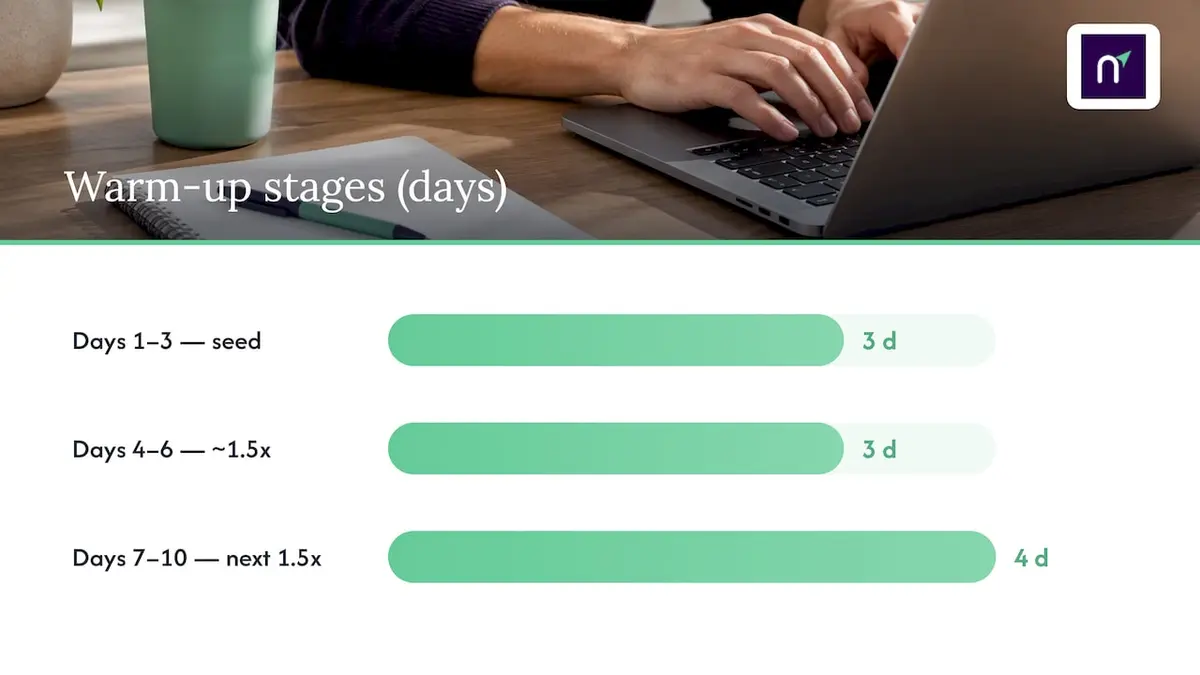
A commonly used ramp increases volume by no more than 1.5x per stage, holding each stage for two to four days before advancing, according to the IP Warmup Planner. A small-volume sender might start at a few hundred messages a day to its most engaged segment, then step up roughly as follows:
- Days 1-3: a small seed volume to your highest-engagement subscribers only.
- Days 4-6: roughly 1.5x the prior stage, still favoring engaged segments.
- Days 7-10: another 1.5x step, expanding to moderately engaged contacts.
- Following weeks: continued 1.5x stages, widening the audience as metrics stay clean.
At scale, reaching a high daily message volume can take several weeks, depending on list engagement and hygiene, per the IP Warmup Planner. That timeline isn't fixed: AWS SES documentation notes that warm-up duration varies by provider, with some mailbox providers granting a positive reputation in as little as two weeks and others requiring six weeks or more.
Pace should flex with your signals, not a calendar. A list with strong open and click rates can often absorb faster steps, while rising bounces or complaints are a reason to hold a stage longer rather than advance on schedule. When a provider's automatic warm-up feature is doing the throttling for you, you still own the job of watching metrics and pausing manually if something looks wrong, since the automation adjusts volume, not your content or list quality.
Best practices during warm-up: content, cadence, and suppression
What you send during warm-up matters as much as how much you send. Mailbox providers are reading engagement signals closely during this window, and a single bad batch can set the whole ramp back.
- Send your most relevant, highest-value content to your most engaged recipients first, saving promotional or re-engagement campaigns for later stages.
- Keep a consistent daily cadence rather than sending in bursts, since sudden spikes look anomalous even within an approved ramp stage.
- Share suppression lists across transactional and marketing streams so a complaint or unsubscribe on one channel blocks sends on the other.
- Keep unsubscribe links obvious and functional, and apply double opt-in on new contacts so only confirmed, interested recipients enter the warm-up pool.
Pro Tip: Treat your suppression list as one shared resource across every sending stream, not a separate list per campaign type, so a complaint never slips through on a different channel.
Monitoring, metrics, and alarms to protect reputation
Warm-up is only safe if you're watching the right numbers in real time. At minimum, track complaint rate, hard and soft bounce rate, deferrals, acceptance rate, and whatever inbox-placement signal your tools expose, since acceptance by a receiving server doesn't guarantee the inbox, per Sender Score.
- Complaint rate approaching a low threshold around 0.1% is a commonly used signal for pausing or stepping back a stage, per the IP Warmup Planner.
- Bounce rates near 2% are generally treated similarly: hold, investigate, and clean before resuming, per the IP Warmup Planner.
- A rising deferral rate often precedes a block, so treat it as an early warning rather than noise.
- Overall sending health shows up in tools like Sender Score, which aggregates complaint rates, spam trap hits, and other signals mailbox providers weigh.
Pair these with feedback loop subscriptions, Postmaster-style tools where your traffic volume qualifies, and automated alerts so a threshold breach triggers a pause before you've sent the next batch. Our bounce handling guide covers how webhook-driven bounce data can feed directly into that kind of automated response, and the open tracking guide is worth reading before you lean too heavily on open rates as your only engagement signal.
Common mistakes and how to recover from a stalled warm-up
Most failed warm-ups trace back to a handful of avoidable errors, and the fix is rarely complicated once you know which one happened.
- Avoid purchased or rented lists entirely: they carry stale addresses and spam traps that spike complaints almost immediately.
- Avoid jumping volume by more than the planned stage increase, even when early metrics look good, since a few clean days don't guarantee the next batch behaves the same way.
- If complaints or bounces exceed your thresholds, pause sending, fix the underlying hygiene or authentication issue, and resume at a lower volume rather than where you left off.
- Re-sequence your most engaged recipients first when resuming, the same way you did at the start.
- If an IP gets blacklisted or throttled despite remediation, consider warming a new IP instead of continuing to fight a damaged one, or escalate to your ESP's deliverability team for guidance specific to that mailbox provider.
Long gaps in sending degrade reputation too: an IP left idle for more than about 30 days generally needs a fresh warm-up cycle before returning to full volume.
Operational checklist for safer IP warming
Several platform-level controls can help maintain these guardrails in practice. Double opt-in confirms that new contacts want your mail before they enter a warm-up sequence, keeping early-stage complaint rates lower. Automated, unified suppression shared across transactional and marketing sends means a bounce or complaint on one stream instantly protects every other stream.
- Signed webhooks for bounces and complaints let you pipe real-time events into your own monitoring instead of checking a dashboard manually.
- A shared suppression list removes the risk of re-mailing a complained address through a different campaign type.
- Infrastructure uptime helps prevent interruptions that could affect a carefully paced ramp.
Relevant platform security practices for webhook signing and delivery reliability are detailed on the security page.
Practitioner perspective: conservative ramp or faster migration?
A slower ramp is almost always the safer bet, but business timelines sometimes force a faster migration anyway. The right call depends on how much reputation risk you can absorb: a payments or transactional sender has far less room for error than a newsletter testing a new ESP. Watch engagement trends and complaint signals daily, not weekly, and when deadlines push you to move faster, protect your most valuable mail stream first and accept slower growth everywhere else.
— Paul
Getting your warm-up right with Notix
We built our platform around the controls this guide recommends: double opt-in on contact books, suppression shared automatically across transactional and marketing sends, and signed webhooks for bounces and complaints so your monitoring updates in real time instead of on a delay.
If you're planning a migration or standing up a new dedicated IP, our Email API and SMTP relay are built for exactly this kind of controlled rollout, and our pricing page lays out Free, Pro, and Enterprise plans with no hidden tiers.
FAQ
How long does IP warming take?
Warm-up duration varies by mailbox provider and target volume: some providers grant a positive reputation in as little as two weeks, while others take six weeks or longer, according to AWS SES documentation. Reaching a large daily volume target can take roughly six to eight weeks, per the IP Warmup Planner.
What are the best practices for IP warming?
Start with your most engaged recipients, increase volume in stages of no more than about 1.5x with two to four day holds, and confirm SPF, DKIM, and DMARC are passing before you begin, per the IP Warmup Planner.
How do I warm up an IP?
Clean your list, verify authentication, then send a small volume to your most engaged segment and increase it gradually while monitoring complaints, bounces, and deferrals at each stage. Hold or step back whenever a metric crosses your threshold rather than advancing on a fixed calendar.
What is IP warming in marketing cloud?
In marketing automation platforms, IP warming refers to the same gradual ramp process applied to dedicated sending IPs provisioned through that platform, often paired with an automated warm-up feature that throttles volume on your behalf. Even with automation handling the throttle, you still need to monitor engagement and complaint signals and sequence your most responsive contacts first, consistent with general dedicated IP warming guidance from AWS SES documentation.
Sources
- Warming up dedicated IP addresses (standard) — AWS SES documentation
- IP Warmup Planner — Maciej Turek