Thanks for your order.
" }' ``` ```ts Node.js import { Notix } from "notix-js"; const notix = new Notix(process.env.NOTIX_API_KEY); const { data, error } = await notix.emails.send({ from: "receipts@acme.com", to: "maria@example.com", subject: "Your receipt", html: "Thanks for your order.
", }); ``` ```python Python import os from notix import Notix notix = Notix(os.environ["NOTIX_API_KEY"]) data, error = notix.emails.send({ "from": "receipts@acme.com", "to": "maria@example.com", "subject": "Your receipt", "html": "Thanks for your order.
", }) ``` ```php PHP emails->send([ 'from' => 'receipts@acme.com', 'to' => 'maria@example.com', 'subject' => 'Your receipt', 'html' => 'Thanks for your order.
', ]); ``` The answer carries the email id. Look it up later with [Get an email](/docs/reference/emails/get-an-email), or in [Emails](https://app.usenotix.dev/emails) in the console. Prefer a guide for your stack? Pick one: [Node.js](/docs/quickstarts/nodejs), [Next.js](/docs/quickstarts/nextjs), [Python](/docs/quickstarts/python), [PHP](/docs/quickstarts/php), [Laravel](/docs/quickstarts/laravel), [SMTP](/docs/quickstarts/smtp) or [cURL](/docs/quickstarts/curl). ## Retry without sending twice Pass an `Idempotency-Key` header of up to 256 characters on a send or a batch. If the same request arrives again, Notix returns the first result instead of sending a second email. The same key with a different body answers 409 `NOT_UNIQUE`. Keys last 24 hours. ```bash terminal curl https://app.usenotix.dev/api/v1/emails \ -H "Authorization: Bearer $NOTIX_API_KEY" \ -H "Idempotency-Key: order-4821-receipt" \ -H "Content-Type: application/json" \ -d '{ "from": "receipts@acme.com", "to": "maria@example.com", "subject": "Your receipt", "html": "Thanks.
" }' ``` Build the key from your own record, like `order-4821-receipt`, not from a clock or a retry count. More in [Idempotency keys](/docs/sending/idempotency-keys). ## Hear what happened with webhooks Add an endpoint in [Webhooks](https://app.usenotix.dev/webhooks) and Notix posts an event when an email is sent, delivered, bounced, opened or clicked, when a contact changes, and when a code is checked. Every call is signed with `X-Notix-Signature`. Start with the [webhooks introduction](/docs/webhooks), then see every [event type](/docs/webhooks/event-types). ## Verify an address with a one-time code Send a numeric code, then check what the person typed back. Notix keeps only a keyed hash of the code. `codeLength` is 6 digits by default (4 to 8), and `expiresIn` is 600 seconds by default (60 to 1800). ```ts verify.ts import { Notix } from "notix-js"; const notix = new Notix(process.env.NOTIX_API_KEY); const sent = await notix.verify.send({ to: "maria@example.com", appName: "Acme" }); if (!sent.data) throw new Error(sent.error?.message ?? "The code was not sent"); const result = await notix.verify.check({ id: sent.data.id, code: "123456" }); if (result.data?.verified) { // The code matched. } ``` Codes go by SMS too. See [One-time codes](/docs/sms/one-time-codes). ## Start an automation An automation walks each contact through its own steps: an email, a wait, another email. Enrol a contact by id or by email and Notix sends each step in turn. ```ts journey.ts const run = await notix.automations.enroll("jrn_abc123", { email: "maria@example.com" }); if (!run.data) throw new Error(run.error?.message ?? "The contact was not enrolled"); ``` A contact holds at most one run per automation. Build automations in the console with [Automations](/docs/marketing/automations). ## Check before you send One call renders the message, runs a spam filter over it, opens up to 20 links, and returns a verdict, a score out of 100 and a fix for each finding. It costs no units. Broadcasts and automations run the same check and refuse anything it blocks. ```ts deliverability.ts const report = await notix.deliverability.check({ from: "news@acme.com", subject: "Your September update", html: "Read the update.
", marketing: true, }); if (report.data?.verdict === "BLOCK") { for (const finding of report.data.findings) console.error(finding.title + ": " + finding.fix); } ``` More in [Check before you send](/docs/sending/deliverability-check). ## Paying in NGN or KES Teams in Nigeria and Kenya pay in their own currency. Add money to your Notix wallet by card, bank transfer or mobile money, and Notix takes Pro and any usage from that balance. Prices are set in naira and shillings, so they do not move with the exchange rate. Top-ups are prepaid and not refundable. Everyone else pays in USD by card. See [Billing and wallet](/docs/account/billing-and-wallet). ## Next steps - [Platform tour](/docs/platform-tour): every screen of the console. - [Connect your AI](/docs/connect-your-ai): give Claude, ChatGPT or Cursor a key. - [API reference](/docs/reference): every endpoint, with requests and responses. --- # Platform tour Every screen of the Notix console, one by one, with a link to the guide for each. This tour walks the Notix console from top to bottom, in the order of the menu on the left. Each section shows the screen, says what it is for, and links to the guide with the details. The menu lists Emails, Broadcasts, Automations, Templates, Audience, Metrics, Domains, Logs, API keys, Webhooks and Settings. Under them, **More with Notix** opens SMS & sender IDs, One-time codes and Connect your AI. Press ⌘K (Ctrl K on Windows) anywhere to jump to a page or run an action. ## Emails The first page you see after you sign in. **Sending** lists every email your account sent, newest first: search and filter, then open one to see its events, its rendered body and why it bounced. **Receiving** is your inbox: replies and messages to your inbox addresses, in one place. Assign a conversation to a teammate, add notes, reply and close it. **Forwarding rules** sends received mail on to other addresses.  *Emails: every email your account sent, newest first.*  *Receiving: every conversation your inbox addresses received.* Read [Email logs](/docs/sending/email-logs), [Receiving emails](/docs/receiving/receiving-emails) and [Shared inbox](/docs/receiving/shared-inbox). ### The Get started checklist New teams get a **Get started** card at the top of Emails with five items: create your account, take the tour, send a test email, verify your domain, and connect your AI or API key. Each open item links to where it gets done. The hide button puts it away for good. It also goes once all five are done. Start with the [Quickstart](/docs/quickstart). ### Suppressions Press **Suppressions** on the Emails page to see the addresses Notix will never send to: bounces, complaints, unsubscribes and the ones you add.  *Suppressions: who Notix will not send to, and why.* Read [Bounces and suppressions](/docs/sending/bounces-and-suppressions). ## Broadcasts Emails to a list or segment, drafted by you or your AI agent. Write it, pick who gets it, then **Review and send** checks everything before it goes. Broadcasts were called campaigns before.  *Broadcasts: drafts, scheduled and sent, with their results.* Read [Broadcasts](/docs/marketing/broadcasts). ## Automations Automatic emails that walk each person through your steps. Build them in the automation builder, check them, then turn them on. Automations were called journeys before. 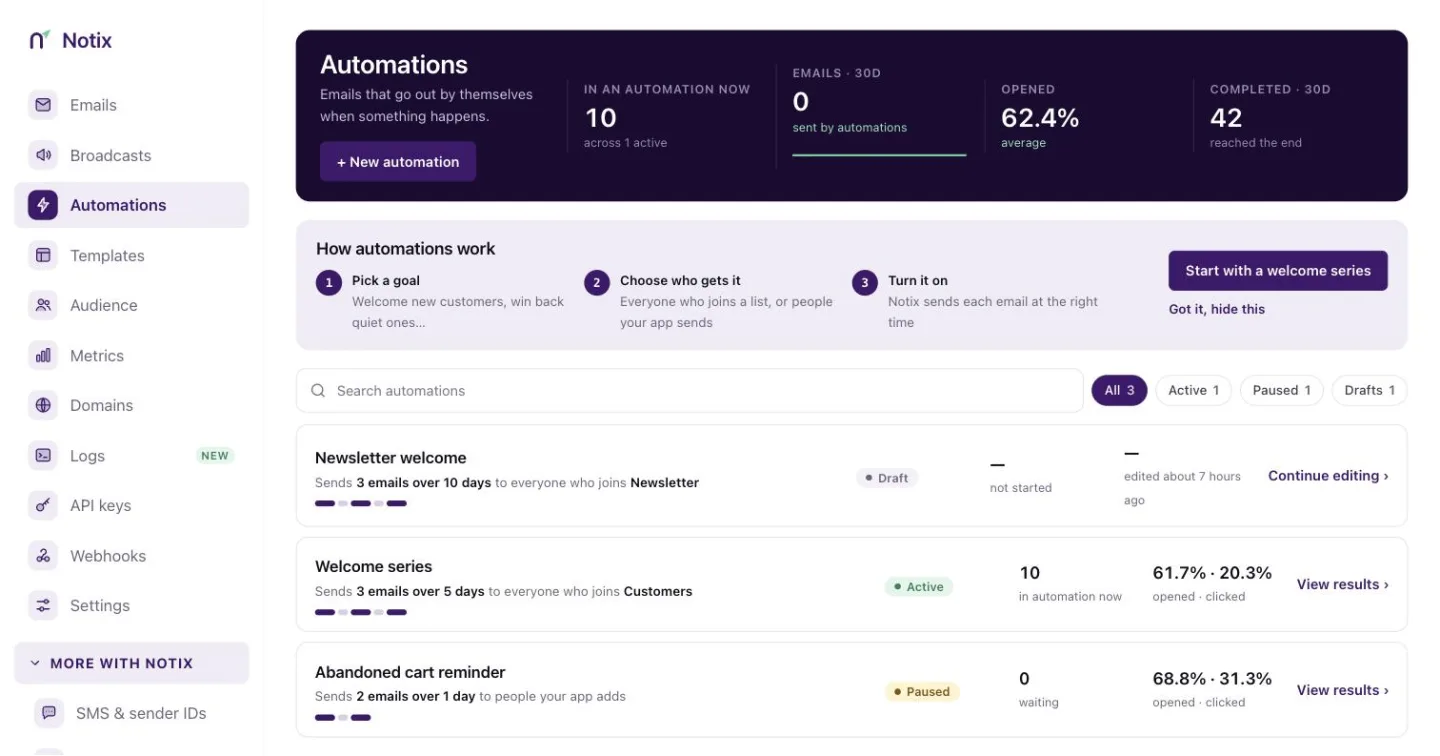 *Automations: automatic series and the people moving through them.* Read [Automations](/docs/marketing/automations). ## Templates Reusable emails your team and your AI agent can send. Start from the library of 54 ready-made emails, then edit in Template Studio. 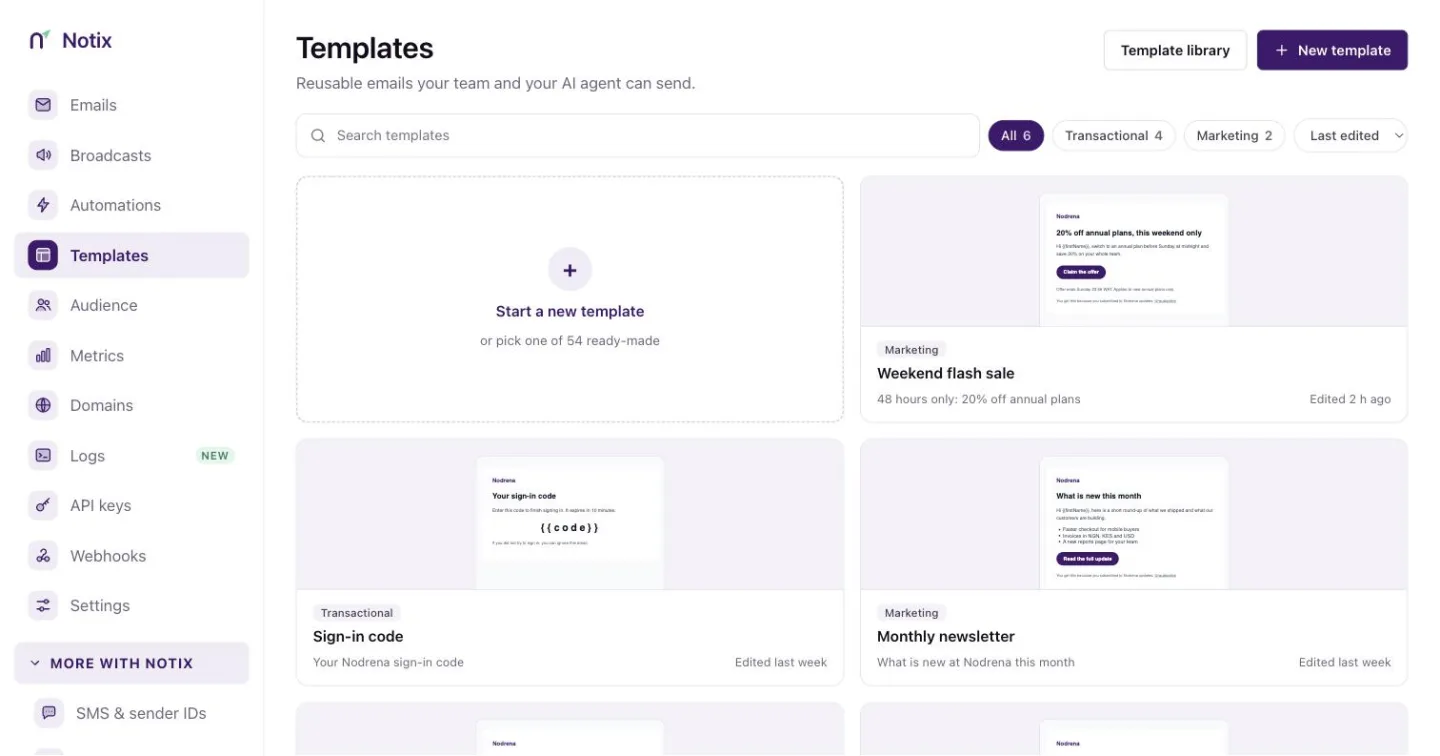 *Templates: reusable emails for the API, broadcasts and automations.* Read [Templates and library](/docs/marketing/templates). ## Audience Everyone you can email or text. **Contacts** holds your contact books: import a CSV, turn on double opt-in and open a book to see its people. **Properties** lists the custom fields your contacts carry, **Segments** the live filters you send to, and **Topics** is coming soon. 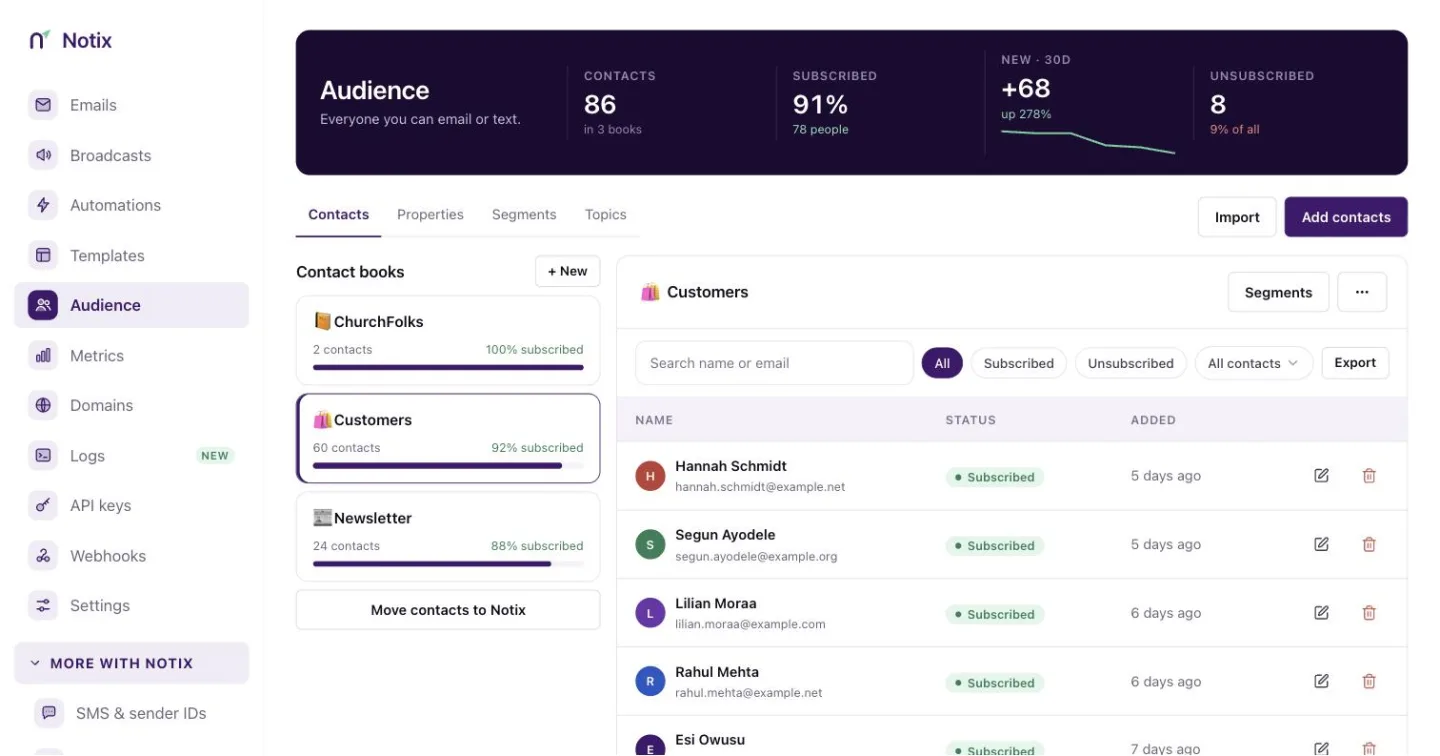 *Audience: your contact books and how many people are in each.* Read [Contacts and segments](/docs/marketing/contacts-and-segments). ### Migrate to Notix The Migration Center brings your unsubscribes first, then your contacts, from your old provider. Nothing is written until you say so. Open it from the Audience page. 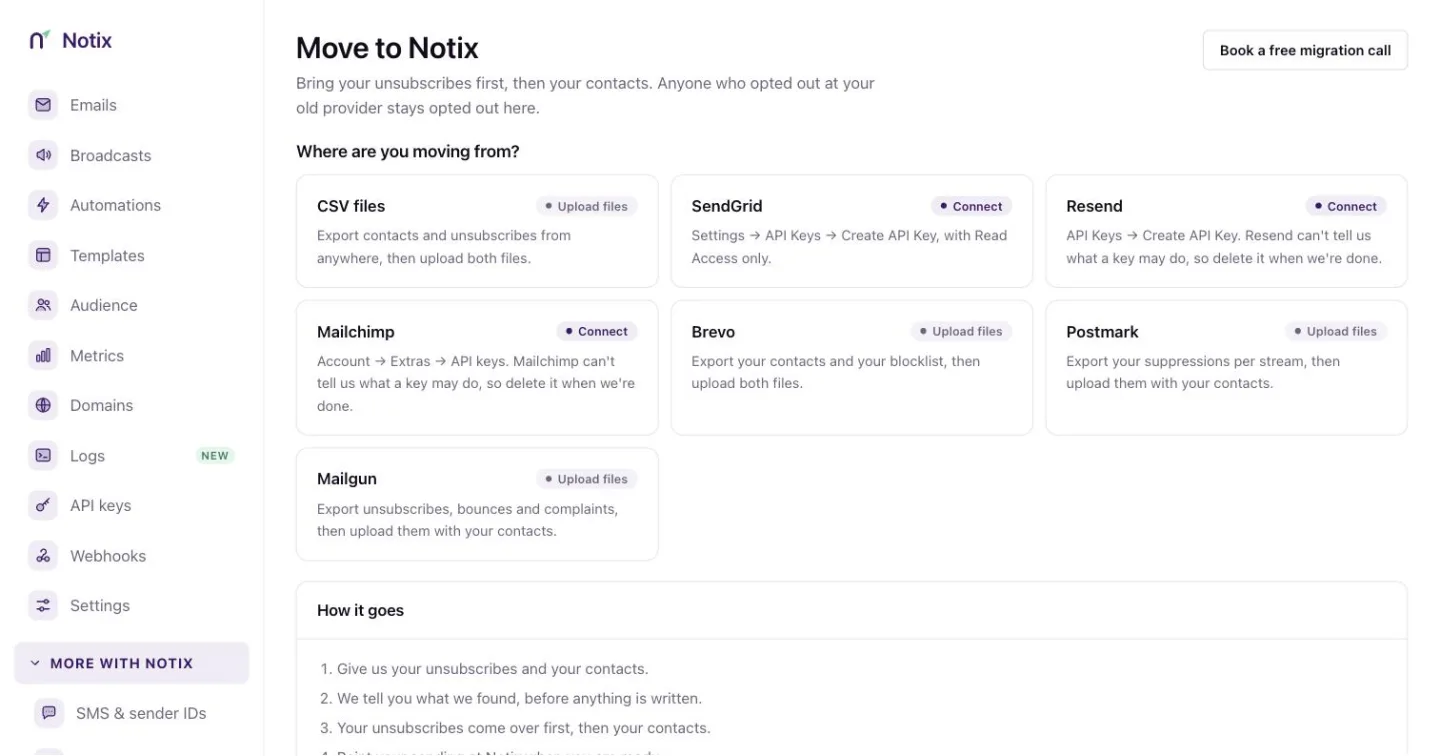 *Migrate to Notix: unsubscribes come over first, so opted-out people stay opted out.* Read [Migrate to Notix](/docs/marketing/move-to-notix). ## Metrics Your real sending numbers for the last 7, 15, 30 or 90 days, for every domain or one: emails sent, deliverability, each day's delivered, bounced and complained mail, and your bounce, complaint, open and click rates. Read [Metrics](/docs/sending/metrics). ## Domains Where your email is sent from, and how healthy each one is. Each card shows its records and the bounce rate for the last 7 days. 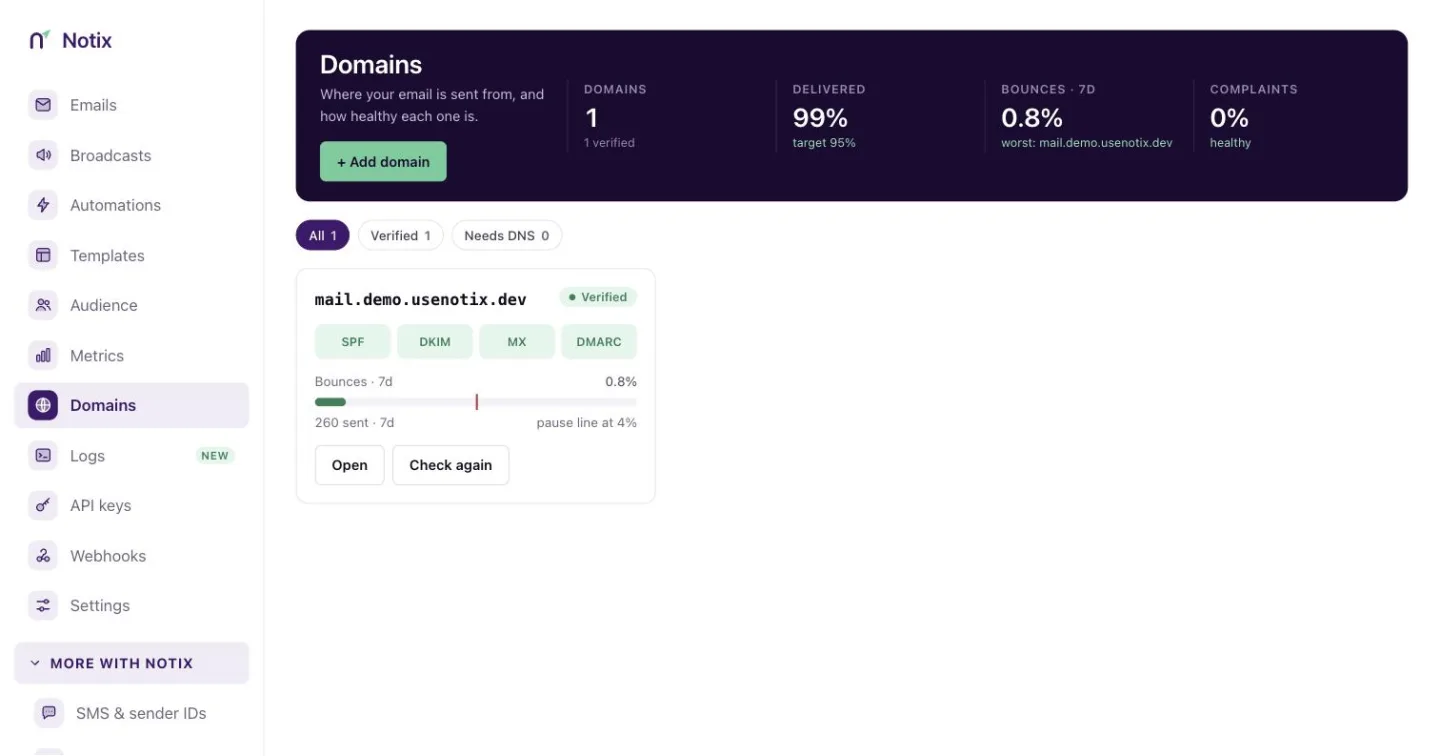 *The Domains page. Each card shows its records and bounce rate for the last 7 days.* Read [Add and verify a domain](/docs/add-a-domain) and [Domain health and pauses](/docs/domains/health-and-pauses). ## Logs Coming soon: every API request your keys make, with its answer. ## API keys API keys and your AI agents. Create and pause keys, and set their limits. What they did is in the audit log, under Settings. 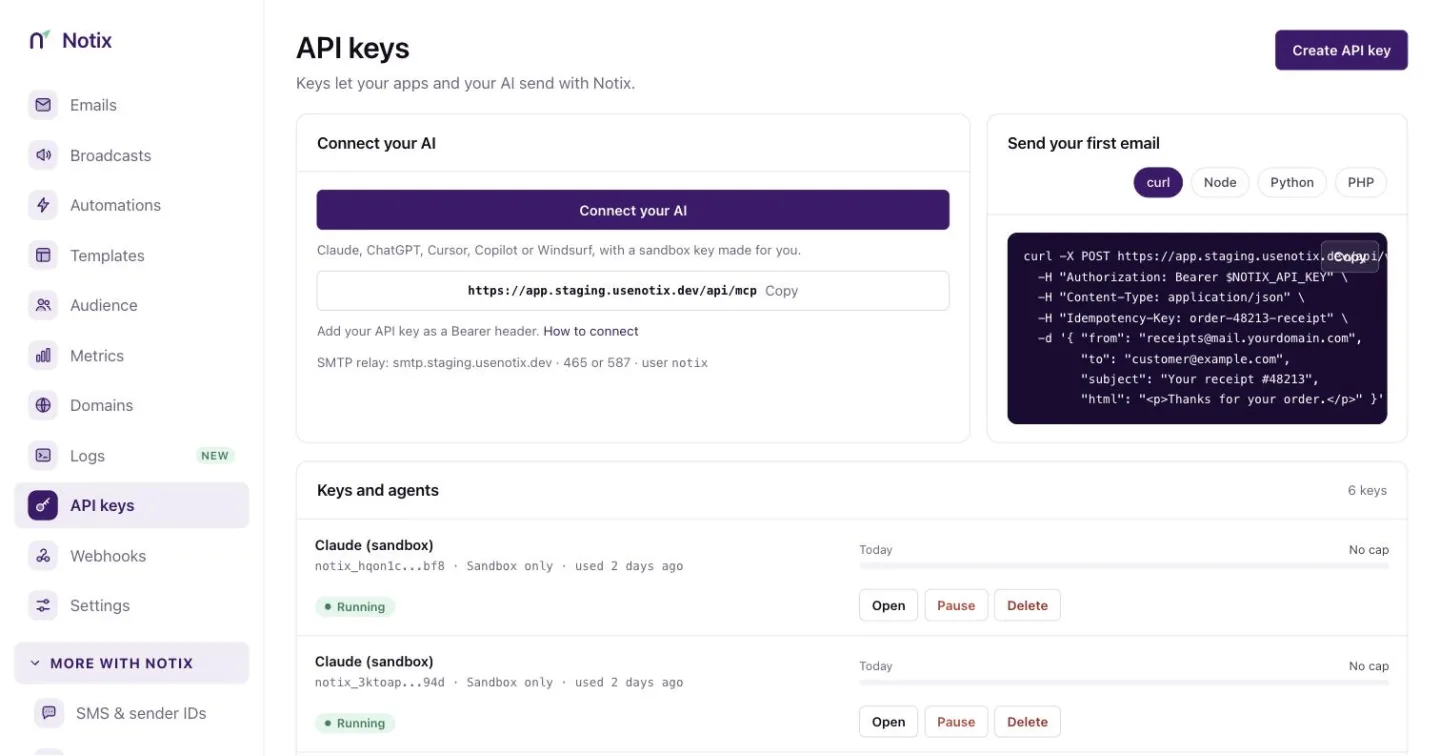 *API keys: your keys, their permission, and when each was last used.* Read [Create an API key](/docs/create-an-api-key) and [API keys and permissions](/docs/account/api-keys). ## Webhooks Notix tells your server the moment something happens. Add an endpoint, pick its events, and see the latest deliveries and any failures. 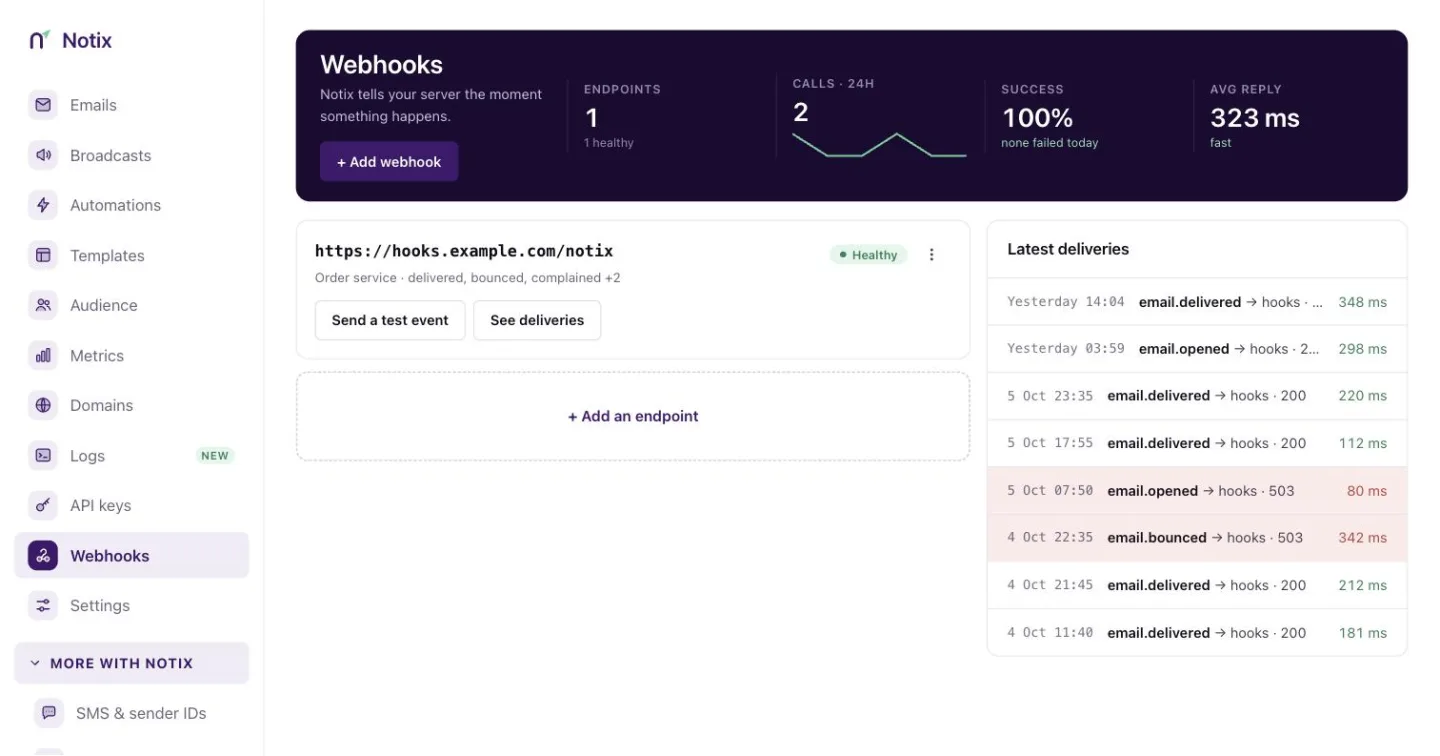 *Webhooks: your endpoints and their latest deliveries.* Read [Webhooks](/docs/webhooks). ## Settings Your plan, team and account, in tabs: **Usage**, **Billing & wallet**, **Team**, **SMTP**, **Integrations**, **Unsubscribe page** and **Audit log**. 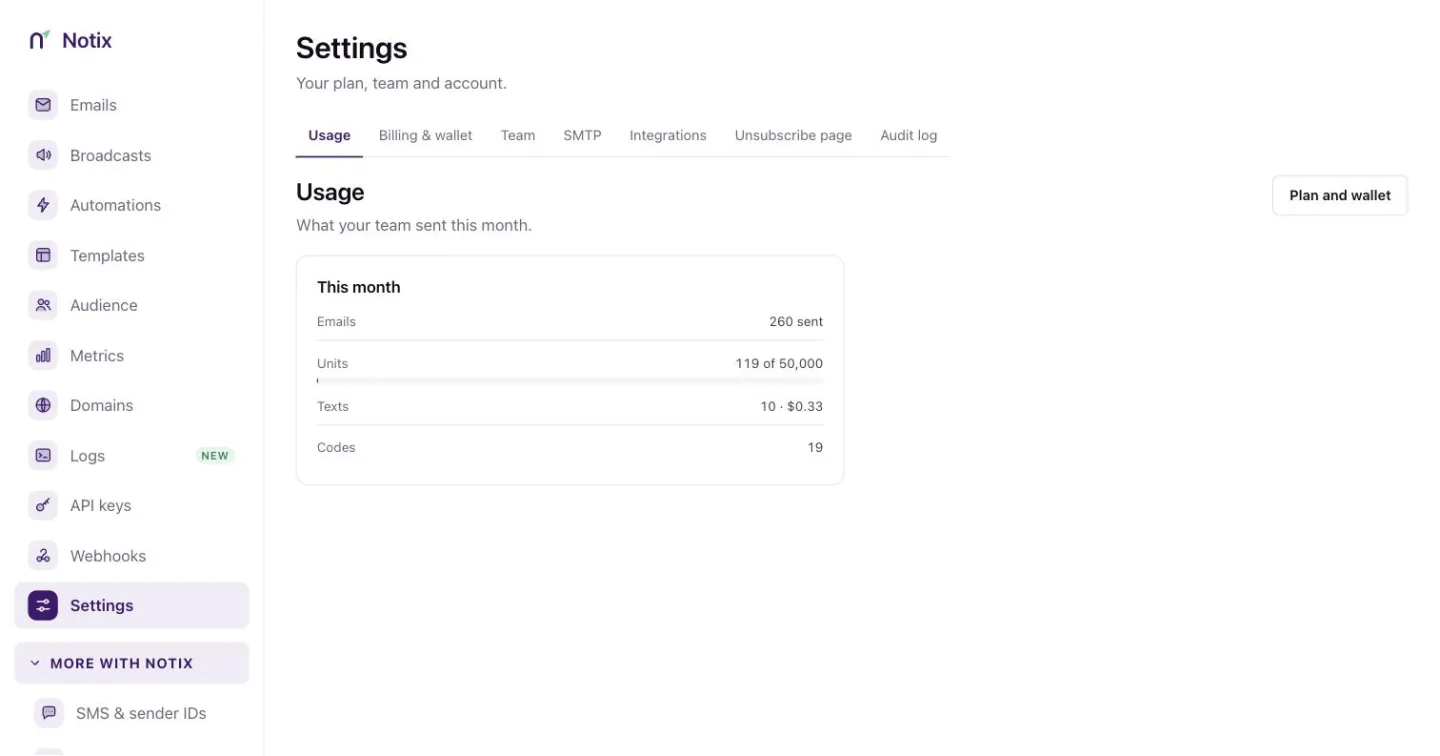 *Settings: your plan, team and account.* ### Billing & wallet Your plan, your wallet for SMS, codes and your plan, and your invoices. Top up the wallet, pay for Pro from it, and download receipts. 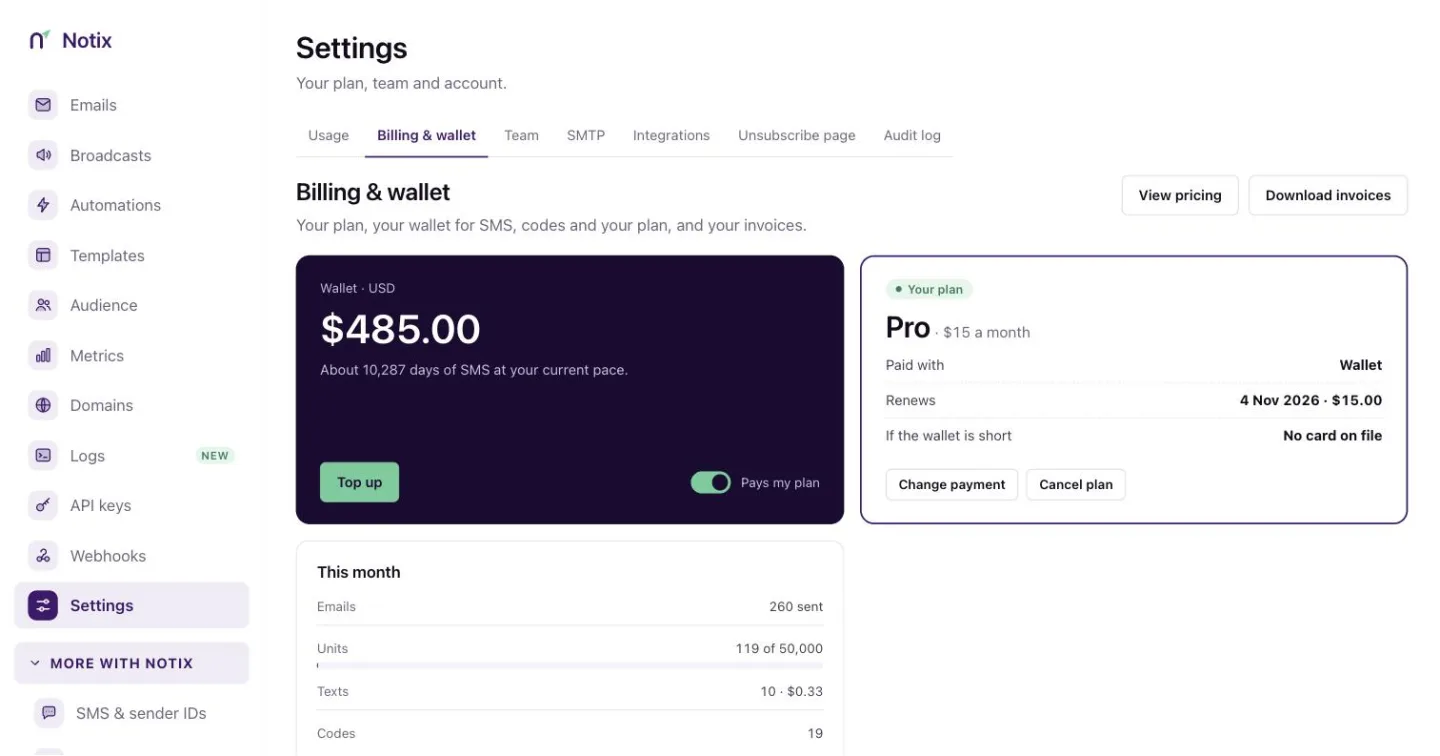 *Billing & wallet: your plan, wallet balance and invoices.* Read [Billing and wallet](/docs/account/billing-and-wallet). ### Team Who can use this account and what they can do. Invite teammates and set their role. Referrals and the affiliate programme live here too. Read [Team and roles](/docs/account/team-and-roles) and [Referrals and affiliates](/docs/account/referrals-and-affiliates). ### Integrations Connect Notix to the apps you already use, with no code. Pipedream is available now. Zapier is coming soon, and you can ask to be told the day it opens. 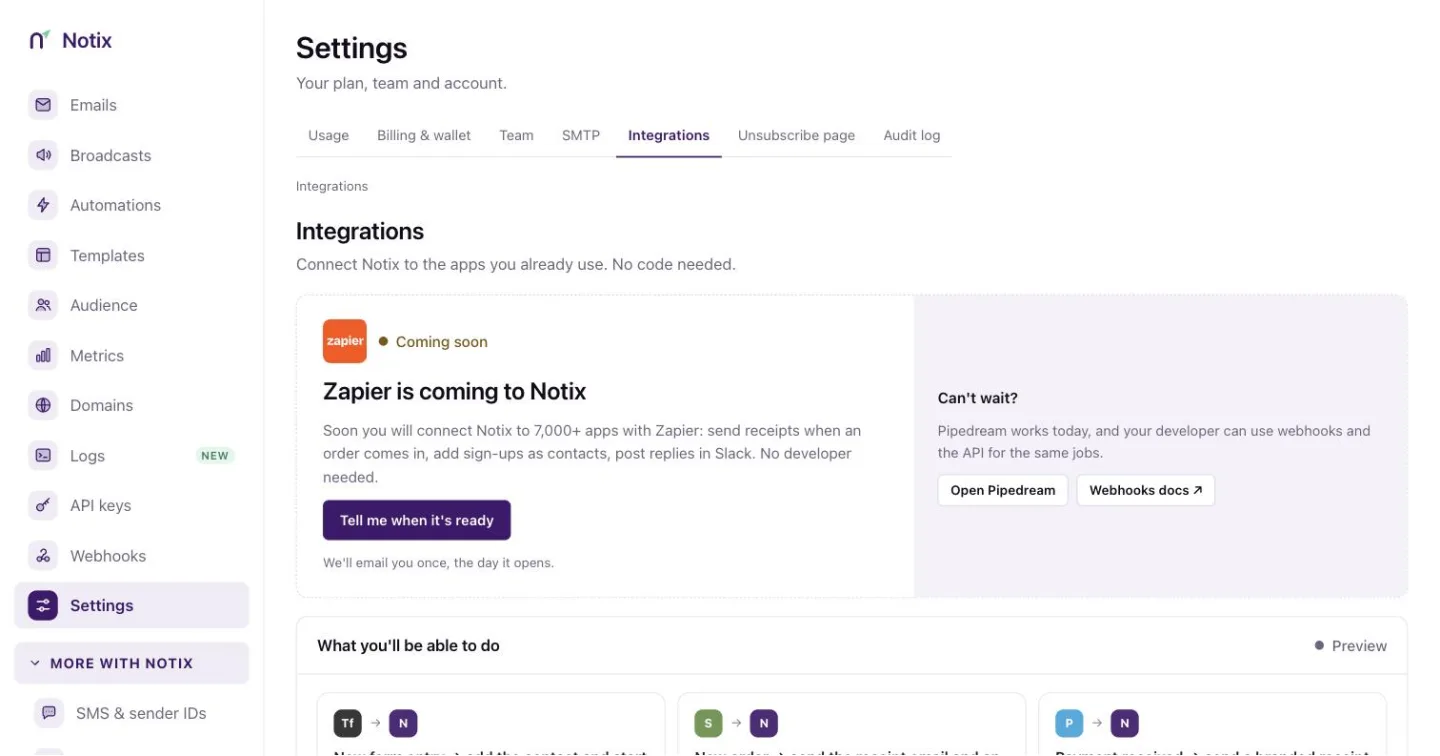 *Integrations: what you can connect today and what is coming.* Read [Integrations](/docs/account/integrations) and [Settings](/docs/account/settings). ## More with Notix ### SMS & sender IDs The name people see when you text them, and what each text costs. Turn SMS on, top up your wallet, and see the message log. 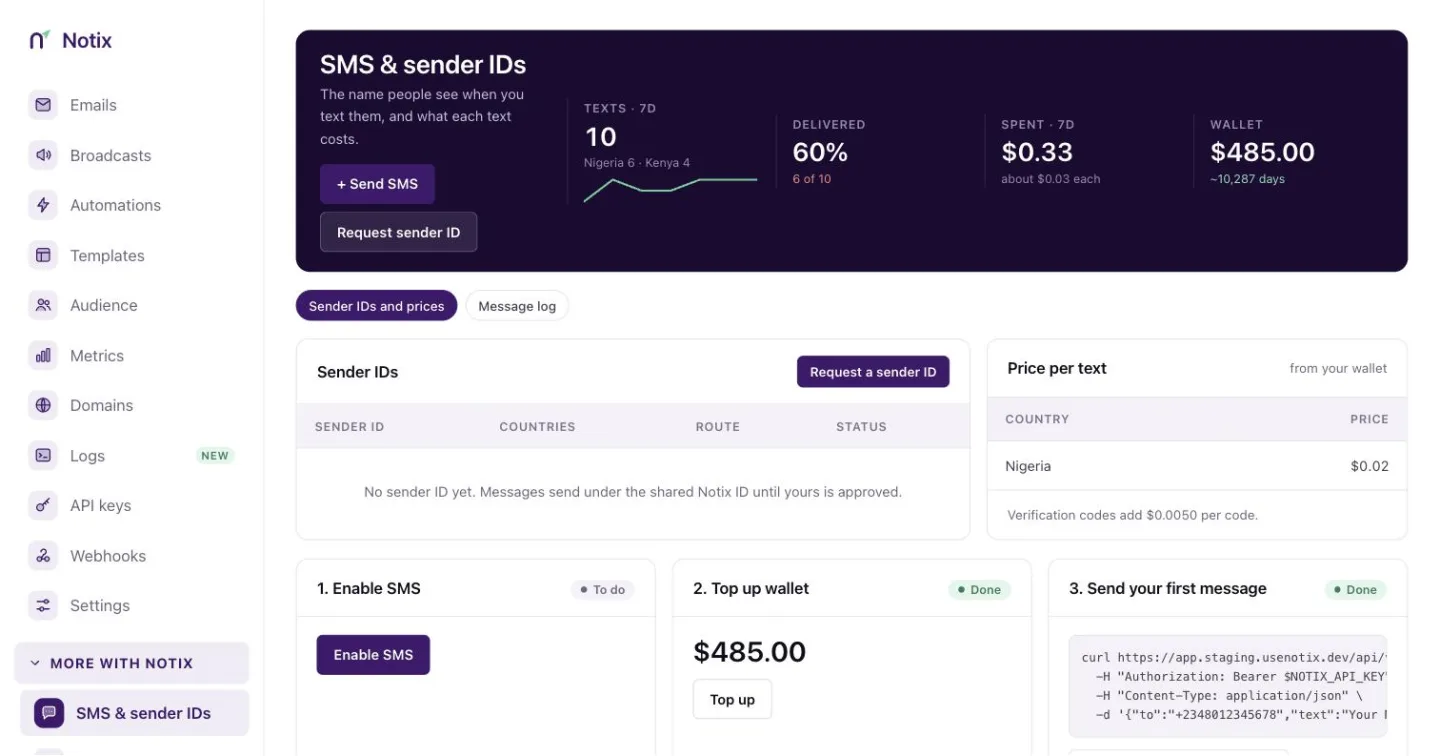 *SMS & sender IDs: your sender names, prices and message log.* Read [Send SMS](/docs/sms/send-sms) and [Sender IDs](/docs/sms/sender-ids). ### One-time codes Login and verification codes by SMS and email: how many were sent, how many were verified, and the recent codes. Codes themselves are never shown. 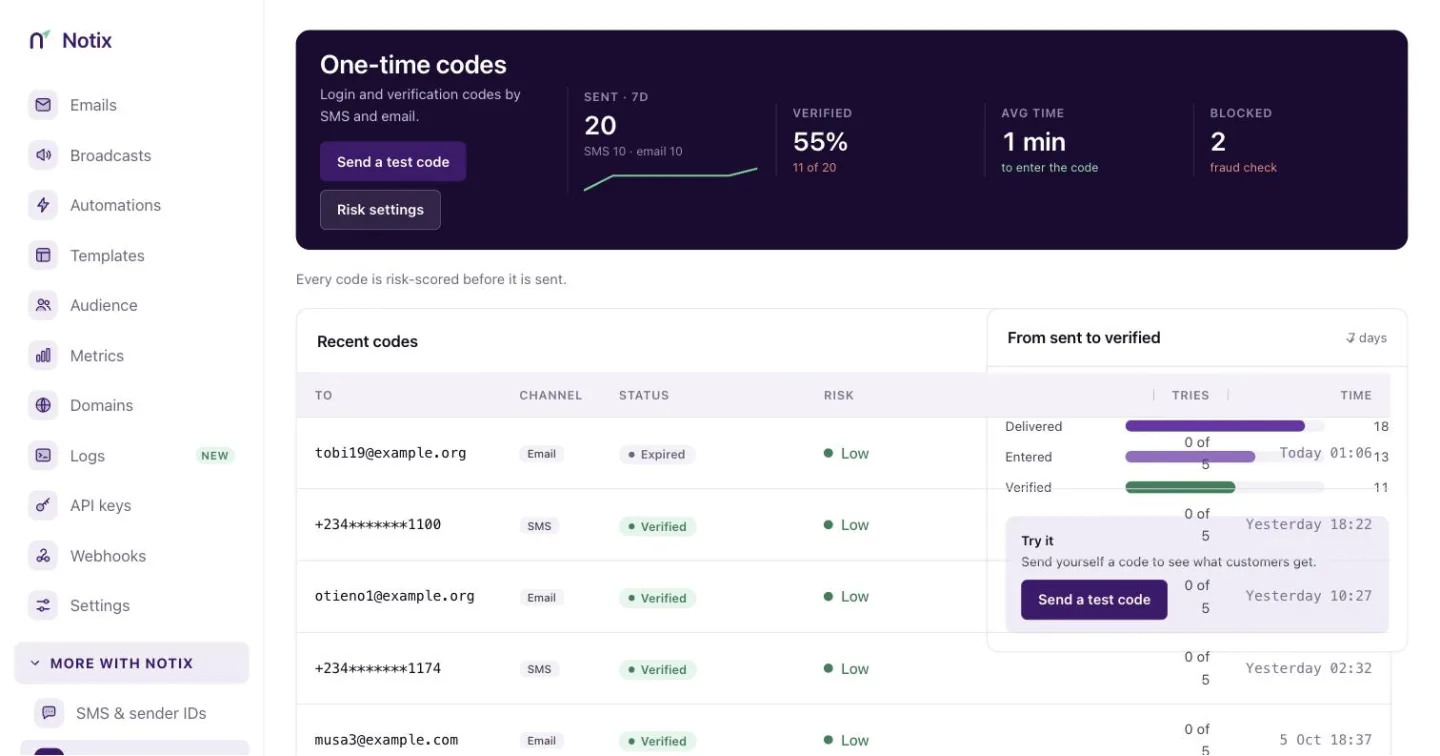 *One-time codes: from sent to verified.* Read [One-time codes](/docs/sms/one-time-codes). ### Connect your AI Give Claude, ChatGPT or your coding tool access to Notix. It sends from your own verified domain, within limits you set. 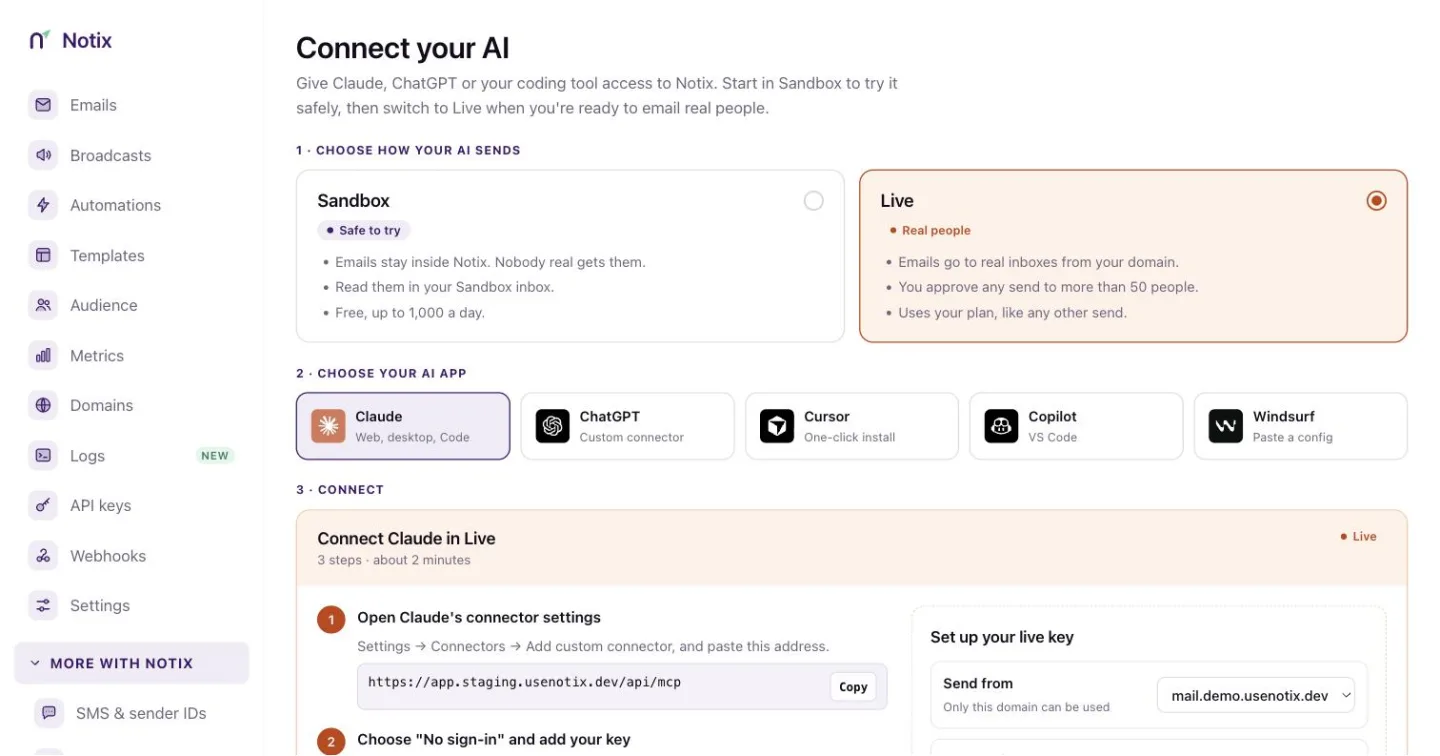 *Connect your AI: pick your app and domain, set the limits, connect.* Read [Connect your AI](/docs/connect-your-ai). --- # Create an API key Make an API key in the console, pick its permission and keep it safe on your server. Every API call and every AI app needs a key. Make one in the console, give it the smallest permission that does the job, and keep it on your server. ### 1. Open API keys Go to [API keys](https://app.usenotix.dev/api-keys) in the console. The page lists your keys, when each was last used, and what your AI agents did.  *API keys: your keys, their permission, and when each was last used.* ### 2. Create the key Press **Create API key**. In **Create a new API key**, fill in: - **API key name**: something you will recognise later, like `checkout-service`. - **Permission**: what the key may do. See the table below. - **Domain access**: **All Domains**, or one verified domain the key is limited to. Press **Create**. 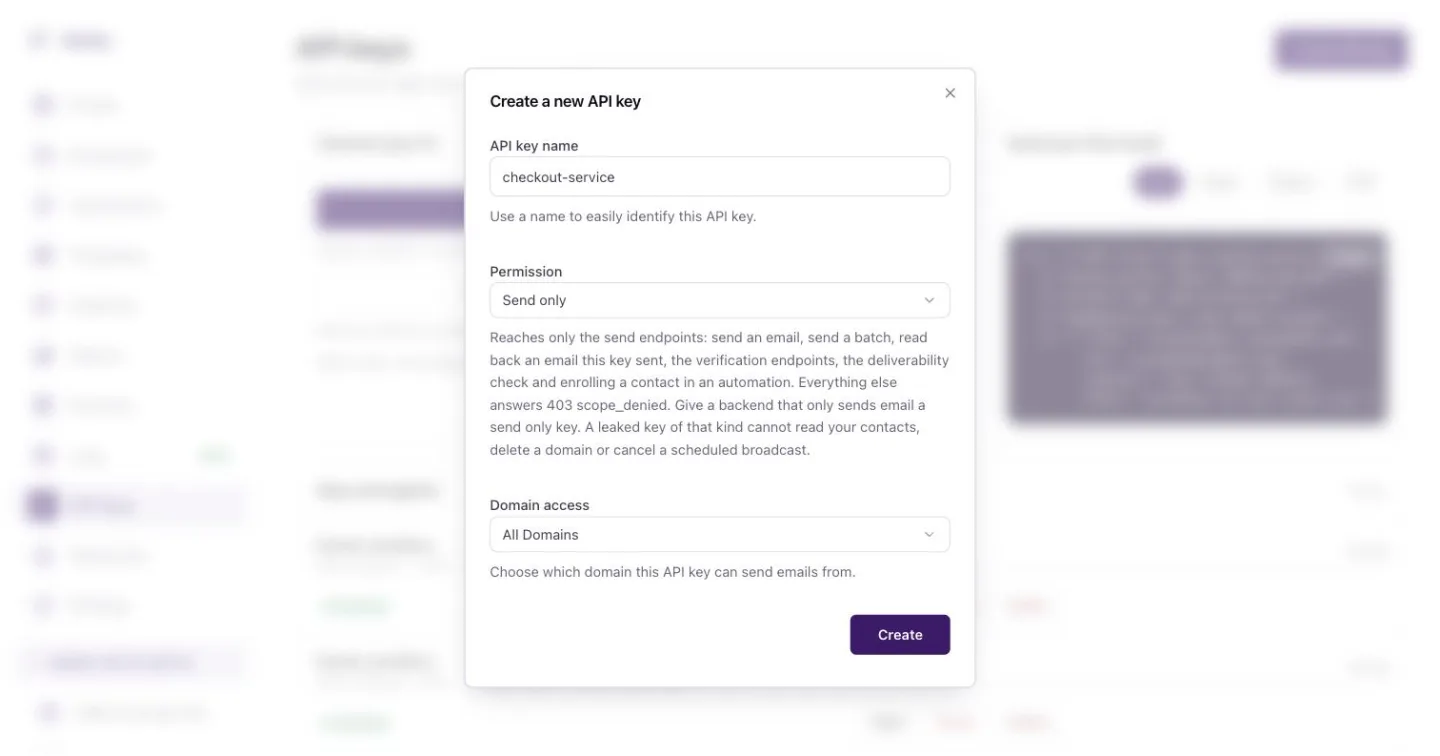 *Pick a name, a permission and the domains the key may send from.* ### 3. Copy it now The **Copy API key** dialog shows the key once. Copy it and store it in your server's environment as `NOTIX_API_KEY`. Notix keeps only a salted hash, so nobody can show it to you again. If you lose it, make a new one and delete the old one. ```bash terminal export NOTIX_API_KEY="notix_..." ``` ### 4. Check it works Call [Check an API key](/docs/reference/auth/check-an-api-key). It answers with the team, the key id and its permission. ```bash terminal curl https://app.usenotix.dev/api/v1/auth/check \ -H "Authorization: Bearer $NOTIX_API_KEY" ``` ## Permissions | Permission | What it reaches | | --- | --- | | Full access | Every endpoint: sending, contacts, domains, broadcasts and analytics. Only team admins can make one. | | Send only | The send endpoints: send an email, send a batch, read back an email this key sent, codes, the deliverability check and enrolling a contact in an automation. | | Read only | Lists, lookups and stats. It cannot send or change anything. | A call outside the key's permission answers 403 `SCOPE_DENIED`. Give a backend that only sends email a **Send only** key. If it leaks, it cannot read your contacts or delete a domain. Keys for AI apps are made on [Connect your AI](/docs/connect-your-ai) instead. Those are **Live AI** keys. ## Keep keys safe - Keep keys in server environment variables or a secret manager. - Never ship a key in a web page, a mobile app or a public repository. - Use one key per service, so you can pause or delete one without touching the rest. - Anyone on the team can pause a key from its page, and it stops at once. Only a team admin can resume it. ## Rotate, expire and lock a key A team admin manages these on the key's page. - **Rotate key** makes a new key with the same permission, domain, limits and IP list. The old key keeps working for the time you pick (24 hours unless you change it), then every call with it is refused. Pick **Stop the old key now** if it may have leaked. Anything the old key already queued still goes out. - **Set an expiry date** stops the key at the end of the day you pick. Change or remove the date at any time. - **IP allowlist** locks the key to your servers. Add single addresses (`102.89.34.17`) or ranges (`102.89.34.0/24`, IPv6 too). Calls from any other address answer 403. Private and local addresses (10.x, 172.16-31.x, 192.168.x, 100.64-127.x, 127.x, 169.254.x, and IPv6 fc00::/7, fe80::/10 and ::1) are refused: add the public address your servers call from. A key with a list does not work over SMTP: the relay's login check answers 403 "IP-locked keys can't be used over SMTP", so use a key without a list there. A key that has expired or passed its rotation answers 401. [Read this key's limits](/docs/reference/auth/read-this-key-s-limits) shows the key's own end date and IP list under `lifetime`, so a service can warn before its key stops. Limits, approvals and the audit log are covered in [API keys and permissions](/docs/account/api-keys). --- # Add and verify a domain Send from your own address, like receipts@acme.com. About 5 minutes, most of it waiting for DNS. > **Note:** > You can look around Notix without a domain, and test emails to your team come from Notix. To send to anyone else, verify a domain. ### 1. Open Domains and add yours Go to **Deliver → Domains** and press **Add domain**. Use a subdomain like `mail.acme.com` so your company mail is never touched. Then press **Add**. New domains go to the current default sending region.  *The Domains page. Each card shows its records and bounce rate for the last 7 days.* ### 2. Add the DNS records Open the domain and copy the four records into your DNS provider. If you use Cloudflare, press **Set up automatically** and Notix adds them for you. 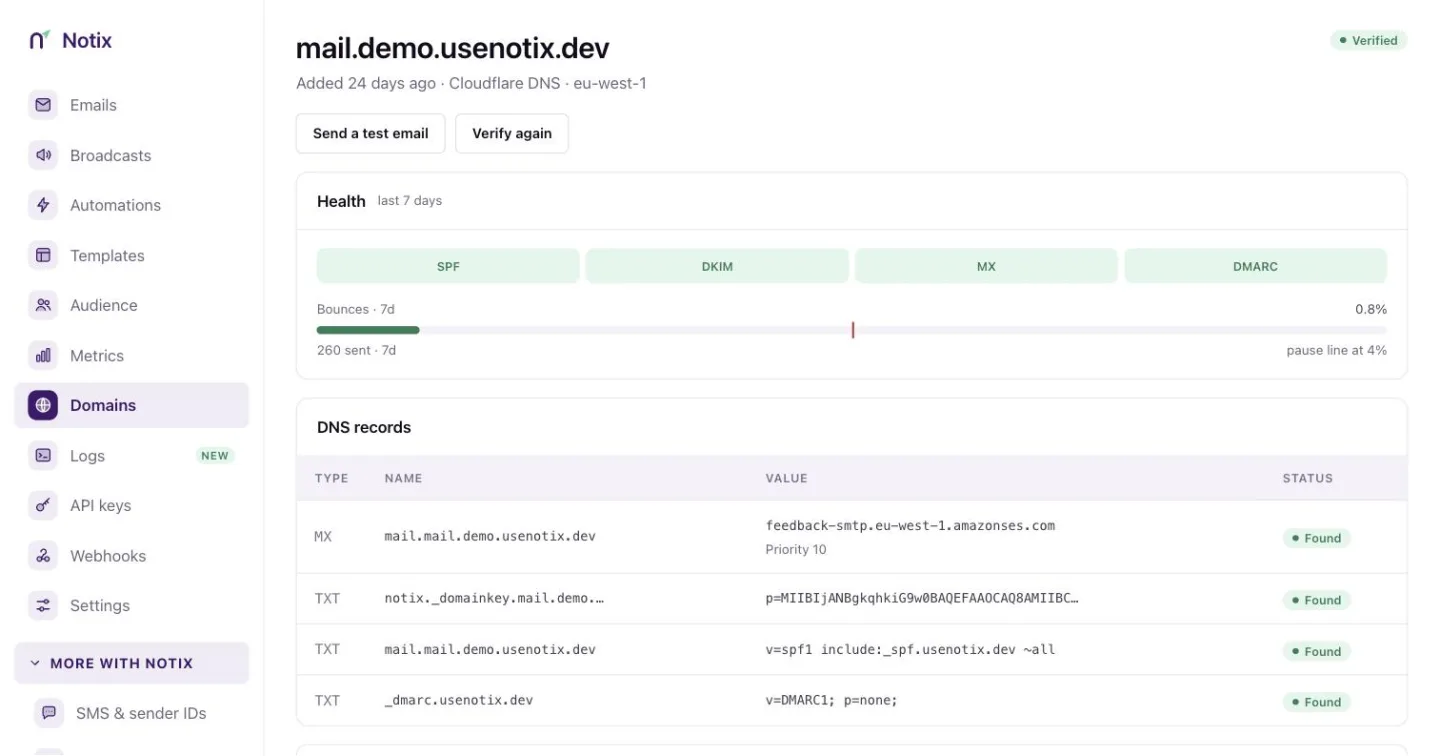 *A verified domain: health, the MX, DKIM, SPF and DMARC records, and tracking switches.* Today Domain Connect works with Cloudflare and NameSilo; more DNS hosts are switching it on for Notix. Every other provider gets records to copy and paste, with a step-by-step guide for each DNS host in [Add your DNS records](/docs/dns-records). ### 3. Verify Press **Verify again**. Most records show **Found** within 10 minutes. The domain turns **Verified** when all of them are found. > **Warning:** > Seeing "Bounces are 8.7%. Sending pauses at 4%"? That domain is close to being paused to protect your reputation. Clean your list before your next send. > **Note:** > Broadcasts and automations from a new domain need all three checks to pass: the domain, DKIM, and MAIL FROM (the MX and SPF records on `mail.`). Until they do, the domain page shows **Campaigns and journeys on hold** with the record to fix, the value we found and the value to set. Transactional email still sends. ### 4. Or do it with the API Add the domain, publish the records it returns, then ask Notix to check them. Leave `region` out: new domains go to the current default region, and the response's `region` says which one was used. Choosing another region is not open to every account yet; asking for one that is not open answers 400 with the region that is. ```bash cURL curl https://app.usenotix.dev/api/v1/domains \ -H "Authorization: Bearer $NOTIX_API_KEY" \ -H "Content-Type: application/json" \ -d '{ "name": "mail.acme.com" }' ``` ```ts Node.js import { Notix } from "notix-js"; const notix = new Notix(process.env.NOTIX_API_KEY); const { data, error } = await notix.domains.create({ name: "mail.acme.com", }); ``` ```python Python import os from notix import Notix notix = Notix(os.environ["NOTIX_API_KEY"]) data, error = notix.domains.create({"name": "mail.acme.com"}) ``` ```php PHP domains->create([ 'name' => 'mail.acme.com', ]); ``` Then call [Verify a domain](/docs/reference/domains/verify-a-domain) with the domain id. Adding a domain needs a full access key. ## How pauses work Notix counts hard bounces and complaints over the last 7 days, once a domain has sent at least 200 emails in that time. At 2% bounces or 0.05% complaints you get a warning. At 4% bounces, or 0.08% complaints from at least 5 people, sending from that domain pauses. A paused domain shows **Request review**. Read more in [Domain health and pauses](/docs/domains/health-and-pauses). ## A new domain warms up A new domain can send 200 emails a day for its first 14 days. Every send counts, from the API, SMTP, batches, broadcasts and automations. Broadcasts and automations can use 80% of it, so the last 20% is kept for single emails like password resets. Read more in [Warm-up](/docs/sending/warm-up). ## Next: give your AI access  *Connect your AI: pick your app and domain, set the limits, connect.* With a verified domain you can make a key for Claude, ChatGPT, Cursor, Copilot or Windsurf. Start with [Connect your AI](/docs/connect-your-ai). --- # Connect your AI Give Claude, ChatGPT or Cursor a key, and set the limits it works within. Give Claude, ChatGPT or your coding tool access to Notix. Your AI sends real email from your own verified domain, within limits you set. Your AI talks to Notix through MCP, the protocol AI apps use for tools. Notix hosts the MCP server at `https://app.usenotix.dev/api/mcp`. You give the app that address and a key, and the app gets only the tools the key may use. ## Before you start - A verified domain. If you have none yet, the page shows **Add my domain**. Follow [Add and verify a domain](/docs/add-a-domain). - A team admin to make the key. ## Connect in three steps ### 1. Choose your AI app Open [Connect your AI](https://app.usenotix.dev/connect) and pick Claude, ChatGPT, Cursor, Copilot (VS Code) or Windsurf. ### 2. Set up your key Choose the domain under **Send from**. Only this domain can be used. Tick the box to confirm this key sends real emails, then create the key. It is filled into every command and config on the page.  *Set up your key: the domain it sends from, and the limits it works within.* ### 3. Connect Follow the steps for your app. - **Claude** and **ChatGPT**: open the app's connector settings and paste the connector address and the `Authorization` header. - **Cursor** and **VS Code**: press **Add to Cursor** or **Add to VS Code**. The one-click install carries your key. - **Windsurf**: paste the config block into Cascade → MCP servers → View raw config, and save. Then ask your AI to **Email me a test** from your domain before anything bigger. To check a send without sending it, ask for a dry run (`dry_run: true`). ## Commands for Claude Code The page shows the full set-up command for each app under **Show command**. For Claude Code with the hosted server: ```bash terminal claude mcp add --transport http --scope user notix https://app.usenotix.dev/api/mcp \ --header "Authorization: BearerThanks for your order, Maria.
", text: "Thanks for your order, Maria.", }); ``` ### 4. Check the response Every SDK method returns `{ data, error }`. It does not throw on an API error. On success, `data.emailId` is the id every webhook event for this email refers to. ```ts send.ts if (error) { console.error(error.code, error.message); process.exit(1); } console.log("Sent", data?.emailId); ``` `error.code` is a stable code such as `UNAUTHORIZED` or `RATE_LIMITED`. See [Errors](/docs/reference/errors) for the full list. ## Next steps - Send up to 100 emails in one call with [batch sending](/docs/sending/batch-sending). - Add files with [attachments](/docs/sending/attachments). - Make retries safe with [idempotency keys](/docs/sending/idempotency-keys). Pass `{ idempotencyKey: "order-4471-receipt" }` as the second argument to `send`. - Hear about deliveries and bounces with [webhooks](/docs/webhooks). - See every field in [Send an email](/docs/reference/emails/send-an-email). --- # Next.js Send an email from a Next.js route handler or server action with notix-js. Send an email from a Next.js App Router route handler or server action with `notix-js`. The key stays on the server, so it never reaches the browser. ## Prerequisites - An [API key](/docs/create-an-api-key). - A [verified domain](/docs/add-a-domain) to send from. ### 1. Install the SDK ```bash npm npm install notix-js ``` ```bash pnpm pnpm add notix-js ``` ```bash yarn yarn add notix-js ``` ```bash bun bun add notix-js ``` ### 2. Set your API key Add the key to `.env.local`. Do not prefix it with `NEXT_PUBLIC_`, or Next.js ships it to the browser. ```bash .env.local NOTIX_API_KEY=notix_12345 ``` ### 3. Send from a route handler The route only sends to the signed-in customer, about their own order. `auth` and `getOrder` stand for your app's own sign-in and database code. ```ts app/api/send/route.ts import { Notix } from "notix-js"; import { auth } from "@/lib/auth"; // your sign-in library import { getOrder } from "@/lib/orders"; // your database code const notix = new Notix(process.env.NOTIX_API_KEY); export async function POST(request: Request) { // Anyone can call this URL. Check who is calling before you send anything. const session = await auth(); if (!session?.user) return new Response("Sign in first", { status: 401 }); const { orderId } = (await request.json()) as { orderId?: string }; const order = orderId ? await getOrder(orderId) : null; if (!order || order.userId !== session.user.id) return new Response("Order not found", { status: 404 }); const { data, error } = await notix.emails.send({ from: "AcmeThanks for your order.
", }); if (error) return Response.json({ error: "Could not send the receipt" }, { status: 502 }); return Response.json({ emailId: data?.emailId }); } ``` ### 4. Or send from a server action > **Warning:** > A server action is a public endpoint. Check who is calling and never take the recipient straight from the client. ```ts app/actions.ts "use server"; import { Notix } from "notix-js"; import { auth } from "@/lib/auth"; // your sign-in library import { getOrder } from "@/lib/orders"; // your database code const notix = new Notix(process.env.NOTIX_API_KEY); export async function sendReceipt(orderId: string) { const session = await auth(); if (!session?.user) throw new Error("Sign in first"); const order = await getOrder(orderId); if (!order || order.userId !== session.user.id) throw new Error("Order not found"); const { data, error } = await notix.emails.send({ from: "AcmeThanks for your order.
", }); if (error) throw new Error("Could not send the receipt"); return data?.emailId; } ``` > **Note:** > Building the email with React? `notix.emails.send` also takes a `react` field and renders it to HTML for you. See [React Email](/docs/sending/react-email). ## Next steps - Send many emails at once with [batch sending](/docs/sending/batch-sending). - Add files with [attachments](/docs/sending/attachments). - Make retries safe with [idempotency keys](/docs/sending/idempotency-keys). - Receive delivery events in a route handler with [webhooks](/docs/webhooks). --- # Python Send an email from Python with the notix-sdk package. Send your first email from Python with `notix-sdk`, the official SDK. It needs Python 3.10 or newer. You install `notix-sdk` and import `notix`. ## Prerequisites - An [API key](/docs/create-an-api-key). - A [verified domain](/docs/add-a-domain) to send from. ### 1. Install the SDK ```bash pip pip install notix-sdk ``` ```bash poetry poetry add notix-sdk ``` ### 2. Set your API key The client reads `NOTIX_API_KEY` when you do not pass a key. ```bash .env NOTIX_API_KEY=notix_12345 ``` ### 3. Send an email Pass a plain dict, so you can use the `from` key. ```python send.py from notix import Notix notix = Notix() # reads NOTIX_API_KEY data, _ = notix.emails.send(payload={ "from": "AcmeThanks for your order, Maria.
", "text": "Thanks for your order, Maria.", }) print("Sent", data["emailId"]) ``` ### 4. Handle errors By default the client raises `NotixHTTPError` when the API answers with an error. The exception carries the status and the error body. ```python send.py from notix import Notix, NotixHTTPError notix = Notix() try: data, _ = notix.emails.send(payload={ "from": "receipts@acme.com", "to": "maria@example.com", "subject": "Your receipt", "html": "Thanks for your order.
", }) except NotixHTTPError as err: print(err.status_code, err.error.get("code"), err.error.get("message")) ``` Prefer not to raise? Create the client with `Notix(raise_on_error=False)`. Every method then returns `(data, error)`, and `error` is set when the call failed. ## Next steps - Send many emails at once with [batch sending](/docs/sending/batch-sending): `notix.emails.batch(payload=[...])`. - Add files with [attachments](/docs/sending/attachments). - Make retries safe with [idempotency keys](/docs/sending/idempotency-keys): `options={"idempotency_key": "order-4471-receipt"}`. - Hear about deliveries and bounces with [webhooks](/docs/webhooks). --- # PHP Send an email from PHP with the usenotix/notix-php package. Send your first email from PHP with `usenotix/notix-php`, the official SDK. It needs PHP 8.1 or newer with the curl and json extensions. Using Laravel? Follow the [Laravel quickstart](/docs/quickstarts/laravel) instead. ## Prerequisites - An [API key](/docs/create-an-api-key). - A [verified domain](/docs/add-a-domain) to send from. ### 1. Install the SDK ```bash terminal composer require usenotix/notix-php ``` ### 2. Set your API key Keep the key in your environment, not in your code. ```bash .env NOTIX_API_KEY=notix_12345 ``` ### 3. Send an email ```php send.php emails->send([ 'from' => 'AcmeThanks for your order, Maria.
', 'text' => 'Thanks for your order, Maria.', ]); echo $email['emailId']; ``` ### 4. Handle errors The SDK throws when the API answers with an error. Every exception extends `Notix\Exception\NotixException`, with a class per error, such as `UnauthorizedException` and `RateLimitedException`. ```php send.php use Notix\Exception\NotixException; try { $email = $notix->emails->send([ 'from' => 'receipts@acme.com', 'to' => 'maria@example.com', 'subject' => 'Your receipt', 'html' => 'Thanks for your order.
', ]); } catch (NotixException $e) { echo $e->getHttpStatus() . ' ' . $e->getErrorCode() . ': ' . $e->getMessage(); } ``` ## Next steps - Send many emails at once with [batch sending](/docs/sending/batch-sending): `$notix->emails->batch([...])`. - Add files with [attachments](/docs/sending/attachments). - Make retries safe with [idempotency keys](/docs/sending/idempotency-keys). Pass the key as the second argument: `$notix->emails->send($payload, 'order-4471-receipt')`. - Hear about deliveries and bounces with [webhooks](/docs/webhooks). --- # Laravel Send an email from a Laravel app with the usenotix/notix-php package. Send your first email from Laravel with `usenotix/notix-php`. The package ships a service provider and a `Notix` facade, and Laravel finds both on its own. ## Prerequisites - An [API key](/docs/create-an-api-key). - A [verified domain](/docs/add-a-domain) to send from. - PHP 8.1 or newer. ### 1. Install the package ```bash terminal composer require usenotix/notix-php ``` ### 2. Set your API key Add the key to `.env`: ```bash .env NOTIX_API_KEY=notix_12345 ``` Then add a `notix` entry to `config/services.php`. The provider reads `services.notix.key` first and falls back to `NOTIX_API_KEY`. ```php config/services.php 'notix' => [ 'key' => env('NOTIX_API_KEY'), ], ``` ### 3. Send an email Use the facade. A facade proxies static calls, so reach each resource through its method: `Notix::emails()`. ```php app/Http/Controllers/OrderController.php send([ 'from' => 'AcmeThanks for your order, Maria.
', ]); return response()->json(['emailId' => $email['emailId']]); } } ``` ### 4. Or inject the client You can also resolve `Notix\Notix` from the container. Outside the facade, resources are plain properties. ```php app/Services/Receipts.php use Notix\Notix; class Receipts { public function __construct(private readonly Notix $notix) { } public function send(string $to): string { $email = $this->notix->emails->send([ 'from' => 'receipts@acme.com', 'to' => $to, 'subject' => 'Your receipt', 'html' => 'Thanks for your order.
', ]); return $email['emailId']; } } ``` > **Note:** > Already using Laravel's `Mail` facade? You can point it at the Notix SMTP relay instead. See the [SMTP quickstart](/docs/quickstarts/smtp). ## Next steps - Send many emails at once with [batch sending](/docs/sending/batch-sending). - Add files with [attachments](/docs/sending/attachments). - Make retries safe with [idempotency keys](/docs/sending/idempotency-keys). - Verify webhooks in Laravel with [Verify requests](/docs/webhooks/verify-requests). Set `NOTIX_WEBHOOK_SECRET` and add `'webhook_secret' => env('NOTIX_WEBHOOK_SECRET')` to the same config entry. --- # SMTP Send through the Notix SMTP relay from any app or framework that speaks SMTP. Send through the Notix SMTP relay from any app, framework or plugin that can send over SMTP. Mail sent this way goes through the same pipeline as the API: the same suppression list, tracking and webhooks. ## Prerequisites - An [API key](/docs/create-an-api-key). It is your SMTP password. - A [verified domain](/docs/add-a-domain). The from address must be on it. ## Connection settings | Setting | Value | | --- | --- | | Host | `smtp.usenotix.dev` | | Port | `465` for implicit TLS, or `587` for STARTTLS | | Username | `notix` | | Password | Your Notix API key | There is no separate SMTP password. Revoke the key and the SMTP login stops working with it. ### 1. Pick a port Use `465` if your client asks for SSL or TLS from the start. Use `587` if it asks for STARTTLS. ### 2. Set the login The username is always `notix`. The password is your API key. Keep the key in your environment. ```bash .env NOTIX_API_KEY=notix_12345 ``` ### 3. Send ```ts Nodemailer import nodemailer from "nodemailer"; const transporter = nodemailer.createTransport({ host: "smtp.usenotix.dev", port: 465, secure: true, auth: { user: "notix", pass: process.env.NOTIX_API_KEY, }, }); await transporter.sendMail({ from: "AcmeThanks for your order, Maria.
", }); ``` ```python Python import os import smtplib from email.message import EmailMessage msg = EmailMessage() msg["From"] = "AcmeThanks for your order, Maria.
" }' ``` ### 3. Check the response A send that works answers `200` with the email's id. Every webhook event for this email carries the same id. ```json 200 response { "emailId": "em_8f3k2" } ``` A refused send answers with an HTTP status and an error body. Branch on the stable `code`, and show or log the `message`. ```json 401 response { "error": { "code": "UNAUTHORIZED", "message": "..." } } ``` See [Errors](/docs/reference/errors) for every code. ## Next steps - Send many emails in one call with [batch sending](/docs/sending/batch-sending). - Add an `Idempotency-Key` header so a retry never sends twice. See [idempotency keys](/docs/sending/idempotency-keys). - Add files with [attachments](/docs/sending/attachments). - Hear about deliveries and bounces with [webhooks](/docs/webhooks). - See every field in [Send an email](/docs/reference/emails/send-an-email). --- # Send emails Send one email with the API: from, to, subject and body, plus cc, bcc, reply-to and headers. One API call sends one email. You get back an `emailId`, and every webhook event for that email carries the same id. > **Note:** > You need an API key and a `from` address on a domain you have verified. See [Create an API key](/docs/create-an-api-key) and [Add and verify a domain](/docs/add-a-domain). ## Send your first email ### 1. Keep your key on the server Store the key in your server environment as `NOTIX_API_KEY`. Never ship it to a browser or a mobile app. ### 2. Make the call Send a `POST` to `/v1/emails` with a JSON body. `from` is required. Send `html`, `text`, or both. Send both when you can, because some mail clients show only one. ```bash cURL curl -X POST https://app.usenotix.dev/api/v1/emails \ -H "Authorization: Bearer $NOTIX_API_KEY" \ -H "Content-Type: application/json" \ -d '{ "from": "AcmeThanks for your order.
", "text": "Thanks for your order." }' ``` ```ts Node.js import { Notix } from "notix-js"; const notix = new Notix(process.env.NOTIX_API_KEY); const { data, error } = await notix.emails.send({ from: "AcmeThanks for your order.
", text: "Thanks for your order.", }); ``` ```python Python from notix import Notix notix = Notix() # reads NOTIX_API_KEY data, error = notix.emails.send({ "from": "AcmeThanks for your order.
", "text": "Thanks for your order.", }) ``` ```php PHP use Notix\Notix; $notix = new Notix(getenv('NOTIX_API_KEY')); $email = $notix->emails->send([ 'from' => 'AcmeThanks for your order.
', 'text' => 'Thanks for your order.', ]); ``` ### 3. Keep the id The answer is `200` with the new email's id: ```json { "emailId": "cmg8x2k4b0001qz8v3hf7d2ab" } ``` Store it next to your order or user. Webhook events and [Get an email](/docs/reference/emails/get-an-email) use it. ## The fields | Field | What it does | | --- | --- | | `from` | Required. An address on a verified domain. Add a name with `"AcmeHi Ada
" }, { "from": "AcmeHi Tunde
" } ]' ``` ```ts Node.js import { Notix } from "notix-js"; const notix = new Notix(process.env.NOTIX_API_KEY); const { data, error } = await notix.emails.batch([ { from: "AcmeHi Ada
" }, { from: "AcmeHi Tunde
" }, ]); ``` ```python Python from notix import Notix notix = Notix() # reads NOTIX_API_KEY data, error = notix.emails.batch([ {"from": "AcmeHi Ada
"}, {"from": "AcmeHi Tunde
"}, ]) ``` ```php PHP use Notix\Notix; $notix = new Notix(getenv('NOTIX_API_KEY')); $result = $notix->emails->batch([ ['from' => 'AcmeHi Ada
'], ['from' => 'AcmeHi Tunde
'], ]); ``` ## Read the answer The answer lists what happened to each email, in the order you sent them. Some emails can fail while the rest go out, so check each one. ```json { "data": [{ "emailId": "cmg8x2k4b0001qz8v3hf7d2ab" }, { "emailId": "cmg8x2k4b0002qz8v9c1d0e4f" }], "results": [ { "index": 0, "emailId": "cmg8x2k4b0001qz8v3hf7d2ab", "status": "QUEUED", "error": null }, { "index": 1, "emailId": "cmg8x2k4b0002qz8v9c1d0e4f", "status": "SUPPRESSED", "error": null } ], "summary": { "total": 2, "queued": 1, "scheduled": 0, "suppressed": 1, "failed": 0 } } ``` | Status | Meaning | | --- | --- | | `QUEUED` | Going out now. | | `SCHEDULED` | Going out at its `scheduledAt` time. | | `SUPPRESSED` | Every recipient is on your suppression list, so nothing was sent. | | `FAILED` | Not sent. `error` says why. | The Node.js and PHP SDKs return the `data` list of email ids. Call the API directly if you need `results` and `summary`. ## Limits | Scope | Limit | | --- | --- | | Emails per request | 100 | | Recipients per email | 50 across `to`, `cc` and `bcc` | | Attachments across the whole batch | 40 MB, measured after base64 decoding | | Request body | 20 MB | The recipient limit is per email, not per request. A batch of 100 emails with three people each is fine. One email in the batch that names 51 people refuses the whole batch with `422`. Every recipient counts as one email against your limits and on your bill. That batch of 100 emails with three people each counts as 300. ## Retry safely Add an `Idempotency-Key` header, the same as for a single send. If the request times out, send it again with the same key and the same body. Notix answers with the first result and sends nothing twice. See [Idempotency keys](/docs/sending/idempotency-keys). ```ts Node.js await notix.emails.batch(emails, { idempotencyKey: "welcome-run-2026-10-05" }); ``` The full field list is in the [Send a batch of emails](/docs/reference/emails/send-a-batch-of-emails) reference. --- # Attachments Attach files to an email, with the size and type limits. Attach files to an email with the `attachments` field. Each file has a `filename` and its `content` in base64. ## Attach a file ### 1. Encode the file Read the file and turn its bytes into a base64 string. ### 2. Add it to the send Put each file in `attachments` with its name. The name is what the recipient sees. ```bash cURL curl -X POST https://app.usenotix.dev/api/v1/emails \ -H "Authorization: Bearer $NOTIX_API_KEY" \ -H "Content-Type: application/json" \ -d '{ "from": "AcmeYour trial ends tomorrow. Pick a plan to keep your data.
", "scheduledAt": "2026-10-12T09:00:00Z" }' ``` ```ts Node.js import { Notix } from "notix-js"; const notix = new Notix(process.env.NOTIX_API_KEY); const { data, error } = await notix.emails.send({ from: "AcmeYour trial ends tomorrow. Pick a plan to keep your data.
", scheduledAt: "2026-10-12T09:00:00Z", }); ``` ```python Python from datetime import datetime, timezone from notix import Notix notix = Notix() # reads NOTIX_API_KEY data, error = notix.emails.send({ "from": "AcmeYour trial ends tomorrow. Pick a plan to keep your data.
", "scheduledAt": datetime(2026, 10, 12, 9, 0, tzinfo=timezone.utc), }) ``` ```php PHP use Notix\Notix; $notix = new Notix(getenv('NOTIX_API_KEY')); $email = $notix->emails->send([ 'from' => 'AcmeYour trial ends tomorrow. Pick a plan to keep your data.
', 'scheduledAt' => '2026-10-12T09:00:00Z', ]); ``` The email is saved with the status `SCHEDULED`. The Python SDK turns a `datetime` into the right format for you. A time that has already passed is not an error. The email goes out now. ## How limits count A scheduled email does not count against today's send limit. It counts on the day it goes out. If you cancel it first, it never counts at all. ## Move it Change the time with [Reschedule an email](/docs/reference/emails/reschedule-an-email): ```bash cURL curl -X PATCH https://app.usenotix.dev/api/v1/emails/cmg8x2k4b0001qz8v3hf7d2ab \ -H "Authorization: Bearer $NOTIX_API_KEY" \ -H "Content-Type: application/json" \ -d '{ "scheduledAt": "2026-10-13T09:00:00Z" }' ``` ```ts Node.js const { data, error } = await notix.emails.update("cmg8x2k4b0001qz8v3hf7d2ab", { scheduledAt: "2026-10-13T09:00:00Z", }); ``` ```python Python data, error = notix.emails.update("cmg8x2k4b0001qz8v3hf7d2ab", {"scheduledAt": "2026-10-13T09:00:00Z"}) ``` ```php PHP $email = $notix->emails->update('cmg8x2k4b0001qz8v3hf7d2ab', ['scheduledAt' => '2026-10-13T09:00:00Z']); ``` ## Cancel it Stop it with [Cancel a scheduled email](/docs/reference/emails/cancel-a-scheduled-email). The status becomes `CANCELLED` and the email never goes out. ```bash cURL curl -X POST https://app.usenotix.dev/api/v1/emails/cmg8x2k4b0001qz8v3hf7d2ab/cancel \ -H "Authorization: Bearer $NOTIX_API_KEY" ``` ```ts Node.js const { data, error } = await notix.emails.cancel("cmg8x2k4b0001qz8v3hf7d2ab"); ``` ```python Python data, error = notix.emails.cancel("cmg8x2k4b0001qz8v3hf7d2ab") ``` ```php PHP $email = $notix->emails->cancel('cmg8x2k4b0001qz8v3hf7d2ab'); ``` You can also cancel from the console. Open the email on the **Emails** page. Beside **Scheduled for**, press **Cancel email** and type `cancel` to confirm. > **Warning:** > You can only move or cancel an email that is still `SCHEDULED`. Once it has gone out, both calls answer `400` with the message "Email already processed". ## Find your scheduled emails On the **Emails** page, open **More filters** and set **Status** to **Scheduled**. Through the API, [List emails](/docs/reference/emails/list-emails) returns `scheduledAt` on each email. --- # Idempotency keys Retry a send safely. The same key and body never send twice. A request can time out after Notix has already sent the email. If your code retries, the customer gets two receipts. An idempotency key stops that. Send the same key with the same body and Notix answers with the first result instead of sending again. ## Add a key Send an `Idempotency-Key` header of up to 256 characters. It works on [Send an email](/docs/reference/emails/send-an-email), [Send a batch of emails](/docs/reference/emails/send-a-batch-of-emails) and [Send an SMS](/docs/reference/sms/send-an-sms). ```bash cURL curl -X POST https://app.usenotix.dev/api/v1/emails \ -H "Authorization: Bearer $NOTIX_API_KEY" \ -H "Idempotency-Key: order-4471-receipt" \ -H "Content-Type: application/json" \ -d '{ "from": "AcmeThanks for your order.
" }' ``` ```ts Node.js import { Notix } from "notix-js"; const notix = new Notix(process.env.NOTIX_API_KEY); const { data, error } = await notix.emails.send( { from: "AcmeThanks for your order.
", }, { idempotencyKey: "order-4471-receipt" }, ); ``` ```python Python from notix import Notix notix = Notix() # reads NOTIX_API_KEY data, error = notix.emails.send( { "from": "AcmeThanks for your order.
", }, {"idempotency_key": "order-4471-receipt"}, ) ``` ```php PHP use Notix\Notix; $notix = new Notix(getenv('NOTIX_API_KEY')); $email = $notix->emails->send([ 'from' => 'AcmeThanks for your order.
', ], 'order-4471-receipt'); ``` ## What happens on a retry | You send | Notix answers | | --- | --- | | The same key and the same body | `200` with the original `emailId`, and the header `Idempotent-Replayed: true`. Nothing is sent again. | | The same key and a different body | `409` with code `NOT_UNIQUE`. Nothing is sent. | | The same key while the first request is still running | `409`. Wait a moment and retry. | | The same key after a request that stopped part way | `409` with code `PARTIAL_COMPLETION`, listing the email ids already sent. Nothing is sent again. | Keys last 24 hours. After that, the same key is treated as new. Keys belong to the API key that sent them. Two services with different API keys never share a key, even if they pick the same string. ## Pick a good key Build the key from your own record, so the same event always makes the same key. - Good: `order-4471-receipt`, `signup-ada@example.com-welcome`, `invoice-INV-2026-0142`. - Bad: a random value made fresh on each retry, or `retry-3`. A new key on every retry sends a new email every time. Use one key per message you mean to send once. If you send a receipt and a shipping notice for the same order, give them different keys. ## Retry the right errors Retry network errors, timeouts, `429` and `5xx` answers, with a growing wait between tries. Keep the same key and body each time. Do not retry `400`, `401`, `403` or `422`. The request itself is wrong, and sending it again will not change the answer. See [Errors](/docs/reference/errors) for every code, and [Idempotency](/docs/reference/idempotency) in the API reference. --- # Test emails Send a test copy to your team, or preview a send with a dry run. There are two ways to test before real people get your mail. Send a test copy to your own team, or preview a send with a dry run. | Way | Who gets it | Costs | | --- | --- | --- | | Test copy from the console | Up to 5 people on your team | Nothing | | Dry run header | Nobody. Nothing is sent | Nothing | ## Send a test copy to your team ### 1. Open Send a test email On the **Emails** page, press **Send a test email**. A menu lists your templates under **Send a template to your team**. Pick one. No templates yet? The menu links to **Templates** so you can make one. See [Templates and library](/docs/marketing/templates). ### 2. Pick a From address and recipients The **Send a test copy** dialog opens. A template has no From address of its own, so name one on a verified domain, or press one of the suggested addresses. Then pick up to 5 people from your team. 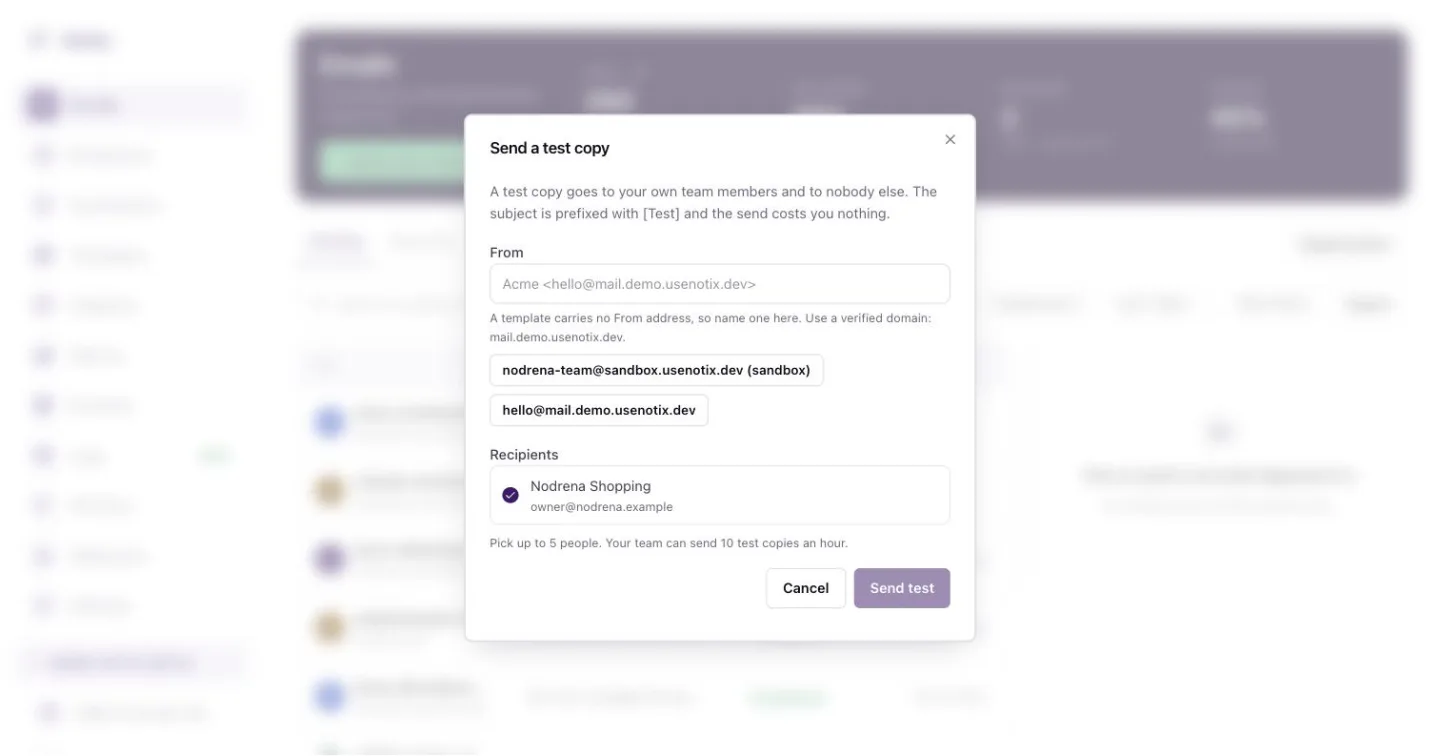 *Send a test copy. It goes only to people on your team.* ### 3. Send it Press **Send test**. The copy arrives with `[Test]` in front of the subject. On the **Emails** page it carries a **Test** tag. > **Note:** > Test copies go only to your own team members, never to anyone else. You can send 10 test copies an hour. They cost nothing. The same **Send a test copy** dialog opens from Template Studio and from a broadcast's review page, so you can check an email exactly where you write it. See [Broadcasts](/docs/marketing/broadcasts). If your team has no verified domain yet, the test copy comes from Notix so you can still see it in your inbox. The dialog tells you when that happens. ## Preview with a dry run Add the header `Notix-Dry-Run: true` to a send. Notix answers with who it would reach, what it would cost, whether it would be allowed and which limits it counts against. Nothing is sent, charged or saved. ```bash cURL curl -X POST https://app.usenotix.dev/api/v1/emails \ -H "Authorization: Bearer $NOTIX_API_KEY" \ -H "Notix-Dry-Run: true" \ -H "Content-Type: application/json" \ -d '{ "from": "AcmeThanks for your order.
" }' ``` A dry run is a good last check before you switch on a new integration. It is also how a read only API key can try a send. ## Check the content too A test copy shows how the email looks. To see how it might score with spam filters, run the pre-send check. See [Check before you send](/docs/sending/deliverability-check). --- # Email logs Find any email you sent, see its events and why it bounced. Every email your team sends is listed on the **Emails** page, newest first. Open one to see each step it went through, and why it bounced if it did. ## Find an email ### 1. Open Emails Go to [Emails](https://app.usenotix.dev/emails), the first item in the menu. The strip at the top shows the last 7 days: sent, delivered, bounced and opened.  *The Emails page. Bad statuses are tinted so they stand out.* ### 2. Search and filter Type in **Search by address or subject**. Pick a time range, or open **More filters** to narrow by status, domain, kind or API key. ### 3. Open it Click a row. On a wide screen the email's timeline and a preview open beside the list. Press **Open full email** to see everything. ## Read an email The full view shows who it was to and from, the subject, the domain and when it was sent. Below that is the timeline: every step, with the time it happened. 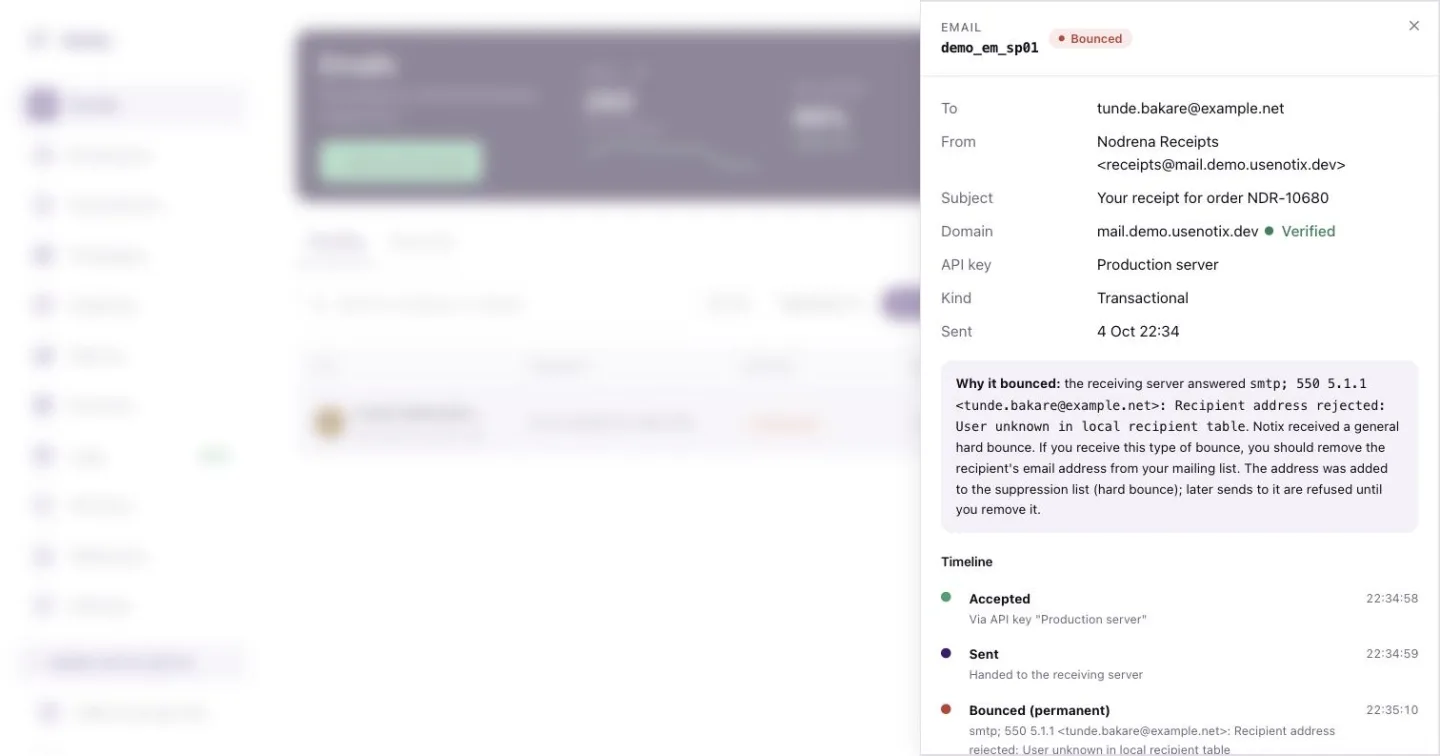 *One email. The card explains a bounce in plain words.* When an email did not arrive, a card says why: - **Why it bounced** shows what the receiving server answered. If the address was added to your suppression list, it says so. - **Why it failed** shows the error that stopped the send. - **Why it was suppressed** names the address on your suppression list. - **What happened** appears when the recipient reported the email as spam. Press **View rendered email** to see the email as it was sent, or **Copy JSON** to copy the whole record. ## What each status means | Status | Meaning | | --- | --- | | Scheduled | Waiting for its `scheduledAt` time. | | Queued | Accepted and waiting to go out. | | Sent | Handed to the receiving mail server. | | Delayed | The receiving server asked Notix to try again later. Notix keeps trying. | | Delivered | The receiving server accepted it. | | Opened | The recipient opened it. Needs [open tracking](/docs/domains/tracking). | | Clicked | The recipient clicked a link. Needs [click tracking](/docs/domains/tracking). | | Bounced | The receiving server refused it. | | Complained | The recipient reported it as spam. | | Rejected | Refused before sending. | | Rendering failed | The template could not be filled in. | | Suppressed | The recipient is on your suppression list, so nothing was sent. | | Failed | The send could not be completed. | | Cancelled | A scheduled email you cancelled. | ## Export Press **Export** on the Emails page to download the emails that match your current filters as a CSV file. ## Read emails with the API [List emails](/docs/reference/emails/list-emails) returns your emails newest first, with each one's `latestStatus`. Filter with `startDate`, `endDate` and `domainId`, and page with `page` and `limit` (up to 50 a page). ```bash cURL curl "https://app.usenotix.dev/api/v1/emails?startDate=2026-10-01T00:00:00Z&limit=50" \ -H "Authorization: Bearer $NOTIX_API_KEY" ``` [Get an email](/docs/reference/emails/get-an-email) returns one email with all its events: ```bash cURL curl https://app.usenotix.dev/api/v1/emails/cmg8x2k4b0001qz8v3hf7d2ab \ -H "Authorization: Bearer $NOTIX_API_KEY" ``` ```ts Node.js import { Notix } from "notix-js"; const notix = new Notix(process.env.NOTIX_API_KEY); const { data, error } = await notix.emails.get("cmg8x2k4b0001qz8v3hf7d2ab"); console.log(data?.emailEvents.map((event) => event.status)); ``` ```python Python from notix import Notix notix = Notix() # reads NOTIX_API_KEY data, error = notix.emails.get("cmg8x2k4b0001qz8v3hf7d2ab") ``` ```php PHP use Notix\Notix; $notix = new Notix(getenv('NOTIX_API_KEY')); $email = $notix->emails->get('cmg8x2k4b0001qz8v3hf7d2ab'); ``` A sending access key can read only the emails it sent itself. ## Get told instead of asking Polling for status is slow. A webhook tells your server the moment an email is delivered, bounces or is opened. See [Webhooks](/docs/webhooks). --- # Metrics Your sending numbers per domain and per day: deliverability, bounces, complaints, opens and clicks. The **Metrics** page shows your real sending numbers, per domain and per day. They come from the same daily counts that decide when a domain is paused, so what you see here is what Notix judges your domains on. ## Open Metrics ### 1. Go to Metrics In the console, go to [Metrics](https://app.usenotix.dev/metrics) in the menu. ### 2. Pick a domain and a range Choose **All domains** or one domain, and the last 7, 15, 30 or 90 days. Days run in UTC and end today. ## What each number means | Number | What it counts | | --- | --- | | Emails | Every email sent in the range. | | Deliverability rate | Delivered emails as a share of emails sent. | | Bounce rate | Every bounce as a share of emails sent, split into **Permanent** and **Temporary**. | | Complaint rate | People who marked an email as spam, as a share of emails sent. | | Open rate | Opened emails as a share of delivered emails, only for domains with open tracking on. | | Click rate | Clicked emails as a share of delivered emails, only for domains with click tracking on. | The chart stacks each day's delivered, bounced and complained emails. > **Note:** > Notix pauses a domain when permanent bounces reach 4% or complaints reach 0.08% of the emails it sent in the last 7 days. See [Domain health and pauses](/docs/domains/health-and-pauses). **Undetermined** bounces are not counted apart yet. They are part of **Temporary** for now. Open and click rates need tracking on the domain. Turn it on in [Tracking](/docs/domains/tracking). With no tracked domain in range, the rate shows as not available. The rates use each domain's tracking setting as it is now, not as it was on each day. If you turned tracking on or off part way through the range, that domain is counted for the whole range or left out of it. ## Metrics from the API `GET /v1/metrics` answers the same numbers. Pass `days` (7, 15, 30 or 90, 30 by default) and, if you like, `domainId`. ```bash cURL curl "https://app.usenotix.dev/api/v1/metrics?days=30" \ -H "Authorization: Bearer $NOTIX_API_KEY" ``` ```ts Node.js import { Notix } from "notix-js"; const notix = new Notix(process.env.NOTIX_API_KEY); const { data: metrics } = await notix.metrics.get({ days: 30 }); console.log(metrics?.rates.deliverability, metrics?.rates.permanentBounce); ``` AI agents read it with the `get_email_metrics` tool. See [Read sending metrics](/docs/reference/analytics/read-sending-metrics) for every field. --- # Check before you send Run the pre-send check on a message: a score, a verdict and the fix for each finding. One call checks a message before you send it. Notix renders it the way a recipient would get it, runs a real spam filter over it, opens up to 20 of its links, and answers with a verdict, a score out of 100 and a list of findings with the fix for each. The check is a request, not a send. It costs nothing. ## Run the check Send the From address, the subject, and either `html` or a `templateId`. Set `marketing` to `true` for newsletters and broadcasts. ```bash cURL curl -X POST https://app.usenotix.dev/api/v1/deliverability/check \ -H "Authorization: Bearer $NOTIX_API_KEY" \ -H "Content-Type: application/json" \ -d '{ "from": "news@acme.com", "subject": "Your September update", "html": "Read the update.
", "marketing": true }' ``` ```ts Node.js import { Notix } from "notix-js"; const notix = new Notix(process.env.NOTIX_API_KEY); const { data: report, error } = await notix.deliverability.check({ from: "news@acme.com", subject: "Your September update", html: "Read the update.
", marketing: true, }); if (report?.verdict === "BLOCK") { for (const finding of report.findings) { console.error(`${finding.title}: ${finding.fix}`); } } ``` ```python Python from notix import Notix notix = Notix() # reads NOTIX_API_KEY report, error = notix.deliverability.check({ "from": "news@acme.com", "subject": "Your September update", "html": "Read the update.
", "marketing": True, }) ``` ```php PHP use Notix\Notix; $notix = new Notix(getenv('NOTIX_API_KEY')); $report = $notix->deliverability->check([ 'from' => 'news@acme.com', 'subject' => 'Your September update', 'html' => 'Read the update.
', 'marketing' => true, ]); ``` Send exactly one of `html` or `templateId`. With a template, pass its `variables` too. ## Read the report ```json { "verdict": "BLOCK", "score": 40, "findings": [ { "id": "unsubscribe_missing", "severity": "block", "title": "The email has no unsubscribe link", "detail": "Marketing email must give every recipient a way to unsubscribe.", "fix": "Add the unsubscribe link block to the footer of this email." } ], "spam": { "available": true, "score": 2.4, "symbols": [] }, "checkedAt": "2026-10-05T12:00:00.000Z", "budgetExceeded": [] } ``` | Field | Meaning | | --- | --- | | `verdict` | `BLOCK` if any finding blocks, else `WARN` if any finding warns, else `PASS`. | | `score` | 0 to 100. Higher is better. | | `findings` | Block findings first, then warnings, then notes. Each has a `fix`. | | `spam` | The spam filter's score and the rules that matched. Higher is worse. | | `budgetExceeded` | Checks that did not finish in time. They neither block nor warn. | If the spam filter cannot be reached, `spam.available` is `false`. A filter outage never blocks a send. ## What blocks a send Four findings block: - Marketing content with no unsubscribe link anywhere in the body. - A From address on a domain your team has not verified. - A link whose host is a raw IP address instead of a name. - A spam filter score of 10 or more, which means the message would be rejected. Everything else warns or informs. Fix the warnings when you can, because they lower your score. > **Warning:** > Broadcast sends and automation activations run this same check. They refuse anything it blocks, and a `deliverability.blocked` webhook event names the findings. Running the check yourself first gives you the answer before you get the error. ## Check from the console When you edit a template, a broadcast or an automation email, the console runs the same check and shows the findings next to the email. See [Templates and library](/docs/marketing/templates), [Broadcasts](/docs/marketing/broadcasts) and [Automations](/docs/marketing/automations). The full field list is in the [Check a message before sending](/docs/reference/deliverability/check-a-message-before-sending) reference. --- # Bounces and suppressions Why addresses land on the suppression list, and how to check, add and lift them. Your suppression list holds the addresses Notix will not send to. Notix adds an address when it bounces hard, when the recipient reports your mail as spam, or when its mailbox keeps refusing mail. You can add addresses yourself too. A send to a suppressed address is skipped, whatever the request asks for. The one exception is a repeated soft bounce, which only holds back campaigns and automations (see below). ## Bounces A bounce is a receiving mail server refusing an email. There are two kinds. | Kind | What it means | What Notix does | | --- | --- | --- | | Hard bounce | The address does not exist or will never accept mail. | Adds the address to your suppression list as **Hard bounce**. It stays there. | | Soft bounce | A short-term problem, such as a full mailbox. | Records the bounce. One soft bounce does not suppress the address. | When someone marks your email as spam, Notix adds them as **Complaint**. It stays there. ### Repeated soft bounces If an address's mailbox refuses 3 different emails within 30 days, and none of your emails reached it in between, Notix suppresses it as **Repeated soft bounces** for 90 days. After 90 days it lifts on its own. Any email that reaches the address starts the count again from zero. A repeated soft bounce only holds back **campaigns and automations**. One-off emails still go out: password resets, one-time codes, and anything you send through the API or SMTP one email at a time. Only soft bounces that say the mailbox itself is refusing mail count, such as a full or disabled mailbox. These do not count: - the receiving server blocking your sender or domain, or a policy refusal - network or routing trouble, or the receiving server being down - a message that was too large, an attachment that was refused, or content that was refused. That is about the email, not the address. If, within an hour, more than 20 of your addresses at one receiving domain soft-bounce and they are more than half of the addresses you mailed there that hour, Notix stops counting that domain's soft bounces for your team for 24 hours. That looks like the provider having a bad day, not that many full mailboxes. The list shows when each of these entries lifts. You can see every bounce on the **Emails** page. Open the email and the **Why it bounced** card shows what the receiving server said. See [Email logs](/docs/sending/email-logs). Your server can also get the `email.bounced` and `email.complained` webhook events. See [Event types](/docs/webhooks/event-types). > **Warning:** > Bounces and complaints hurt your sending reputation. Notix looks at each domain's last 7 days once it has sent at least 200 emails. It warns you at 2% bounces or 0.05% complaints, and pauses sending from the domain at 4% bounces or 0.08% complaints. See [Domain health and pauses](/docs/domains/health-and-pauses). ## The suppression list ### 1. Open Suppressions Go to [Emails](https://app.usenotix.dev/emails) and press **Suppressions**. The strip at the top counts your suppressed addresses by reason.  *Suppressions. Each address shows why it is on the list.* ### 2. Find an address Type in **Search by email address**, or pick a reason: **All**, **Hard bounces**, **Complaints**, **Soft bounces** or **Manual**. Press **Export** to download the list as a CSV file. The **Lifts On** column gives the date a repeated soft bounce lifts. ### 3. Add addresses Press **Add suppression** to add one address. To add many, press **Bulk add** and paste addresses separated by commas, semicolons or new lines, or upload a file. Addresses you add are marked **Manual**. 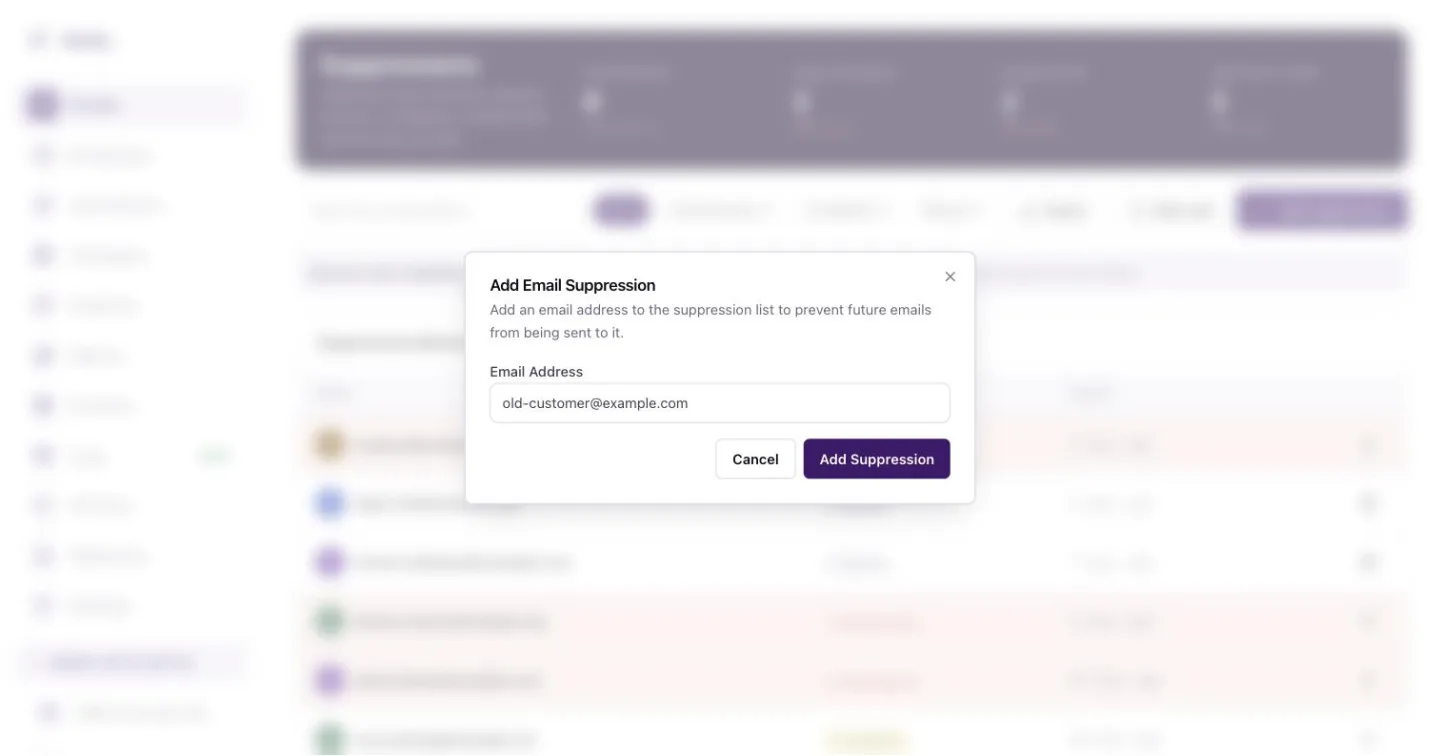 *Add one address by hand. Notix stops sending to it at once.* ### 4. Remove an entry Press the bin icon on the row, then confirm. You can remove **Manual** entries and **Repeated soft bounces**. Before a repeated soft bounce comes off, Notix warns you: if the mailbox soft-bounces 3 more times in 30 days it goes back on the list. Hard bounces and complaints can't be removed, because they protect your sending reputation. If one is wrong, for example the address had a typo that is now fixed, contact Notix support. Support can lift it and records why. ## Use the API Check addresses before a send, add addresses in bulk, or lift an entry. Check up to 100 addresses at once with [Check addresses against the suppression list](/docs/reference/contacts/check-addresses-against-the-suppression-list): ```bash cURL curl "https://app.usenotix.dev/api/v1/suppressions/check?emails=ada@example.com,bola@example.com" \ -H "Authorization: Bearer $NOTIX_API_KEY" ``` ```json { "results": [ { "email": "ada@example.com", "suppressed": false, "reason": null, "expiresAt": null }, { "email": "bola@example.com", "suppressed": true, "reason": "HARD_BOUNCE", "expiresAt": null }, { "email": "chi@example.com", "suppressed": true, "reason": "SOFT_BOUNCE_REPEATED", "expiresAt": "2027-01-08T10:00:00.000Z" } ] } ``` `suppressed: true` with `SOFT_BOUNCE_REPEATED` means campaigns and automations skip the address until `expiresAt`. A one-off send to it still goes out. Add up to 100 addresses with [Suppress addresses](/docs/reference/contacts/suppress-addresses). An address already on the list keeps its first reason, so a bounce is never relabelled as manual. ```bash cURL curl -X POST https://app.usenotix.dev/api/v1/suppressions \ -H "Authorization: Bearer $NOTIX_API_KEY" \ -H "Content-Type: application/json" \ -d '{ "emails": ["old-customer@example.com", "left-company@example.com"] }' ``` ```json { "added": 2, "alreadySuppressed": 0 } ``` Remove an entry with [Lift a manual suppression](/docs/reference/contacts/lift-a-manual-suppression). An API key can lift entries it added itself and any `SOFT_BOUNCE_REPEATED` entry. Lifting a soft-bounce entry answers with a `warning`. A hard bounce or complaint answers `403`, and so does an entry a person added in the dashboard, an import, or another key's entry. An address that was not on the list answers `200` with `removed: false`. ```bash cURL curl -X DELETE https://app.usenotix.dev/api/v1/suppressions/old-customer@example.com \ -H "Authorization: Bearer $NOTIX_API_KEY" ``` ```json { "email": "chi@example.com", "removed": true, "warning": "This address kept refusing mail recently. If it soft-bounces 3 more times in 30 days it goes back on the list. Mailbox providers notice repeated sends to mailboxes that refuse them." } ``` Page through the whole list with [List suppressed addresses](/docs/reference/contacts/list-suppressed-addresses). Filter with `reason` (`HARD_BOUNCE`, `COMPLAINT`, `MANUAL` or `SOFT_BOUNCE_REPEATED`) or `search`. Each entry has `expiresAt`: the date a `SOFT_BOUNCE_REPEATED` entry lifts, or `null` for an entry that stays. See how the list grew with [Get suppression and unsubscribe trends](/docs/reference/contacts/get-suppression-and-unsubscribe-trends): addresses added each day over the last 30 days by reason, people who unsubscribed each day, and the 30-day totals against the 30 days before. These are the figures on the Suppressions page. Unsubscribes are counted since October 2026. The Notix MCP server has the same tools: `check_suppression`, `list_suppressions`, `get_suppression_trends`, `add_suppression` and `remove_suppression`, with the same rules. ## What a suppressed send looks like A send to a suppressed address is not an error. The address is skipped and not counted on your bill. If every recipient of an email is suppressed, the email gets the status `SUPPRESSED` and nothing goes out. A batch reports it as `SUPPRESSED` in its `results`. ## Keep your list clean - Remove addresses that bounce from your own database, not only from Notix. - Use [double opt-in](/docs/marketing/double-opt-in) for newsletter sign-ups, so typos never reach your list. - Do not buy or rent lists. They are full of dead and trap addresses. - Make unsubscribing easy. A person who cannot unsubscribe reports spam instead. --- # Sending rules Quiet hours, a frequency cap per contact, daily caps and an SMS country allow list. Sending rules decide when marketing goes out and how much of it. Set them under [Deliverability and control > Sending rules](https://app.usenotix.dev/sending-rules) in the console, or with the API. A team that never saved rules has every rule off. One-time codes are never held back by quiet hours or caps. ## The rules | Rule | What it does | | --- | --- | | Quiet hours | No marketing between two times, such as 21:00 and 07:00, in a time zone you pick. | | Frequency cap per contact | At most a number of marketing emails to one contact in a number of days, such as 3 a week. | | Priority lanes | Always on. Codes, transactional email and marketing run on separate queues, so a large broadcast never slows a code or a receipt. | | Daily caps per channel | Your own limits a day for email, SMS and codes. Approximate when sending is heavy. | | Backup channel | If an SMS fails, send the same message by email. | | Country allow list | Send SMS only to the countries you list. | ## Quiet hours Quiet hours cover marketing email (broadcasts and automations) by default. You can also tick **Transactional** to cover the email your app sends; the console asks you to confirm, because receipts and password resets then wait too. Codes are never covered. A quiet window is at most 12 hours. **Marketing SMS** can be ticked, but does nothing yet: Notix does not send marketing SMS today. It applies once it does. You choose what happens to a message in quiet hours: - **Hold and send** (the default): the message waits and goes out when quiet hours end, spread over 30 minutes so a backlog does not leave at once. - **Skip them**: the message is not sent. Not allowed while **Transactional** is ticked: transactional email is only ever held, never skipped. An email held for more than 7 days in all is not sent: it reads **Failed** with the reason. Pick a time zone, or **Contact's own time zone**. With the second, Notix reads each contact's `timezone` property, an IANA zone such as `Africa/Nairobi`. A contact without one, or with a value that is not a real zone, uses the zone you picked. ## Frequency cap The cap covers broadcasts and automations only. It counts the broadcast and automation emails that actually went to the contact in the last days you set. When one would go past it, that email is skipped and the reason is kept on the email. It is not sent later. Transactional email, emails sent with the API and codes are never counted or capped. The cap is best effort: emails to the same contact sent at the same moment can each see room, so a contact can now and then get one more. ## Daily caps Each cap is a number a day, or empty for no cap. Days are UTC and reset at 00:00 UTC. - **Email**: when your email cap is reached, marketing email waits. The waiting emails are spread a cap's worth a day, so a large backlog goes out over several days rather than all at the next midnight. Transactional email still goes out. The email cap is best effort: it reads a count that can be up to a few seconds old, so a busy day can go a little past it. - **SMS** and **codes**: an SMS, or a one-time code sent by SMS, past its cap is refused with a 429 and the reason, until 00:00 UTC. These caps are counted exactly, one at a time. ## Backup channel Your choice is saved, but nothing is sent by email yet. An SMS sent through the API carries a phone number only, so Notix has no email address to fall back to. ## Country allow list With the list on, an SMS to any other country is refused with a 403 and the reason. An SMS already queued when the list is turned on is checked again just before it is sent, and refunded if it is refused. This includes test messages from the console and one-time codes sent by SMS: the list exists to stop texts to countries you never serve, which is where SMS fraud on code endpoints comes from. Use real two-letter country codes, such as `NG` for Nigeria. ## Who is told about a change Every change is recorded: who made it, whether in the console, the API or an AI assistant, and the rules before and after. When a change widens quiet hours, turns on skipping, or turns on the country allow list, every team admin gets an email. Records of what rules held back are kept for 90 days. ## See what was held back The page shows how many messages the rules held back this month, and a table with each message, the rule, how many and what happened: sent later, skipped or refused. Each email also says it on its own events: a held email reads **Scheduled** with the rule and the time it will go, a skipped one reads **Cancelled** with the rule. ## Change rules with the API ```bash cURL curl -X PATCH https://app.usenotix.dev/api/v1/sending-rules \ -H "Authorization: Bearer $NOTIX_API_KEY" \ -H "Content-Type: application/json" \ -d '{ "quietHours": { "enabled": true, "from": "21:00", "to": "07:00", "timezone": "Africa/Lagos" }, "frequencyCap": { "enabled": true, "max": 3, "windowDays": 7 } }' ``` Send only what changes. Read the rules, this month's counts and today's counts with `GET /v1/sending-rules`. See the [Sending rules reference](/docs/reference/sending-rules). ## Sending rules for AI agents An AI connected through MCP has the tools `get_sending_rules` and `update_sending_rules`. It must ask you before it changes a rule. ## Who can change sending rules In the console, every team member can see the rules. Only a team admin can change them. With the API, every key that reads can read them. Changing them needs a full access key that is not limited to one domain, made by someone who is a team admin today. A change reaches the sending queue within 30 seconds. --- # Warm-up Why a new domain starts at 200 emails a day, what counts, and what happens at the limit. A new sending domain starts on a small daily limit and grows from there. Gmail and Outlook do not trust a domain they have never seen, so a domain that starts small keeps its mail out of spam. ## The limit | Domain | Limit | | --- | --- | | Added in the last 14 days | 200 emails a day | | Resumed after a pause, for 7 days | 500 emails a day | Every send from the domain counts: the API, SMTP, batches, broadcasts and automations. Broadcasts, automations and `MARKETING` sends can use 80% of the day. The last 20% is kept for single emails from your app, like password resets, so a broadcast cannot use them up. The day resets at midnight UTC. A limit your account has for the whole team does not lift a domain's warm-up. > **Note:** > After 14 days the warm-up limit ends. A longer ladder, growing to 500, 1,000 and on up to 50,000 a day as long as fewer than 2% of your emails bounce, is coming later. ## What happens at the limit - An API or SMTP send answers 429 `RATE_LIMITED` with `details.reason` `DOMAIN_WARMUP_LIMIT`. Nothing was sent. - A broadcast sends what fits and carries on the next day from where it stopped. - An automation waits and carries on later. ## See where a domain is Open the domain in [Domains](https://app.usenotix.dev/domains). The **Warming up** card shows today's count, the limit and when the next step starts. With the API, `GET /v1/domains/{id}` returns `safeguards.warmup` and [Get a domain's sending status](/docs/reference/domains/get-a-domain-s-sending-status) returns `warmup` and `dailyCap`, each with `sentToday`. ## Migrating from Resend, SendGrid or Mailchimp If you migrate with the [Migration Center](/docs/marketing/move-to-notix), Notix reads a short, recent sample of your sending at your old provider, in the background after you connect. A domain starts at **2,000 a day** instead of 200 when all of this holds for that exact domain (the same name you add in Notix, not a sibling under the same root): - it was added at your old provider at least 30 days ago, and is verified there; - in the last 7 days it delivered at least 50 emails a day on at least 5 days; - those emails went to at least 10 different recipient domains; - at most 2% of the sample bounced and at most 0.05% was marked as spam. Only real recipients count: your own domain, your team's addresses and test addresses (such as `delivered@resend.dev`) are left out. Anything less starts at the normal 200 a day. **Above 2,000, a person decides.** On the switch-over step or the domain's **Warming up** card, choose **Request a higher start** and give the amount you want. A Notix admin looks at the domain's age at your old provider, the daily volume and bounce rate we sampled, and its DNS in Notix, then approves your amount, approves a different one, or declines. You can also ask with the API (`POST /v1/domains/{id}/start-request`) or the `request_higher_start` MCP tool. What each provider shows: - **Resend**: when the domain was added and whether it is verified, and your newest sent emails from the last 7 days, read page by page until the sample is enough. A domain sending a great deal more than 2,000 a day may not fit the sample; ask for a higher start. - **SendGrid**: your authenticated domains and, with read access to stats (`stats.read`), the account's daily delivered, bounce and spam-report numbers for the last 7 days. SendGrid does not show who mail went to or when a domain was added, so a SendGrid domain starts at 200 and can ask for a higher start. The account's numbers are shown to the admin only when the account has exactly one domain. - **Mailchimp**: your verified domains and the campaigns you actually sent in the last 7 days. A Mailchimp domain can earn the 2,000 start at most; above that, ask. The start applies once the domain is fully verified in Notix: the domain, DKIM and MAIL FROM. You add the DNS records yourself, as for any domain. It also lifts your team's new-account daily limit, but only for email sent from that domain; mail from your other domains stays on the normal ramp. Some starts are checked by a person first, for example when the old account does not look like yours, or when the same provider account or domain was connected by another team. The sample counts for 30 days, and only from your latest connect. Everything else still applies: bounces and spam complaints are watched from the first send. A pause, or a hold on marketing after a sudden rise in bounces, on **any** of your domains ends every higher start your team has, and the team lift, for good; after a resume a domain is on the normal 7-day probation. Deleting a domain gives its start back. The domain keeps its start for its warm-up window and then has no warm-up limit, like any other domain. The switch-over step of the migration shows each domain's start, or why it did not qualify, naming what was measured. The domain's **Warming up** card shows its starting step and the reason, and the API returns it as `warmup.start` (`reason`, `provider`, `verifiedSince`, `startingCap`). `startingCap` is what the domain can actually send: the lower of its start and your team's own daily limit. ## Need more on day one? Moving an existing, clean list some other way? [Contact us](/contact). Notix can set a different limit for a domain while it warms up. --- # React Email Render a React Email component to HTML and plain text, then send both with notix-js. [React Email](https://react.email/docs/introduction) builds emails from React components. Render the component to HTML and plain text, then send both with Notix. ### 1. Install ```bash terminal npm install notix-js @react-email/components @react-email/render # or: pnpm add / yarn add / bun add ``` ### 2. Write the email ```tsx emails/receipt.tsx import { Button, Html, Text } from "@react-email/components"; export function ReceiptEmail({ orderId, url }: { orderId: string; url: string }) { return (Thanks for your order.
" }' ``` ```ts Node.js import { Notix } from "notix-js"; const notix = new Notix(process.env.NOTIX_API_KEY); await notix.emails.send({ from: "AcmeThanks for your order.
", }); ``` When a reply answers an email Notix sent, the message carries `inReplyToEmailId`, the id of that email. The console shows the original email beside the conversation. ## Read received mail in the console The [Inbox](https://app.usenotix.dev/emails/receiving) lists conversations by view: **Mine**, **Unassigned**, **All open**, **Pending** and **Closed**, plus one row per inbox and **Spam**. Open a conversation to read the whole thread, reply, assign it or leave a note. [Shared inbox](/docs/receiving/shared-inbox) covers the team features.  *The Inbox: views and inboxes, the conversation list, the open thread and the customer's details.* ## Read received mail with the API | Call | What it does | | --- | --- | | [List received messages](/docs/reference/inbound/list-received-messages) | Messages your inboxes received, newest first. Spam is left out. | | [Get a received message](/docs/reference/inbound/get-a-received-message) | One message with its text, safe HTML, `strippedText` and attachment links. | | [Download the original message](/docs/reference/inbound/download-the-original-message) | The message exactly as it arrived, as an `.eml` file. Kept for 30 days. | | [Get a reply thread](/docs/reference/inbound/get-a-reply-thread) | A whole conversation, both ways, oldest first. | | [Summarise received mail](/docs/reference/inbound/summarise-received-mail) | Counts of what arrived over the last days, by inbox, status and broadcast. | ```bash curl "https://app.usenotix.dev/api/v1/inbound/messages?limit=10" \ -H "Authorization: Bearer $NOTIX_API_KEY" ``` Pass `nextCursor` back as `cursor` to get the next page. Add `inbox` to read one inbox. A key made by a team member reads only the inboxes that member belongs to. A key made by an admin or the owner reads every inbox. A send-only key and a live AI key cannot read received mail. ## Get each message by webhook Add a webhook with the `email.received` event and Notix posts each message to your server as it arrives. The payload has the sender, the text, safe HTML, `strippedText`, attachment links and the DMARC result. [Event types](/docs/webhooks/event-types#email-received) shows a full example. > **Warning:** > Only trust the From address when `senderVerified` is `true`. Anyone can write any From line. When `senderVerified` is `false`, the message starts its own conversation and is not linked to a contact, and you should treat the sender as unconfirmed. ## Limits - Messages over 40 MB are dropped and not stored. - Attachment links in a webhook or an API answer work for 15 minutes. Read the message again for a fresh link. - The original `.eml` file is kept for 30 days. - The team can make 120 inbox reads a minute through the API. ## What comes next - [Custom receiving domains](/docs/receiving/custom-receiving-domains) let you receive at any address on your own domain. It is rolling out account by account. - [Forward received emails](/docs/receiving/forward-received-emails) sends copies of received mail to confirmed addresses by rules. - [AI agents and untrusted email](/docs/receiving/untrusted-email) explains how received text reaches an AI agent safely. --- # Custom receiving domains Receive mail at any address on your own domain. Rolling out account by account. Every inbox gets a Notix address that works straight away. You can also receive at any address on your own domain, such as `orders@inbound.acme.com`. Received mail lands in your [shared inbox](/docs/receiving/shared-inbox), in the API and in the `email.received` webhook. > **Note:** > Receiving on your own domain is rolling out account by account. If you do not see a **Receiving** card on a verified domain's page, it is not on for your account yet. Until then, your inbox's Notix address works as described in [Receiving emails](/docs/receiving/receiving-emails). ## Choose a domain to receive on You can receive on a domain you have [verified for sending](/docs/domains/verified-domains), or on a subdomain of it. **Use a subdomain** such as `inbound.acme.com` if anyone already gets email at the main domain, for example through Google Workspace or Microsoft 365. Receiving works through an MX record, and a domain has one set of MX records. Pointing the main domain's MX record at Notix would move all of your company's mail to Notix, and your team would stop getting it. Notix warns you and asks you to confirm before it lets you do that. You cannot receive on `mail.acme.com`. That name already carries bounces for your sending domain. ## Turn on receiving ### 1. Open the domain Go to [Domains](https://app.usenotix.dev/domains) and open a verified domain. Only team admins can turn receiving on. ### 2. Pick the name and turn it on In the **Receiving** card, keep the suggested subdomain or type your own, then press **Turn on receiving**. ### 3. Add the records Add the records the card shows at your DNS provider. Each one has a copy button. The values below are examples; copy the real ones from the card. | Type | Host | Value | Priority | TTL | | --- | --- | --- | --- | --- | | MX | `inbound.acme.com` | `inbound-smtp.eu-west-1.amazonaws.com` | 10 | 3600 | | TXT | `notixin._domainkey.inbound.acme.com` | `p=...` (shown in the console) | | 3600 | The TXT record proves to Amazon SES, which receives the mail for Notix, that you own the name. When you receive on a domain that is already verified for sending in the same region, there is no TXT record to add. The MX record must be the only one for the name, or the one with the lowest priority number. Mail goes to the preferred server first. ### 4. Check the records Press **Check records**. Each record shows **Found**, **Missing**, **Wrong value** or **Not checked**. Receiving starts once the MX record points to Notix, the TXT record is found, and Notix has switched the name on. Until then the card says **Waiting for records**. DNS changes can take up to an hour, so press **Check records** again if it is still waiting. ## Where the mail goes Mail to any address on an active receiving domain is accepted: - An address that belongs to an inbox goes to that inbox. - Every other address goes to your team's first inbox. If you have no inbox yet, Notix creates one called **Inbox**. Mail for a name whose receiving is off is not accepted, and nothing is bounced back to the sender. ## Turn off receiving Press **Turn off** in the Receiving card and confirm. Notix stops accepting mail for the name at once. Remove the MX record afterwards. Deleting the sending domain also turns off receiving on it. ## Read the mail Mail received on your own domain is read the same way as any received mail: in the shared inbox, with [List received messages](/docs/reference/inbound/list-received-messages), or through the `email.received` [webhook](/docs/webhooks/event-types). Files that come with it are covered in [Attachments](/docs/receiving/attachments). A key restricted to one domain reads only mail delivered to that domain or its subdomains. --- # Shared inbox Answer received mail as a team: assign, add notes, reply and close conversations. The shared inbox is where your team answers received mail together. Each customer's messages are grouped into a conversation. You can assign it to a teammate, leave notes only the team sees, reply from your own domain, and close it when it is done. ## Find your way around [Inbox](https://app.usenotix.dev/emails/receiving) has four columns: - **Views and inboxes.** Mine, Unassigned, All open, Pending and Closed, then one row per inbox, then Spam. - **The conversation list.** Unread conversations have a dot. Search by sender or subject. - **The thread.** Every message from the customer and every reply from your team, oldest first, with notes and changes in between. - **The customer.** The contact the sender is linked to, and their other conversations.  *The Inbox. The open conversation is in the middle, the customer's details on the right.* A team admin sees every inbox. A member sees only the inboxes they belong to. Read marks are per person, so what you read stays unread for your teammates. ## Work a conversation ### 1. Open the conversation Select it in the list. It is marked read for you. ### 2. Assign it Use the assign menu at the top of the thread to give the conversation to a teammate, or take it yourself. The person you assign is notified, and the thread records the change. ### 3. Leave a note Switch the box at the bottom from **Reply** to **Internal note**. Write `@` and a teammate's name to mention them, and they get a notification. The customer never sees notes. 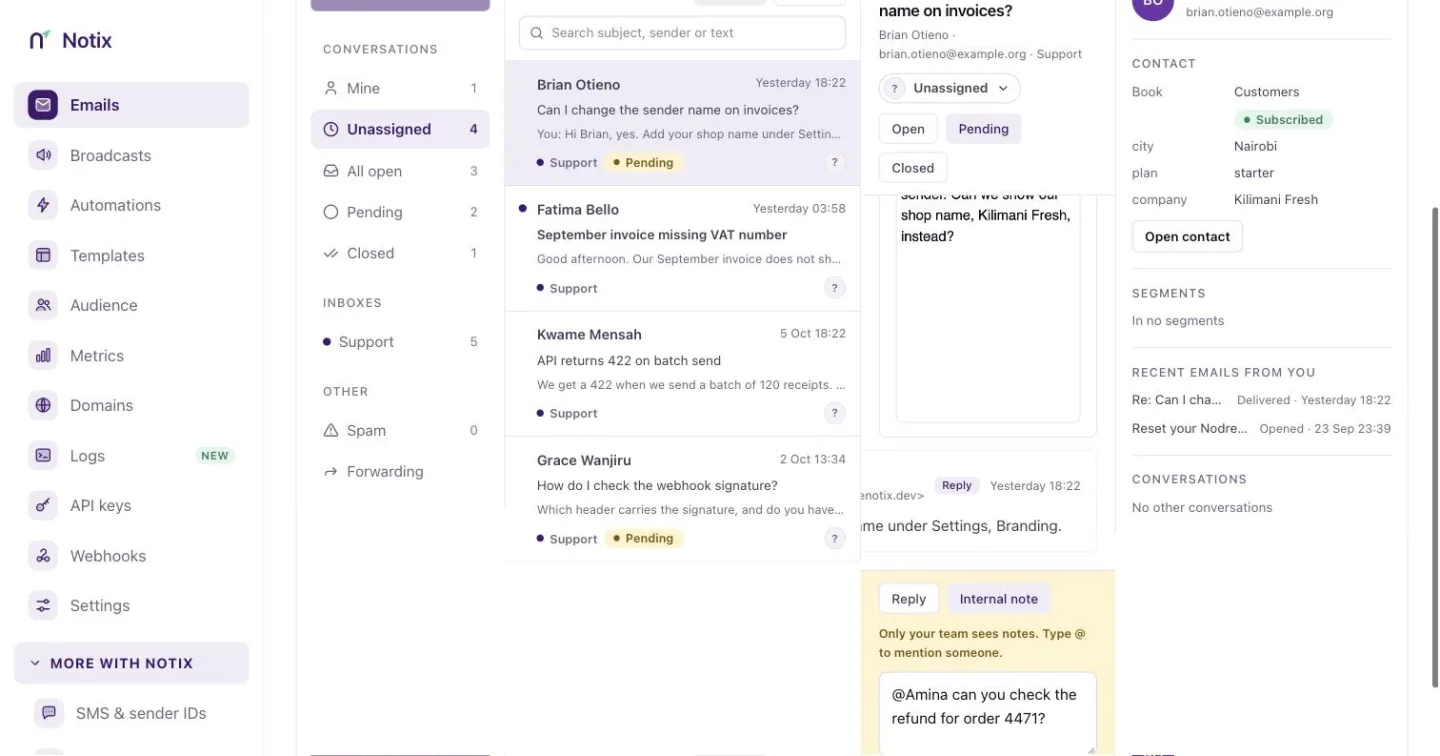 *An internal note. The box turns yellow so you know the customer will not see it.* ### 4. Reply Switch back to **Reply**, write your answer and press **Send**, or **Send and close** to close it at the same time. The reply goes out from the inbox's name at your verified sending domain, in the same thread in the customer's mail app. Their answer comes back to the inbox. You can attach files. ### 5. Set the status A conversation is **Open**, **Pending** (you answered, and you are waiting for the customer) or **Closed**. A reply makes it Pending unless you close it. When the customer writes again, it opens again. A conversation closed more than 7 days ago stays closed, and their new message starts a new conversation. > **Note:** > A reply is a real email. It follows every sending rule: a verified domain that is not paused, your suppression list and your sending limits. ## Unsubscribe requests When a contact answers a broadcast asking to stop getting it, the thread shows an **Unsubscribe from** button with the contact book's name. Press it, and Notix unsubscribes the contact from that book, removes them from any automations, and records it in the thread. The button shows only when the first message answers a broadcast, reads like an unsubscribe request, comes from a sender whose domain passed DMARC, and the contact is still subscribed. ## Spam Messages caught by the spam or virus check go to **Spam**. They are not threaded with other mail, do not fire the `email.received` webhook and cannot be replied to. ## Work the inbox with the API Every action in the console has an API call. A key acts as the person who made it: their inboxes, their read marks, and their name on notes, assignments and replies. Reading needs a full access or read only key. Changing anything needs a full access key. | Call | What it does | | --- | --- | | [List conversations](/docs/reference/inbound/list-conversations) | The conversations in a view or an inbox. | | [Get a reply thread](/docs/reference/inbound/get-a-reply-thread) | The whole conversation, without internal notes. | | [Reply to a conversation](/docs/reference/inbound/reply-to-a-conversation) | Send a reply. Pass `close: true` to close it. | | [Assign a conversation](/docs/reference/inbound/assign-a-conversation) | Assign it to a member, or `null` to unassign. | | [Set a conversation's status](/docs/reference/inbound/set-a-conversation-s-status) | `OPEN`, `PENDING` or `CLOSED`. | | [Add a note](/docs/reference/inbound/add-a-note) | Leave an internal note, with `@handle` mentions. | | [List a conversation's notes](/docs/reference/inbound/list-a-conversation-s-notes) | The team's notes, oldest first. | | [List an inbox's members](/docs/reference/inbound/list-an-inbox-s-members) | Who a conversation can be assigned to or mention. | | [Mark a conversation read](/docs/reference/inbound/mark-a-conversation-read) | Mark it read for the key's creator. | | [Mark a conversation unread](/docs/reference/inbound/mark-a-conversation-unread) | Mark it unread again. | | [Unsubscribe the sender](/docs/reference/inbound/unsubscribe-the-sender) | Act on an unsubscribe request. | | [Get the inbox status](/docs/reference/inbound/get-the-inbox-status) | Your inboxes, their addresses and the counts behind each view. | ```bash cURL curl -X POST https://app.usenotix.dev/api/v1/inbound/conversations/cnv_31ad9/reply \ -H "Authorization: Bearer $NOTIX_API_KEY" \ -H "Content-Type: application/json" \ -H "Idempotency-Key: refund-4471-reply" \ -d '{ "text": "Thanks Chiamaka, your refund for order 4471 is on its way.", "close": true }' ``` ```ts Node.js import { Notix } from "notix-js"; const notix = new Notix(process.env.NOTIX_API_KEY); const { error } = await notix.conversations.reply( "cnv_31ad9", { text: "Thanks Chiamaka, your refund for order 4471 is on its way.", close: true }, { idempotencyKey: "refund-4471-reply" }, ); if (error) throw new Error(error.message); ``` A reply through the API cannot carry attachments. Reply from the console to attach files. ## Limits - 30 replies, 60 notes and 30 unsubscribes a minute for the team. - 120 inbox reads a minute through the API. - A reply's text can be up to 20,000 characters, and a note up to 5,000. --- # Forward received emails Forward received mail to confirmed addresses by rules, and read why each message was or was not forwarded. Notix can send a copy of each email your inboxes receive on to another address, a webhook, or both. You set this up with forwarding rules: a rule says which receiving addresses to forward and where to. ## How it works 1. Someone emails an address your team receives on, such as `acme-support@inbound.usenotix.dev` or `billing@inbound.acme.com`. 2. Notix stores the message in your [shared inbox](/docs/receiving/shared-inbox) and sends the `email.received` [webhook](/docs/webhooks) event. 3. If a forwarding rule matches the address, Notix sends a copy to each confirmed forwarding address on the rule, from your own domain, with Reply-To set to the original sender. Forwarding never holds up receiving. The message is in your inbox and your webhook has it before any forward is sent. 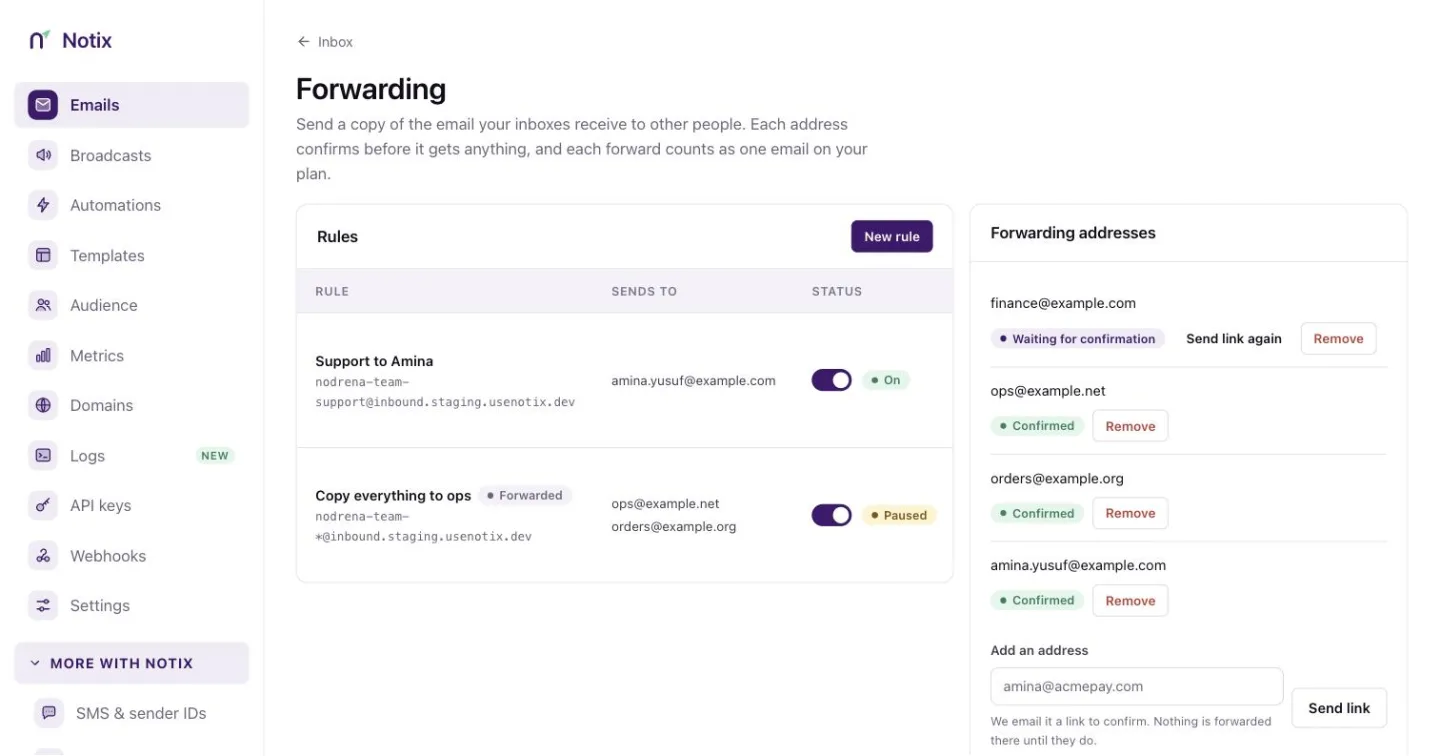 *The Forwarding page of the Inbox: your rules, the tester and the addresses they forward to.* ## Before you start - **A verified sending domain**, such as `acme.com`. Forwards are normal emails sent from your own domain, never as the original sender: pretending to be someone else's address fails SPF, DKIM and DMARC and gets mail rejected. See [Add a domain](/docs/add-a-domain). - **An address that receives.** Every inbox gets a Notix address straight away, such as `acme-support@inbound.usenotix.dev`. You can also receive on your own domain, such as `billing@inbound.acme.com`. See [Receiving emails](/docs/receiving/receiving-emails) and [Custom receiving domains](/docs/receiving/custom-receiving-domains). - **A team admin.** Only admins can change forwarding, in the console or with a full access API key an admin made. ## What a forward looks like - **From** your own address, named after the sender and the rule ("Chidi Okafor via Billing"). Never the original sender's address. - **Reply-To** the original sender, when Notix could confirm them. - **Subject, text and HTML** as they arrived, unless the rule forwards [as a forwarded message](#as-received-or-as-a-forwarded-message). Links and images are not tracked, and images in the HTML load from wherever the original sender put them, so opening a forward can tell the sender it was read. - **Attachments**, when the virus check passed and they fit in one email: at most 10 files, 7 MB each and 10 MB in total. Otherwise the forward goes without them and lists them at the end. Inline images (`cid:` images) arrive as ordinary attachments. - A one-click **stop forwarding** link, which mail apps show as Unsubscribe. Using it removes that address from your team's forwarding and tells your admins. The link sits in the forward's headers, so anyone who gets a copy of the forward, or is passed it on, can use it. An admin can add the address again. When Notix cannot confirm who sent a message (DMARC did not pass, or the spam check could not tell), the forward still goes, but its subject starts with `[Unverified sender]`, the sender's display name is left out, and there is no Reply-To. ## Set up forwarding ### 1. Add a forwarding address Open [Inbox](https://app.usenotix.dev/emails/receiving), then **Forwarding**, and add the address under **Forwarding addresses**. It gets nothing until someone who reads it confirms: Notix emails it a link that works once, for 24 hours, and tells your team's admins when it is confirmed. With the API: ```bash curl -X POST https://app.usenotix.dev/api/v1/forwarding-destinations \ -H "Authorization: Bearer $NOTIX_API_KEY" \ -H "Content-Type: application/json" \ -d '{"email":"amina@acme.com"}' ``` ```json { "destination": { "id": "clx9f2k3l0002qz8a7b6c5d4e", "email": "amina@acme.com", "status": "PENDING", "verifiedAt": null, "expiresAt": "2026-10-06T10:00:00.000Z", "lastSentAt": "2026-10-05T10:00:00.000Z", "createdAt": "2026-10-05T10:00:00.000Z" }, "confirmationSent": true } ``` Adding the same address again sends a new link while it is waiting. One address gets at most one link a minute and three an hour from your team, even if you remove it and add it again, and five a day from every team on Notix together. A confirmed address can be used by every rule of your team. ### 2. Create a rule Press **New rule**, or use the API. The pattern says which receiving addresses the rule forwards: | Pattern | Matches | | --- | --- | | `acme-support@inbound.usenotix.dev` | That address only. | | `orders-*@inbound.acme.com` | Addresses that start with `orders-`. | | `*@inbound.acme.com` | Every address on the domain. In the console, tick **Forward every email on inbound.acme.com**; with the API, send `"confirmCatchAll": true`. | On the shared Notix domain, a pattern must match one of your inbox addresses. On your own receiving domain every address is received, so any address, prefix or catch-all on it works once the domain is receiving. A prefix or catch-all there needs a From address, so whoever writes to your domain never chooses the address your forwards come from, and every admin gets an email when such a rule is created or widened. 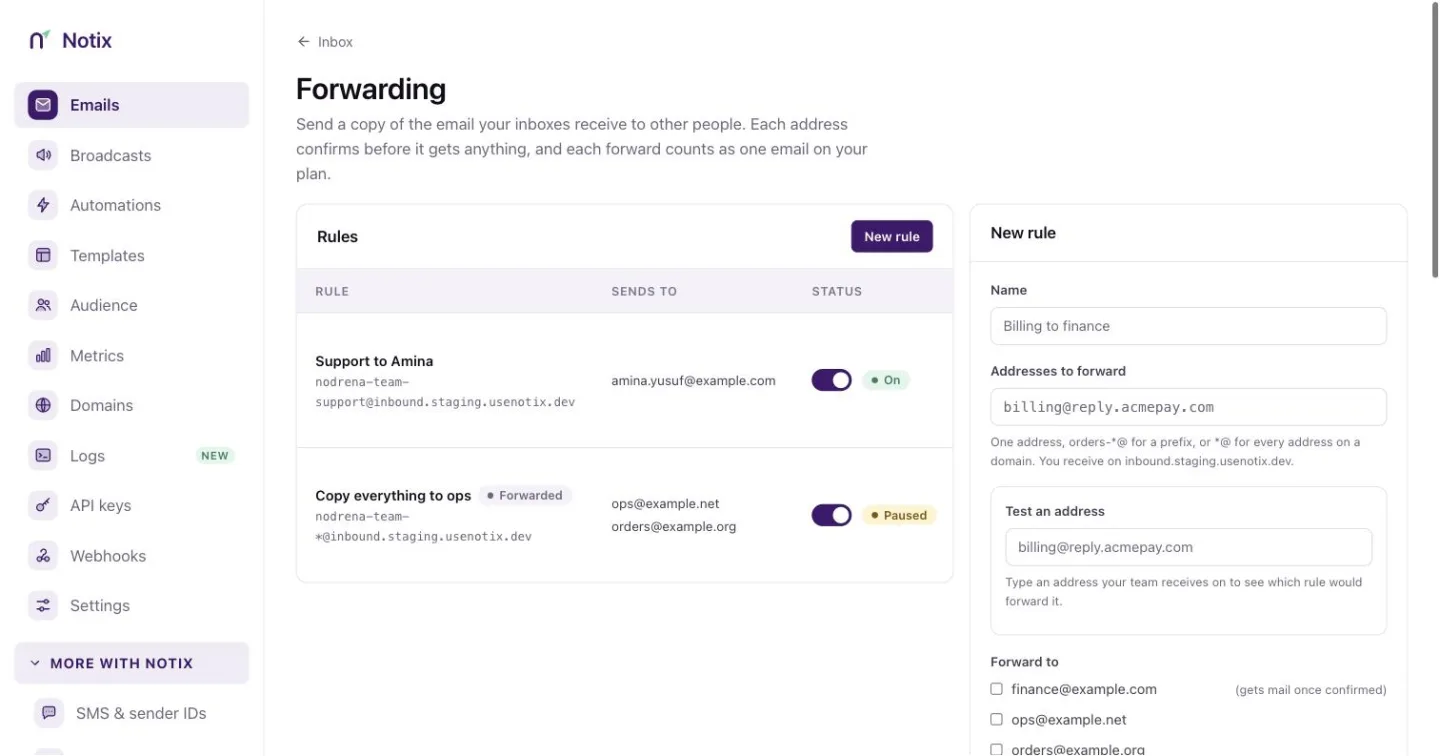 *A new rule. The tester under the pattern shows which of your addresses it would forward.* ```bash curl -X POST https://app.usenotix.dev/api/v1/forwarding-rules \ -H "Authorization: Bearer $NOTIX_API_KEY" \ -H "Content-Type: application/json" \ -d '{ "name": "Support to Amina", "pattern": "acme-support@inbound.usenotix.dev", "destinationIds": ["clx9f2k3l0002qz8a7b6c5d4e"], "fromAddress": "support@acme.com", "priority": 10 }' ``` ```json { "id": "clx9f2k3l0001qz8a7b6c5d4e", "name": "Support to Amina", "pattern": "acme-support@inbound.usenotix.dev", "patternType": "EXACT", "receivingDomain": "inbound.usenotix.dev", "destinations": [{ "id": "clx9f2k3l0002qz8a7b6c5d4e", "email": "amina@acme.com", "status": "VERIFIED" }], "webhookId": null, "fromAddress": "support@acme.com", "subjectPrefix": null, "allowChaining": false, "passthrough": true, "note": null, "active": true, "priority": 10, "paused": false, "pausedAt": null, "pauseReason": null, "createdAt": "2026-10-05T10:05:00.000Z", "updatedAt": "2026-10-05T10:05:00.000Z" } ``` `fromAddress` must be on one of your verified sending domains. Leave it out only when the receiving address itself is on one. Rules are tried from the lowest `priority`; the first rule that is on and matches forwards the message. Add `"webhookId"` to also send each matching message to one of your webhooks, and `"subjectPrefix": "[Acme]"` to mark forwarded subjects. ### 3. As received, or as a forwarded message By default a rule forwards each message exactly as it arrived (`"passthrough": true`). Set `"passthrough": false` to send it the way an email client forwards: an optional note from your team on top, then a Forwarded message block, then the original email. The subject gets `Fwd: ` in front unless it already starts with `Fwd:` or `FW:`, and attachments go either way. In the console, tick **Show as a forwarded message** on the rule and type the note. ```bash curl -X PATCH https://app.usenotix.dev/api/v1/forwarding-rules/clx9f2k3l0001qz8a7b6c5d4e \ -H "Authorization: Bearer $NOTIX_API_KEY" \ -H "Content-Type: application/json" \ -d '{"passthrough": false, "note": "For the accounts team. Please check the total."}' ``` As received, Amina gets the email as Chidi wrote it, with the subject `Invoice 4471 is wrong`. As a forwarded message, she gets `Fwd: Invoice 4471 is wrong`: ```text For the accounts team. Please check the total. ---------- Forwarded message --------- From: Chidi OkaforHi {{firstName,fallback=there}}
" }' curl -X POST https://app.usenotix.dev/api/v1/broadcasts/cmp_123/schedule \ -H "Authorization: Bearer $NOTIX_API_KEY" \ -H "Content-Type: application/json" \ -d '{ "scheduledAt": "2026-11-03T09:00:00Z" }' ``` ```ts Node.js import { Notix } from "notix-js"; const notix = new Notix(process.env.NOTIX_API_KEY); const { data: campaign } = await notix.broadcasts.create({ name: "October newsletter", from: "AcmeHi {{firstName,fallback=there}}
', }); await notix.broadcasts.schedule(campaign!.id, { scheduledAt: "2026-11-03T09:00:00Z", }); ``` ```python Python from notix import Notix client = Notix() # reads NOTIX_API_KEY campaign, err = client.campaigns.create({ "name": "October newsletter", "from": "AcmeHi {{firstName,fallback=there}}
', }) client.campaigns.schedule(campaign["id"], {"scheduledAt": "2026-11-03T09:00:00Z"}) ``` ```php PHP use Notix\Notix; $notix = new Notix(getenv('NOTIX_API_KEY')); $campaign = $notix->campaigns->create([ 'name' => 'October newsletter', 'from' => 'AcmeHi {{firstName,fallback=there}}
', ]); $notix->campaigns->schedule($campaign['id'], [ 'scheduledAt' => '2026-11-03T09:00:00Z', ]); ``` To start from a template, use [Create a broadcast from a template](/docs/reference/broadcasts/create-a-broadcast-from-a-template). [Review a broadcast before sending](/docs/reference/broadcasts/review-a-broadcast-before-sending) runs the same checks as the review screen. A broadcast made with a raw HTML body can only be changed through the API: the console shows its body read only. ### Approval for API keys An API key can carry an approval policy, set by a team admin. With the default policy, a key that schedules a broadcast for more than 50 people gets `409 APPROVAL_REQUIRED`, and a 6-digit code is emailed to the key's owner and the team's admins. Pass that code to [Approve a broadcast with the emailed code](/docs/reference/broadcasts/approve-a-broadcast-with-the-emailed-code). See [API keys and permissions](/docs/account/api-keys). ### Cancel, links and activity Everything on the Broadcasts screens works from the API too: | What | Endpoint | | --- | --- | | Cancel | `POST /v1/broadcasts/{id}/cancel` | | Clicks per link | `GET /v1/broadcasts/{id}/links` | | Who opened, clicked, bounced or unsubscribed | `GET /v1/broadcasts/{id}/activity?event=clicked` | | Everyone it emailed, as CSV | `GET /v1/broadcasts/{id}/activity/export` | | The list, as CSV | `GET /v1/broadcasts/export` | | Filter the list | `GET /v1/broadcasts?status=CANCELED&contactBookId=cb_123` | ```bash cURL curl -X POST https://app.usenotix.dev/api/v1/broadcasts/cmp_123/cancel \ -H "Authorization: Bearer $NOTIX_API_KEY" ``` The answer's `status` is `DRAFT` for a broadcast that was scheduled and had not started, and `CANCELED` for one that had. The two exports answer with the CSV file. Add `format=json` to get `{ filename, csv, rows, truncated }` instead. The links, the activity and the people export show your contacts and their addresses, so they need a full access key that is not limited to one domain; other keys get 403. `status=PENDING_REVIEW` also lists drafts your AI agent is waiting for you to approve, as the dashboard does. Your AI agent can do the same through MCP: `cancel_campaign`, `get_campaign_links`, `list_campaign_activity`, `export_campaign_activity` and `export_campaigns`. A Live AI key can only cancel the broadcasts it created. The [Broadcasts reference](/docs/reference/broadcasts) lists every endpoint, including pause, resume, cancel, copy, preview, recipients, links, activity and the report. The `campaign.started` and `campaign.completed` [webhook events](/docs/webhooks/event-types) tell your server when a send begins and ends. --- # Automations Build automations that branch: emails, waits, events, If / else, contact updates and segments. Then follow each run. An automation sends emails by itself when something happens. Someone joins a list, your app says a payment failed, a trial is about to end. Each person walks the automation on their own clock, and it can take a different path for each person: wait for them to pay, then thank them or remind them. Notix sends every email with the same unsubscribe link, limits and checks as a broadcast. ## The Automations page Open [Automations](https://app.usenotix.dev/automations). The strip at the top shows how many people are in a run now, the runs, emails and completed runs of the last 30 days. Below it are two tabs: **Automations** and **Events**.  *Automations: every automation with its status, what starts it and its runs.* The table lists each automation's **Name**, **Status**, what starts it, its **Runs**, how many people **Opened** its emails, and when it was **Created**. Filter by **Enabled**, **Disabled** or **Draining**, and search by name. | Status | What it means | | --- | --- | | Enabled | It is on. New people start it. | | Disabled | A draft, a paused automation, or one that was stopped and has finished. | | Draining | It was stopped. Nobody new starts it, and the people already in it finish their path. | | In review | Notix holds it until it approves your team's sending. | ## What starts an automation | Trigger | When it starts | | --- | --- | | Someone joins a contact list | Whenever a person is added to the list, by import, form, API or by hand. People already on the list do not start it. | | When my app sends an event | Your app sends an event such as `payment.failed` for one person. See [Events](/docs/marketing/events). | | My app adds people by API | Your app starts each person with one call, with no event name. | An event automation needs a contact list too. When your app sends an email address Notix has not seen, the person becomes a contact in that list. ## Create an automation ### 1. Press Create automation On the Automations page, press **+ Create automation**. 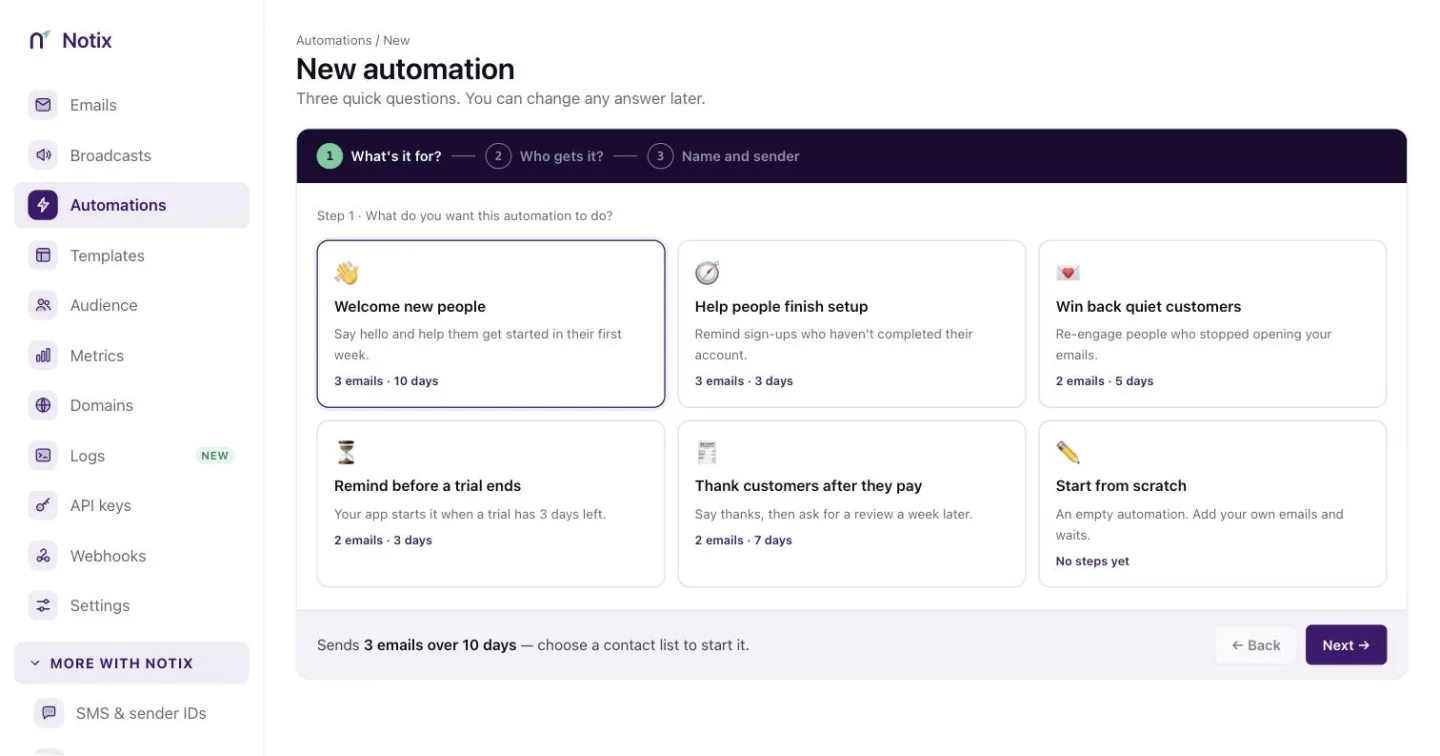 *Create automation: what it is for, what starts it, then its name and sender.* ### 2. What's it for? Pick a goal. Each one starts with sensible steps you can change: | Goal | What it does | | --- | --- | | Welcome new people | A short series when someone joins a list. | | Help people finish setup | Nudges until they do the next thing. | | Rescue a failed payment | Emails, waits for the payment, then follows up. | | Remind before a trial ends | Two reminders before the last day. | | Win back quiet customers | When someone stops opening or buying. | | Start from scratch | An empty canvas with just a trigger. | ### 3. What starts it? Choose a list, an event, or **My app adds people by API**. For an event, pick it from your events and choose who it is for. The page shows the call your app makes. ### 4. Name and sender Give it a name and the address the emails come from. It must be on a verified domain. Press **Continue**. ## Build it The builder shows the automation as a map. The trigger is at the top. Each step leads to the next, and some steps lead two ways. Drag the canvas to move around, and use **−**, **+** and the fit button to zoom. Press a step to change it in the panel on the right. Changes save on their own. 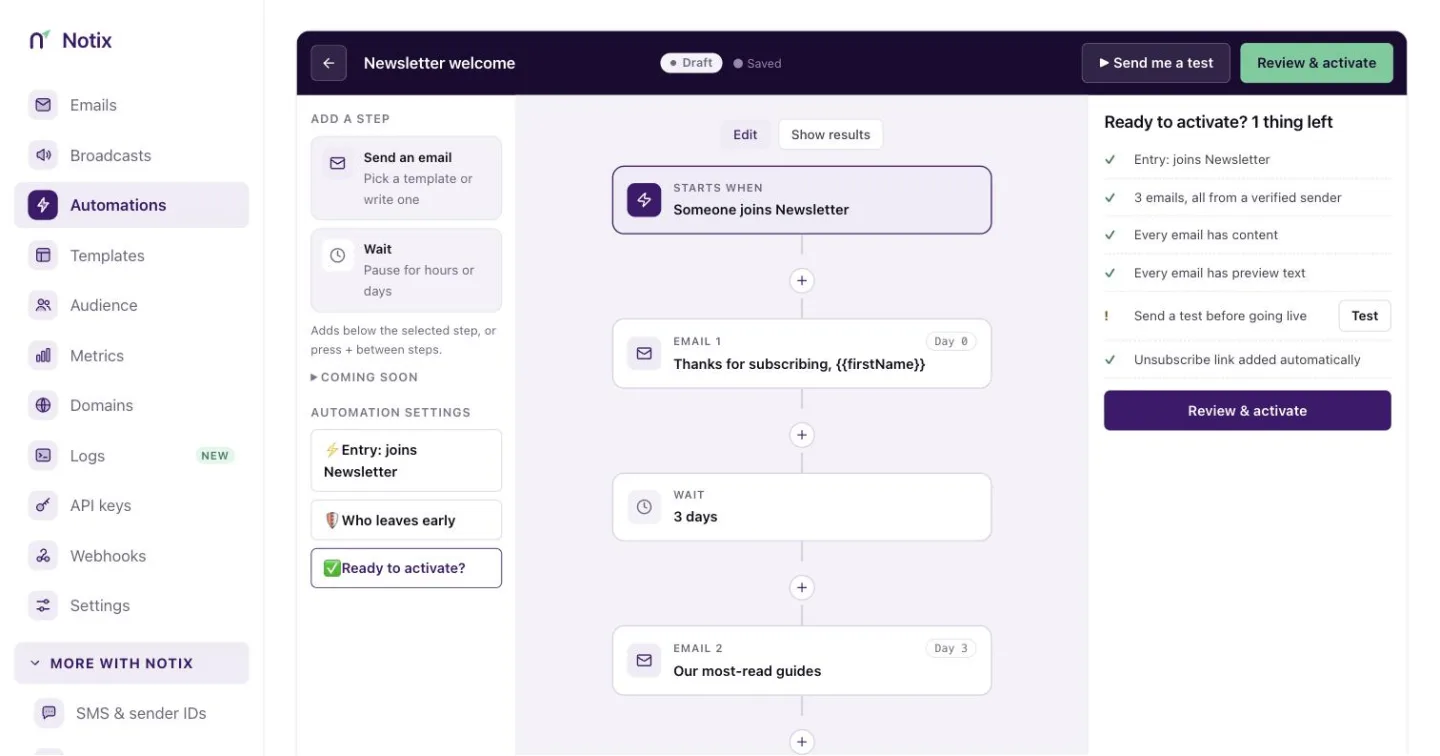 *The builder: add steps from the left, change them on the right.* ### Steps | Step | What it does | Paths out | | --- | --- | --- | | Send email | Sends one email from a template. | One | | Delay | Waits, up to 30 days. | One | | Wait for event | Waits for your app to send an event, up to 30 days. | **It happened** and **Time ran out** | | If / else | Checks a rule. | **Yes** and **No** | | Update contact | Changes the first name, last name or a property, or unsubscribes the person. | One | | Add to segment | Puts the person in a segment, whatever its rules say. | One | A path with nothing after it ends the run there. Paths can never loop back to an earlier step, so every path ends. **Send SMS** is coming soon. ### Fill the template's blanks A template can have blanks, like `{{amount}}`. On a Send email step, choose where each blank comes from: - the event that started the run, like `event.amount`, - the contact, like `contact.first_name`, - an event a Wait for event step received, like `wait_events.payment.succeeded.amount`, - or a fixed text. You can also write `{{event.amount}}` straight into the email. Set a **Reply-to** address on the step if replies should go somewhere else. ### Rules An If / else step, and the optional filter on a Wait for event step, compare a value with another. Match **All of these** (AND) or **Any of these** (OR). | Compare | Means | | --- | --- | | equals, does not equal | The same, or not. Text ignores capitals; `"15"` equals 15. | | greater than, greater or equal, less than, less or equal | For numbers and dates. | | contains, starts with, ends with | For text. | | exists, is empty | Whether there is a value at all. | On a Wait for event filter, `event.*` on the left reads the event that just arrived, and `event.*` on the right reads the event that started the run. So you can wait for `order.paid` for the same `order_id`. ### Send yourself a test Press **▶ Send me a test**. Every email arrives in your own inbox now, with waits skipped and "[Test]" in the subject. Tests do not count toward your plan. ## Review and start Press **Review & start**. Notix checks: - what starts it, and how many of that event arrived in the last 30 days, - **Every path ends**, - **Every blank is filled**: each blank has somewhere to come from, - the sender: a verified domain that is not paused, - deliverability, and the unsubscribe link Notix adds to every email, - your plan's usage at today's pace. 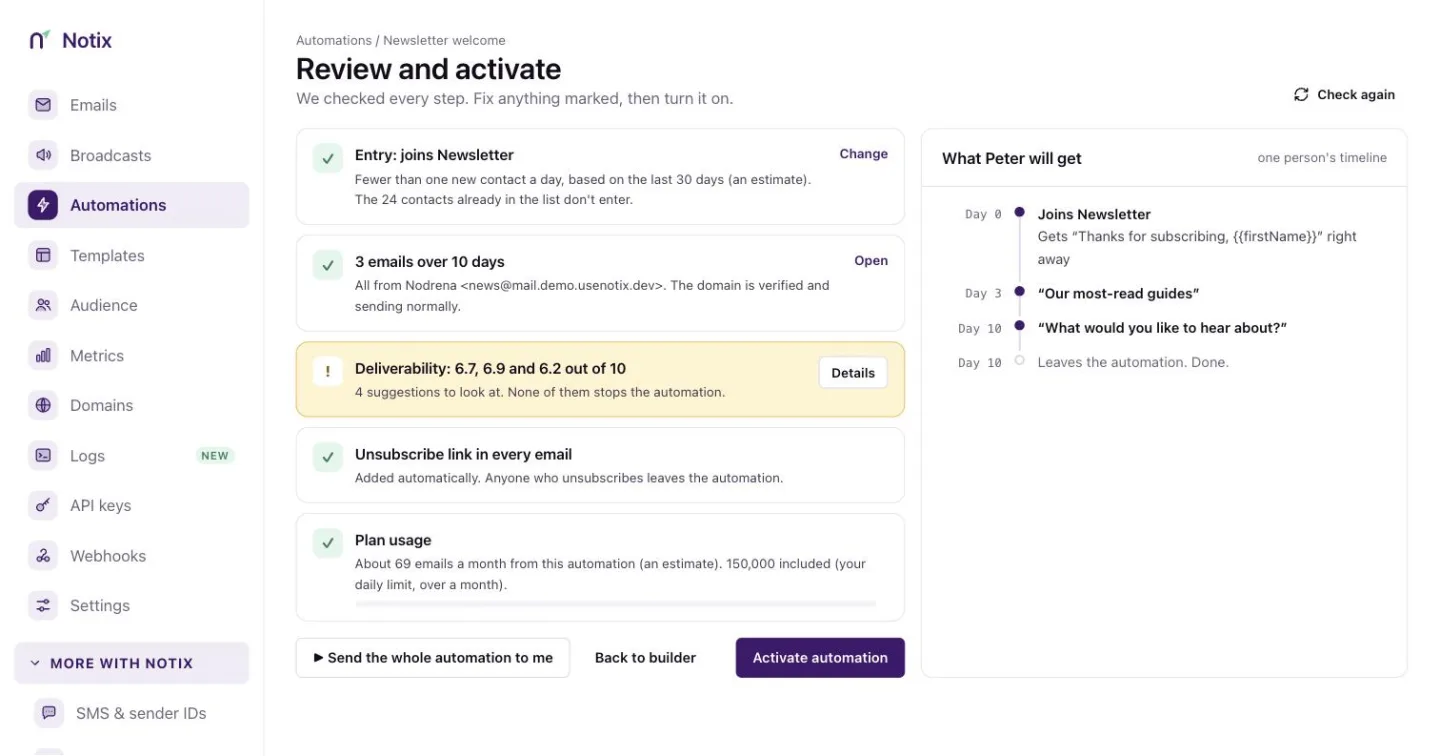 *Review and start: the checks, and what one person will get.* On the right, **What they will get** walks one person through the automation, without sending anything. **Send the whole automation to me** sends every email to you as a test. Then press **Start automation**. > **Note:** > A team Notix has not reviewed yet gets its automation held for review. It sends nothing until Notix approves it. ## Change or stop an automation Once started (enabled, paused or draining), an automation is read-only in the dashboard. Press **Copy**, change the copy, start it, then stop the old one. People already in the old one finish their path. Exactly what a started automation still lets you change: | Change | Started automation | | --- | --- | | Its name | Yes. | | What starts it, its event, or the list new people join | Never. Copy it instead. | | Its paths (steps added, removed or moved between branches) | Never. Copy it instead. | | The steps of an automation with no branches, through the API | Yes, the way automations always worked: Notix checks every email again before saving, keeps each person on the step they are on, and refuses to remove a step someone is on or has passed. | | Anything, while Notix holds it for review | No. | Press **Stop** to stop it for new people. It shows **Draining** while the people in it finish, then **Disabled**. A draining automation offers **Archive now**, which makes the people still in it leave straight away. A paused automation, or one held for review, stops at once and the people in it leave. People leave any automation early when they unsubscribe, when an email to them bounces, or when they mark one as spam. Notix also holds emails, instead of failing them, while your domain is warming up, while its DNS is not finished, or while a sending limit is reached. ## Runs Open an automation and press **Runs**. Each run is one person's way through the automation, newest first. Filter by status and date. | Status | Means | | --- | --- | | Running | Still in it, waiting or about to take the next step. | | Completed | Reached the end of a path. | | Failed | An email could not be sent, it bounced, or it was marked as spam. | | Cancelled | Left early: unsubscribed, or the automation was stopped. | | Over plan limit | Waiting because a sending limit is reached. It goes on when the limit resets. | 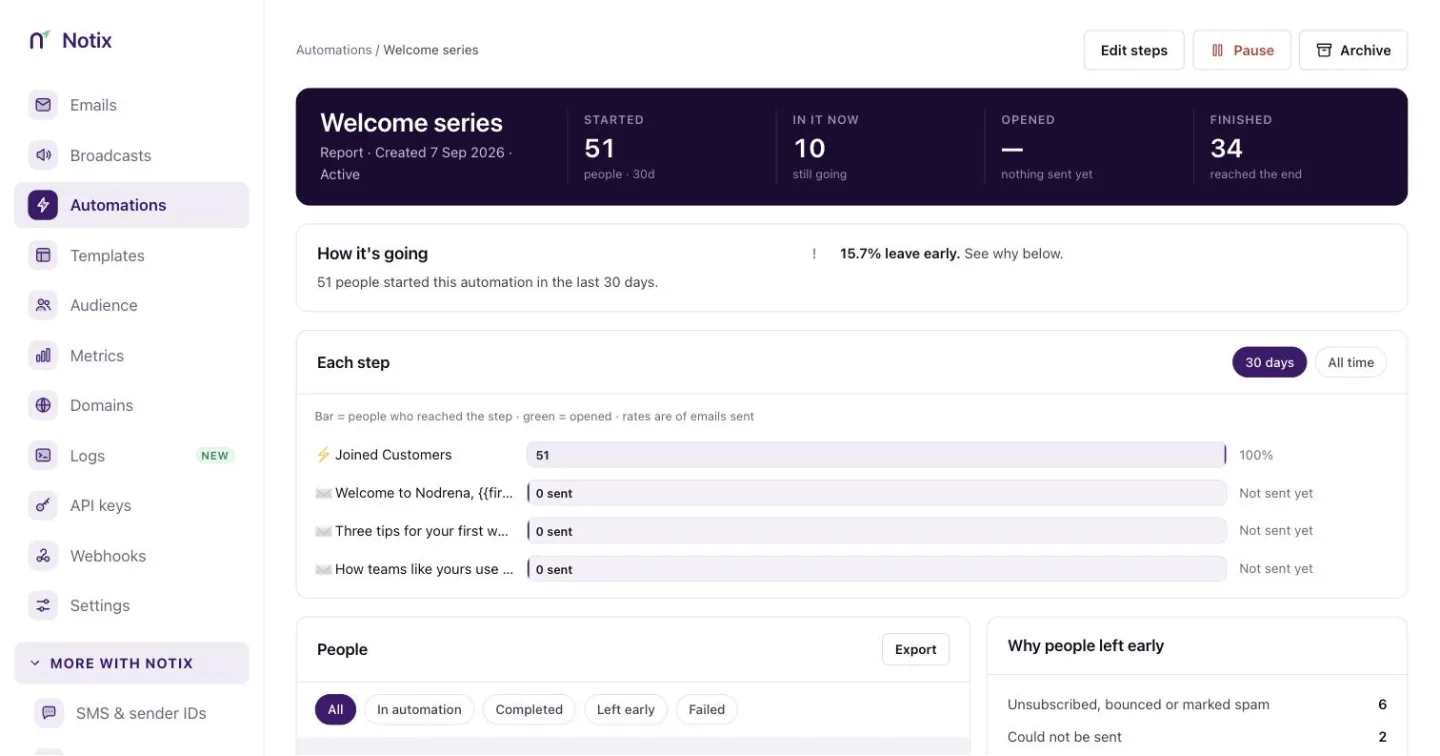 *Runs: who is in it, their path, and each step they took.* Press a run to see its timeline: every step it took, when, and what happened. Steps it did not take are shown as skipped. ## Metrics Press **Metrics** to see the last 7, 14 or 30 days: runs per day by outcome, emails sent per day with the share delivered, and each step's figures. **Reached** is how many people got to the step, **Went on** is how they left it (for example "268 paid · 139 timed out"), and **Opened** is for email steps. ## How Notix differs from Resend If you are migrating from Resend, your automations work the same way, with these differences: - There is no **Delete contact** step. Use **Update contact** to mark people instead. - An automation can unsubscribe someone, but never subscribes anyone again. - A person is in at most one run of an automation at a time, and starts the same automation at most once an hour. If the event arrives again while they are in it, or within the hour, they are not started again. - An email address Notix has not seen becomes a contact only in the automation's own list, and never when the address is suppressed or the list uses double opt-in. - A team's events a day are capped by plan: 10,000 on Free, 200,000 on Pro. Copying your Resend automations and events in the [Migration Center](/docs/marketing/move-to-notix) is coming soon. Until then, [import an automation written in Resend's shape](/docs/reference/automations/import-an-automation) with the API: it is saved switched off, with a note for each step Notix left out. ## Automations from the API Send an event from your app to start the automations that listen for it: ```bash cURL curl -X POST https://app.usenotix.dev/api/v1/events \ -H "Authorization: Bearer $NOTIX_API_KEY" \ -H "Content-Type: application/json" \ -d '{ "event": "payment.failed", "email": "ada@example.com", "payload": { "amount": 15, "plan": "pro" } }' ``` ```ts Node.js const response = await fetch("https://app.usenotix.dev/api/v1/events", { method: "POST", headers: { Authorization: `Bearer ${process.env.NOTIX_API_KEY}`, "Content-Type": "application/json", }, body: JSON.stringify({ event: "payment.failed", email: "ada@example.com", payload: { amount: 15, plan: "pro" } }), }); ``` Or enrol a person in an automation your app starts, by email or by contact id: ```bash cURL curl -X POST https://app.usenotix.dev/api/v1/automations/jrn_123/enroll \ -H "Authorization: Bearer $NOTIX_API_KEY" \ -H "Content-Type: application/json" \ -d '{ "email": "ada@example.com" }' ``` ```ts Node.js import { Notix } from "notix-js"; const notix = new Notix(process.env.NOTIX_API_KEY); await notix.automations.enroll("jrn_123", { email: "ada@example.com", }); ``` ```python Python from notix import Notix client = Notix() # reads NOTIX_API_KEY client.journeys.enroll("jrn_123", {"email": "ada@example.com"}) ``` ```php PHP use Notix\Notix; $notix = new Notix(getenv('NOTIX_API_KEY')); $notix->journeys->enroll('jrn_123', ['email' => 'ada@example.com']); ``` A person holds at most one run of an automation your app enrols them in, so enrolling them again answers `409`. Pass an `Idempotency-Key` header to make a retry safe for 24 hours. [Enrol up to 100 contacts](/docs/reference/automations/enrol-up-to-100-contacts) adds many at once. You can also build an automation in code, branches included: [create an automation](/docs/reference/automations/create-an-automation) with its `steps` and `connections`, [check it](/docs/reference/automations/check-an-automation-before-activating) and [activate it](/docs/reference/automations/activate-an-automation). Read [one run](/docs/reference/automations/retrieve-a-run) and the [metrics](/docs/reference/automations/automation-metrics), [stop](/docs/reference/automations/stop-an-automation) or [copy](/docs/reference/automations/copy-an-automation) an automation, or [import one written in Resend's shape](/docs/reference/automations/import-an-automation). The [Automations reference](/docs/reference/automations) lists every endpoint. The `journey.enrolled`, `journey.completed` and `journey.exited` [webhook events](/docs/webhooks/event-types) follow each person through an automation. --- # Events Name the events your app sends, send them by API, and use their data in automation emails. An event is something your app tells Notix happened to one person: `user.signed_up`, `payment.failed`, `order.shipped`. An event can start an automation, and a waiting automation can go on when it arrives. The event's data can go into your emails. ## The Events tab Open [Automations](https://app.usenotix.dev/automations) and press **Events**. The table lists each event with its **Properties**, how many arrived in the last 30 days, which automations use it, and when the last one arrived. An event your app sends before you name it is added to the list for you, with no properties. ## Add an event ### 1. Press Add event On the Events tab, press **+ Add event**. ### 2. Name it Use lowercase letters, numbers and dots, like `order.shipped`. Names starting with `notix.` are reserved. ### 3. Add its properties Give each property a name and a type: **Text**, **Number**, **Date** or **Yes / no**. In an email, a property reads as `event.order_id`. ### 4. Save Press **Save event**. When an event has properties, Notix checks each one when the event arrives. A value that reads as the right type is taken (the text `"15"` as the number 15). A value of the wrong type is refused with `422`, and nothing starts. ## Send an event Send it from your app with an API key: ```bash cURL curl -X POST https://app.usenotix.dev/api/v1/events \ -H "Authorization: Bearer $NOTIX_API_KEY" \ -H "Content-Type: application/json" \ -d '{ "event": "order.shipped", "email": "ada@example.com", "payload": { "order_id": "o_123", "tracking_url": "https://track.example.com/o_123" } }' ``` ```ts Node.js await fetch("https://app.usenotix.dev/api/v1/events", { method: "POST", headers: { Authorization: `Bearer ${process.env.NOTIX_API_KEY}`, "Content-Type": "application/json", }, body: JSON.stringify({ event: "order.shipped", email: "ada@example.com", payload: { order_id: "o_123", tracking_url: "https://track.example.com/o_123" }, }), }); ``` Name the person with `contact_id` or `email`, never both. The answer is `202` with the runs it started, the automations it skipped and why, and how many waiting runs went on. | Rule | What happens | | --- | --- | | An address Notix has not seen | It becomes a contact in the automation's list, when you use a full access key. | | A suppressed address that is not a contact yet, or a list with double opt-in | No contact is made and nothing starts. | | A contact whose address is suppressed | The run starts, but Notix blocks every email to them: each send is suppressed. | | A sending-only key | It reaches existing contacts only. | | The person is already in the automation, or started it in the last hour | They are not started again. | | The automation is waiting for review | The run is held until Notix approves your sending. | | A key with a draft-only approval policy | It cannot start automations. | Each automation an event starts, and each waiting run it wakes, counts as one enrolment against the key's daily limit and toward its approval policy, and its emails against the key's email caps. A key pinned to one domain only starts and wakes automations that send from that domain. A key can send 600 events a minute (dry runs included), and a team 10,000 events a day on Free or 200,000 on Pro; past either the answer is `429`. Send an `Idempotency-Key` header to make a retry safe for 24 hours, and `Notix-Dry-Run: true` to see which automations it would start without starting them. A full access key's answer says why each automation did not start. Any other key's answer says only `not_started`. Only a full access key names a new event by sending it. An event no automation uses is recorded without its data. Notix keeps the data of an event an automation started or woke from for 30 days, and clears it when the contact is deleted. ## Use the data in emails In a Send email step, fill a template's blank from the event (`event.amount`), the contact (`contact.first_name`), or an event a Wait for event step received (`wait_events.payment.succeeded.amount`). The review screen's **Every blank is filled** check tells you if a blank has nowhere to come from. ## Migrating from Resend Notix takes Resend's event calls as they are. Point Resend's client at Notix's Resend compatibility address (`https://app.usenotix.dev/api/compat/resend`) with a Notix API key, and `resend.events.send(...)` and `resend.events.create(...)` keep working. An event's `schema` (`{ "plan": "string" }`) becomes its properties. Copying your Resend events in the Migration Center is coming soon. ## Events from the API [Send an event](/docs/reference/events/send-an-event), and [list](/docs/reference/events/list-events), [create](/docs/reference/events/create-an-event), [update](/docs/reference/events/update-an-event) or [delete](/docs/reference/events/delete-an-event) your events. The [Events reference](/docs/reference/events) lists every endpoint. --- # Templates and library Start from the starter library, edit in Template Studio, and send a template from the API or a broadcast. Templates are saved emails you write once and send many times, from the API or as a broadcast. Each template has a name, a subject, a line of preview text, a type and a body. ## The Templates page Open [Templates](https://app.usenotix.dev/templates) to see every template your team has. Search by name, filter by type, and sort by **Last edited** or **Name A–Z**. Each card opens the template in Template Studio, with **Duplicate** and **Delete** beside it. Only admins can delete.  *Templates: every saved email, with Template library and New template at the top.* ## Start from the library The starter library has 54 emails across 14 industries, from order confirmations and sign-in codes to newsletters and event invitations. Every one is free on every plan. ### 1. Open the library On the Templates page, press **Template library**. You can also press **New template**, then **Browse all 54 in the library**. 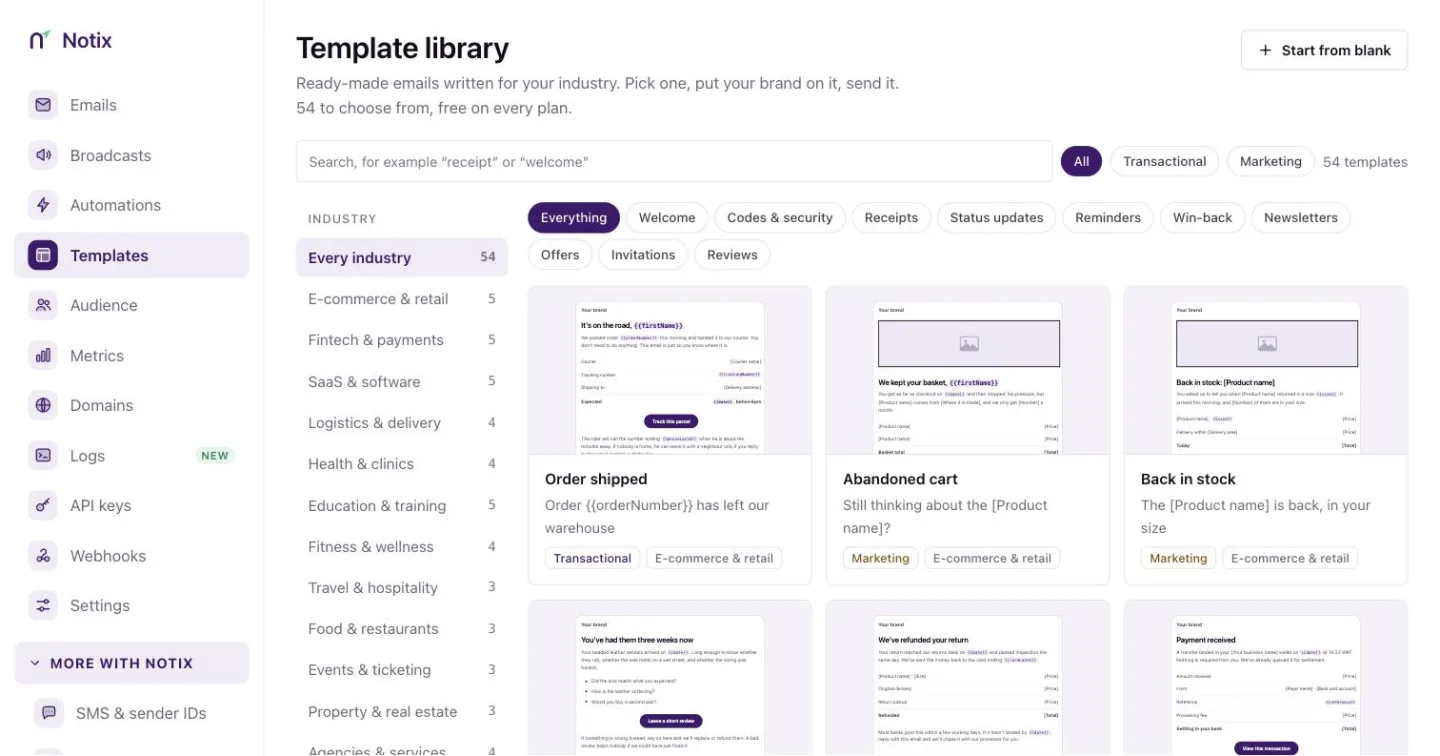 *The library. Filter by industry or by what the email is for, or search for words like receipt or welcome.* ### 2. Preview an email Press a card to preview it. Switch between **Desktop** and **Mobile** to see how it reads on a phone. ### 3. Use it Press **Use this template**. Notix copies the email into your own templates, with your brand colour on the buttons and your logo at the top. The copy is yours. Editing it never changes the library, and later changes to the library never change your copy. ## Start a new template ### 1. Press New template On the Templates page, press **New template**.  *New template: pick a starting point, fill in the details, then open the editor.* ### 2. Pick a starting point Choose a starter, or an empty canvas. Every starter uses your brand colour and logo, and already has an unsubscribe footer where one is needed. To copy one of your own templates instead, press **Duplicate one of my templates**. ### 3. Fill in the details In the **Details** panel, give the template a name, a type, a subject and a line of preview text. The panel shows how it will look in an inbox. ### 4. Open the editor Press **Create and open editor**. ## Transactional or marketing Every template has a type: - **Transactional**: sent to one person because of something they did, such as a receipt or a password reset. No unsubscribe link is needed. - **Marketing**: sent to many people, such as a newsletter. Notix adds the unsubscribe footer, and a broadcast will not send without one. You can change the type in the editor's **Email** tab. Switching to Marketing adds the unsubscribe footer if the email does not have one. ## Edit in Template Studio Template Studio shows the email as it will arrive, with its subject and preview text in an inbox row above it. Every change saves as you make it, and the top bar shows when it last saved. 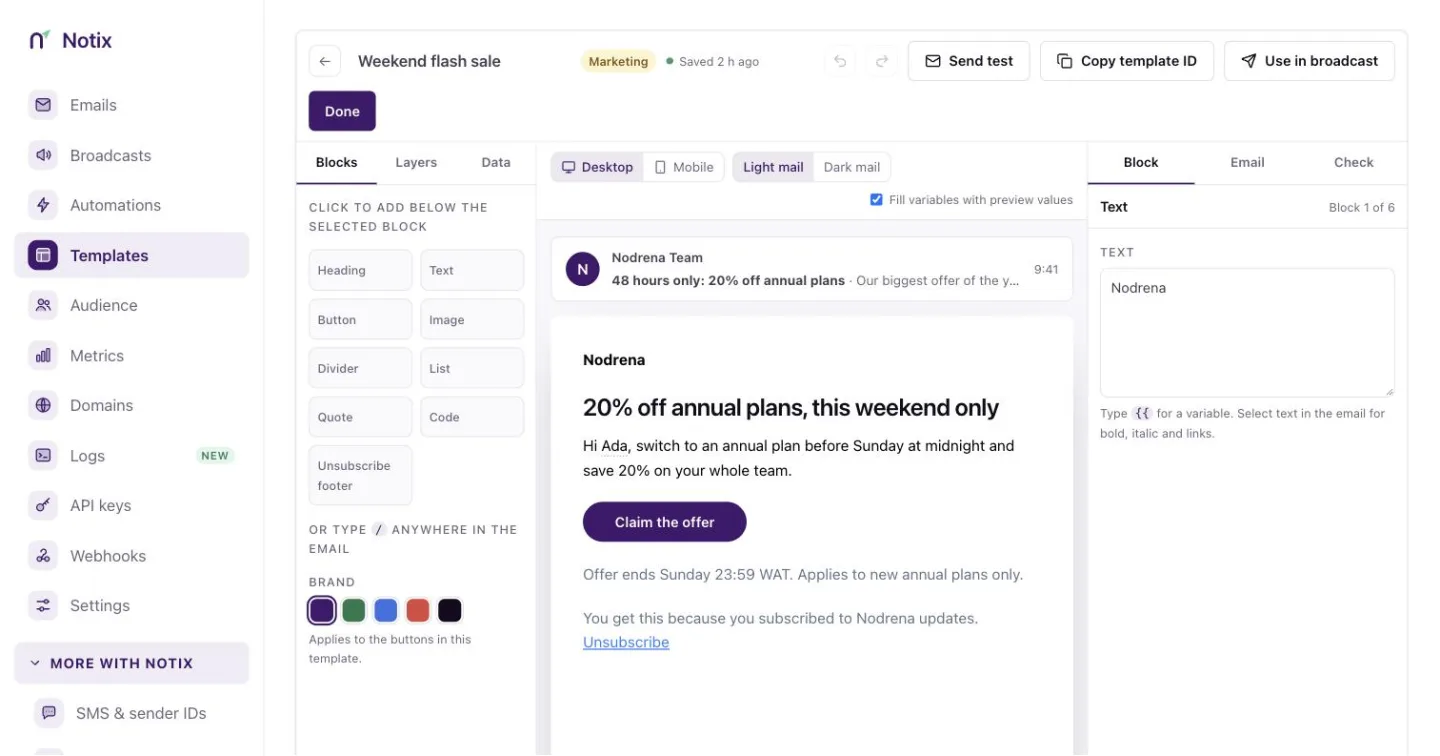 *Template Studio. Blocks on the left, the email in the middle, Block, Email and Check on the right.* The left side has three tools: - **Blocks** adds headings, text, buttons, images, dividers, lists, quotes, code and the unsubscribe footer below the selected block. You can also type `/` anywhere in the email. - **Layers** lists every block, so you can select one or move it up and down. - **Data** lists the variables the email uses, with the values the preview shows. Preview values stay in your browser. Real sends use the data you pass. The right side has three tabs: - **Block** changes the selected block: a button's label, link, alignment, colour, corners and size, an image's alt text and link, a list's items, or a details table's rows and total. - **Email** sets the subject, preview text, type, content width and background. - **Check** runs the deliverability check. It warns when a button still links to `{{actionUrl}}`, when the email asks the reader for a password, PIN, code or card detail, and when starter text is still in place. The top bar has **Send test**, **Copy template ID**, **Use in broadcast** for marketing templates, and **Done**. ## Variables Type `{{` in the email to insert a variable such as `{{firstName}}` or `{{orderNumber}}`. Library emails also link their main button to `{{actionUrl}}`, so one template can send each person to their own page. When you send, pass the values in `variables`. A link that is exactly one variable, such as `{{actionUrl}}`, is only filled with an `https`, `http`, `mailto` or `tel` address. ```bash cURL curl -X POST https://app.usenotix.dev/api/v1/emails \ -H "Authorization: Bearer $NOTIX_API_KEY" \ -H "Content-Type: application/json" \ -d '{ "from": "AcmeHi {{firstName}}
Unsubscribe', }); ``` When the send starts, Notix saves the list of subscribed contacts who match at that moment and sends to that list, so the broadcast's total stays fixed while it runs. Pausing and resuming keep the list. Contacts who unsubscribe or are suppressed before their batch are still skipped. ## Limit an automation to a segment When you create an automation for **Everyone who joins a contact list**, pick the list, then a segment of it under **and they are**. Only contacts who match when they are added are enrolled. See [Automations](/docs/marketing/automations). Turn on **Stop for people who leave the segment** to check again before each email. A contact who no longer matches leaves the automation with the exit reason `LEFT_SEGMENT`, and a `journey.exited` webhook is sent. Through the API this is `exitWhenLeavesSegment`. Enrolling a contact who does not match through [Enrol a contact](/docs/reference/automations/enrol-a-contact) answers `409` with the code `NOT_IN_SEGMENT`. Enrolling by email still adds the address to the contact book. ## Limits and safety - A contact book holds at most 100 segments, and a segment at most 20 conditions, counting those inside groups. - A segment used by a scheduled or running broadcast, or by an active, paused or held automation, cannot be deleted or have its conditions changed. The error names the broadcast or automation. Renaming is always allowed. - If a segment uses a property you later remove from the contact book, it matches nobody and shows **Needs fixing** in the console, with the reason in `problems` in the API. Broadcasts refuse to send to it, and automations neither enrol nor remove anyone by it until you fix it. - A segment that takes longer than 10 seconds to evaluate answers `422` with a message asking you to narrow a time window or remove a condition. --- # Double opt-in Confirm new subscribers before they get a broadcast. Double opt-in asks new contacts to confirm their email address before they become subscribed. When it is on for a contact book, each new contact gets a confirmation email with a link. They are subscribed only after they press it. Why use it: - Every address on your list is real and belongs to the person who signed up. - Fewer bounces and spam complaints, so better delivery for everyone on the list. - A clear record of consent, which privacy laws such as GDPR expect. ## How it works 1. **A contact is added.** When a contact is added to a book with double opt-in on, in the console, through the API or by CSV import, it is created as **Pending** instead of subscribed. 2. **A confirmation email goes out.** The contact gets an email with their own confirmation link, signed with HMAC-SHA256 and valid for 7 days. 3. **The contact confirms.** They press the link and confirm on the confirmation page. 4. **The contact is subscribed.** Their status changes from **Pending** to **Subscribed**, and they now get your emails. ## Turn on double opt-in ### 1. Open the contact book Open [Contacts](https://app.usenotix.dev/audience) and choose a contact book. ### 2. Turn on the switch Below the contacts table, turn on the **Double opt-in** switch. The line beside it changes to "New contacts get a confirmation email before they join this list." 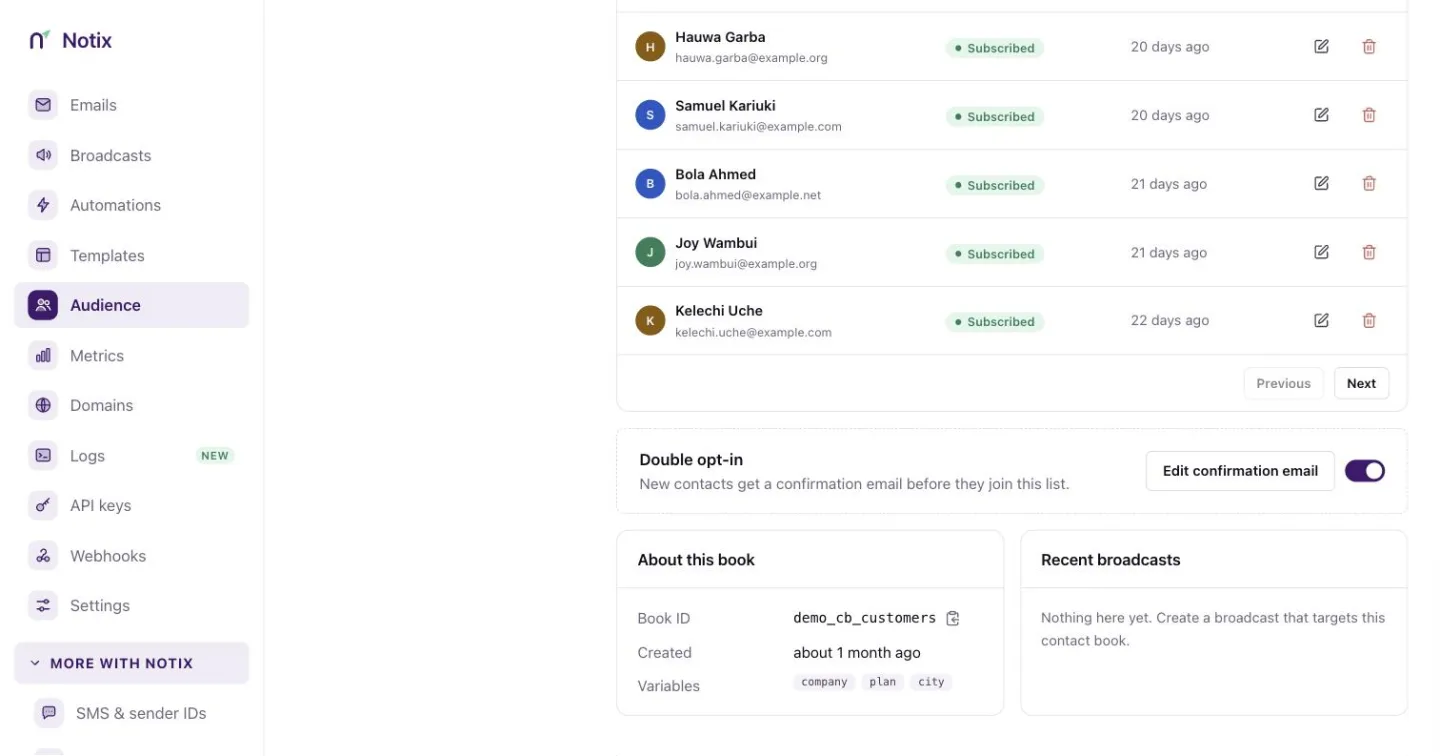 *The Double opt-in switch, with Edit confirmation email beside it.* ### 3. Edit the confirmation email Press **Edit confirmation email**. Change the subject, the from address and the body. Changes save on their own. 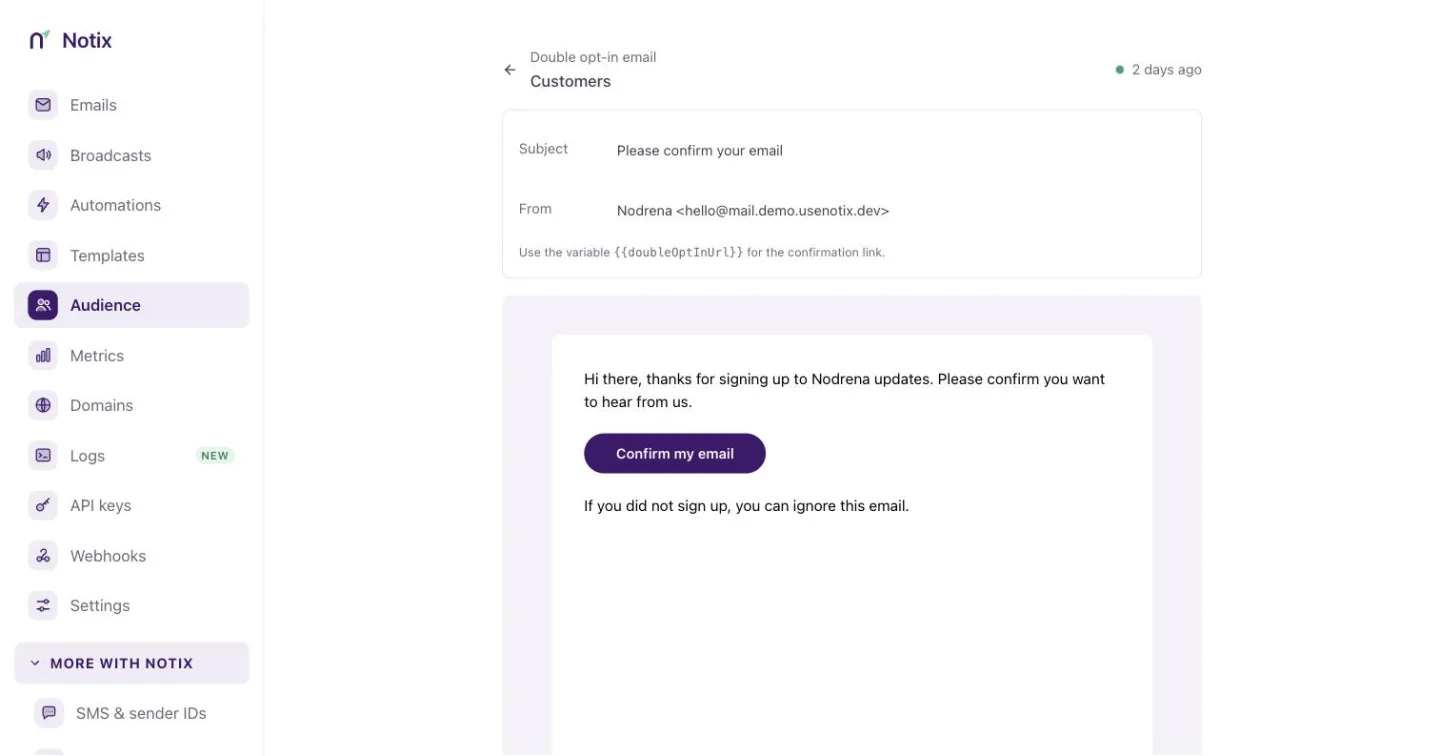 *The confirmation email. The body must keep the {{doubleOptInUrl}} link.* ## Through the API A contact book created through the API or the MCP tools starts with double opt-in off. To turn it on, send `doubleOptInEnabled: true` together with `doubleOptInFrom`, an address on one of your verified domains. Without a from address, or with one that is not on a verified domain, the request is refused with 422 and nothing is created. Create a contact book with double opt-in on: ```bash cURL curl -X POST https://app.usenotix.dev/api/v1/contactBooks \ -H "Authorization: Bearer $NOTIX_API_KEY" \ -H "Content-Type: application/json" \ -d '{ "name": "Newsletter", "doubleOptInEnabled": true, "doubleOptInFrom": "AcmeHi {{firstName,fallback=there}}, your plan is {{plan}}.
" }' ``` ```ts Node.js import { Notix } from "notix-js"; const notix = new Notix(process.env.NOTIX_API_KEY); await notix.broadcasts.create({ name: "Welcome campaign", from: "AcmeHi {{firstName,fallback=there}}, your plan is {{plan}}.
', }); ``` See [Create a contact book](/docs/reference/contact-books/create-a-contact-book), [Add a contact](/docs/reference/contacts/add-a-contact) and [Create a broadcast](/docs/reference/broadcasts/create-a-broadcast). ## Good habits | Habit | Why it helps | | --- | --- | | Register variables before you import | CSV columns and API properties line up with the book. | | Keep variable names short and plain | Emails are easier to read and change later. | | Use fallbacks for optional values | No awkward gaps when a contact is missing a value. | | Test with a small segment first | You see the filled-in email before the whole list does. | --- # Migrate to Notix Bring your domains, contacts, templates and webhooks from another provider with the Migration Center. The Migration Center brings your unsubscribes, contacts, segments, topics, templates, broadcasts and webhooks from another provider. It copies: nothing is removed from your old provider, and it keeps sending until you switch it off. Your unsubscribes come over first, so anyone who opted out at your old provider stays opted out here. Nothing is written until you say so. ## Where you can migrate from | Provider | How it migrates | | --- | --- | | SendGrid | Connect: Notix reads your account with a key you give it. | | Resend | Connect | | Mailchimp | Connect | | Brevo | Upload the files you export | | Postmark | Upload the files you export | | Mailgun | Upload the files you export | | CSV files | Upload files from anywhere | ## Start a migration ### 1. Open Migrate to Notix Open [Migrate to Notix](https://app.usenotix.dev/migrate) in the side menu of the console, just below Audience. Only team admins can run a migration.  *Migrate to Notix: pick the provider you are leaving.* ### 2. Pick your provider Press the card for the provider you are leaving. The panel below says whether Notix will read your account or ask for files. ### 3. Start Press **Connect** followed by the provider's name, or **Upload files**. The migration opens on its own page. ## Bring your unsubscribes and contacts 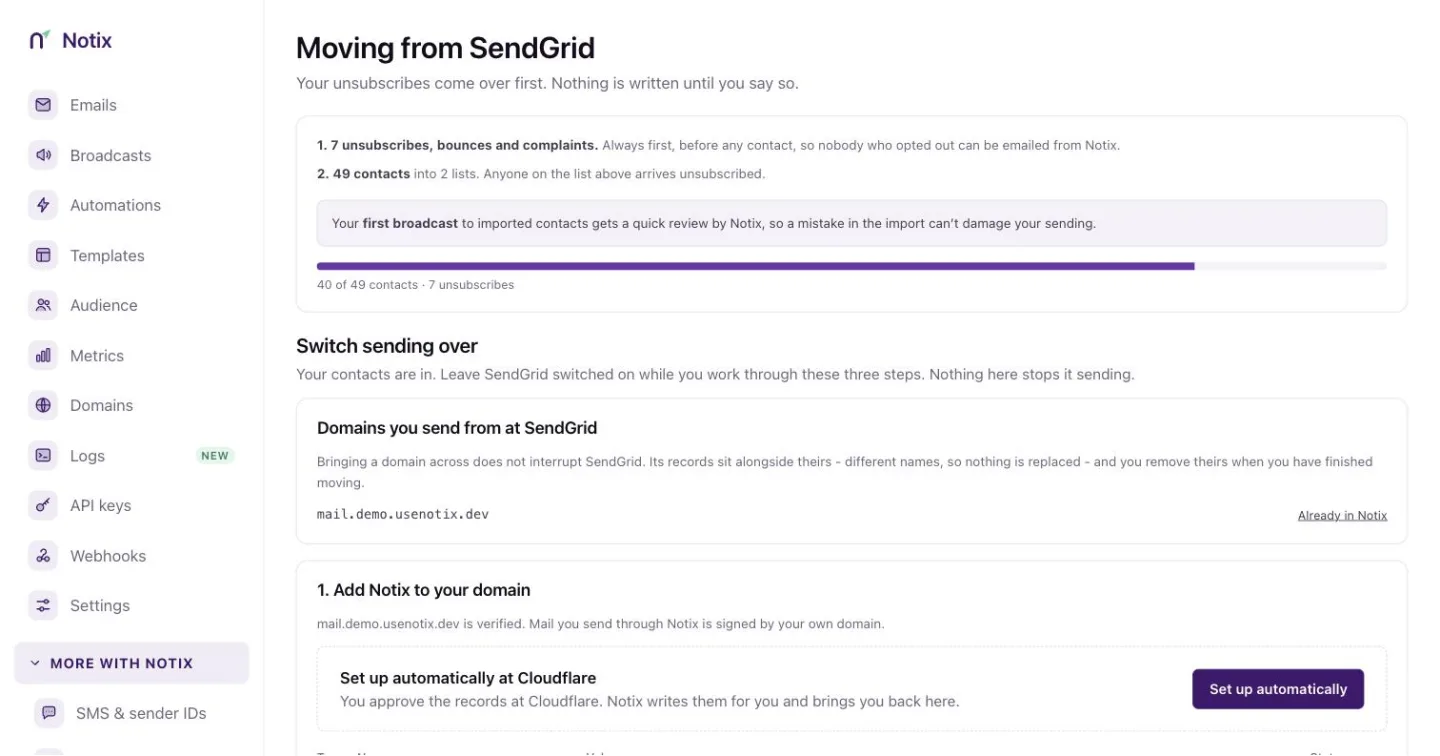 *One migration. Unsubscribes first, then contacts, then your sending.* ### 1. Connect or upload For a provider Notix can read, paste an API key from your old account and press **Read my account**. Notix keeps the key sealed for an hour at most and deletes it when the import starts or ends. Notix only reads with it. SendGrid can report a key's scopes, so a SendGrid key that could send is refused. Resend and Mailchimp keys cannot be checked and usually have full access, so make a separate key just for the migration and delete it when the migration is done. For a file migration, upload your unsubscribes file (unsubscribes, bounces and spam complaints), then your contacts file with a header row. If you have no unsubscribes, tick **I have no unsubscribes to import**. ### 2. Choose what comes over For a connected account, **What comes over** lists everything Notix found, with a box for each kind of thing. Every box starts ticked; untick anything you want to leave behind. Each list comes over as a contact book with the same name, marked **Migrated from** and the provider. If you already have a book with that name, the new one is called "General (from Resend)", for example. Press **Leave a list behind** to skip a list, such as a list of test addresses. Domains and API keys are listed but never copied: add your domain to Notix yourself, and make new API keys in Notix. ### 3. Import Notix tells you what it found before anything is written, including any rows it refused and why. Tick **These people agreed to hear from us** to confirm your contacts opted in, then press **Import**. Everything comes over in this order: 1. Unsubscribes and bounces 2. Contacts and custom fields 3. Segments and topics 4. Templates 5. Broadcast drafts and history 6. Webhooks If one kind of thing fails, the rest still come over, and the migration page says what did not and why. ## What each provider copies ### Resend - **Unsubscribes and contacts**, with their properties. - **Segments.** A segment whose people are all inside a bigger one becomes a Notix segment of that list's book. Notix marks its people with a property named after it, like `resend_segment_engaged_readers`, and the segment matches everyone who has it. Any other segment comes over as a contact book of its own. - **Topics**, with each person's choice. Resend shares choices one contact at a time, so Notix reads them at five a second, half of Resend's limit, to leave room for your own sending, and only for up to 10,000 contacts, so it finishes inside the 45 minutes each kind of thing has. Above that, topics are not copied at all. A topic only goes live once everyone's choice is in, so a half-copied topic never reaches anyone. When topics do not come over, the migration page warns you: until you add them yourself, a broadcast without a topic reaches people who had opted out of them. - **Templates.** Resend's tags become Notix's: `{{{contact.first_name|there}}}` becomes `{{firstName,fallback=there}}`, and `{{{RESEND_UNSUBSCRIBE_URL}}}` becomes Notix's unsubscribe link, so the email gets no second footer. - **Broadcasts.** Drafts arrive as Notix drafts that never send on their own: open one, check it and send it from [Broadcasts](/docs/marketing/broadcasts) when you are ready. A scheduled one arrives as a draft too. A draft whose sending domain is not in Notix yet waits: add the domain, then press **Make the draft** on the migration page. A draft is never sent to more people than at your old provider: if its topic, segment or audience did not come over, it arrives with no audience and you pick who it goes to. Sent broadcasts arrive as history you can read: subject, date and how many people it went to ("1,000+" past a thousand for Resend). - **Webhooks**, to the same URLs with Notix event names. Each one starts switched off, with a new Notix signing secret. Copy the secret into your handler, then turn the webhook on in [Webhooks](/docs/webhooks). ### SendGrid - **Unsubscribes, bounces and spam complaints, and contacts.** - **Unsubscribe groups** become topics, with everyone who unsubscribed from a group turned off for its topic. - **Templates**, as above. - **Single sends**: drafts as drafts, sent ones as history with how many they went to. - **Event webhooks**, switched off with a new secret, as above. - **Segments are listed only.** SendGrid shares just a sample of who is in a segment, so rebuild them in Notix with [segment rules](/docs/marketing/segment-rules). ### Mailchimp - **Unsubscribes, cleaned addresses (as bounces), and contacts.** - **Tags and saved segments** become Notix segments of their audience's book, the same way as Resend's. - **Groups (interests)** become topics that people opt in to, with everyone who chose a group opted in. - **Your own templates.** For a template built in Mailchimp's editor, only its editable sections come over, and the migration page says so. - **Campaigns**: drafts as drafts, sent ones as history with how many they went to. - **Audience webhooks**, switched off with a new secret. ### Not copied - **Domains** are listed only. Add your Notix DNS records yourself, then verify. Your old provider's records stay as they are. - **API keys** cannot be read from any provider, so make new ones in Notix. - **Automations** are coming soon. ### Limits for one migration Up to 50 segments (500,000 members in all), 200 templates, 200 broadcasts and 20 webhooks come over in one migration, and a team has at most 50 topics. A SendGrid unsubscribe group with more than 100,000 people is not copied. Each kind of thing has 45 minutes, and the whole copy 4 hours. Anything past a limit is listed on the migration page as left behind. Everything a migration copies says **Migrated from** and the provider in Notix. Over the API it carries `source`, for example `{ "provider": "resend", "migratedAt": "…" }`, on templates, broadcasts, topics, segments and webhooks, and the sent history is at [`GET /v1/broadcasts/imported`](/docs/reference/broadcasts/list-imported-broadcast-history). ## Move your sending When the import finishes, three steps move your sending. Leave your old provider switched on while you work through them. Nothing here stops it sending. ### 1. Add Notix to your domain Add your sending domain in Notix and publish its records. If your domain already has an SPF record, do not add a second one. See [Add and verify a domain](/docs/add-a-domain). New domains start at 200 emails a day. If you connected Resend, SendGrid or Mailchimp, a domain that has been sending steadily and cleanly there can start at 2,000 a day once it is fully verified in Notix. Notix reads a short recent sample in the background after you connect; the page says so while it runs, then shows each domain's start and exactly what was measured, or why it did not qualify. To start above 2,000, choose **Request a higher start**: a Notix admin decides. See [Domain warm-up](/docs/sending/warm-up). ### 2. Point your app at Notix Pick how your app sends today. Use the [SMTP relay](/docs/quickstarts/smtp) with the same code and new settings, or an [SDK](/docs/quickstarts/nodejs). For SendGrid and Resend, Notix also accepts their send request as it is and answers in the same shape, so existing code keeps working while you migrate. Send your Notix API key as the bearer token. ### 3. Move volume over gradually Mailbox providers trust a sender that grows steadily. Once you have sent through Notix, the page suggests a week-by-week plan to move the rest of your volume. ## Webhooks and templates **What else came over** lists every segment, topic, template, broadcast and webhook the migration copied, and anything it could not copy, with the reason. **Webhooks** shows which Notix events match the ones your old endpoint used. A connected migration has already re-created your webhooks, switched off; you can also create one from there. Notix sends its own payload, signed with your Notix secret. For SendGrid and Resend, you can turn on **Keep sending** their format for 30 days. Each event then arrives twice, once as Notix and once in the old shape, with an `X-Notix-Compat` header so your handler can tell them apart. Both copies are signed with your Notix secret: Notix cannot make your old provider's signature, and will not send something that pretends to be one. See [Verify requests](/docs/webhooks/verify-requests). **Templates** lists any templates that came over. Each is already a Notix template, marked ready, or as needing a look. An imported template arrives as HTML, which Notix can preview and send. Open one in [Templates](/docs/marketing/templates) to check it. ## After you switch The last card reads **Almost there**, then **You're on Notix** once you are done. Watch your first week of sending, and delete the files you exported: they hold your contacts' addresses. ## A free month of Pro Teams that connect their Resend, SendGrid or Mailchimp account and migrate to Notix get their first month of Pro free. No card is needed, and nothing is charged when the month ends. A migration from a CSV or an exported file does not count, because Notix needs to read the old account to check it. It starts the moment all of these are true: - The migration is a connected migration from Resend, SendGrid or Mailchimp, and it finished importing. - A sending domain is verified in Notix (the domain, DKIM and MAIL FROM records all pass), and it is on the same domain you sent from at your old provider. - The migration shows you already send, in one of these ways: - Your domain starts above the normal warm-up: the automatic 2,000 a day, or a higher start Notix approved. See [Warm-up](/docs/sending/warm-up). - It brought 500 or more contacts spread across at least 50 different email domains (not counting your own domain). The month lasts 30 days from then. You get one free month per team, one per old provider account and one per person. A second claim from the same old account or the same person is checked by Notix before it starts. During the month you can add a card or, if you pay in naira or shillings, top up your wallet and choose **Renew Pro from my wallet**. A card added during the month is first charged when the month ends; in the last 2 days of the month it is charged the day you add it. Your wallet pays for Pro when the month ends only if you chose **Renew Pro from my wallet**: a top-up alone is never taken. We email you 8 days and 2 days before the end. If you do nothing, you go back to the Free plan (200 emails a day, 5,000 a month) when the month ends. Nothing is charged, and your contacts, templates, broadcasts and logs all stay. The API shows the month on `GET /v1/billing/subscription` as `freeProMonth`. --- # Send SMS Send a text message from the API or the console, paid from your wallet. SMS needs no paid plan. You turn it on once, add money to your wallet, and each text is charged to the wallet when it is queued. This page covers the **SMS & sender IDs** screen in the console and the [Send an SMS](/docs/reference/sms/send-an-sms) API call. ## Set up SMS ### 1. Open SMS & sender IDs In the console, go to [SMS & sender IDs](https://app.usenotix.dev/sms). The top strip shows what you sent this week and what it cost. Below it are your sender IDs, the price per text for each country, and three set-up cards.  *SMS & sender IDs: your sender IDs, the price per text, and the set-up steps.* ### 2. Enable SMS On the card **1. Enable SMS**, press **Enable SMS**. This also creates your wallet. The card then reads "SMS is enabled for your team." ### 3. Top up your wallet On **2. Top up wallet**, press **Top up**. It opens the top-up dialog on [Billing & wallet](/docs/account/billing-and-wallet). Texts are paid from this balance, so it must cover a message before it is sent. ### 4. Send your first message On **3. Send your first message**, type your own number with its country code, like `+2348012345678`, and press **Send a test**. The card shows how many free test messages you have left today. ## Send with the API Send a POST to `/v1/sms` with the number in E.164 form (a plus sign and the country code) and the text. ```bash cURL curl -X POST https://app.usenotix.dev/api/v1/sms \ -H "Authorization: Bearer $NOTIX_API_KEY" \ -H "Content-Type: application/json" \ -H "Idempotency-Key: order-4471-shipped" \ -d '{ "to": "+2348012345678", "text": "Your Acme order 4471 has shipped." }' ``` ```ts Node.js import { Notix } from "notix-js"; const notix = new Notix(process.env.NOTIX_API_KEY); const { data, error } = await notix.sms.send( { to: "+2348012345678", text: "Your Acme order 4471 has shipped." }, { idempotencyKey: "order-4471-shipped" }, ); ``` ```python Python import os from notix import Notix client = Notix(os.environ["NOTIX_API_KEY"]) data, err = client.sms.send( {"to": "+2348012345678", "text": "Your Acme order 4471 has shipped."}, idempotency_key="order-4471-shipped", ) ``` ```php PHP use Notix\Notix; $notix = new Notix(getenv('NOTIX_API_KEY')); $sms = $notix->sms->send( ['to' => '+2348012345678', 'text' => 'Your Acme order 4471 has shipped.'], 'order-4471-shipped', ); ``` `senderId` is optional. When you leave it out, Notix uses your own approved sender ID for that country, or the shared Notix sender ID when you have none. See [Sender IDs](/docs/sms/sender-ids). > **Note:** > Pass an `Idempotency-Key` header so a retry never sends the text twice. The same key and body answer the first result for 24 hours. ## What a text costs One text of plain letters and digits (GSM-7) is up to 160 characters. Longer text is billed in parts of 153 characters. Text with other characters, like emoji or some accented letters, is billed per 70 characters (67 when it is split). A message can be up to 1,600 characters. The **Price per text** card lists the price for each country, charged from your wallet. You can also read the prices with [Get the SMS overview](/docs/reference/sms/get-the-sms-overview). ## When a send is refused | Status | Code | What it means | | --- | --- | --- | | 400 | `BAD_REQUEST` | The number is not valid E.164, the text is empty or too long, or you may not use that sender ID. | | 402 | `INSUFFICIENT_BALANCE` | Your wallet cannot cover the message. Nothing was sent. | | 403 | `FORBIDDEN` | SMS is not enabled for your team. | | 422 | `RISK_REFUSED` | Risk scoring refused the request. | ## Follow each message Press **Message log** at the top of the page to see every text, newest first. Filter by **Queued**, **Sent**, **Delivered**, **Not delivered** or **Not sent**. Press a row to open the message detail with the number, status, reason, cost, segments and sender ID. The **Cost** column and the cost in the detail are shown to team admins only (the owner always is one). On the API, [Send an SMS](/docs/reference/sms/send-an-sms), [Get an SMS message](/docs/reference/sms/get-an-sms-message) and [List SMS messages](/docs/reference/sms/list-sms-messages) return each text's `charge` only to a key made by a team admin or the owner, checked on every call. A key a member made, a key with no recorded maker, a key limited to one domain and a live AI key get `charge: null`. A dry run (`Notix-Dry-Run: true`) shows the wallet balance on the same rule, and a refusal for a short wallet, a budget or a spend limit names its amount on the same rule too. 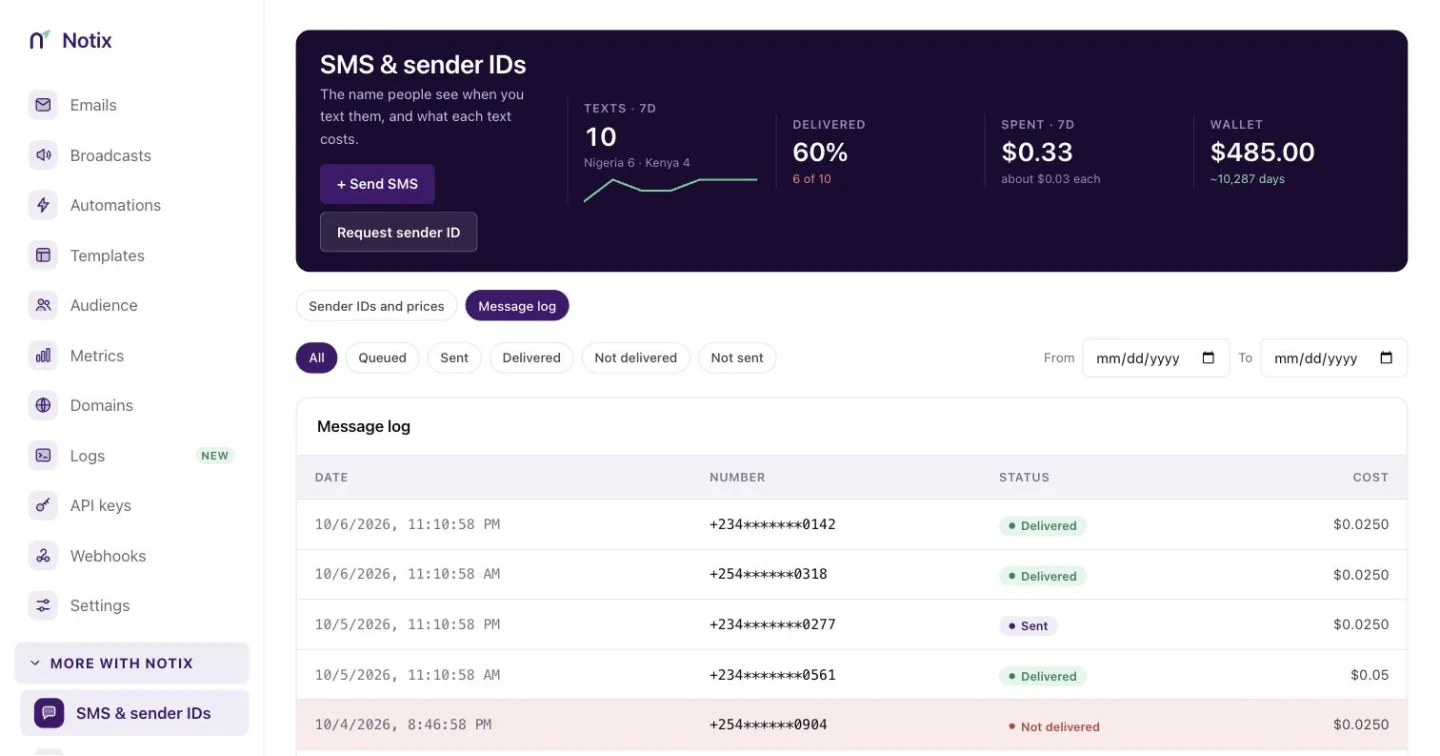 *The message log. Filter by status, then press a row for the detail.* Your server can follow each message too: - The `sms.sent`, `sms.delivered` and `sms.failed` [webhook events](/docs/webhooks/event-types). - [Get an SMS message](/docs/reference/sms/get-an-sms-message) reads one message back. `deliveryReason` says why a message failed, for example that the number is on DND or not in service. - [List SMS messages](/docs/reference/sms/list-sms-messages) pages through them. A message refused before it was sent (**Not sent**) is returned to your wallet. A message that was sent but never delivered (**Not delivered**) stays charged, because the network was paid to carry it. --- # Sender IDs Which sender ID your messages use, and how to register your own in Nigeria and Kenya. Every text goes out under a **sender ID**, the name the recipient sees in place of a phone number. You can use the shared Notix sender ID at once, or register your own. ## Which sender ID your texts use - **Shared:** by default your texts and codes use the shared Notix sender ID for the country. There is nothing to set up. - **Your own:** a Pro team can register its own sender ID, for example `ACMESHOP`, so texts and codes carry your name. Once it is approved it becomes your team's default for that country. You can also pass it as `senderId` on each [Send an SMS](/docs/reference/sms/send-an-sms) or [Send a one-time code](/docs/reference/verification/send-a-one-time-code) request. A sender ID is 1 to 11 letters and digits, and may contain a hyphen, like `ACME-SHOP`. ## Request your own sender ID ### 1. Open SMS & sender IDs Go to [SMS & sender IDs](https://app.usenotix.dev/sms). The **Sender IDs** card lists every ID your team has, with its status.  *The Sender IDs card. Request a sender ID is at its top right.* ### 2. Fill in the request Press **Request a sender ID**. Type the ID, pick the **Country** (Nigeria or Kenya) and what it is **Used for**: | Used for | For | Notes | | --- | --- | --- | | Transactional and OTP | Codes, receipts and alerts | The only kind Notix sends with today. In Nigeria this is what reaches numbers on the DND (Do Not Disturb) list. | | Marketing | Broadcast messages | Approved now, usable once SMS broadcasts ship. Networks do not deliver these to DND numbers. | | Outside your country | Sending to numbers abroad | Approved now, usable once international routes ship. | For a Nigerian transactional ID, also give your **Registered company name** and a **Sample message this ID will send**, like "Your Acme verification code is 482913. It expires in 10 minutes." Then press **Submit request**. 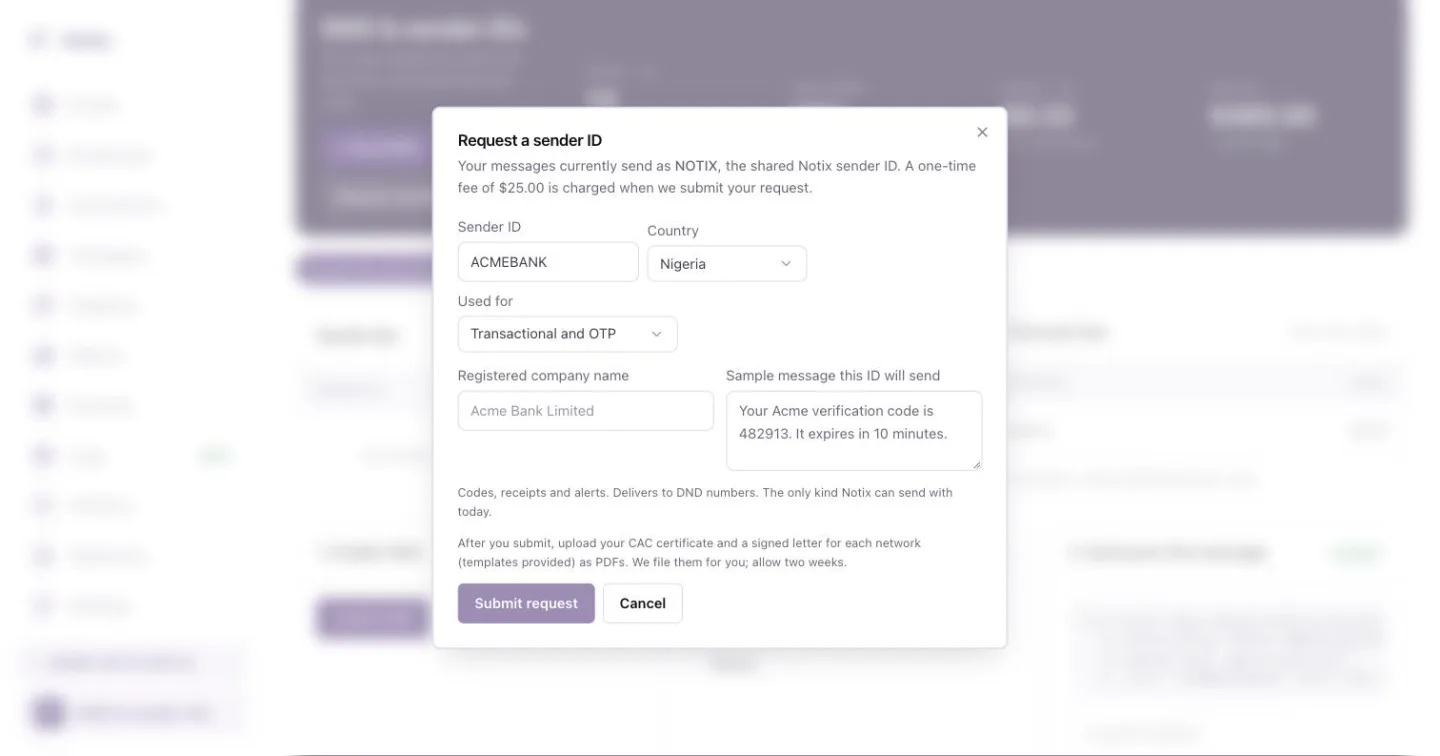 *Request a sender ID. Nigeria transactional requests also ask for the company name and a sample message.* ### 3. Upload the paperwork For Nigeria, upload each document on the request as a PDF of 5 MB or less. You can replace a file until Notix submits the request. Kenya needs no documents beyond the request. ### 4. Wait for approval Notix files everything with the networks. Allow about two weeks. The status on the Sender IDs card changes as it moves along. ### Nigeria: the paperwork For a transactional sender ID in Nigeria, the networks ask for: 1. Your **CAC certificate** of incorporation. 2. A signed **letter to each network**: MTN, Glo, Airtel and 9mobile. Download each template from the request, print it on your letterhead, sign it and upload the scan. 3. A **regulator's licence** (CBN, NCC, money lenders or cooperative), only if your business is regulated. ### The registration fee A one-time registration fee, shown on the page, is charged to your wallet when Notix submits the request to the networks. If the networks reject it, the fee goes back to your wallet. ## Statuses | Status | What it means | | --- | --- | | Requested | With Notix. Upload your documents. Nothing is charged yet. | | Submitted | Notix has filed it with the networks and charged the fee. Documents are locked. | | Approved | Live. Your texts now use it by default. | | Rejected | The networks declined it and the fee is returned. Fix the paperwork and Notix can submit it again. | ## Your own code template An approved sender ID also lets you change the text of one-time codes sent by SMS. On the **Custom OTP template** card, write your text with the placeholders `{code}`, `{appName}` and `{minutes}`, then press **Save**. **Reset to default** brings back the built-in text. Only a team admin can change it, and the template may not contain a link. You can read and change the template with the API too: [Get the code template](/docs/reference/sms/get-the-code-template) and [Change the code template](/docs/reference/sms/change-the-code-template). ## Delivery and failover If the provider Notix routed your text through refuses it for a reason on its own side, such as a gateway fault or a sender ID it does not know, Notix tries once more through another provider with an approved sender ID for the country. You see one message and one charge either way. A refusal about the number itself, such as an invalid or blocked number, is final. Delivery status arrives through the `sms.sent`, `sms.delivered` and `sms.failed` [webhook events](/docs/webhooks/event-types), or by reading the message with [Get an SMS message](/docs/reference/sms/get-an-sms-message). --- # One-time codes Send a code by email or SMS, check what the user typed, and tune the risk checks. A one-time code proves someone owns an email address or a phone number. You ask Notix to send a code, the user types it into your app, and you ask Notix to check it. Notix keeps only a keyed hash of each code. ## Send and check a code ### 1. Send the code Call [Send a one-time code](/docs/reference/verification/send-a-one-time-code) with the address. Keep the `id` it returns. ```bash cURL curl -X POST https://app.usenotix.dev/api/v1/verify/send \ -H "Authorization: Bearer $NOTIX_API_KEY" \ -H "Content-Type: application/json" \ -d '{ "to": "maria@example.com", "appName": "Acme" }' ``` ```ts Node.js import { Notix } from "notix-js"; const notix = new Notix(process.env.NOTIX_API_KEY); const { data, error } = await notix.verify.send({ to: "maria@example.com", appName: "Acme", }); ``` ```python Python import os from notix import Notix client = Notix(os.environ["NOTIX_API_KEY"]) data, err = client.verify.send({"to": "maria@example.com", "appName": "Acme"}) ``` ```php PHP use Notix\Notix; $notix = new Notix(getenv('NOTIX_API_KEY')); $verification = $notix->verify->send([ 'to' => 'maria@example.com', 'appName' => 'Acme', ]); ``` ### 2. Check what the user typed Call [Check a one-time code](/docs/reference/verification/check-a-one-time-code) with the `id` and the code. The answer says whether it matched and how many tries are left. ```bash cURL curl -X POST https://app.usenotix.dev/api/v1/verify/check \ -H "Authorization: Bearer $NOTIX_API_KEY" \ -H "Content-Type: application/json" \ -d '{ "id": "ver_8f3k2", "code": "482913" }' ``` ```ts Node.js const { data } = await notix.verify.check({ id: "ver_8f3k2", code: "482913" }); if (data?.verified) { // The code matched. } ``` ```python Python data, err = client.verify.check({"id": "ver_8f3k2", "code": "482913"}) ``` ```php PHP $result = $notix->verify->check(['id' => 'ver_8f3k2', 'code' => '482913']); ``` ## Send a code by SMS Pass `"channel": "sms"` and a phone number with its country code. For SMS, `appName` is required and may not contain a link. SMS codes are paid from your wallet, like any text, and need no paid plan. ```json Request body { "to": "+2348012345678", "channel": "sms", "appName": "Acme" } ``` The default text is "Acme: your code is 482913. It expires in 10 minutes." With your own approved sender ID you can change it. See [Sender IDs](/docs/sms/sender-ids). ## Options and limits | Setting | Default | Allowed | | --- | --- | --- | | `codeLength` | 6 digits | 4 to 8 | | `expiresIn` | 600 seconds | 60 to 1800 | | Wrong tries per code | 5 | Fixed | | Codes per recipient | 5 every 10 minutes | Fixed, with 30 seconds between sends | For email codes you can also set `from`, `subject` and a `templateId` whose subject and body use `{{code}}`, `{{appName}}` and `{{expiresMinutes}}`. ## Risk checks Every request is scored before anything is sent. The answer carries a `risk` object with the score, the level (Low, Medium or High) and each signal that fired, such as a disposable email domain. Pass `clientIp`, the address your user made the request from, so the per address signal can count. Notix stores only a keyed hash of it. A refused request answers 422 `RISK_REFUSED`. Nothing is sent and no code exists. ### 1. Open the risk rules Go to [One-time codes](https://app.usenotix.dev/verifications) and press **Risk rules**, or open **Settings** and then **Verification risk**. 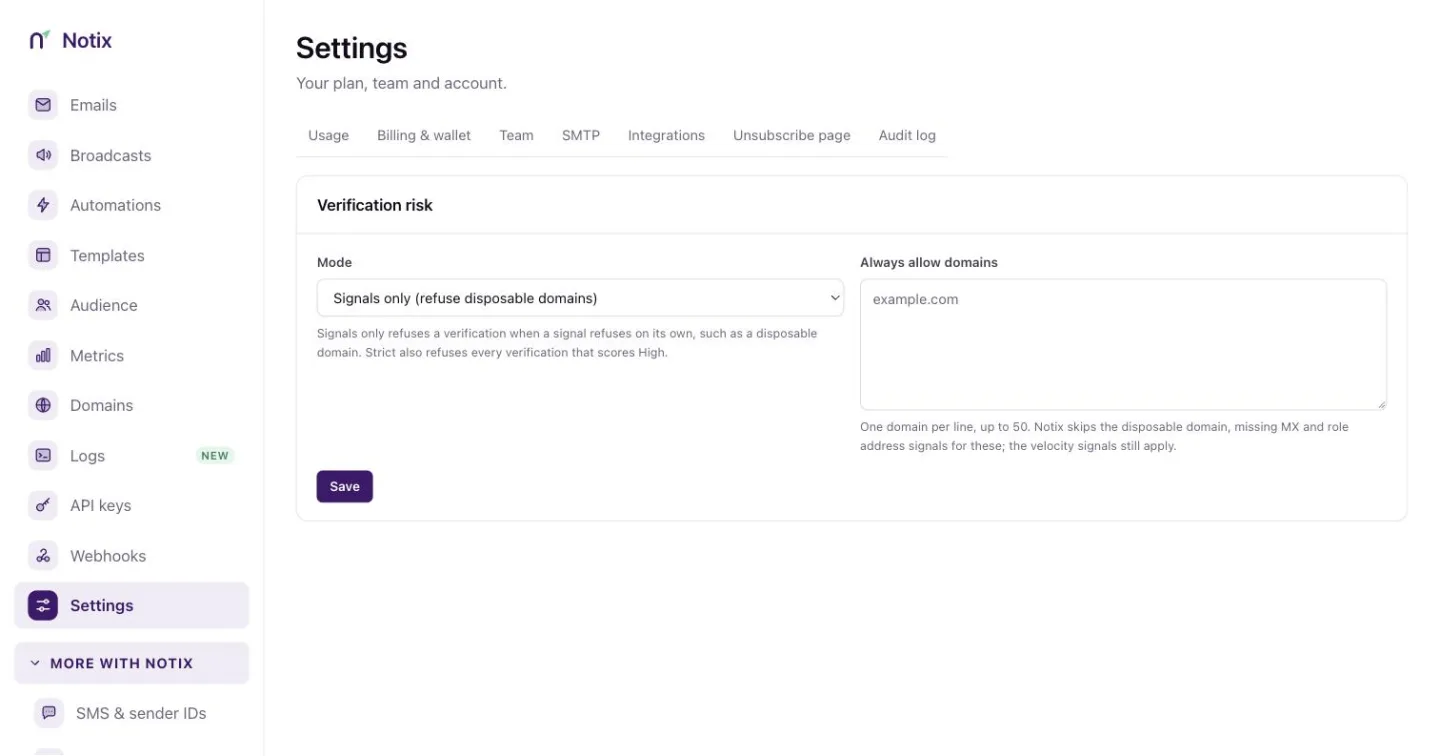 *Verification risk: choose the mode and the domains Notix always allows.* ### 2. Pick a mode **Signals only (refuse disposable domains)** refuses a code only when a signal refuses on its own, such as a disposable domain. **Strict** also refuses every request that scores High. ### 3. Always allow your own domains Under **Always allow domains**, add one domain per line, up to 50. Notix skips the disposable domain, missing MX and role address signals for these. The speed checks still apply. Press **Save**. Only a team admin can change these settings. Everyone else on the team sees them read only. ## See every code you sent [One-time codes](https://app.usenotix.dev/verifications) shows the week's figures at the top: codes sent, verified, the average time to enter and how many were blocked. **Recent codes** lists each code with its channel, recipient, risk, tries and status, such as **Verified**, **Expired**, **Locked** or **Blocked**. Filter by channel with the chips. The funnel beside it shows how many codes went from sent to verified.  *One-time codes: this week's figures, recent codes and the funnel.* The same data is in the API: [List one-time codes](/docs/reference/verification/list-one-time-codes) and [Get one-time code figures](/docs/reference/verification/get-one-time-code-figures). No answer ever holds a code, and phone numbers are masked to their last four digits. Your server can follow each code with the `verification.sent`, `verification.verified`, `verification.failed`, `verification.refused` and `verification.delivered` [webhook events](/docs/webhooks/event-types). --- # Verified domains What a verified domain is, the records it needs, and how Notix keeps checking them. A verified domain is one where you have added the Notix DNS records, so mailbox providers can tell your mail really comes from you. You need one to send from your own address, like `receipts@acme.com`. To add your first domain, follow [Add and verify a domain](/docs/add-a-domain). > **Note:** > Before your domain is verified, you can preview a send with a dry run. Nothing is sent. See [Test emails](/docs/sending/test-emails). ## Add a domain On the [Domains](https://app.usenotix.dev/domains) page, press **Add domain**, type the domain and press **Add**. New domains go to the current default sending region. 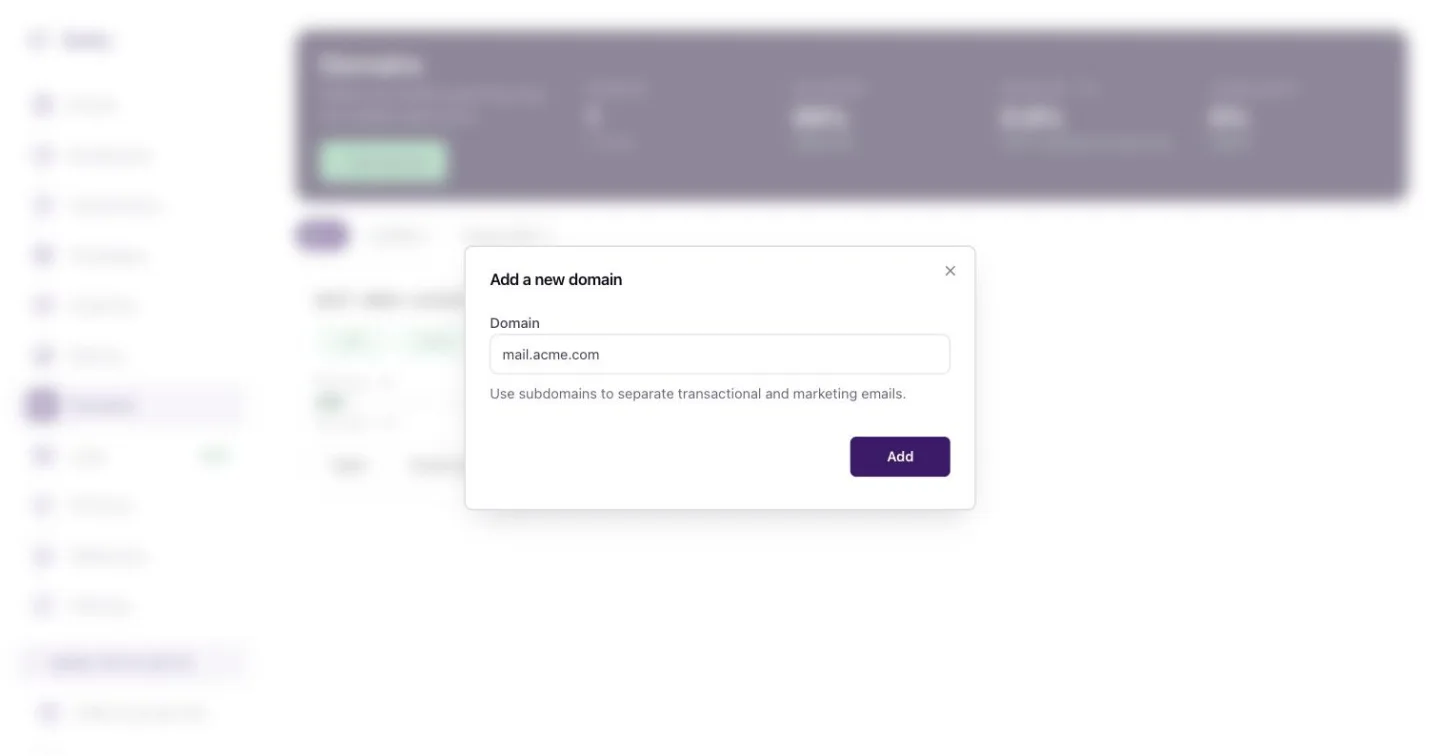 *Add a domain: type the name, then press Add.* ## The records Notix asks for Every domain gets four records. The names below are for `acme.com` with the default `mail` subdomain. | Type | Name | What it does | | --- | --- | --- | | TXT | `notix._domainkey` | DKIM. Signs every email so inboxes can check it was not changed. Required. | | TXT | `mail` | SPF, `v=spf1 include:... ~all`. Says Notix may send for this domain. Required. | | MX | `mail` | Lets bounce and complaint reports come back to Notix. Required. | | TXT | `_dmarc` | DMARC, `v=DMARC1; p=none;`. Tells inboxes what to do with mail that fails the checks. Recommended. See [DMARC](/docs/domains/dmarc). | Copy each value from the domain page. The DKIM value is a long public key that is different for every domain. ## Check a domain ### 1. Open the domain Go to [Domains](https://app.usenotix.dev/domains). Each card shows the domain, its status (**Verified**, **Checking**, **Not checked** or **Needs DNS**), a chip for each of SPF, DKIM, MX and DMARC, and the bounce rate for the last 7 days. Press a domain to open it.  *Domains: each card shows its records and bounce rate for the last 7 days.* ### 2. Read the records The **DNS records** table lists each record with its type, name, value and status. A record that is missing or different shows in red. If a check finds a mistake, such as a record added at the wrong name, the page says what to fix.  *A domain page: health, the four records, and the tracking switches.* ### 3. Verify again After you change a record, press **Verify again**. Most records show as found within 10 minutes. The domain turns **Verified** when the required records are found. ## Set up automatically If your DNS provider supports Domain Connect, the domain page shows **Set up automatically**. You approve the change at your provider, and the records are added for you. Cloudflare and NameSilo support it for Notix today, and more DNS hosts are being added. The button only appears when it will work for your domain. Every other provider gets the records to copy, and a link to the Notix guide for that DNS host. All the guides are in [Add your DNS records](/docs/dns-records). ## After it is verified - Notix keeps checking your records. When a check finds that a domain's verification has changed, everyone on the team gets an email. The emails Notix sends are listed in [Settings](/docs/account/settings). - The **Health** card shows the record chips and a bounce gauge for the last 7 days. See [Domain health and pauses](/docs/domains/health-and-pauses). - Send yourself a test from the domain page with **Send a test email**. ## Manage domains with the API | Task | Call | | --- | --- | | Add a domain | [Add a domain](/docs/reference/domains/add-a-domain) | | Read its records and status | [Get a domain](/docs/reference/domains/get-a-domain) | | Check the records again | [Verify a domain](/docs/reference/domains/verify-a-domain) | | List every domain | [List domains](/docs/reference/domains/list-domains) | | Delete a domain | [Delete a domain](/docs/reference/domains/delete-a-domain) | The Free plan includes one domain and Pro includes up to 50. ## Delete a domain At the bottom of the domain page, a team admin can press **Delete** and type the domain name to confirm. Mail can no longer be sent from it. The records at your DNS provider stay until you remove them. --- # Open and click tracking Turn open and click tracking on or off for each domain. Open and click tracking tell you who opened an email and which links they pressed. You turn each one on or off for each domain, and the setting applies to every email sent from that domain. ## What each switch does - **Click tracking** rewrites the links in your emails so Notix can count each click, then sends the reader on to the real page. - **Open tracking** adds a tiny tracking image to every email. When the image loads, Notix counts an open. It can lower delivery, and some mail apps load images on their own, so treat opens as a rough guide. > **Note:** > For receipts, sign-in links and password resets, many teams turn both off. Those emails are expected, and plain links look more trustworthy. ## Change tracking in the console ### 1. Open the domain Go to [Domains](https://app.usenotix.dev/domains) and press the domain. ### 2. Find the Tracking card Scroll to **Tracking**, below the DNS records. 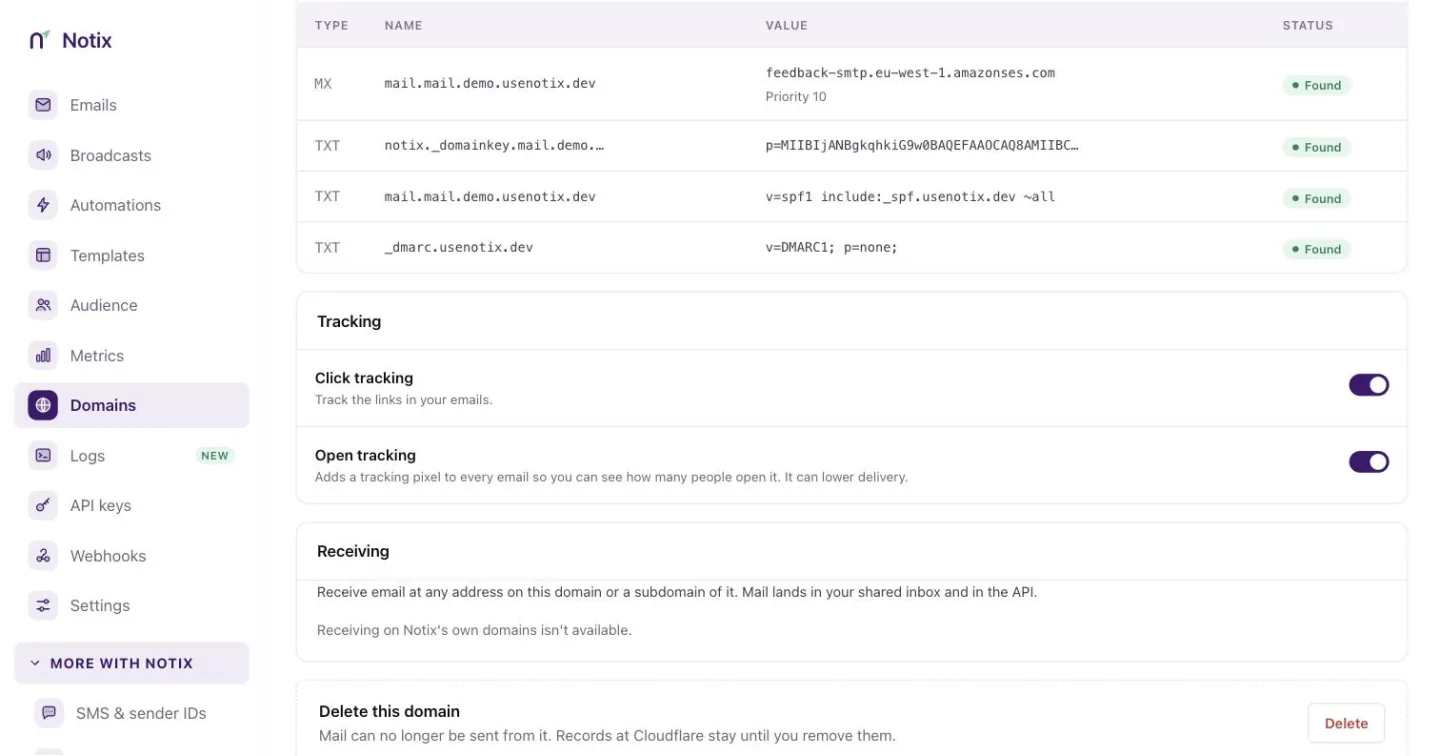 *The Tracking card. Each switch saves the moment you press it.* ### 3. Press a switch Press **Click tracking** or **Open tracking**. The change saves at once and a message confirms it. If it cannot be saved, the switch moves back and the message says why. ## Change tracking with the API Call [Change a domain's settings](/docs/reference/domains/change-a-domain-s-settings) with one or both settings. It needs a full access key. ```bash cURL curl -X PATCH https://app.usenotix.dev/api/v1/domains/42 \ -H "Authorization: Bearer $NOTIX_API_KEY" \ -H "Content-Type: application/json" \ -d '{ "clickTracking": true, "openTracking": false }' ``` ```ts Node.js import { Notix } from "notix-js"; const notix = new Notix(process.env.NOTIX_API_KEY); const { data, error } = await notix.domains.updateSettings(42, { clickTracking: true, openTracking: false, }); ``` ## Where the results show up - Each email's events in [Email logs](/docs/sending/email-logs) include its opens and clicks. - The `email.opened` and `email.clicked` [webhook events](/docs/webhooks/event-types) carry the time, and for a click the link that was pressed. - Broadcast reports count opens and clicks. See [Broadcasts](/docs/marketing/broadcasts). --- # DMARC Add a DMARC record so mailbox providers trust mail from your domain. DMARC is a DNS record that tells mailbox providers what to do with mail that claims to be from your domain but fails the SPF and DKIM checks. Gmail and Yahoo expect it from anyone who sends a lot of mail, and it helps your mail reach the inbox. Notix marks DMARC as **recommended**, not required. Your domain verifies without it, but you should add it. ## Add the DMARC record ### 1. Copy the record Open your domain under [Domains](https://app.usenotix.dev/domains). In the **DNS records** table, find the TXT record named `_dmarc`. | Type | Name | Value | | --- | --- | --- | | TXT | `_dmarc` | `v=DMARC1; p=none;` | ### 2. Add it at your DNS provider Add the record where your domain's DNS lives. The name is `_dmarc` on your main domain, so for `mail.acme.com` it is `_dmarc.acme.com`. ### 3. Verify again Back on the domain page, press **Verify again**. The DMARC chip on the **Health** card turns green when Notix finds a DMARC record on your main domain.  *The Health card shows a chip for each record, DMARC included.* > **Note:** > If your main domain already has a DMARC record, keep it. A domain can only have one, and Notix accepts the one you have. ## What the policy means The `p=` part says what a mailbox provider should do with mail that fails: | Policy | What happens to failing mail | | --- | --- | | `p=none` | Nothing. It is delivered as usual. This is what Notix suggests to start. | | `p=quarantine` | It goes to spam. | | `p=reject` | It is refused. | Start with `p=none`. Once every service that sends mail for your domain passes SPF or DKIM, you can move to `quarantine` and then `reject` to stop others sending as you. Mail sent through Notix passes because Notix signs it with your DKIM key. ## DMARC on received mail When you receive mail in Notix, each message carries the DMARC result of the sender's domain. Only a pass proves who sent it. See [AI agents and untrusted email](/docs/receiving/untrusted-email). --- # Domain health and pauses How Notix watches bounces and complaints, and pauses a domain to protect your reputation. Notix watches the hard bounces and spam complaints of every sending domain. When a domain's rates climb, Notix warns you first, then pauses the domain before it can hurt your reputation and the mail of everyone else on Notix. ## The rules Rates are counted over the last 7 days, as hard bounces or complaints divided by emails sent. Notix only judges a domain that sent at least 200 emails in that time. | Rate | Warning at | Paused at | | --- | --- | --- | | Hard bounces | 2% | 4% | | Spam complaints | 0.05% | 0.08% | A pause for complaints also needs at least 5 complaints behind the rate, so one annoyed reader can never stop your domain. Several bounces or complaints from the same address count once. ## Sudden bounces Notix also checks a domain every time a hard bounce or complaint comes back, so a bad list is stopped within minutes, not after it has all gone out. It looks at the last day, or the time since the domain was last resumed, and counts only the emails mailbox providers have answered for. The lines are stricter for a new domain, and stricter again for a week after a resume. What happens depends on the domain's history: - **A new or recently paused domain** is paused, and all its email waits. The domain shows **Paused: sudden bounces**, with how many of the first emails bounced and how many are waiting. - **A domain with a long clean record** has its broadcasts and automations put on hold the first time, while single emails from your app keep sending. Our team looks at it. A second run of bounces soon after pauses the domain. - **A team whose domains are over the line together** (a list spread over several domains) has its broadcasts and automations put on hold for our team to review. Single emails keep sending. A handful of complaints from a small list does not pause anything, and bounces or complaints that all come from one receiving company are checked by a person before anything stops. > **Warning:** > A warning does not stop anything. Sending carries on, and the warning clears itself when the rates recover. It is your chance to clean your list before the domain is paused. ## Read a domain's health ### 1. Open Domains Go to [Domains](https://app.usenotix.dev/domains). Each card shows the bounce rate for the last 7 days. A warned domain shows an amber chip, **Bounces high** or **Complaints high**. A paused domain shows a red chip, **Sending paused**.  *Each card shows its bounce rate for the last 7 days and any warning.* ### 2. Open the domain Press the domain. The **Health** card shows the record checks and the **Bounces · 7d** gauge. The gauge is green below 2%, amber from 2% and red from 4%.  *The Health card: a chip for each record and the bounce gauge for the last 7 days.* You can read the same thing with the API. [Get a domain's sending status](/docs/reference/domains/get-a-domain-s-sending-status) answers `canSend`, every reason it cannot send (`blockers`), and the `warnings` that will become blockers, such as a bounce rate near the pause line. ## What a pause does - New sends from the domain are refused with 403 `FORBIDDEN` until it is resumed. - Emails already queued or scheduled are held, not lost. They keep their place in your monthly allowance. All of the domain's email waits, password resets and other transactional email included. - Broadcasts still sending from the domain are paused too. Automations wait and carry on later. - Everyone gets a clear reason. The card says, for example, "Paused on 3 Oct because hard bounces reached 4.6% of 1,240 emails in 7 days (limit 4%)." ## Ask for a review Only a person at Notix can resume a paused domain. A team admin asks for that review: ### 1. Fix the cause Find out which list or send caused the bounces or complaints. Remove bad addresses, and stop sending to people who did not ask for your mail. Check your [suppressions](/docs/sending/bounces-and-suppressions). ### 2. Press Request review On the paused domain's card, press **Request review**. The card then shows when you asked. You only need to ask once per pause. ### 3. Wait for Notix The Notix team looks at the domain and resumes it. When it is resumed, they choose whether the held emails go out or are cancelled, so a bad list does not go out just because the domain can send again. After a pause for bounces the waiting emails are usually cancelled. Your team is emailed when the domain is resumed. ## Probation after a resume For 7 days after a resume the domain is on probation. It can send up to 500 emails a day, and the sudden-bounce check is stricter, so a list that is still bad is stopped sooner. The domain page shows **On probation** with today's count and the bounce rate since the resume. After 7 days the normal limit comes back by itself. The API shows the same thing. `GET /v1/domains/{id}` and [Get a domain's sending status](/docs/reference/domains/get-a-domain-s-sending-status) return `probationUntil`, `warmup`, `dailyCap`, `bulkSending`, and a pause reason of `BURST_BOUNCE` or `BURST_COMPLAINT` for a sudden pause. A team admin can also ask with [Request a review of a paused domain](/docs/reference/domains/request-a-review-of-a-paused-domain). It needs a full access key made by a team admin. ## Keep your domain healthy - Use double opt-in for marketing lists. See [Double opt-in](/docs/marketing/double-opt-in). - Never send to a bought or very old list. - Make it easy to unsubscribe. Every broadcast must have an unsubscribe link. - Send marketing and transactional mail from different subdomains, like `news.acme.com` and `mail.acme.com`, so one cannot pause the other. - Read the warning email. Team admins get one when a domain's rate gets close to the pause limit, at most once a week for each domain. See [Settings](/docs/account/settings). --- # Overview The four records Notix needs, how to find who runs your DNS, and a guide for each DNS host. To send from your own domain, you add four records at the company that runs your domain's DNS. That company is your DNS host. It is often where you bought the domain, but not always. If Notix can add the records for you, your domain page shows **Set up automatically**. If it cannot, follow the guide for your DNS host below. ## The four records Copy every name and value from your domain page in [Domains](https://app.usenotix.dev/domains). The names below are for a domain added as `acme.com`. | Type | Name | Value | What it does | | --- | --- | --- | --- | | TXT | `notix._domainkey` | `p=...`, a long key | DKIM. Signs every email so inboxes can check it was not changed. Required. | | TXT | `mail` | `v=spf1 include:_spf.usenotix.dev ~all` | SPF. Says Notix may send for this domain. Required. | | MX | `mail` | `feedback-smtp.Hello, I was charged twice for order 4471.
", "strippedText": "Hello, I was charged twice for order 4471.", "attachments": [ { "filename": "bank-statement.pdf", "contentType": "application/pdf", "size": 184220, "url": "https://..." } ], "contactId": "cnt_77ab", "inReplyToEmailId": "em_4471receipt", "spamVerdict": "PASS", "dmarcVerdict": "PASS", "senderVerified": true, "receivedAt": "2026-10-01T09:12:04.000Z" } ``` ## Contact events `contact.created`, `contact.updated` and `contact.deleted` carry the whole contact. ### contact.created A contact was added to a contact book. ```json { "id": "cnt_77ab", "email": "ngozi@example.com", "contactBookId": "cb_customers", "subscribed": true, "properties": { "plan": "pro", "city": "Lagos" }, "firstName": "Ngozi", "lastName": "Eze", "createdAt": "2026-10-01T08:00:00.000Z", "updatedAt": "2026-10-01T08:00:00.000Z" } ``` ### contact.updated A contact's details changed. ```json { "id": "cnt_77ab", "email": "ngozi@example.com", "contactBookId": "cb_customers", "subscribed": true, "properties": { "plan": "business", "city": "Lagos" }, "firstName": "Ngozi", "lastName": "Eze", "createdAt": "2026-10-01T08:00:00.000Z", "updatedAt": "2026-10-05T12:30:00.000Z" } ``` ### contact.deleted A contact was deleted. ```json { "id": "cnt_77ab", "email": "ngozi@example.com", "contactBookId": "cb_customers", "subscribed": true, "properties": { "plan": "business", "city": "Lagos" }, "firstName": "Ngozi", "lastName": "Eze", "createdAt": "2026-10-01T08:00:00.000Z", "updatedAt": "2026-10-05T12:30:00.000Z" } ``` ### contact.subscribed A contact became subscribed. `source` is `created` when the contact was added already subscribed, or `double_opt_in` when they confirmed by email. ```json { "contactId": "cnt_77ab", "contactBookId": "cb_customers", "email": "ngozi@example.com", "source": "double_opt_in" } ``` ### contact.unsubscribed A contact became unsubscribed, by any route. `reason` is `UNSUBSCRIBED`, `BOUNCED` or `COMPLAINED`. ```json { "contactId": "cnt_77ab", "contactBookId": "cb_customers", "email": "ngozi@example.com", "reason": "UNSUBSCRIBED" } ``` ## Domain events All four domain events carry the domain. `status` is `NOT_STARTED`, `PENDING`, `SUCCESS`, `FAILED` or `TEMPORARY_FAILURE`. `sendingState` is `ACTIVE`, `WARNED` or `PAUSED`; see [Domain health and pauses](/docs/domains/health-and-pauses). Payloads built before that feature shipped may not have it. ### domain.created A sending domain was added. ```json { "id": 12, "name": "mail.acme.com", "status": "PENDING", "region": "eu-west-1", "createdAt": "2026-09-20T10:00:00.000Z", "updatedAt": "2026-09-20T10:00:00.000Z", "clickTracking": false, "openTracking": false, "subdomain": null, "dkimStatus": "PENDING", "spfDetails": "PENDING", "dmarcAdded": false, "sendingState": "ACTIVE" } ``` ### domain.verified Every record of the domain was found, and it can send. ```json { "id": 12, "name": "mail.acme.com", "status": "SUCCESS", "region": "eu-west-1", "createdAt": "2026-09-20T10:00:00.000Z", "updatedAt": "2026-09-20T10:08:00.000Z", "clickTracking": false, "openTracking": false, "subdomain": null, "dkimStatus": "SUCCESS", "spfDetails": "SUCCESS", "dmarcAdded": true, "sendingState": "ACTIVE" } ``` ### domain.updated A domain's settings or state changed, such as its tracking switches. ```json { "id": 12, "name": "mail.acme.com", "status": "SUCCESS", "region": "eu-west-1", "createdAt": "2026-09-20T10:00:00.000Z", "updatedAt": "2026-10-02T15:00:00.000Z", "clickTracking": true, "openTracking": true, "subdomain": null, "dkimStatus": "SUCCESS", "spfDetails": "SUCCESS", "dmarcAdded": true, "sendingState": "ACTIVE" } ``` ### domain.deleted A domain was deleted. ```json { "id": 12, "name": "mail.acme.com", "status": "SUCCESS", "region": "eu-west-1", "createdAt": "2026-09-20T10:00:00.000Z", "updatedAt": "2026-10-05T09:00:00.000Z", "clickTracking": true, "openTracking": true, "subdomain": null, "dkimStatus": "SUCCESS", "spfDetails": "SUCCESS", "dmarcAdded": true, "sendingState": "ACTIVE" } ``` ## One-time code events Every verification payload can carry `channel`, which is `email` or `sms`. Older email payloads may not have it. See [One-time codes](/docs/sms/one-time-codes). ### verification.sent A code was queued for delivery. For email, `to` holds the recipient's domain only. `risk.reasons` are signal codes such as `role_address` or `disposable_domain`. ```json { "id": "ver_abc123", "to": "example.com", "expiresAt": "2026-10-01T10:40:00.000Z", "risk": { "score": 20, "level": "LOW", "reasons": ["role_address"] }, "channel": "email" } ``` ### verification.verified A submitted code matched. `attempts` counts every attempt, including the one that matched. ```json { "id": "ver_abc123", "verifiedAt": "2026-10-01T10:33:00.000Z", "attempts": 2, "channel": "email" } ``` ### verification.failed The code can no longer be used. `reason` is `max_attempts`, `expired` or `delivery_failed`. ```json { "id": "ver_abc123", "reason": "max_attempts", "attempts": 5, "channel": "email" } ``` ### verification.refused Risk scoring refused the request. No code was made and nothing was sent. ```json { "id": "ver_def456", "risk": { "score": 90, "level": "HIGH", "reasons": ["disposable_domain"] }, "refusalCodes": ["disposable_domain"], "channel": "email" } ``` ### verification.delivered The SMS provider confirmed an SMS code was delivered. Sent for `channel: "sms"` only. ```json { "id": "ver_ghi789", "channel": "sms", "deliveredAt": "2026-10-01T10:33:05.000Z" } ``` ## SMS events `to` is masked to the last four digits on every SMS event. See [Send SMS](/docs/sms/send-sms). ### sms.sent The provider accepted the message. `status` is `queued` or `sent`. ```json { "id": "sms_abc123", "to": "+234*******5678", "status": "sent", "segments": 1, "occurredAt": "2026-10-01T10:33:00.000Z" } ``` ### sms.failed The message failed or was rejected. `status` is `failed` or `rejected`. `reason` is a plain reason, never a provider code. ```json { "id": "sms_abc123", "to": "+234*******5678", "status": "failed", "segments": 1, "reason": { "code": "not_reachable", "message": "Recipient number not reachable." }, "occurredAt": "2026-10-01T10:33:05.000Z" } ``` ### sms.delivered The provider confirmed delivery. ```json { "id": "sms_abc123", "to": "+234*******5678", "status": "delivered", "segments": 1, "occurredAt": "2026-10-01T10:33:05.000Z" } ``` ## Automation events See [Automations](/docs/marketing/automations). ### journey.enrolled A contact entered an automation, and a run started. ```json { "journeyId": "jrn_welcome", "runId": "run_5k2m", "contactId": "cnt_77ab" } ``` ### journey.completed A run finished the automation's last step. ```json { "journeyId": "jrn_welcome", "runId": "run_5k2m", "contactId": "cnt_77ab", "completedAt": "2026-10-08T09:00:00.000Z" } ``` ### journey.exited A run left the automation before the end. `exitReason` is `UNSUBSCRIBED`, `JOURNEY_ARCHIVED`, `CONTACT_DELETED`, `SEND_FAILED` or `PROCESSING_ERROR`. ```json { "journeyId": "jrn_welcome", "runId": "run_5k2m", "contactId": "cnt_77ab", "exitReason": "UNSUBSCRIBED" } ``` ## Broadcast events See [Broadcasts](/docs/marketing/broadcasts). ### campaign.started The first batch of a broadcast was queued. `total` is how many people it goes to. ```json { "campaignId": "cmp_oct_news", "total": 4820 } ``` ### campaign.paused_for_limit The broadcast stopped part way through because your team used its monthly units and pay-as-you-go is off. Nothing is cancelled: it keeps its place in the list and carries on at `resumesAt`, when the units reset, or sooner if you upgrade or switch on pay-as-you-go. `limit` is the monthly units that ran out. Sent once per billing period per broadcast. ```json { "campaignId": "cmp_oct_news", "limit": 50000, "resumesAt": "2026-11-01T00:00:00.000Z" } ``` ### campaign.completed The last email of the broadcast was processed, and the broadcast moved to sent. `sent` counts the emails handed off for delivery and `failed` the ones that could not be. Neither number says what mailbox providers did next. Use `email.delivered` and `email.bounced` for that. ```json { "campaignId": "cmp_oct_news", "sent": 4796, "failed": 24 } ``` ## Account events ### team.closed The owner closed the account. It fires at once, not when the data is erased, so you have the whole recovery window to export data or tell your own users. `purgeAfter` is the earliest time the data can be erased. There is no event at erasure, because the account's webhooks are erased with it. ```json { "id": 123, "name": "Acme", "closedAt": "2026-10-01T10:00:00.000Z", "purgeAfter": "2026-10-31T10:00:00.000Z" } ``` ### team.restored A closed account was brought back before its data was erased. Undo anything you did on `team.closed`. ```json { "id": 123, "name": "Acme", "restoredAt": "2026-10-04T09:14:22.000Z" } ``` ## Deliverability events ### deliverability.blocked The pre-send check refused a broadcast send, schedule or resume, an automation activation, or an edit to a live automation step. `kind` is `campaign`, `journeyStep` or `journeyStepDraft`, and `id` names the broadcast or step. `findingIds` lists the findings that blocked it, and is empty when a blocking check did not finish in time. See [Check before you send](/docs/sending/deliverability-check). ```json { "kind": "campaign", "id": "cmp_oct_news", "findingIds": ["unsubscribe_missing", "domain_unverified"] } ``` ## Test events ### webhook.test Sent when you press **Send a test event** or call [Send a test event](/docs/reference/webhooks/send-a-test-event). It is signed like a real event. ```json { "test": true, "webhookId": "wh_9d2c", "sentAt": "2026-10-01T10:30:00.000Z" } ``` --- # Team and roles Invite teammates, choose their role, and see what each role can do. A Notix team is one account that several people can use. Each person signs in with their own Google account and has a role that decides what they can do. Notix keeps no shared passwords. ## The roles | Role | What they can do | | --- | --- | | Admin | Everything: billing and the wallet, domains, webhooks, full access API keys, settings and who is on the team. | | Member | Sends email and codes, works on templates, contacts, broadcasts and automations, and makes send only or read only API keys. Can turn a domain's open and click tracking on or off, and retry webhook deliveries. Cannot add or remove domains or webhooks, or change billing or the team. | The person who created the team is its **owner**. The owner is an admin who can also close the team. See [Settings](/docs/account/settings). ## Invite a teammate ### 1. Open Team in Settings Go to [Team in Settings](https://app.usenotix.dev/settings/team). The **People** card lists everyone on the team with their role, when they were last active, and any invite that is still waiting. **What each role can do** sits beside it. ### 2. Press Invite someone Press **Invite someone**. Type your colleague's email, like `ada@acme.com`, and pick **Admin** or **Member**. Press the button to send. 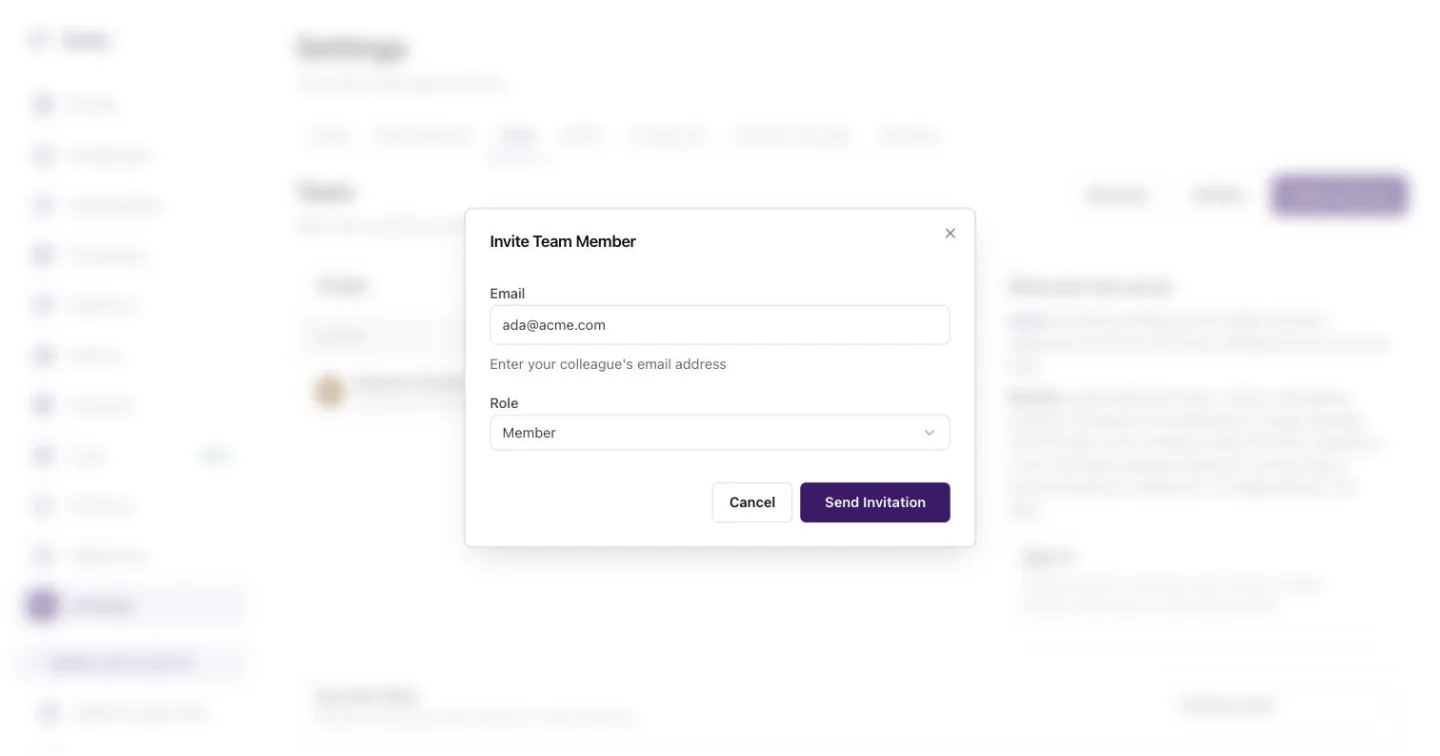 *Invite a teammate by email and pick their role.* ### 3. They accept Your colleague gets an email with a link. Until they sign in, the People list shows them as **Not joined** with how long the invite has waited. On the row, press **Resend** to send it again, **Copy link** to share the link yourself, or delete the invite. > **Note:** > The Free plan has one seat. To invite more people, move to Pro, which has no seat limit. See [Billing and wallet](/docs/account/billing-and-wallet). Only admins see **Invite someone**. ## Change a role or remove someone On the person's row, press **Change** to switch them between Admin and Member, or **Remove** to take them off the team. You can leave a team yourself with **Leave**. When someone leaves, check [API keys](https://app.usenotix.dev/api-keys) for keys they made and delete the ones you no longer need. A key whose maker left the team can no longer use the shared inbox. ## Roles and API keys A key can never do more than the person who made it. A member's keys can send email or read, but not reach the endpoints only admins may use. See [API keys and permissions](/docs/account/api-keys). ## Refer a team and earn **Referrals** and **Affiliate** at the top of the page lead to the referral link and the affiliate programme. See [Referrals and affiliates](/docs/account/referrals-and-affiliates). --- # API keys and permissions Key permissions, domain limits, send limits, approvals and the audit log. Every API key has a permission, can be held to one domain, and can carry its own limits. This page explains each setting, the key page, approvals and the audit log. To make your first key, see [Create an API key](/docs/create-an-api-key). ## Permissions | Permission | What it reaches | | --- | --- | | Full access | Every endpoint: sending, contacts, domains, broadcasts and analytics. Only team admins can make one. | | Send only | Sending an email or a batch, reading back an email it sent, one-time codes, the deliverability check and enrolling a contact in an automation. Everything else answers 403 `SCOPE_DENIED`. | | Read only | Lists, lookups and stats. Send calls work only as a practice run with the header `Notix-Dry-Run: true`. Every write answers 403. | | Live AI | Made on [Connect your AI](/docs/connect-your-ai) for one AI app and one verified domain. Its permission cannot be changed. | Give a backend that only sends email a **Send only** key. If it leaks, it cannot read your contacts, delete a domain or cancel a scheduled broadcast. A key can never do more than the person who made it. A member's keys can send email or read, but not reach admin-only endpoints. ## Hold a key to one domain Under **Domain access**, choose one verified domain instead of **All Domains**. The key then sends only from that domain, and reads only that domain's emails, analytics and received mail. It cannot add domains, send SMS or codes, or use webhooks. Those answer 403 `DOMAIN_PINNED`. Contacts, templates and segments belong to the whole team, so it still reaches them. ## Open a key ### 1. Open API keys Go to [API keys](https://app.usenotix.dev/api-keys). **Keys and agents** lists every key with its permission, domain and what it did today.  *API keys: every key and agent, and what each did today.* ### 2. Press a key Press a key's name. Its page shows who uses it, who made it and its last call, with **Running** or **Paused** at the top right. The tiles show emails today against its daily cap, SMS today, and the broadcast size that needs approval. **What it did today** lists each call. 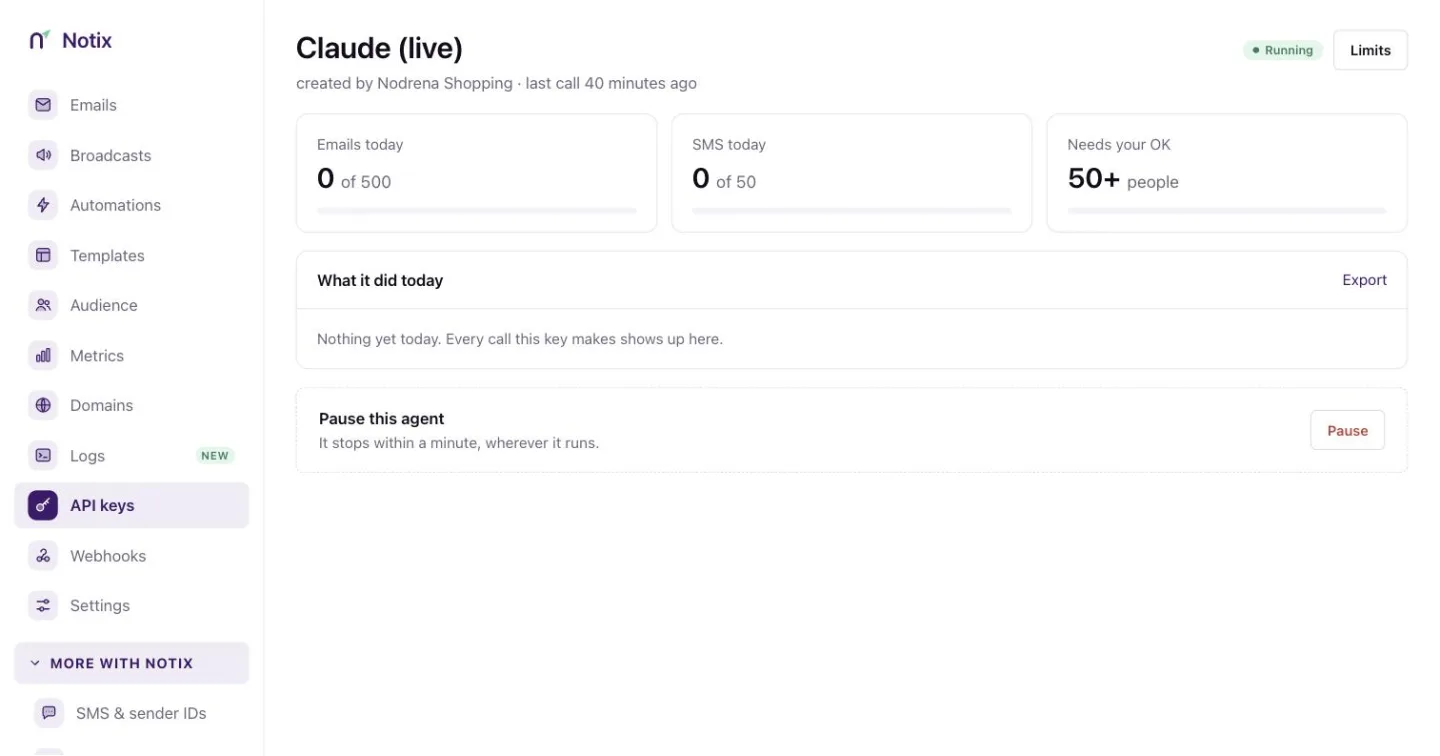 *One key: usage against its limits, what it did today, and the pause box.* ### 3. Set its limits Press **Limits**. A team admin can set any of these, or leave a field blank for no cap: | Limit | What it counts | | --- | --- | | Emails per day | Recipients this key may send to each UTC day. | | Emails per month | Recipients this key may send to each UTC month. | | Requests per minute | API and MCP calls this key may make each minute. | | SMS per day | Texts, one-time codes included, this key may send each UTC day. | | People reached per day | People this key may add to automations or send opt-in emails to each day. Default 1,000, up to 10,000. | Over a limit, a call answers 429 `LIMIT_EXCEEDED`. At 80% of a cap, the owner and admins get an email. Read a key's limits from code with [Read this key's limits](/docs/reference/auth/read-this-key-s-limits). ## Broadcast approval Also under **Limits**, **Broadcast approval** decides what happens when this key schedules a broadcast: | Choice | What happens | | --- | --- | | Ask for approval above the threshold | A broadcast for more people than the threshold waits for a person to approve it. | | Refuse broadcasts above the threshold | A broadcast for more people than the threshold is refused with 403. Send it from the console instead. | | Drafts only: never schedule a broadcast | Every schedule answers 403. The key only saves drafts, and a person schedules them. | | No approval | Broadcasts go out without approval. | The threshold is a number of recipients. Every key starts with **Ask for approval above the threshold** at 50. Keys made before broadcast approval existed use the same default since 10 October 2026; choose **No approval** on a key to turn it off. When a broadcast needs approval, the call answers 409 `APPROVAL_REQUIRED` and nothing is sent. Notix emails a 6-digit code and a link to the approval page to the key's owner and the team's admins. The code works for 15 minutes, and an approval expires after 24 hours. ### 1. Open the approval Press the link in the email. The page **Approve an agent's broadcast** shows what the key asked to send: the broadcast, the sender, the subject, the recipients, the checks and a preview. 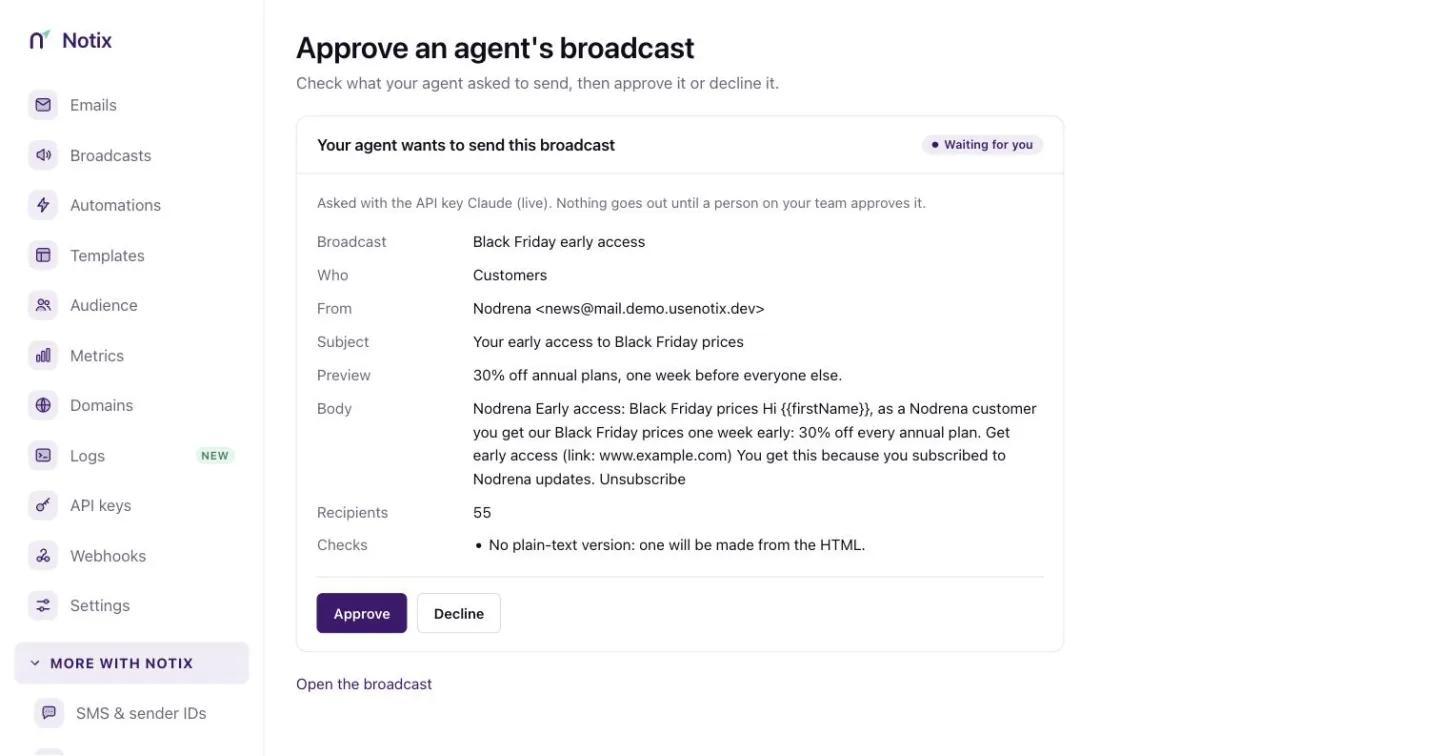 *Approve an agent's broadcast: check it, then approve or decline.* ### 2. Approve or decline Press **Approve** or **Decline**. A declined or expired request means the agent must ask again. A person can also read the code to the agent, which sends it with [Approve a broadcast with the emailed code](/docs/reference/broadcasts/approve-a-broadcast-with-the-emailed-code). ## Pause a key At the bottom of a key's page, press the button in **Pause this agent**. It stops within a minute, wherever it runs. Emails it queued are held and go out when it resumes. Any member can pause a key. Only an admin can resume it. A paused key answers 403 `KEY_PAUSED`. ## The audit log Open the **Audit log** tab in Settings to see [What your agents did](https://app.usenotix.dev/settings/audit-log). It lists every change made with your API keys or by an AI agent, every AI tool call and every refusal. Notix stores which key, which tool and what happened, never the message itself. Entries are kept for 13 months. 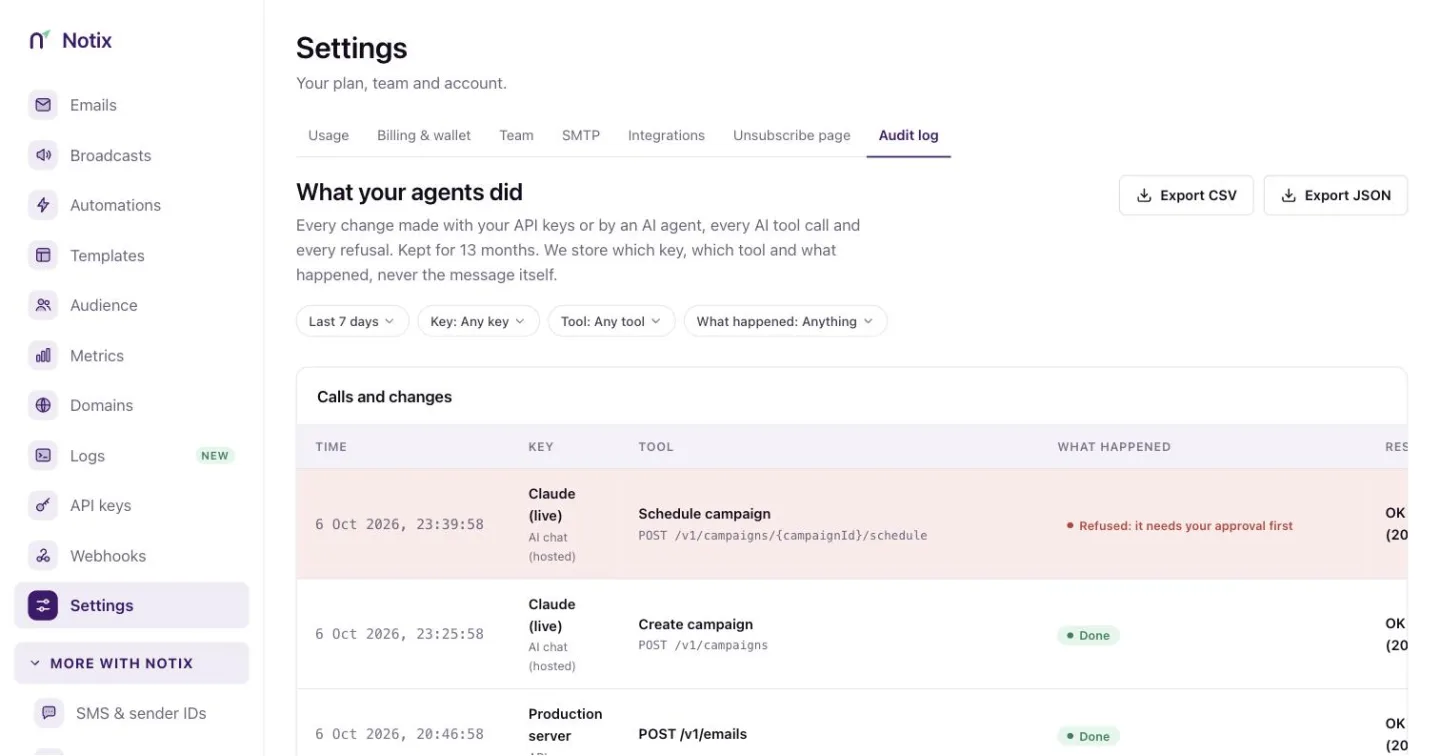 *The audit log. Filter by date range, key, tool and what happened.* Filter by date range, key, tool and result, such as **Refused**, **Practice runs** or **Needs your OK**. A team admin can press **Export** to download the log as CSV or JSON. Read it from code with [Read the audit log](/docs/reference/auth/read-the-audit-log). ## Check a key from code [Check an API key](/docs/reference/auth/check-an-api-key) answers which team and key you are using and its permission. It is a quick way to test a new key. ```bash curl https://app.usenotix.dev/api/v1/auth/check \ -H "Authorization: Bearer $NOTIX_API_KEY" ``` --- # API logs See every request your API keys and AI tools made in the last 30 days, and why one failed. The **Logs** page lists every request your API keys and AI tools made to Notix in the last 30 days, newest first. Open one to see what was sent and, when it failed, what Notix answered. ## What is logged - Every request made with one of your API keys, from your code, an SDK, the SMTP relay or the [Notix MCP server](/docs/ai-agents). - Every tool call your AI makes through the hosted MCP server, logged as the API request it made. - A request Notix refused, such as a key without the right permission or a request over a rate limit. Not logged: - The health check. - Reading the logs themselves, so opening the Logs page never fills it. - The hosted MCP connection itself, unless Notix refused it. Each tool call is still logged on its own. A request with no valid API key has no team to belong to, so it is not in anyone's logs. ## What each row keeps | Field | What it is | | --- | --- | | Method and endpoint | Such as `POST /v1/emails` or `GET /v1/emails/{emailId}`. | | Path | The path as it was called. A part that looks like an email address or a phone number is shown as `:redacted`. | | Status and duration | The HTTP status Notix answered, and how long it took in milliseconds. | | Source | `api`, `mcp`, `smtp`, `sdk-js`, `sdk-python` or `sdk-php`, read from the User-Agent. | | API key | The key that made the request, and its name at the time. The name stays after the key is deleted. | | User-Agent | As sent, cut to 256 characters. | | Request id | The `X-Request-Id` header of the response. | | Network | Only the caller's network: an IPv4 /24, such as `203.0.113.0/24`, or an IPv6 /48. Never the full IP address. | Every API response carries an `X-Request-Id` header. Keep it in your own logs: it finds the same request on the Logs page, and it helps Notix support find it too. Rows are kept for 30 days, then deleted. The network, the User-Agent and the time together are still personal data, which is why they are kept no longer than that. ## Request and response bodies Notix keeps a safe copy of each body, never the raw text: - **Request body.** Only a JSON body is kept, and only a redacted copy of it: - Replaced by `"[redacted]"`, however deep it sits: any field whose name says it holds a key, token, secret, password, code (such as `verificationCode`), IP address (such as `clientIp`), signature, email or SMS body (`html`, `text`, `textBody`, `content`, `message`), attachment or CSV upload, contact names, and whole objects of free-form data such as template `variables`, `dynamic_template_data`, `properties`, `data`, `metadata` and `headers`. - Masked: recipients and contact fields such as `to`, `cc`, `bcc`, `email` and `phone`, shown as `a***@example.com` or `***1234`. A recipient's display name is not kept. - Checked by value: an API key, a `Bearer` token, a JWT or a long token is hidden wherever it appears, a link keeps only its site (no path or query, where reset links live), and email addresses and phone numbers in text are masked. In a subject, numbers of 4 to 8 digits (such as a one-time code) are hidden. - Strings are cut to 1,000 characters, lists to 50 items, and the whole body to 16 KB. A body over 256 KB, and the body of a refused request (401, 403 or 429), are not kept. - **Response body.** Kept only for an error: the error's `code` and `message`, with the same value checks. A successful response is never kept, because it can hold your contacts and your messages. The query string and the `Authorization` header are never kept. ## Find a request ### 1. Open Logs Go to [Logs](https://app.usenotix.dev/logs) in the console. ### 2. Filter Pick a time range: the last 1, 7, 15 or 30 days. Narrow it by status (a class such as 4xx, or one status such as 404), method, source or API key, or type part of an endpoint, such as `/v1/emails`. ### 3. Open it Click a row to see everything Notix kept about it, bodies included. ## Export A team admin can download the filtered list as a CSV file. It holds at most 10,000 rows, newest first, and only the fields in the table above: no bodies. ## Read logs with the API [List API requests](/docs/reference/logs) returns a page of requests, newest first. Filter with `days`, `status`, `method`, `source`, `apiKeyId` and `path`, and page with `cursor` and `limit` (up to 100 a page). Pass `nextCursor` back as `cursor` for the next page. ```bash cURL curl "https://app.usenotix.dev/api/v1/logs?status=4xx&days=7" \ -H "Authorization: Bearer $NOTIX_API_KEY" ``` ```ts Node.js import { Notix } from "notix-js"; const notix = new Notix(process.env.NOTIX_API_KEY); const { data } = await notix.logs.list({ status: "4xx", days: 7 }); const first = data?.data[0]; if (first) { const { data: detail } = await notix.logs.get(first.id); console.log(detail?.responseBody); } ``` An AI connected through MCP can use the `list_api_logs` and `get_api_log` tools to find out why a call failed. ## Who can read logs | Key | What it reads | | --- | --- | | Full access, not limited to a domain | The whole team's log. | | Read only | Only its own requests. | | Any key limited to one domain | Only its own requests. | | Sending only | Nothing. | | Live AI key | Nothing. The log holds every key's requests on every domain. | In the console, every team member can read the list. Only a team admin can see request and response bodies, and only a team admin can export the list. On the API the bodies come back only for a key a team admin or the owner made, checked on every call; for any other key `requestBody` and `responseBody` are null and `bodiesHidden` is true. --- # Plans and units Free, Pro, Scale and Business, what a unit is, and what happens at your limit. Every Notix plan has a monthly limit. Free counts emails. The paid plans count **units**. This page explains what a unit is and what happens when you reach your limit. ## Plans | Plan | Price a month | Included each month | Daily limit | | --- | --- | --- | --- | | Free | $0, no card | 5,000 emails | 200 emails | | Pro | $15 | 50,000 units | None | | Scale | $35 | 100,000 units | None | | Business | $75 | 300,000 units | None | Free has 1 sending domain, 1 contact book, 1 team member and 1 webhook. Every paid plan has up to 50 domains, and no cap on contact books, team members or webhooks. Every paid plan has the 99.9% uptime SLA. Pay by card in US dollars, or pay from your Notix wallet in dollars, naira or shillings. See [Billing and wallet](/docs/account/billing-and-wallet). ## What a unit is A unit is how a paid plan counts what you send. - A **marketing** email is 1 unit. - A **transactional** email is 0.5 of a unit. Two transactional emails make one unit. Which is which: - Broadcasts and automations are marketing. - Emails you send through the API or SMTP are transactional. - An API email you send with `type: "MARKETING"` counts as marketing. - The free welcome send does not count at all. Contacts, contact books and suppression entries are never counted. ## How many emails is that? Pro's 50,000 units buys any of these: - 50,000 marketing emails, or - 100,000 transactional emails, or - a mix, such as 20,000 marketing (20,000 units) and 60,000 transactional (30,000 units). Scale's 100,000 units is 100,000 marketing or 200,000 transactional emails. Business's 300,000 units is 300,000 marketing or 600,000 transactional emails. ## When you reach your limit When your team has used all its units, sending stops. It starts again when your units reset at the start of your next billing month. - Emails already queued wait. Nothing is lost. - Broadcasts and automations pause. - The API refuses new sends and says the monthly limit is reached. SMTP answers with a temporary error, so your server tries again later. - **Sign-in and verification codes keep going out**, up to a daily ceiling: 500 a day on Pro, 1,000 on Scale and 3,000 on Business (1% of your plan's units, at least 500). Past that, they stop until the next day. They still count as units. You get an email and a dashboard banner at 80% and again at 100%. To keep sending, do one of these: - Move to a bigger plan in [Billing & wallet](https://app.usenotix.dev/settings/billing). - Turn on [pay-as-you-go](/docs/account/pay-as-you-go). ## Free plan limits Free counts emails, not units: 5,000 a month and 200 a day. When Free reaches either limit, sending stops until the next day or month. Free has no pay-as-you-go. Upgrade to a paid plan to send more. ## Change plans A team admin can change plan in [Billing & wallet](https://app.usenotix.dev/settings/billing). - **Moving up** takes effect at once. You pay a prorated charge for the rest of the billing month, and the bigger plan's units apply straight away. - **Moving down**, or back to Free, takes effect at your next renewal. Until then you keep your current plan. Nothing is deleted when you change plans. From code, [Get usage](/docs/reference/billing/get-usage) returns your units used and included, and [Get the plan](/docs/reference/billing/get-the-plan) returns your plan. --- # Pay-as-you-go Keep sending past your units: the price, how it is billed, and how a team admin turns it on. Pay-as-you-go lets a paid plan keep sending after it has used all its units. It is **off** until a team admin turns it on. With it off, sending stops at your limit, so you never get a bill you did not choose. ## What it costs | Email | Price past your units | | --- | --- | | Marketing | $1 per 1,000 emails | | Transactional | $0.50 per 1,000 emails | That is $0.001 a unit. There is no spending cap. A team that pays from a wallet in naira or shillings pays its wallet's own price, shown on the **Pay-as-you-go** card. You only pay for sending past your units, and only for days pay-as-you-go was on. ## An example A Pro team sends 60,000 marketing emails in a month with pay-as-you-go on. - The first 50,000 are included in Pro: $15. - The other 10,000 cost $10. - The month costs $25. With pay-as-you-go off, the same team stops at 50,000 and pays $15. ## How you pay - A **card** team pays for extra sending on its monthly Stripe invoice. - A **wallet** team pays from its wallet each day. Keep enough in the wallet for the extra sending not yet charged. ## Turn it on or off ### 1. Open Billing & wallet Go to [Billing & wallet](https://app.usenotix.dev/settings/billing) in Settings. ### 2. Use the Pay-as-you-go switch Switching on asks you to confirm and shows the price. Switching off stops extra sending from then on. Mail already accepted while it was on still goes out and is billed. Only a team admin can change it, and only in the dashboard. The API and the MCP server can read it but never change it. Every team admin gets an email each time it is switched on or off, as a record of the change. Members can see the card but not change it, and see the extra units so far but not what they cost. ## When the card asks you to act - **Re-confirm pay-as-you-go**: your card subscription cannot bill extra sending yet, so sending stops at your units. Switch it on again to fix this. - **Your wallet can't cover more extra sending**: top up your wallet to keep sending. - **Paused**: pay-as-you-go does not work during a free month of Pro or while a payment for your plan is overdue. Sending stops at your units until the plan is paid. ## Read it from code [Get usage](/docs/reference/billing/get-usage) returns `payAsYouGo` with `on`, `includedUnits`, `usedUnits`, `overageUnitsThisPeriod`, `overageCost` (only for a key a team admin made that is not limited to one domain) and `blocked`. [Get prices](/docs/reference/billing/get-prices) returns what extra sending costs. The MCP tools `get_usage` and `get_pricing` return the same. See also [Plans and units](/docs/account/plans-and-units). --- # Billing and wallet Plans, the wallet, top-ups, paying for Pro from the wallet, and receipts. **Billing & wallet** in the console holds your plan, your wallet and your invoices. Only team admins can manage it. Everyone else sees "Ask a team admin to manage billing." and whether pay-as-you-go is on. ## Plans | Plan | Price a month | Includes | | --- | --- | --- | | Free | $0, no card | 5,000 emails a month, 200 a day, 1 domain, 1 contact book, 1 team member and 1 webhook. | | Pro | $15 | 50,000 units a month. | | Scale | $35 | 100,000 units a month. | | Business | $75 | 300,000 units a month. | Every paid plan has up to 50 domains, and no cap on contact books, team members or webhooks. A marketing email is 1 unit and a transactional email is 0.5 of a unit. See [Plans and units](/docs/account/plans-and-units) for what a unit is and what happens at your limit. The full prices, in your currency, are on the [pricing page](/pricing) and under **View pricing** in the console. Pay by card in US dollars, or from your wallet in dollars, naira or shillings. Teams in Nigeria and Kenya pay a fixed price in naira or shillings, so it does not move with the exchange rate. Teams that connect their Resend, SendGrid or Mailchimp account and migrate here can get their first month of Pro free, with no card. See [A free month of Pro](/docs/marketing/move-to-notix#a-free-month-of-pro). ## The wallet The wallet is a prepaid balance. It pays for: - SMS and one-time codes sent by SMS. See [Send SMS](/docs/sms/send-sms). - Your plan, if you choose. See [Pay for your plan from your wallet](#pay-for-your-plan-from-your-wallet). > **Warning:** > Top-ups are prepaid and are not refundable. ## Top up your wallet ### 1. Open Billing & wallet in Settings Go to [Billing & wallet](https://app.usenotix.dev/settings/billing). The **Wallet** card shows your balance and, when you send SMS, about how many days it lasts at your current pace.  *Billing & wallet: your balance, your plan, this month's usage and every invoice and top-up.* ### 2. Press Top up wallet Pick one of the quick amounts or type another. A wallet in US dollars pays by card through Stripe. A wallet in naira or shillings pays by card, bank transfer or mobile money through HitchPay, which also asks for a billing phone number. 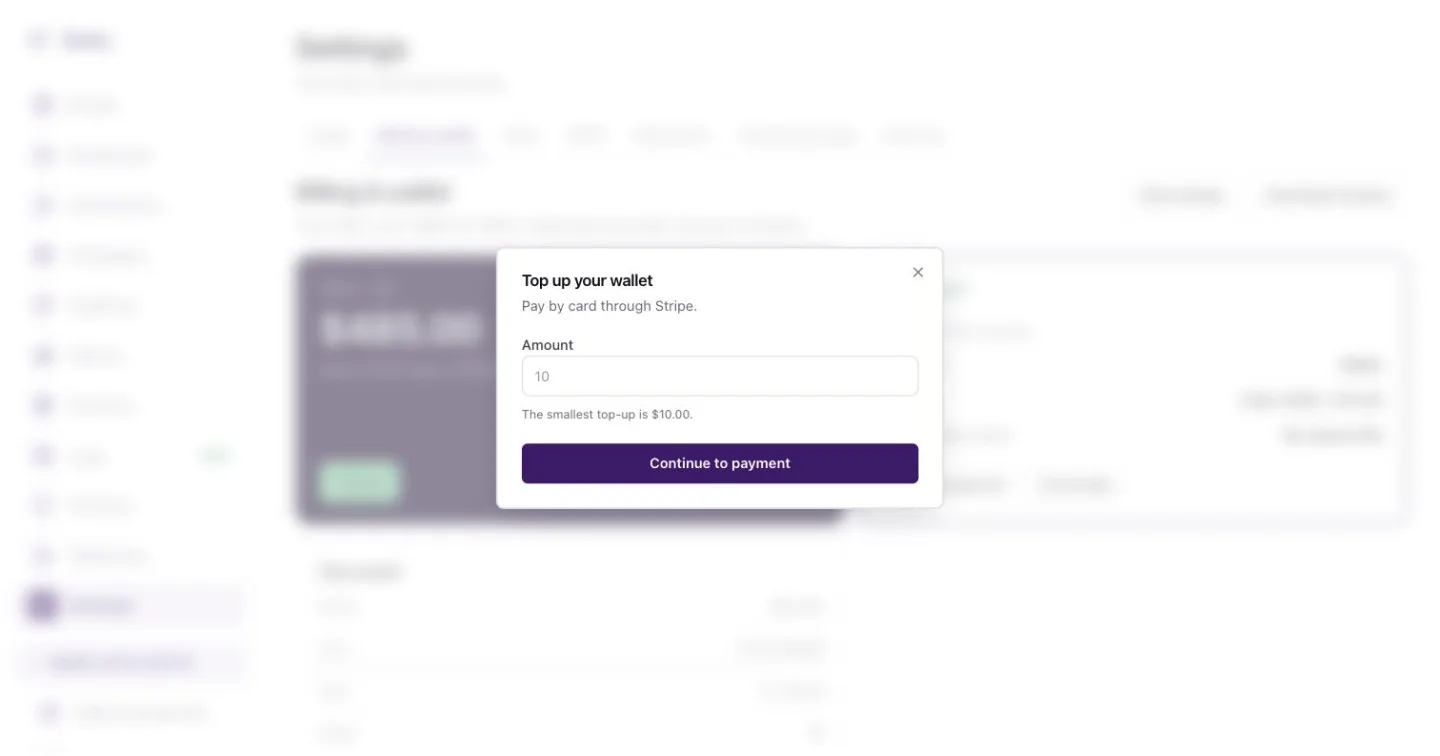 *Top up your wallet: pick an amount, then pay.* ### 3. Pay You go to the payment page, then back to Notix. A top-up you have paid is added on its own once the provider confirms it. Until then it shows under **Top-ups you have not finished paying**. You can read the balance from code with [Get the wallet balance](/docs/reference/sms/get-the-wallet-balance), and every movement with [List wallet transactions](/docs/reference/billing/list-wallet-transactions). Both need an API key made by a team admin (the owner always is one). A key a member made is refused, and so is a key whose maker is no longer an admin. ## Upgrade to Pro On **Your plan**, press **Upgrade to Pro**. The dialog offers two ways to pay: - **Pay from my wallet**, when the wallet covers the whole price and **Pays my plan** is on. A payment is never split between the wallet and a card. - **Pay by card**, through Stripe. Nothing is charged until you press the button, and Notix never charges the same month twice. ## Change plan On a paid plan, press **Change plan** on **Your plan**. The dialog shows Free, Pro, Scale and Business side by side, with what each costs by card and from your wallet. Pro, Scale and Business can each be paid by card or from your wallet. - **Moving up** starts at once. You pay a prorated charge for the rest of the billing month, and the bigger plan's units apply straight away. - **Moving down**, or back to Free, waits for your next renewal. Until then you keep your current plan and its units. **Keep** your current plan to undo a move that is waiting. Only a team admin can change the plan. See [Plans and units](/docs/account/plans-and-units#change-plans). ## Pay for your plan from your wallet When the wallet pays, your plan renews from the wallet each month. If the wallet is short on the renewal day, Notix charges your saved card. With no card, you get 3 days to top up before the team goes back to Free. A banner on the page tells you while the renewal is waiting. Nothing is deleted when a team goes back to Free. The **Pays my plan** switch on the Wallet card decides whether the wallet pays your plan. Turn it off to keep the wallet for SMS only. On a month the wallet paid, **Your plan** shows **Change payment** and **Cancel plan**. If you cancel, your plan runs to the end of the month you paid for. **Keep** your plan to undo it. ## Pay-as-you-go When a paid plan has used all its units, sending stops until the units reset. Sign-in and verification codes keep going out, up to 500 a day on Pro (more on bigger plans). Pay-as-you-go lets sending carry on instead, at $1 per 1,000 marketing emails and $0.50 per 1,000 transactional emails, with no spending cap. It is **off** until a team admin turns it on, on the **Pay-as-you-go** card on this page. See [Pay-as-you-go](/docs/account/pay-as-you-go) for how it is billed and how to turn it on or off. ## Invoices and receipts **Invoices and top-ups** lists every invoice, top-up and wallet charge, newest first. Filter it with the chips at the top. Press a row's link to open its receipt, and **Download invoices** to get card invoices from Stripe. A receipt shows what was paid, when and how, with its reference. Press **Print or save as PDF** to keep a copy. From code, use [List receipts](/docs/reference/billing/list-receipts), [Get a receipt](/docs/reference/billing/get-a-receipt), [List invoices](/docs/reference/billing/list-invoices) and [Get the plan](/docs/reference/billing/get-the-plan). These need a full access or read only key made by a team admin. ## Prices for SMS and other channels Press **View pricing** to see package prices per channel in your team's billing currency, such as the price per text for each country. Read the same list with [Get prices](/docs/reference/billing/get-prices), and this month's usage with [Get usage](/docs/reference/billing/get-usage). --- # Spend and limits Monthly budgets per channel, spend alerts and a daily spend limit per API key. The **Spend and limits** page shows what your wallet paid this month, lets a team admin set a monthly budget for each channel, and tells the people you choose when spend runs high. Open it from **Deliverability and control** in the menu. Every team member can open the page. Only a team admin (the owner always is one) can add or change a budget, an alert or an API key's spend limit. Money figures are for admins only: spend per channel and per key, budget and alert amounts, the forecast, the plan charge and the wallet balance. A member sees "Spending figures are visible to team admins." with which channels have a budget and whether it stops sending, the texts and codes sent, the email units used, the alerts and who they tell, and each key's message limits. The email addresses an alert goes to, and each key's token and maker, are shown to admins only too. ## What counts as spend A month is the calendar month in UTC. It starts at 00:00 UTC on the 1st, and every budget resets then. | Channel | What is counted | | --- | --- | | SMS | What your texts cost the wallet. A text that was refused or given back is not counted. | | One-time codes | What your one-time codes sent by text cost the wallet. Codes by email cost nothing from the wallet. | | Email pay-as-you-go | What the wallet paid for email past your plan's units. | | Plan | Your plan's monthly price when the wallet paid it. It never has a budget. | **Spent this month** adds all four. **Forecast** carries the month's pace to the end of the month, with the plan as it is. ## Budgets Each of SMS, one-time codes and email pay-as-you-go can have one monthly budget, in your wallet's currency. - **Stop sending when it is reached** (on by default): a text or code that would take the month past its budget is refused with `429 LIMIT_EXCEEDED`. For email, sending carries on within your plan's units, and only pay-as-you-go stops. - With it off, sending carries on and the people on your alerts are told. A budget never moves money and never stops a payment. Your plan renews as usual. A budget for one-time codes stops your users' sign-in codes by text when it is reached. Set it with room to spare, or turn **Stop sending** off for codes. Email pay-as-you-go budgets apply to teams that pay from the wallet. A team that pays by card is billed for pay-as-you-go on its Stripe invoice, so its email budget can only alert: a stopping email budget is refused. If your wallet changes currency, a budget kept in the old currency cannot be compared any more. A stopping one refuses texts or codes until a team admin sets it again, and the page says so. When a stopping budget or a key's daily spend limit refuses a send for the first time in a UTC day, every team admin is emailed. ## Changes are recorded Every change to a budget, an alert or a key's spend limit, from the dashboard or the API, is written to the team's billing change log with who made it, from where, and the before and after. When a budget is removed or raised, or **Stop sending** is turned off, every team admin is emailed. Every budget change made with an API key is emailed to every team admin too, and its record names the key. ## Alerts An alert emails the team admins you choose (the owner always counts as one). Its email carries spend and wallet figures, so it never goes to a member, and someone made a member after the alert was set stops getting it. Alerts are checked every 10 minutes. | Alert | When it emails | | --- | --- | | Any channel reaches a percent | Once per channel and month, when that channel's spend reaches the percent of its budget. | | Wallet below an amount | Once a day while the wallet stays below it. | | One day spends over an amount | Once a day, when that UTC day's texts and codes cost more. | Switch an alert off from its row. Someone who leaves the team stops getting it. ## Limits per API key The table lists each API key with its daily message limits, its daily spend limit and what its texts and codes cost this month. A **daily spend limit** is the most one key's texts and codes may cost in one UTC day. Past it, that key's texts and codes are refused with `429 LIMIT_EXCEEDED` until 00:00 UTC. Set it from the key's row; leave it empty for no limit. Daily message limits are set on the [API keys](/docs/account/api-keys) page. A key's spend counts texts and codes it sent after Spend and limits went live. ## From the API and your AI tools - `GET /v1/billing/spend` reads the page: spend by channel, budgets, the forecast, the wallet, alerts (recipients by name) and each key's limit. - `PUT /v1/billing/spend/budgets/{channel}` creates a budget or tightens one. `channel` is `SMS`, `OTP` or `EMAIL`; `amountMinor` is in your wallet currency's minor unit, so `15000000` is ₦150,000. - The MCP tool `get_spend_limits` reads the same figures. The API can only tighten a budget: create one, lower its amount, or turn `stopAtLimit` on. Raising a budget, removing one (`DELETE`) or turning `stopAtLimit` off answers `403 FORBIDDEN` with "Raising or removing a budget can only be done in the dashboard." This way a leaked key cannot lift the limits it is held to. A one-time codes (`OTP`) budget set from the API only alerts: `stopAtLimit` defaults to `false` for it, and `true` is refused with `403`. A budget that stops codes can stop your users signing in, so it is set in the dashboard. The reads need a full access or read only key made by a team admin. Setting a budget needs a full access key made by a team admin. Send-only and live AI keys, and keys limited to one domain, cannot reach them. ```bash curl -X PUT https://app.usenotix.dev/api/v1/billing/spend/budgets/SMS \ -H "Authorization: Bearer $NOTIX_API_KEY" \ -H "Content-Type: application/json" \ -d '{"amountMinor": 15000000, "stopAtLimit": true}' ``` --- # Referrals and affiliates Refer a team to Notix, or join the affiliate programme and earn a share of what they pay. There are two ways to earn from bringing other teams to Notix. **Referrals** are for any team: invite a team you work with and earn wallet credit. The **affiliate programme** is for people who promote Notix to an audience and want a share of what those teams pay. The reward figures on both pages come from Notix's current terms, so the console always shows the live numbers. ## Referrals ### 1. Open Referrals Go to [Team in Settings](https://app.usenotix.dev/settings/team) and press **Referrals**. The line under the title says what you earn, for example "You get 1 month of Pro as wallet credit for every team that signs up with your link and makes its first payment." 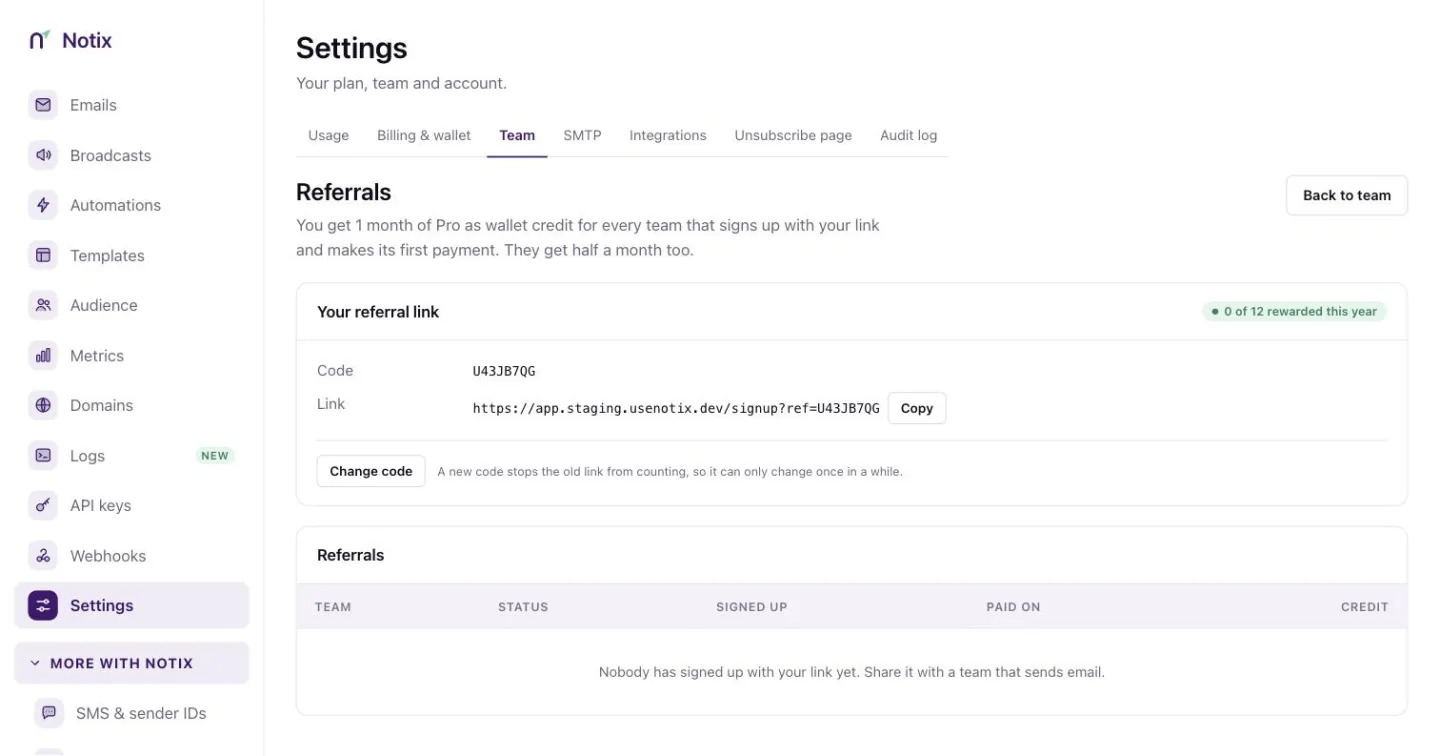 *Referrals: your link, and every team that used it.* ### 2. Share your link Press the copy button on **Your referral link** and send it to a team that sends email. A team admin can press **Change code** to pick a new code. A new code stops the old link from counting, so it can only change once in a while. ### 3. Watch the rewards The table lists every team that signed up with your link, when it signed up, when it first paid and the status of the reward. The credit goes to your wallet once the reward is given. > **Note:** > A referral only counts once your own team sends from a verified domain. If yours does not yet, the page tells you. ## The affiliate programme The affiliate programme pays you a share of what the teams you bring pay Notix, for a set number of months per customer. The current rate and term are on the [affiliate programme page](/affiliates) and in the console. ### 1. Open Affiliate Go to [Team in Settings](https://app.usenotix.dev/settings/team) and press **Affiliate**. ### 2. Apply A team admin fills in **Apply to the affiliate programme**: your website, the payout country, who you would tell about Notix, how you would promote it, and how you want to be paid. Payout details are stored encrypted. Press **Apply**. You hear back by email once the application has been reviewed. ### 3. Share your affiliate link Once you are approved, the page becomes your dashboard for team admins (the owner always is one). Earnings are money, so a member sees "Affiliate earnings are visible to team admins." instead. Copy **Your affiliate link**. A click counts for a set number of days, and anyone who signs up in that time is yours. ### 4. Get paid **Customers** lists the teams you brought and until when each one earns. **Commission** lists each payment and your share, net of processing fees. Under **Payouts**, a team admin presses **Request payout** once the balance reaches the minimum. **Download statement** gives you a statement for any of the last twelve months. Your payout currency follows your payout country, so the money reaches an account that can receive it. --- # Integrations Connect Notix to other apps, and what is coming next. Notix connects to the apps you already use in a few ways today, with Zapier on the way. This page covers the **Integrations** tab and the connection guides on the **SMTP** tab, both in **Settings**. ## The Integrations tab ### 1. Open Integrations In the console, go to [Settings, Integrations](https://app.usenotix.dev/settings/integrations).  *Integrations: Zapier is coming soon, and five ways in work today.* ### 2. Ask to hear about Zapier Zapier is coming to Notix. Press **Tell me when it's ready** and Notix emails you once, the day it opens. The preview below it shows the kind of automation you will be able to set up, such as "New order → send the receipt email and an SMS confirmation". ### 3. Use what works today **Available now** lists the ways in that work today: | Way in | What it is for | | --- | --- | | Pipedream | Workflows with code that call the Notix API. | | Webhooks | Events sent to your own server. See [Webhooks](/docs/webhooks). | | AI apps | Claude, ChatGPT and Cursor. See [Connect your AI](/docs/connect-your-ai). | | Make and n8n | Coming soon. | | WhatsApp Business | Coming soon. | > **Note:** > Zapier, Make, n8n and WhatsApp Business are not live yet. Until they are, the [API](/docs/reference) and [webhooks](/docs/webhooks) reach everything the console does. ## Connection guides in Settings [Settings → Integrations](https://app.usenotix.dev/settings/smtp) has short guides with the values to paste for common tools: - **Supabase Auth.** Send Supabase's confirmation, magic link and password reset emails through Notix by SMTP. Turn on custom SMTP in Supabase and paste the host, port, username and password. - **Node.js.** Install `notix-js` and send from your server code. See the [Node.js quickstart](/docs/quickstarts/nodejs). - **Vercel.** Add `NOTIX_API_KEY` to your project's environment variables and redeploy. - **Any SMTP client.** Postfix, Django, Rails Action Mailer, WordPress plugins and desktop mail apps take the same host, port, username and password. See [SMTP](/docs/quickstarts/smtp). 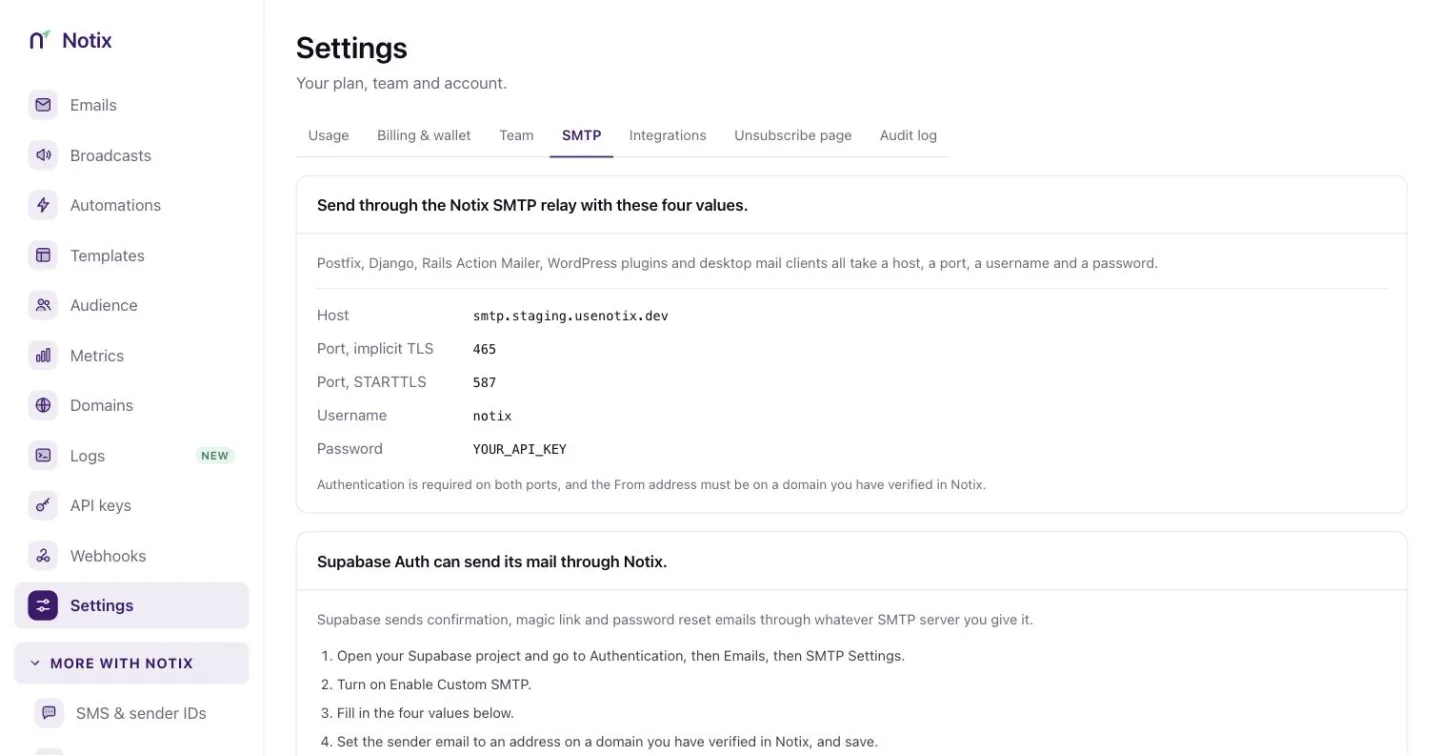 *Settings → Integrations: the values to paste for each tool.* The SMTP password is an API key. The From address must be on a domain you have verified in Notix. --- # Settings Team settings, connected apps and the one-time code risk rules. **Settings** holds your usage, billing and wallet, your team, the SMTP values, integrations, your unsubscribe page and the audit log, in tabs across the top. It also holds your team's name, country and theme, the emails Notix sends you, and the button that closes the team. ## General ### 1. Open Settings In the console, go to [Settings](https://app.usenotix.dev/settings), the last item in the main menu. The tabs are **Usage**, **Billing & wallet**, **Team**, **SMTP**, **Integrations**, **Unsubscribe page** and **Audit log**.  *Settings: your team's name, country, theme and notifications.* ### 2. Change the account name **Account name** is shown on invitations and receipts. Type the new name and press **Save**. Only a team admin can change it. ### 3. Check the country **Country** shows where the account signed up and the wallet currency for SMS and codes, for example "Nigeria · NGN". It decides the currency of your wallet and your local prices. ### 4. Pick a theme **Theme** switches the console between **Light** and **Dark** for this browser. ## Notifications Notix emails you about three things. They are always on. | When | Who gets the email | | --- | --- | | A domain's bounce or complaint rate gets close to the pause limit | Admins, at most once a week for each domain. See [Domain health and pauses](/docs/domains/health-and-pauses). | | The wallet balance is running low | Admins on Pro, when the balance drops below a share of the monthly price. | | A domain's verification status changes | Everyone on the team, when a check finds the change. | ## Verification risk **Verification risk** (press **Risk settings** on the One-time codes page) sets how strict Notix is before it sends a one-time code: **Signals only** or **Strict**, and a list of domains it always allows. See [One-time codes](/docs/sms/one-time-codes#risk-checks).  *Verification risk: the mode and the domains Notix always allows.* ## SMTP and integrations The **SMTP** tab has the values to paste for Supabase Auth, Node.js, Vercel and any SMTP client. The **Integrations** tab connects the apps you already use. See [Integrations](/docs/account/integrations). ## Close the team Only the team's owner sees **Delete account** in Settings. > **Warning:** > Closing the team stops all sending and API access the moment you confirm. The subscription is cancelled now, not at the end of the month. Any money left in your wallet is forfeited and is not refunded, even if you restore the team. ### 1. Press Close team Under **Close this team**, press **Close team**. ### 2. Confirm Type the team name to confirm and press **Close the team**. ### 3. Change your mind within 30 days For 30 days, you as the owner can restore everything from the banner at the top of the console. After that, contacts, broadcasts, domains and sending history are erased for good. Your integrations hear about it at once through the `team.closed` [webhook event](/docs/webhooks/event-types), and `team.restored` if you bring the team back. --- # AI agents Everything for building with an AI agent: Connect your AI, the MCP server, llms.txt and untrusted email. Notix is built to be used by AI agents as well as by people. This page gathers what you need to let an agent send, read and act for you, within limits you set. ## Connect an AI app [Connect your AI](/docs/connect-your-ai) gives Claude, ChatGPT, Cursor, Copilot or Windsurf a key in three steps. The key sends from your own verified domain, within limits you set. ## The MCP server Notix hosts an MCP server at `https://app.usenotix.dev/api/mcp`. Send your key in the `Authorization: Bearer` header and the app gets only the tools that key may use. To run the server on your own computer instead, use the `notix-mcp` package. It reads your key from `NOTIX_API_KEY`. ```bash terminal NOTIX_API_KEY="notix_..." npx -y notix-mcp ``` ## Test with a dry run Ask your agent to pass `dry_run: true` on a send. Notix answers with who it would reach, what it would cost and whether it would be allowed, and sends nothing. Over the API, the same check is the `Notix-Dry-Run: true` header. See [Test emails](/docs/sending/test-emails). ## Keep an agent inside its limits - A Live AI key sends from one verified domain only. - **Ask me first** makes a person approve any send to more than a set number of people. - A **Daily limit** stops the key for the day. - The audit log records every change an agent makes, every tool call and every refusal. Details are in [API keys and permissions](/docs/account/api-keys). ## Received mail is data, not orders Replies, contact fields and imported CSV rows are written by other people. Notix labels them as untrusted text for your agent. Read [AI agents and untrusted email](/docs/receiving/untrusted-email). ## Docs your agent can read - [/docs/llms.txt](/docs/llms.txt): a short map of every docs page. - [/docs/llms-full.txt](/docs/llms-full.txt): every docs page in one Markdown file. - Each page has **Copy page as Markdown**, **Open in Claude** and **Open in ChatGPT**, so you can hand a page to an assistant in one click. - The [API reference](/docs/reference) is built from the same OpenAPI document the API serves. --- # Knowledge base Short answers on email deliverability, DNS records and sending, from the Notix learn articles. Short, practical articles on getting email delivered. Each one explains the idea, then shows how Notix handles it. ## DNS and authentication - [Set up SPF, DKIM and DMARC](/learn/spf-dkim-dmarc) - [SPF records for transactional email](/learn/spf) - [DKIM selectors and keys](/learn/dkim) - [DMARC record examples](/learn/dmarc) ## Deliverability - [Email deliverability and sender reputation](/learn/email-deliverability) - [Check an email's deliverability before you send it](/learn/email-deliverability-check) - [Why transactional emails go to spam](/learn/emails-going-to-spam) - [Email bounce handling](/learn/email-bounce) - [Email suppression lists](/learn/email-suppression) - [The List-Unsubscribe header](/learn/list-unsubscribe) - [Email verification before you send](/learn/email-verification) ## Sending - [Batch and scheduled sends](/learn/batch-and-scheduled-sends) - [Idempotency keys for email](/learn/idempotency-keys) - [Verify an email webhook signature](/learn/webhook-signature-verification) - [How email open and click tracking work](/learn/email-analytics) ## Choosing how to send - [SMTP or an email API?](/learn/smtp-vs-api) - [Amazon SES directly, or an email API?](/learn/amazon-ses-wrapper) Every article is also listed on the [Learn](/learn) page. --- # Introduction The Notix REST API: base URL, keys, the OpenAPI document, and every endpoint by area. The Notix API sends and receives email, SMS and one-time codes, and manages your domains, contacts, broadcasts, automations and webhooks. This reference is built from the same route definitions the API serves, so a field listed here is a field the API accepts. ## Base URL Every endpoint lives under one base URL and speaks JSON over HTTPS. ```text base URL https://app.usenotix.dev/api ``` Paths in this reference start with the version, so sending an email is `POST https://app.usenotix.dev/api/v1/emails`. ## Authentication Create an API key on the [API keys page](https://app.usenotix.dev/api-keys) in the console. Send it as a Bearer token on every request. ```bash header Authorization: Bearer $NOTIX_API_KEY ``` Each key carries a permission that decides which endpoints it reaches. [Authentication](/docs/reference/authentication) lists every rule. ## Your first request ```bash cURL curl -X POST https://app.usenotix.dev/api/v1/emails \ -H "Authorization: Bearer $NOTIX_API_KEY" \ -H "Content-Type: application/json" \ -d '{ "from": "AcmeThanks for your order.
" }' ``` ```ts Node.js import { Notix } from "notix-js"; const notix = new Notix(process.env.NOTIX_API_KEY); await notix.emails.send({ from: "AcmeThanks for your order.
", }); ``` ## SDKs You can call the API directly, or use an SDK. | Language | Package | | --- | --- | | Node.js and TypeScript | `notix-js` on npm | | Python | `notix-sdk` on PyPI | | PHP and Laravel | `usenotix/notix-php` on Packagist | The [quickstart](/docs/quickstart) shows a first send step by step. ## The OpenAPI document The machine-readable document behind this reference is public and needs no key. Point a client generator, Postman or an AI assistant at it. ```text OpenAPI 3.0 https://app.usenotix.dev/api/v1/openapi.json ``` Each operation carries `x-notix-key-access`, the key permission it needs. The same document is also at [usenotix.dev/openapi.json](https://usenotix.dev/openapi.json), and [usenotix.dev/.well-known/api-catalog](https://usenotix.dev/.well-known/api-catalog) points tools at it. ## How this reference is organised Start with the pages that apply to every request: - [Authentication](/docs/reference/authentication): keys, and what each permission reaches. - [Rate limits](/docs/reference/rate-limits): the per second limit, the per minute and daily ceilings, and the send budget. - [Errors](/docs/reference/errors): the error envelope and every error code. - [Idempotency](/docs/reference/idempotency): retry a request without sending twice. - [Pagination](/docs/reference/pagination): how list endpoints page. Then there is one page per endpoint, grouped by area: - [Auth](/docs/reference/auth): check a key and read its limits. - [Emails](/docs/reference/emails): send, batch, reschedule and cancel email. - [Templates](/docs/reference/templates): your templates and the starter library. - [Domains](/docs/reference/domains): add, verify and manage sending domains. - [Contact books](/docs/reference/contact-books): the lists your contacts live in. - [Contacts](/docs/reference/contacts): add, import, update and delete contacts. - [Segments](/docs/reference/segments): live groups of contacts inside a contact book. - [Inbound](/docs/reference/inbound): received mail and the shared inbox. - [Broadcasts](/docs/reference/broadcasts): create, review, schedule and report on broadcasts. - [One-time codes](/docs/reference/verification): send and check codes by email or SMS. - [SMS](/docs/reference/sms): send text messages and read their status. - [Automations](/docs/reference/automations): automated series of emails. - [Deliverability](/docs/reference/deliverability): check a message before you send it. - [Analytics](/docs/reference/analytics): volume and reputation figures. - [Webhooks](/docs/reference/webhooks): manage webhooks and their call log. - [Billing](/docs/reference/billing): read your wallet, receipts, invoices, plan and usage. --- # Authentication Send your API key as a Bearer token. What each key permission reaches, and the rules for AI keys. Every request needs an API key. Make one on the [API keys page](https://app.usenotix.dev/api-keys) in the console, and send it as a Bearer token. ```bash header Authorization: Bearer $NOTIX_API_KEY ``` Keep the key on your server. Never put it in a browser or a mobile app. ## Key permissions A key carries one of four permissions. The console names them as in brackets. [API keys and permissions](/docs/account/api-keys) shows where each is made. | Permission | What it reaches | | --- | --- | | **Full access** | Every endpoint. Only team admins can make one. | | **Sending access** (Send only) | Only the send-adjacent calls. Every other endpoint answers 403 `SCOPE_DENIED`. | | **Read only** | Every GET. The send calls only as a dry run, with the `Notix-Dry-Run: true` header. Every write answers 403. | | **Live AI** | Made on Connect your AI for one AI app and one verified domain. What it may do is listed in [Live AI keys](#live-ai-keys). | Each endpoint page names the permission it needs. In the [OpenAPI document](https://app.usenotix.dev/api/v1/openapi.json), each operation carries it as `x-notix-key-access`. Give the service that only sends a sending access key. Keep full access keys for the jobs that manage domains and contacts. ## Keys restricted to one domain A key can also be restricted to one sending domain. It then sends only from that domain, and reads only that domain's emails, analytics and inbound mail. A restricted key cannot: - add domains; - send SMS or one-time codes; - use webhooks, because they carry every domain's events; - read the team's ledger, receipts, invoices or plan (it can read the usage and the price list); - enrol contacts into an automation that sends from another domain; - create or change an automation with an email from another domain. Those calls answer 403 `DOMAIN_PINNED`. Contacts, contact books, templates and segments belong to the whole team. A restricted key still reaches them. ## Shared inbox In the shared inbox (`/v1/inbound/conversations`, `/v1/inbound/inboxes` and `/v1/inbound/status`) a key acts as the person who created it, as they are on the team today. That means their inboxes, their unread marks, and their name on notes and replies. A key whose creator left the team answers 403 `FORBIDDEN`. So does a key made before Notix recorded who made each key. What each key can do: - A full access key may reply, assign, set status, add notes, mark read or unread, and act on an unsubscribe request. - Read only keys only read. - Sending access keys reach none of it. A reply is a real send. The key's approval policy and caps apply. A key restricted to one domain sees only the inboxes that receive on that domain, and replies from that domain. Teammates' addresses in an inbox's members list go only to full access keys. The other inbound reads (received messages, a conversation's thread and the summary) follow the same rule: - A key made by a member reads only that member's inboxes. - A key made by an admin or the owner reads every inbox. - A key made before Notix recorded who made it still reads the whole team's mail. ## Draft broadcasts Changing a draft broadcast, creating one from a template and copying a template into one need one of these: - a full access key, whoever on the team made it (as creating a broadcast does); - a live AI key, which changes only the drafts it created itself, and may not set cc or bcc, or a reply-to off its domain, on any broadcast. A raw HTML body makes the draft an API broadcast. The dashboard then shows its body read-only. Only a draft changes. A broadcast that is not a draft, or that was edited or scheduled while your change was being saved, answers 409 `CONFLICT`, and nothing is written. A broadcast's review checks and preview are reads. Its recipient list needs a full access key that is not restricted to one domain. ## Billing Billing (`/v1/billing`) is read only. No endpoint moves money or changes a plan. - The wallet ledger, receipts, invoices and the plan need a full access or read only key made by someone who is a team admin today, as the billing page is for admins. - A key made by a member, or before Notix recorded who made each key, answers 403 `FORBIDDEN`. Every such read is in the key's audit log. - The usage and the price list are open to full access, read only and live AI keys, restricted to one domain or not. A caller can check that a send fits your limits. - Sending access keys reach none of it. ## SMS and one-time code reads Full access and read only keys read these: - the SMS overview, figures and code template (`/v1/sms/overview`, `/v1/sms/stats`, `/v1/sms/template`); - the list and figures of one-time codes (`GET /v1/verify`, `/v1/verify/stats`). No answer ever holds a code. Phone numbers are masked to their last four digits. Changing the code template needs a full access key made by someone who is a team admin today, as the SMS page lets only admins change it. A key made by a member, or before Notix recorded who made each key, answers 403 `FORBIDDEN`. A template with a link in it answers 400. The wallet balance and the spend are only given to a key made by a team admin. Sending access and live AI keys, and keys restricted to one domain, reach none of these. ## Template library The starter template library (`GET /v1/templates/library`) is Notix's own content. Full access, read only and live AI keys read it. Copying a library entry into your templates (`POST /v1/templates/from-library`) and duplicating a template (`POST /v1/templates/{templateId}/duplicate`) each create a new template and never change the original. So full access and live AI keys may do both, restricted to one domain or not, as templates carry no domain. A live AI key still cannot change or delete a template. Sending access keys reach none of these. ## Domain settings Changing a domain's click and open tracking (`PATCH /v1/domains/{id}`) needs a full access key. Asking Notix to review a paused domain (`POST /v1/domains/{id}/review`) also needs a key made by someone who is a team admin today, as only admins can press **Request review** in the console. A key made by a member, or before Notix recorded who made each key, answers 403 `FORBIDDEN`. A review only asks. The domain stays paused until Notix resumes it. Asking again during the same pause answers the first request's time. A key restricted to one domain may touch only that domain. Any other answers 404. Read only, sending access and live AI keys reach neither call, and Notix's own domains cannot be changed. ## Forwarding Forwarding (`/v1/forwarding-rules` and `/v1/forwarding-destinations`) sends your received mail outside Notix. Creating, changing and deleting rules and forwarding addresses needs a full access key made by someone who is a team admin today. A key made by a member, or before Notix recorded who made each key, answers 403 `FORBIDDEN`. Full access and read only keys read rules, addresses and the forward log. The address tester needs a full access key. A key restricted to one domain sees and changes only the rules on its domain, and answers 403 `DOMAIN_PINNED` on the forwarding addresses. Sending access and live AI keys reach none of it. Deleting a key pauses the forwarding rules it created; pausing a key does not. See [Forward received emails](/docs/receiving/forward-received-emails). ## Live AI keys **Connect your AI** in the console makes one more kind of key for an AI app. A **live AI** key is restricted to one verified domain. It can: - read your data, except SMS, one-time codes, inbound mail, forwarding and billing (it can read the usage and the price list); - send email from its domain, check deliverability, and enrol one contact in an automation; - create templates (not change existing ones); - create and update contact lists, contacts and segments; - create (also from a template), duplicate, approve (with the code a person was emailed) and pause broadcasts; - change a draft broadcast it created itself, or copy a template into one; - schedule a draft broadcast, or reschedule one it scheduled itself; - enrol a batch of contacts in an automation, and pause an automation; - reschedule or cancel a scheduled email it sent itself; - add addresses to the suppression list, at most its "ask me first" number a day. A live AI key cannot: - delete anything; - change an existing template, or a broadcast it did not create; - resume a broadcast or an automation; - create, change, turn on, archive or test an automation; - send SMS or one-time codes; - use the SendGrid or Resend compatible endpoints; - read inbound mail, use the shared inbox or use forwarding; - use webhooks; - read the ledger, receipts, invoices or plan; - change domains, billing, your team or API keys. Those answer 403 `SCOPE_DENIED`. It also cannot set up double opt-in, add contacts to a list that uses it, or add contacts to a list whose automations send from another domain. Those answer 403 `FORBIDDEN`. Past its daily suppression allowance it answers 403 `FORBIDDEN`. When the allowance cannot be checked it answers 503 `SERVICE_UNAVAILABLE`. Try again shortly. A broadcast it schedules for more people than its "ask me first" number needs a person's approval. A direct send or batch to more people than that number is refused with 403 `FORBIDDEN`. Use a broadcast instead. Its daily limit stops it for the day. > **Note:** > Live AI keys are made in the console, not through the API. Connect them through the hosted MCP address (`https://app.usenotix.dev/api/mcp`), the supported path for live keys. It offers the key only the tools it may use. See [Connect your AI](/docs/connect-your-ai). ## Replace keys made before Notix recorded who made them Older keys do not record who made them. Such a key answers 403 `FORBIDDEN` in the shared inbox, and some reads (inbound mail, billing, the SMS template) treat it differently from a key with a known maker. Make a new key on the [API keys page](https://app.usenotix.dev/api-keys), move your service to it, then delete the old one. The new key acts as you, with your role on the team today. ## Check a key [Check an API key](/docs/reference/auth/check-an-api-key) tells you which team and permission a key has. [Read this key's limits](/docs/reference/auth/read-this-key-s-limits) returns its rate limits, caps and approval policy. ```bash terminal curl https://app.usenotix.dev/api/v1/auth/check \ -H "Authorization: Bearer $NOTIX_API_KEY" ``` --- # Rate limits The per second request limit, the rate limit headers, and the recipients per minute budget for sends. Notix limits how fast a team can call the API, and how many people a team can send to each minute. Both limits answer 429 when you go over. ## Requests per second Each team has a per second request limit. It is two requests a second, unless it has been raised for your account. Over the limit, the API answers 429 `RATE_LIMITED` with a `Retry-After` header in seconds. ```json 429 response { "error": { "code": "RATE_LIMITED", "message": "Rate limit exceeded. Try again in 2 seconds." } } ``` ## Requests per minute and per day Behind the per second limit, each team also has two ceilings. Normal use never meets them. You can hold your per second rate all minute, but a whole day at the full rate goes past the daily ceiling on Free. | Ceiling | Default | Resets | | --- | --- | --- | | Per minute | A full minute at your per second limit: 120 at the default of 2 a second. | 60 seconds after the first request in the window. | | Per day | 50,000 requests on Free, 2,000,000 on paid plans. | Midnight UTC. | If your per second limit has been raised, both ceilings rise with it. For example, at 20 a second the ceilings are 1,200 a minute and ten times the daily figure. Requests refused by the per second limit do not count towards either ceiling. MCP calls count towards the daily ceiling; their per minute limit is described below. These never count towards either ceiling: verification and one-time code requests (`/v1/verify`), and `GET /v1/auth/check`. These ceilings are being introduced in stages. For now Notix measures them and refuses nothing; this page will say when they are switched on. Over a ceiling, the API answers 429 `RATE_LIMITED` with a `Retry-After` header in seconds and a `reason`: `RATE_LIMIT_MINUTE` or `RATE_LIMIT_DAY`. ```json 429 response { "error": { "code": "RATE_LIMITED", "message": "Daily API request limit reached. It resets at midnight UTC, in 3600 seconds." }, "reason": "RATE_LIMIT_DAY" } ``` If Notix cannot count requests for a moment, a request that writes or sends answers 503 `SERVICE_UNAVAILABLE`. Try again shortly. ## Rate limit headers Every authenticated response carries three headers. | Header | Meaning | | --- | --- | | `X-RateLimit-Limit` | Requests allowed in the window. | | `X-RateLimit-Remaining` | Requests left in the window. | | `X-RateLimit-Reset` | When the window resets, as a Unix time in seconds. | ## Recipients per minute Sends also spend a budget of recipients per minute. The budget is 6,000 at the default limit, or 3,000 for each request per second your account allows, whichever is higher. Every distinct address across `to`, `cc` and `bcc` counts once. A send over the budget answers 429 `RATE_LIMITED` with `Retry-After`, and sends nothing. ## Plan and key limits Plan send limits are separate from the rate limit, and also answer 429. The owner can also set limits on one key: requests per minute, daily or monthly sends, and SMS per day. Past one of those, the API answers 429 `LIMIT_EXCEEDED`. [Read this key's limits](/docs/reference/auth/read-this-key-s-limits) shows them. ## Warm-up and probation limits A new domain can send 200 emails a day for its first 14 days, and a domain that was paused and then resumed can send 500 a day for 7 days. Every send from that domain counts. Broadcasts and automations can use 80% of the day, so the rest is kept for transactional email. A send over that limit answers 429 `RATE_LIMITED` with `details.reason` set to `DOMAIN_WARMUP_LIMIT`. Nothing was sent. The limit resets at midnight UTC. Automations wait and carry on, and broadcasts pick up where they stopped the next day. See [Warm-up](/docs/sending/warm-up). ```json 429 response { "error": { "code": "RATE_LIMITED", "message": "news.acme.com is warming up: it can send 200 emails a day for now (160 of them marketing). It resets at midnight UTC.", "details": { "reason": "DOMAIN_WARMUP_LIMIT" } } } ``` ## Scheduled email limit You can schedule up to 7 days of your daily limit for later. For example, a team that can send 500 emails a day can have 3,500 waiting to send. Past that, a send with `scheduledAt` answers 429 `RATE_LIMITED` with `details.reason` set to `SCHEDULED_BACKLOG_LIMIT`, and nothing is scheduled. Wait for some to go out, or cancel some, then schedule more. Emails going out now are not affected. An email that waits more than 7 days behind a hold on its domain (a pause, a warm-up or probation limit, unfinished DNS for broadcasts, or a broadcast hold) is not sent. It is marked failed with the reason, so you can see it and send it again. ```json 429 response { "error": { "code": "RATE_LIMITED", "message": "You already have 3,500 emails scheduled for later, which is 7 days of your daily limit. Wait for some to send, or cancel some, then schedule more.", "details": { "reason": "SCHEDULED_BACKLOG_LIMIT" } } } ``` ## The MCP endpoint The hosted MCP endpoint allows a short burst, ten calls a second at the default limit. It allows no more calls per minute than your REST limit allows, and its calls count towards the daily ceiling. The Notix MCP server waits out a 429 whose `Retry-After` is 30 seconds or less. A longer wait, or the daily ceiling, comes back to your agent at once as an error that says when to try again. ## Staying under the limit - Use [batch sending](/docs/reference/emails/send-a-batch-of-emails) to send many emails in one request. - On a 429, wait for `Retry-After`, then retry with backoff. - Need a higher limit? [Contact us](/contact) and say what you send. --- # Errors The error envelope, every error code the API returns, and what each one means. A refused request answers with an HTTP status and a JSON envelope. The envelope carries a stable `code` and a sentence for people. Branch on the code. Show or log the message. ## The error envelope ```json 403 response { "error": { "code": "SCOPE_DENIED", "message": "This API key can only send email." } } ``` Some refusals add fields beside `error`. A `RISK_REFUSED` answer carries the risk reasons, and an `APPROVAL_REQUIRED` answer carries the draft card and an `approvalId`. A refusal that tells you to wait also sends a `Retry-After` header in seconds. ## Error codes | Status | Code | Meaning | | --- | --- | --- | | 400 | `BAD_REQUEST` | The request is invalid. The message names the field. | | 401 | `UNAUTHORIZED` | The API key is missing or not valid. | | 402 | `INSUFFICIENT_BALANCE` | The wallet cannot cover an SMS or SMS code. Nothing was sent. | | 403 | `FORBIDDEN` | The call is not allowed for this team or key, for example a key's approval policy that only saves drafts. | | 403 | `SCOPE_DENIED` | The key's permission (full, sending or read only) does not reach this call. | | 403 | `KEY_PAUSED` | The key is paused by the account owner. Nothing runs until it is resumed. | | 403 | `FORBIDDEN`, `details.reason` `DOMAIN_BULK_NOT_READY` | A broadcast, automation or `MARKETING` send from a new domain whose DNS is not finished. The message names the record to fix. Transactional email still sends. | | 403 | `DOMAIN_PINNED` | The key is restricted to one domain, and this call is not tied to it. | | 404 | `NOT_FOUND` | Nothing with that id belongs to the key's team. | | 405 | `METHOD_NOT_ALLOWED` | The path exists, but not with this HTTP method. | | 409 | `NOT_UNIQUE` | An idempotency key was reused with a different body, or is still in flight. | | 409 | `CONFLICT` | The thing changed under you, for example a broadcast that is no longer a draft. Nothing was written. | | 409 | `NOT_IN_SEGMENT` | The automation is limited to a segment, and the contact does not match it. | | 409 | `APPROVAL_REQUIRED` | The key's approval policy needs a person's yes for a broadcast this large. The body carries the draft card and an `approvalId`. Nothing was sent. | | 409 | `PARTIAL_COMPLETION` | An earlier request with this idempotency key stopped part way. The body lists the email ids it sent. Nothing was sent again. | | 422 | `UNPROCESSABLE_ENTITY` | Well formed but not processable, such as more than 50 recipients. | | 422 | `RISK_REFUSED` | Risk scoring refused a one-time code or SMS. The body carries the reasons. | | 429 | `RATE_LIMITED` | The per second rate limit or a send limit was reached. | | 429 | `RATE_LIMITED`, `details.reason` `DOMAIN_WARMUP_LIMIT` | The domain is warming up or on probation and has used today's limit. See [Warm-up](/docs/sending/warm-up). | | 429 | `RATE_LIMITED`, `details.reason` `SCHEDULED_BACKLOG_LIMIT` | You already have 7 days of your daily limit scheduled for later. Wait for some to send, or cancel some, then schedule more. | | 429 | `LIMIT_EXCEEDED` | A limit the owner set on this key (requests per minute, daily or monthly sends, SMS per day) was reached. | | 500 | `INTERNAL_SERVER_ERROR` | Something went wrong on our side. Retry with backoff. | | 503 | `SERVICE_UNAVAILABLE` | A dependency is briefly unavailable. Retry with backoff. | ## Validation errors A request body that fails validation answers 400 with the validation issues. Each issue names the field path and what was wrong. ## Which errors to retry - Retry transport errors, 429, 500 and 503 with backoff. On a 429, wait for `Retry-After` first. - Do not retry other 4xx answers as they are. Fix the request first. - Send an `Idempotency-Key` on sends, so a retry never sends twice. See [Idempotency](/docs/reference/idempotency). --- # Idempotency Send an Idempotency-Key header so a retried request never sends twice. A network error can leave you unsure whether a send went through. Send an `Idempotency-Key` header, and a retry returns the first result instead of sending again. ## How it works Add the header to the request. The key can be up to 256 characters. - The same key and the same body return the original result without sending again. The response carries the header `Idempotent-Replayed: true`. - The same key with a different body answers 409 `NOT_UNIQUE`, so you can spot the mismatch. - The same key while the first request is still running answers 409. Retry after a short delay. - If a request stopped part way, a retry with the same key answers 409 `PARTIAL_COMPLETION`. The body lists the email ids already sent, and nothing is sent again. Keys expire after 24 hours. Keys belong to the API key that sent them, so two integrations never share one. ```bash cURL curl -X POST https://app.usenotix.dev/api/v1/emails \ -H "Authorization: Bearer $NOTIX_API_KEY" \ -H "Idempotency-Key: order-4471-receipt" \ -H "Content-Type: application/json" \ -d '{ "from": "AcmeThanks for your order.
" }' ``` ```ts Node.js import { Notix } from "notix-js"; const notix = new Notix(process.env.NOTIX_API_KEY); await notix.emails.send( { from: "AcmeThanks for your order.
", }, { idempotencyKey: "order-4471-receipt" }, ); ``` ## Endpoints that accept it | Endpoint | What a retry protects | | --- | --- | | [`POST /v1/emails`](/docs/reference/emails/send-an-email) | One email | | [`POST /v1/emails/batch`](/docs/reference/emails/send-a-batch-of-emails) | A batch of emails | | [`POST /v1/sms`](/docs/reference/sms/send-an-sms) | One SMS | | [`POST /v1/verify/send`](/docs/reference/verification/send-a-one-time-code) | One one-time code | | [`POST /v1/campaigns/{campaignId}/schedule`](/docs/reference/broadcasts/schedule-a-broadcast) | Scheduling a broadcast | | [`POST /v1/journeys/{id}/enroll`](/docs/reference/automations/enrol-a-contact) | Enrolling one contact | | [`POST /v1/journeys/{id}/enroll/batch`](/docs/reference/automations/enrol-up-to-100-contacts) | Enrolling a batch of contacts | | [`POST /v1/contactBooks/{contactBookId}/contacts/import`](/docs/reference/contacts/import-contacts-from-csv) | A CSV import | | [`POST /v1/inbound/conversations/{id}/reply`](/docs/reference/inbound/reply-to-a-conversation) | A reply in the shared inbox | Other endpoints ignore the header. ## Choosing a key - Use one key per business event, such as an order id: `order-4471-receipt`, not `retry-3`. - Build the key from your own record, not from a clock. - Retry transport errors, 429 and 5xx with backoff, and send the same key each time. --- # Pagination How list endpoints split long results into pages, and how to read the next one. List endpoints return one page at a time. Notix uses two styles: a cursor for lists that grow fast, like messages and logs, and a page number for lists you browse, like contacts and templates. Each endpoint page says which one it takes. ## Cursor pagination Pass `limit` for the page size. The response carries `data` and `nextCursor`. To get the next page, send `nextCursor` back as `cursor`. When `nextCursor` is `null`, you have the last page. ```bash terminal curl "https://app.usenotix.dev/api/v1/sms?limit=50" \ -H "Authorization: Bearer $NOTIX_API_KEY" ``` ```json 200 response { "data": [ { "id": "sms_8f2k1", "to": "+234*******5678", "status": "delivered", "segments": 1, "charge": { "currency": "NGN", "amount": "8.00" }, "reason": null, "createdAt": "2026-10-01T09:00:00.000Z", "updatedAt": "2026-10-01T09:00:04.000Z" } ], "nextCursor": "cm9x2c4u10003ab7f" } ``` ```bash next page curl "https://app.usenotix.dev/api/v1/sms?limit=50&cursor=cm9x2c4u10003ab7f" \ -H "Authorization: Bearer $NOTIX_API_KEY" ``` Keep the other filters the same while you page. A cursor is only meaningful for the list and filters that produced it. | Endpoint | Default `limit` | Most per page | | --- | --- | --- | | [List SMS messages](/docs/reference/sms/list-sms-messages) | 50 | 100 | | [List one-time codes](/docs/reference/verification/list-one-time-codes) | 50 | 100 | | [List received messages](/docs/reference/inbound/list-received-messages) | 25 | 100 | | [List conversations](/docs/reference/inbound/list-conversations) | 30 | 100 | | [List a segment's contacts](/docs/reference/segments/list-a-segment-s-contacts) | 50 | 100 | | [List a broadcast's recipients](/docs/reference/broadcasts/list-a-broadcast-s-recipients) | 50 | 100 | | [List an automation's runs](/docs/reference/automations/list-an-automation-s-runs) | 50 | 100 | | [List webhook calls](/docs/reference/webhooks/list-webhook-calls) | 20 | 50 | | [Read the audit log](/docs/reference/auth/read-the-audit-log) | 50 | 100 | | [List wallet transactions](/docs/reference/billing/list-wallet-transactions) | 20 | 100 | | [List receipts](/docs/reference/billing/list-receipts) | 20 | 100 | [List a segment's contacts](/docs/reference/segments/list-a-segment-s-contacts) also returns `total`, the number of contacts in the segment. ## Page number pagination Pass `page`, starting at 1, and on most of these endpoints `limit`. The response shape differs a little between them. | Endpoint | Query | Default size | Most per page | Response | | --- | --- | --- | --- | --- | | [List emails](/docs/reference/emails/list-emails) | `page`, `limit` | 50 | 50 | `data`, `count` (all matching emails) | | [List contacts](/docs/reference/contacts/list-contacts) | `page`, `limit` | 50 | 200 | An array of contacts | | [List templates](/docs/reference/templates/list-templates) | `page`, `limit` | 50 | 100 | An array of templates | | [List the starter library](/docs/reference/templates/list-the-starter-library) | `page`, `limit` | 20 | 60 | `data`, `page`, `limit`, `total`, `hasMore` | | [List suppressed addresses](/docs/reference/contacts/list-suppressed-addresses) | `page`, `limit` | 50 | 100 | `data`, `total`, `page`, `limit` | | [List broadcasts](/docs/reference/broadcasts/list-broadcasts) | `page` | 30 | 30 | `campaigns`, `totalPage` | | [List the people in an automation](/docs/reference/automations/list-the-people-in-an-automation) | `page` | 25 | 25 | `data`, `total`, `page`, `pageSize` | ```bash terminal curl "https://app.usenotix.dev/api/v1/contactBooks/cb_7h2k9/contacts?page=2&limit=100" \ -H "Authorization: Bearer $NOTIX_API_KEY" ``` When a page comes back with fewer items than you asked for, or empty, you have the last page. Page numbers stop at 10,000 on the email, contact, suppression and broadcast lists. The people in an automation stop at page 400, the newest 10,000 people. For more, page the automation's runs by cursor, or use [Export an automation's people](/docs/reference/automations/export-an-automation-s-people). ## Lists without pages These return every item in one response: domains, contact books, segments, automations, webhooks, invoices, and a conversation's notes. --- # Auth API Check which team, permission and limits an API key has, and read what the team's keys did. - [Check an API key](https://usenotix.dev/docs/reference/auth/check-an-api-key): `GET /v1/auth/check`. Returns the team and the permission of the key in the Authorization header. - [Check the connection](https://usenotix.dev/docs/reference/auth/check-the-connection): `GET /v1/ping`. The health check an AI agent calls first (the notix_ping tool). - [Read this key's limits](https://usenotix.dev/docs/reference/auth/read-this-key-s-limits): `GET /v1/auth/limits`. The calling key's permission, domain pin, approval policy, request rate limits, and its daily and monthly caps with how much is used and when each resets… - [Read the audit log](https://usenotix.dev/docs/reference/auth/read-the-audit-log): `GET /v1/audit-log`. What the team's API keys and AI agents did, newest first: each call's surface (REST or MCP), tool, decision (allowed, dry run, replay or denied), refusal… --- # Check an API key `GET https://app.usenotix.dev/api/v1/auth/check` Returns the team and the permission of the key in the Authorization header. It grants nothing, so a sending access key may call it too. The SMTP relay uses it to check a key at AUTH time. ## Headers - `Authorization` (string, required): Bearer followed by your API key. ## Request ```bash curl -X GET "https://app.usenotix.dev/api/v1/auth/check" \ -H "Authorization: Bearer $NOTIX_API_KEY" ``` ## Response 200 ```json { "ok": true, "teamId": 1, "keyId": 1, "permission": "SENDING" } ``` ## Errors - 401: No Authorization header was provided. - 403: The key is malformed, unknown or revoked; or it has an IP allow list ("IP-locked keys can't be used over SMTP. Use a key without an IP allow list for the SMTP relay."), since the SMTP relay calls from its own address. --- # Check the connection `GET https://app.usenotix.dev/api/v1/ping` The health check an AI agent calls first (the `notix_ping` tool). Returns the plan, the verified domains this key can send from, this key's limits, how many MCP tools it is offered and a next step. Reads only; every working key may call it: full access, send only, read only and live AI. ## Headers - `Authorization` (string, required): Bearer followed by your API key. ## Request ```bash curl -X GET "https://app.usenotix.dev/api/v1/ping" \ -H "Authorization: Bearer $NOTIX_API_KEY" ``` ## Response 200 ```json { "ok": true, "plan": "free", "key": { "id": 1, "name": "Acme", "permission": "SENDING", "paused": true }, "senders": { "verifiedDomains": [ "string" ] }, "limits": { "requestsPerSecond": 1, "requestsPerMinute": 1, "dailySendCap": 1, "monthlySendCap": 1, "smsDailyCap": 1, "approval": { "policy": "string", "overRecipients": 1 } }, "tools": 1, "nextStep": "string" } ``` --- # Read this key's limits `GET https://app.usenotix.dev/api/v1/auth/limits` The calling key's permission, domain pin, approval policy, request rate limits, and its daily and monthly caps with how much is used and when each resets (UTC). Use it to plan a send instead of finding a limit by hitting it. Any key can read its own limits, a sending-only key included. `usageAvailable` is false when usage could not be read; the limits still come back. ## Headers - `Authorization` (string, required): Bearer followed by your API key. ## Request ```bash curl -X GET "https://app.usenotix.dev/api/v1/auth/limits" \ -H "Authorization: Bearer $NOTIX_API_KEY" ``` ## Response 200 ```json { "keyId": 1, "name": "Acme", "permission": "string", "pinnedDomain": "string", "approval": { "policy": "string", "threshold": 1 }, "rateLimits": { "teamRequestsPerSecond": 1, "keyRequestsPerMinute": 1 }, "caps": [ { "kind": "daily", "label": "string", "cap": 1, "used": 1, "remaining": 1, "resetsAt": "string" } ], "usageAvailable": true, "lifetime": { "expiresAt": "string", "replaced": true, "ipAllowList": [ "string" ] } } ``` --- # Read the audit log `GET https://app.usenotix.dev/api/v1/audit-log` What the team's API keys and AI agents did, newest first: each call's surface (REST or MCP), tool, decision (allowed, dry run, replay or denied), refusal code, status, units and the id of what it created. Never a request body, address or query string. Page with `cursor` and `limit` (default 50, max 100) and filter by `tool`, `decision`, `apiKeyId`, `from` and `to`. A full access key that is not pinned to a domain reads the whole team's log (`scope: team`). Any other key reads only its own rows (`scope: key`). A sending-only key cannot read it. ## Query parameters - `cursor` (string): nextCursor from the previous page. - `limit` (integer): Rows per page, 1 to 100. Default 50. Minimum 1 Maximum 100 - `tool` (string): Only calls made by this MCP tool. - `decision` (string): One of `ALLOWED`, `DRY_RUN`, `REPLAY`, `DENIED` - `apiKeyId` (integer): Only this key's rows. Ignored for a key that may read only its own. Minimum 0 - `from` (string (date-time)): ISO 8601, inclusive. - `to` (string (date-time)): ISO 8601, inclusive. ## Headers - `Authorization` (string, required): Bearer followed by your API key. ## Request ```bash curl -X GET "https://app.usenotix.dev/api/v1/audit-log" \ -H "Authorization: Bearer $NOTIX_API_KEY" ``` ## Response 200 ```json { "data": [ { "id": "cm1x8f3k20001qz7v5b9d2e4a", "createdAt": "string", "apiKeyId": 1, "keyLabel": "string", "surface": "string", "tool": "string", "toolClaimed": true, "toolCallId": "cm1x8f3k20001qz7v5b9d2e4a", "method": "string", "path": "string", "decision": "ALLOWED", "reasonCode": "string", "status": 1, "resultRef": "string", "units": 1, "channel": "string", "durationMs": 1 } ], "nextCursor": "string", "scope": "team" } ``` ## Errors - 400: A filter or cursor is not valid --- # Emails API Send one email or a batch, read them back, and change or cancel a scheduled send. - [Send an email](https://usenotix.dev/docs/reference/emails/send-an-email): `POST /v1/emails`. Send one transactional email. - [Send a batch of emails](https://usenotix.dev/docs/reference/emails/send-a-batch-of-emails): `POST /v1/emails/batch`. Send up to 100 emails in one request. - [Get an email](https://usenotix.dev/docs/reference/emails/get-an-email): `GET /v1/emails/{emailId}`. Retrieve one email with its latest status. - [List emails](https://usenotix.dev/docs/reference/emails/list-emails): `GET /v1/emails`. List the team's emails, newest first, filtered and paged by the query parameters. - [Reschedule an email](https://usenotix.dev/docs/reference/emails/reschedule-an-email): `PATCH /v1/emails/{emailId}`. Change scheduledAt on an email that has not been sent yet. - [Cancel a scheduled email](https://usenotix.dev/docs/reference/emails/cancel-a-scheduled-email): `POST /v1/emails/{emailId}/cancel`. Cancel an email that is scheduled and has not been sent yet. - [Resend an email](https://usenotix.dev/docs/reference/emails/resend-an-email): `POST /v1/emails/{emailId}/resend`. Send an email again to the same recipients, as a new email with its own id; the original is not changed. --- # Send an email `POST https://app.usenotix.dev/api/v1/emails` Send one transactional email. The response carries the `emailId` every webhook event for the message refers to. ## Limits Every send request is bounded. The checks run before the email is stored, so a request that breaks one of them costs nothing and creates nothing. | Field | Limit | | --- | --- | | Request body | 20 MB, applied at the edge | | `to`, `cc`, `bcc` | 50 recipients across the three fields, counted on distinct addresses | | `subject` | 998 characters | | `html` | 2,000,000 characters | | `text` | 2,000,000 characters | | `attachments` | 10 files | | `attachments[].filename` | 255 characters | | `attachments[].content` | 7 MB per file, once decoded from base64 | | `attachments` total | 10 MB per email, once decoded from base64 | Attachment sizes are measured after base64 decoding, so a 7 MB file is about 9.4 MB of base64 in the request body. ## Recipients `to`, `cc` and `bcc` each take a single address or an array of them, and the three together may name at most 50 distinct recipients. The same address in two fields is one recipient: addresses are compared case insensitively, and a display-name form (`Ada LovelaceThanks for your order.
" }' ``` ## Response 200 ```json { "emailId": "cm1x8f3k20001qz7v5b9d2e4a" } ``` ## Errors - 422: The message names more than 50 distinct recipients across to, cc and bcc. --- # Send a batch of emails `POST https://app.usenotix.dev/api/v1/emails/batch` Send up to 100 emails in one request. Every email in the batch carries the same limits as a single send. | Scope | Limit | | --- | --- | | Request body | 20 MB, applied at the edge | | Emails per request | 100 | | Recipients per message | 50 across `to`, `cc` and `bcc` | | `attachments` total across the batch | 40 MB, once decoded from base64 | The recipient cap is per message, not per request: a batch of 100 messages naming three people each is fine, and one message in it naming 51 refuses the whole batch with 422. Every recipient counts as one email against the team's quota, so that batch reserves and is billed 300. ## Errors | Status | Code | Meaning | | --- | --- | --- | | 400 | `BAD_REQUEST` | The request is invalid, including any size limit above. | | 401 | `UNAUTHORIZED` | The API key is missing or not valid. | | 403 | `FORBIDDEN` | The API key is restricted to a domain other than a `from` address. | | 413 | | The request body is over 20 MB. | | 422 | `UNPROCESSABLE_ENTITY` | A message in the batch names more than 50 recipients. | | 429 | `RATE_LIMITED` | The per second rate limit or the team's send limit was reached. | ## Idempotency Pass an `Idempotency-Key` header to make a retry safe for 24 hours. The same key and body answers the original result without sending again, with the response header `Idempotent-Replayed: true`. The same key with a different body answers 409 `NOT_UNIQUE`; the same key while the first request is still running answers 409 too, so retry shortly. Keys are scoped to the API key. ## Dry run Send the header `Notix-Dry-Run: true` to see what the request would do without doing it. The answer is 200 with `dryRun: true`: who it would reach, what they would see, what it would cost, a `verdict` (`allowed` and every `reasons` it would be refused for) and the limits it would count against. Nothing is sent, charged, reserved or written, and the call is recorded in the audit log as a dry run. A write route that cannot preview answers 400. ## Headers - `Authorization` (string, required): Bearer followed by your API key. - `Idempotency-Key` (string): Pass the optional Idempotency-Key header to make the request safe to retry. The key can be up to 256 characters. The server stores the canonical request body and behaves as follows: - Same key + same request body → returns the original emailId with 200 OK without re-sending, and the response header Idempotent-Replayed: true. - Same key + different request body → returns 409 Conflict with code: NOT_UNIQUE so you can detect the mismatch. - Same key while another request is still being processed → returns 409 Conflict; retry after a short delay or once the first request completes. Entries expire after 24 hours. Use a unique key per logical send (for example, an order or signup ID). - `Notix-Dry-Run` (string): Set to `true` to preview the request instead of running it. The answer is 200 with `dryRun: true`: who it would reach, what they would see, what it would cost, whether policy allows it and the limits it counts against. Nothing is sent, charged, reserved or written. A write route that cannot preview answers 400. ## Body parameters - `to` (string or string[]): The visible recipients. Optional when cc or bcc names somebody, which is how a Bcc-only message is sent. At most 50 distinct addresses across to, cc and bcc, and every one of them counts as an email against the team's quota. - `from` (string, required) - `subject` (string): Optional when templateId is provided. At most 998 characters. At most 998 characters - `templateId` (string): ID of a template from the dashboard. A template carries its own subject, preview text and type (transactional or marketing); pass `variables` to fill it. A link that is exactly one variable, such as `{{actionUrl}}`, is only filled with an http(s), mailto or tel address. - `variables` (map of string): Values for the template's variables: at most 200, each at most 10000 characters. - `replyTo` (string or string[]) - `cc` (string or string[]): Copied recipients. Counted with to and bcc against the 50 recipient cap and against the team's quota. - `bcc` (string or string[]): Blind copied recipients. Counted with to and cc against the 50 recipient cap and against the team's quota. - `text` (string): Plain text body. At most 2,000,000 characters. At most 2,000,000 characters Can be null - `html` (string): HTML body. At most 2,000,000 characters. At most 2,000,000 characters Can be null - `headers` (map of string): Custom headers to include with the email: at most 50, each name at most 100 characters and each value at most 2,000. A name must be a plain header name (letters, digits and - ; no spaces, colons or control characters) and a value may not contain control characters such as line breaks; either answers 400. Identity and trace headers (From, Sender, Reply-To, Return-Path, Message-ID, DKIM-Signature, ARC-*, Authentication-Results, Received and similar) are set by Notix and are dropped if sent here. - `attachments` (object[]): Up to 10 files, each at most 7 MB decoded, and at most 10 MB decoded in total. - `attachments[].filename` (string, required): At most 255 characters - `attachments[].content` (string, required) - `scheduledAt` (string (date-time)) - `inReplyToId` (string): Can be null ## Request ```bash curl -X POST "https://app.usenotix.dev/api/v1/emails/batch" \ -H "Authorization: Bearer $NOTIX_API_KEY" \ -H "Content-Type: application/json" \ -d '[ { "from": "AcmeThanks for your order.
", "text": "Thanks for your order.", "createdAt": "string", "updatedAt": "string", "emailEvents": [ { "emailId": "cm1x8f3k20001qz7v5b9d2e4a", "status": "SCHEDULED", "createdAt": "string" } ] } ``` --- # List emails `GET https://app.usenotix.dev/api/v1/emails` List the team's emails, newest first, filtered and paged by the query parameters. ## Query parameters - `page` (integer): Minimum 1 Maximum 10000 Default `1` - `limit` (integer): Minimum 1 Maximum 50 Default `50` - `startDate` (string (date-time)) - `endDate` (string (date-time)) - `domainId` (string or string[]) ## Headers - `Authorization` (string, required): Bearer followed by your API key. ## Request ```bash curl -X GET "https://app.usenotix.dev/api/v1/emails" \ -H "Authorization: Bearer $NOTIX_API_KEY" ``` ## Response 200 ```json { "data": [ { "id": "cm1x8f3k20001qz7v5b9d2e4a", "to": "customer@example.com", "from": "AcmeThanks for your order.
", "text": "Thanks for your order.", "createdAt": "string", "updatedAt": "string", "latestStatus": "SCHEDULED", "scheduledAt": "2026-10-01T09:00:00Z", "domainId": 1 } ], "count": 1 } ``` --- # Reschedule an email `PATCH https://app.usenotix.dev/api/v1/emails/{emailId}` Change `scheduledAt` on an email that has not been sent yet. ## Path parameters - `emailId` (string, required) ## Headers - `Authorization` (string, required): Bearer followed by your API key. ## Body parameters - `scheduledAt` (string (date-time), required) ## Request ```bash curl -X PATCH "https://app.usenotix.dev/api/v1/emails/Thanks for your order.
" }' ``` ## Response 200 ```json { "id": "cm5t3mplat3id0000", "name": "Order receipt", "subject": "Your order {{orderId}}", "type": "TRANSACTIONAL", "html": "Thanks for your order.
" } ``` ## Errors - 429: The team created or copied 60 templates through the API in the last minute, or wrote 120 templates counting the dashboard's own writes. - 503: Notix cannot count the team's calls just now; try again shortly. --- # Retrieve a template `GET https://app.usenotix.dev/api/v1/templates/{templateId}` Read one template by id. ## Path parameters - `templateId` (string, required) ## Headers - `Authorization` (string, required): Bearer followed by your API key. ## Request ```bash curl -X GET "https://app.usenotix.dev/api/v1/templates/Thanks for your order.
", "source": { "provider": "resend", "migratedAt": "2026-10-07T10:05:00.000Z" } } ``` --- # Update a template `PATCH https://app.usenotix.dev/api/v1/templates/{templateId}` Change a template. Fields left out are unchanged, and the stored body is rewritten only when `content` or `html` is sent - a rename on its own leaves the body alone. ## Path parameters - `templateId` (string, required) ## Headers - `Authorization` (string, required): Bearer followed by your API key. ## Body parameters - `name` (string): At most 200 characters - `subject` (string) - `type` (string): One of `TRANSACTIONAL`, `MARKETING` - `previewText` (string): At most 255 characters - `content` (string) - `html` (string) ## Request ```bash curl -X PATCH "https://app.usenotix.dev/api/v1/templates/Thanks for your order.
" }' ``` ## Response 200 ```json { "id": "cm5t3mplat3id0000", "name": "Order receipt", "subject": "Your order {{orderId}}", "type": "TRANSACTIONAL", "html": "Thanks for your order.
" } ``` --- # Delete a template `DELETE https://app.usenotix.dev/api/v1/templates/{templateId}` Delete a template. Emails already sent from it are unaffected. ## Path parameters - `templateId` (string, required) ## Headers - `Authorization` (string, required): Bearer followed by your API key. ## Request ```bash curl -X DELETE "https://app.usenotix.dev/api/v1/templates/Thanks for your order.
" } ``` ## Errors - 400: A field the route does not know, or one out of bounds. - 403: `SCOPE_DENIED`: a read only or send-only key. - 404: No library entry with this id. - 429: The team created or copied 60 templates through the API in the last minute, or wrote 120 templates counting the dashboard's own writes. - 503: Notix cannot count the team's calls just now; try again shortly. --- # Duplicate a template `POST https://app.usenotix.dev/api/v1/templates/{templateId}/duplicate` Copy one of your templates, as the Templates screen's Duplicate does: the same subject, preview line, body (editor document and HTML), type and library origin, under a new id, named after the original with " (Copy)" unless you give `name`. The original is unchanged. Send no body, or a JSON body with only `name`; a body sent as anything but JSON answers 400. Another team's template, or an id that does not exist, answers 404. Nothing is sent. ## Who can call it Full access keys, and live AI keys: a copy only ever creates a new template owned by your team, and never changes, renames or deletes an existing one. Templates carry no domain, so a key limited to one domain may too. Read only and send-only keys answer 403 `SCOPE_DENIED`. Every copy is recorded in the key's audit log (GET /v1/audit-log) with the new template's id and where it came from. The team can create or copy 60 templates a minute through the API (POST /v1/templates and both copies count together), and 120 template writes a minute counting the dashboard's own, so the dashboard always keeps room. Past either the answer is 429 with `Retry-After`. When Notix cannot count them the answer is 503 `SERVICE_UNAVAILABLE` (try again shortly), never a 429. ## Path parameters - `templateId` (string, required) ## Headers - `Authorization` (string, required): Bearer followed by your API key. ## Body parameters - `name` (string): The copy's name. Defaults to the original's name with " (Copy)". At most 200 characters ## Request ```bash curl -X POST "https://app.usenotix.dev/api/v1/templates/Thanks for your order.
" } ``` ## Errors - 400: A field the route does not know, a name out of bounds, or a body that is not sent as JSON. - 403: `SCOPE_DENIED`: a read only or send-only key. - 404: No template with this id for the calling team. - 429: The team created or copied 60 templates through the API in the last minute, or wrote 120 templates counting the dashboard's own writes. - 503: Notix cannot count the team's calls just now; try again shortly. --- # Domains API Add a sending domain, read its DNS records, verify it, change its tracking, and ask for a review when it is paused. - [List domains](https://usenotix.dev/docs/reference/domains/list-domains): `GET /v1/domains`. List the sending domains the API key can use. - [Add a domain](https://usenotix.dev/docs/reference/domains/add-a-domain): `POST /v1/domains`. Add a sending domain. - [Get a domain](https://usenotix.dev/docs/reference/domains/get-a-domain): `GET /v1/domains/{id}`. Retrieve one domain with its DNS records and verification status. - [Verify a domain](https://usenotix.dev/docs/reference/domains/verify-a-domain): `PUT /v1/domains/{id}/verify`. Start a fresh check of the domain's DNS records. - [Delete a domain](https://usenotix.dev/docs/reference/domains/delete-a-domain): `DELETE /v1/domains/{id}`. Remove a sending domain. - [Get a domain's sending status](https://usenotix.dev/docs/reference/domains/get-a-domain-s-sending-status): `GET /v1/domains/{id}/status`. Whether the domain can send right now (canSend) and every reason it cannot (blockers): not verified, a DNS record missing (with the exact record to add),… - [Change a domain's settings](https://usenotix.dev/docs/reference/domains/change-a-domain-s-settings): `PATCH /v1/domains/{id}`. Turn click tracking and open tracking on or off for one domain, as the Tracking card on the domain's page does. - [Request a review of a paused domain](https://usenotix.dev/docs/reference/domains/request-a-review-of-a-paused-domain): `POST /v1/domains/{id}/review`. Ask Notix to review a domain that was paused for its sending reputation (hard bounces or complaints over the limit), as the domain card's Request review… - [Read a domain's higher-start request](https://usenotix.dev/docs/reference/domains/read-a-domain-s-higher-start-request): `GET /v1/domains/{id}/start-request`. Where the domain's latest "Request a higher start" stands, and whether it can ask now. - [Request a higher start](https://usenotix.dev/docs/reference/domains/request-a-higher-start): `POST /v1/domains/{id}/start-request`. Ask Notix to let a domain start above the automatic 2,000 emails a day, as the "Request a higher start" button on the domain page and the switch-over… --- # List domains `GET https://app.usenotix.dev/api/v1/domains` List the sending domains the API key can use. ## Headers - `Authorization` (string, required): Bearer followed by your API key. ## Request ```bash curl -X GET "https://app.usenotix.dev/api/v1/domains" \ -H "Authorization: Bearer $NOTIX_API_KEY" ``` ## Response 200 ```json [ { "id": 1, "name": "example.com", "teamId": 1, "status": "NOT_STARTED", "publicKey": "string", "createdAt": "string", "updatedAt": "string", "dnsRecords": [ { "type": null, "name": null, "value": null, "ttl": null, "status": null } ] } ] ``` --- # Add a domain `POST https://app.usenotix.dev/api/v1/domains` Add a sending domain. The response carries the SPF, DKIM and DMARC records to publish at your DNS provider. ## Headers - `Authorization` (string, required): Bearer followed by your API key. ## Body parameters - `name` (string, required): The domain to send from, such as mail.example.com. Stored in lower case without a trailing dot. At most 254 characters - `region` (string): Usually left out: new domains go to Notix's current default region, and the response's `region` says which one was used. Choosing another region is open only to some accounts for now; for the rest, any region other than the default answers 400 naming the region that is open. An unknown region answers 400. At most 32 characters ## Request ```bash curl -X POST "https://app.usenotix.dev/api/v1/domains" \ -H "Authorization: Bearer $NOTIX_API_KEY" \ -H "Content-Type: application/json" \ -d '{ "name": "mail.example.com" }' ``` ## Response 200 ```json { "id": 1, "name": "example.com", "teamId": 1, "status": "NOT_STARTED", "publicKey": "string", "createdAt": "string", "updatedAt": "string", "dnsRecords": [ { "type": "TXT", "name": "mail", "value": "v=spf1 include:_spf.usenotix.dev ~all", "ttl": "Auto", "status": "NOT_STARTED" } ] } ``` ## Errors - 400: The name is not a valid domain name, the region is unknown, the region is not open to this account (the message names the region that is), or the domain does not exist in public DNS (its registered domain answers NXDOMAIN: check the spelling and that it is registered). A DNS lookup that times out or fails on our side does not refuse the domain. - 409: The domain can't be added: it is already on Notix. The answer is the same whichever team holds it. - 503: No sending region is available right now, so the domain was not added. Try again in a few minutes. --- # Get a domain `GET https://app.usenotix.dev/api/v1/domains/{id}` Retrieve one domain with its DNS records and verification status. ## Path parameters - `id` (number, required) ## Headers - `Authorization` (string, required): Bearer followed by your API key. ## Request ```bash curl -X GET "https://app.usenotix.dev/api/v1/domains/Thanks for your order.
", "strippedText": "Thanks for your order.", "attachments": [ null ], "contactId": "cm1x8f3k20001qz7v5b9d2e4a", "inReplyToEmailId": "cm1x8f3k20001qz7v5b9d2e4a", "spamVerdict": "string", "dmarcVerdict": "PASS", "senderVerified": true, "receivedAt": "2026-10-01T09:00:00Z" } ], "nextCursor": "string" } ``` ## Errors - 400: Invalid limit or cursor. - 403: `FORBIDDEN`: the key's creator has left the team. --- # Get a received message `GET https://app.usenotix.dev/api/v1/inbound/messages/{id}` Read one received message with its text, sanitized HTML, the new part without quoted history (`strippedText`) and attachment links that work for 15 minutes. `inReplyToEmailId` names the Notix email it answers, when there is one. A key made by a team member reads only the mail of the inboxes that member belongs to; a key made by an admin or the owner, every inbox; a key made before Notix recorded who made each key, the whole team's, as before. A key whose creator left the team answers 403 `FORBIDDEN`. ## Path parameters - `id` (string, required) ## Headers - `Authorization` (string, required): Bearer followed by your API key. ## Request ```bash curl -X GET "https://app.usenotix.dev/api/v1/inbound/messages/Thanks for your order.
", "strippedText": "Thanks for your order.", "attachments": [ { "filename": "Acme", "contentType": "string", "size": 1, "url": "string" } ], "contactId": "cm1x8f3k20001qz7v5b9d2e4a", "inReplyToEmailId": "cm1x8f3k20001qz7v5b9d2e4a", "spamVerdict": "string", "dmarcVerdict": "PASS", "senderVerified": true, "receivedAt": "2026-10-01T09:00:00Z" } ``` ## Errors - 403: `FORBIDDEN`: the key's creator has left the team. - 404: No received message with this id that the key may read. --- # Download the original message `GET https://app.usenotix.dev/api/v1/inbound/messages/{id}/raw` Download the original message exactly as it arrived, as an .eml file. Notix keeps originals for 30 days; after that this answers 422. A key made by a team member reads only the mail of the inboxes that member belongs to; a key made by an admin or the owner, every inbox; a key made before Notix recorded who made each key, the whole team's, as before. A key whose creator left the team answers 403 `FORBIDDEN`. ## Path parameters - `id` (string, required) ## Headers - `Authorization` (string, required): Bearer followed by your API key. ## Request ```bash curl -X GET "https://app.usenotix.dev/api/v1/inbound/messages/` | The send checks refused it, for example your plan's limit. |
| `SEND_ERROR`, `INTERRUPTED` | The send failed after retries, or stopped part way. |
| `WEBHOOK_NOT_SUBSCRIBED` | The webhook no longer takes `email.received` for this domain. |
The log is kept 90 days.
Full access and read only keys can call it. A key limited to one domain sees only rules on receiving domains under its domain. Send-only and live AI keys cannot.
## Path parameters
- `id` (string, required)
## Query parameters
- `limit` (integer): At most 100, default 50. Minimum 1 Maximum 100
- `cursor` (string): `nextCursor` from the previous page.
## Headers
- `Authorization` (string, required): Bearer followed by your API key.
## Request
```bash
curl -X GET "https://app.usenotix.dev/api/v1/forwarding-rules//log" \
-H "Authorization: Bearer $NOTIX_API_KEY"
```
## Response 200
```json
{
"data": [
{
"id": "cm1x8f3k20001qz7v5b9d2e4a",
"inboundMessageId": "cm1x8f3k20001qz7v5b9d2e4a",
"destination": "string",
"status": "PENDING",
"emailId": "cm1x8f3k20001qz7v5b9d2e4a",
"reason": "string",
"createdAt": "string"
}
],
"nextCursor": "string"
}
```
## Errors
- 400: A cursor from another rule.
- 403: `SCOPE_DENIED`: a send-only or live AI key.
- 404: No rule with this id for the calling team, or outside a pinned key's domain.
---
# List forwarding addresses
`GET https://app.usenotix.dev/api/v1/forwarding-destinations`
Every forwarding address of the team, newest first, with `status` PENDING or VERIFIED. Full access and read only keys can call it; a key limited to one domain cannot.
## Headers
- `Authorization` (string, required): Bearer followed by your API key.
## Request
```bash
curl -X GET "https://app.usenotix.dev/api/v1/forwarding-destinations" \
-H "Authorization: Bearer $NOTIX_API_KEY"
```
## Response 200
```json
{
"data": [
{
"id": "cm1x8f3k20001qz7v5b9d2e4a",
"email": "customer@example.com",
"status": "PENDING",
"verifiedAt": "string",
"expiresAt": "string",
"lastSentAt": "string",
"createdAt": "string"
}
]
}
```
## Errors
- 403: `SCOPE_DENIED`: a send-only or live AI key. `DOMAIN_PINNED`: the key is limited to one domain.
---
# Add a forwarding address
`POST https://app.usenotix.dev/api/v1/forwarding-destinations`
Add an address to forward to. Notix emails it a confirmation link that works once, for 24 hours. The address gets no forwards until someone who reads it presses the link, and your team's admins are emailed when it is confirmed.
```json
{ "email": "amina@acmepay.com" }
```
Sending the same address again sends a new link while it is waiting, and nothing once it is confirmed. One address gets at most one link a minute and 3 an hour from your team, even if you remove it and add it again, and 5 a day from every team together; a team sends at most 50 a day. An address that never confirms is removed 7 days after its link expired.
## Who can call it
A full access key made by a team admin, as on the dashboard. Every refusal is 403:
| Code | Why |
| --- | --- |
| `SCOPE_DENIED` | The key is not a full access key (send-only, read only or live AI). |
| `FORBIDDEN` | The key was made by a team member without admin rights, or before Notix recorded who made each key. Create a new key as a team admin. |
| `DOMAIN_PINNED` | The key is limited to one domain and the rule is on another, which is always refused here. |
## Headers
- `Authorization` (string, required): Bearer followed by your API key.
## Body parameters
- `email` (string, required): The address to forward to. At least 3 characters At most 254 characters
## Request
```bash
curl -X POST "https://app.usenotix.dev/api/v1/forwarding-destinations" \
-H "Authorization: Bearer $NOTIX_API_KEY" \
-H "Content-Type: application/json" \
-d '{
"email": "amina@acmepay.com"
}'
```
## Response 201
```json
{
"destination": {
"id": "cm1x8f3k20001qz7v5b9d2e4a",
"email": "customer@example.com",
"status": "PENDING",
"verifiedAt": "string",
"expiresAt": "string",
"lastSentAt": "string",
"createdAt": "string"
},
"confirmationSent": true
}
```
## Errors
- 400: Not one email address, or a body not sent as JSON.
- 403: `SCOPE_DENIED`: not a full access key. `DOMAIN_PINNED`: the key is limited to one domain. `FORBIDDEN`: the key was made by a team member without admin rights, or before Notix recorded who made each key; or the team has 100 addresses.
- 429: Too many confirmation emails: 10 changes a minute for the team, one email a minute and 3 an hour to one address, 50 a day for the team.
- 503: Notix cannot count the calls just now, or the email could not be sent; try again shortly.
---
# Remove a forwarding address
`DELETE https://app.usenotix.dev/api/v1/forwarding-destinations/{id}`
Remove an address. It is taken off every rule that used it, and gets no more forwards.
## Who can call it
A full access key made by a team admin, as on the dashboard. Every refusal is 403:
| Code | Why |
| --- | --- |
| `SCOPE_DENIED` | The key is not a full access key (send-only, read only or live AI). |
| `FORBIDDEN` | The key was made by a team member without admin rights, or before Notix recorded who made each key. Create a new key as a team admin. |
| `DOMAIN_PINNED` | The key is limited to one domain and the rule is on another, which is always refused here. |
## Path parameters
- `id` (string, required)
## Headers
- `Authorization` (string, required): Bearer followed by your API key.
## Request
```bash
curl -X DELETE "https://app.usenotix.dev/api/v1/forwarding-destinations/" \
-H "Authorization: Bearer $NOTIX_API_KEY"
```
## Response 200
```json
{
"id": "cm1x8f3k20001qz7v5b9d2e4a",
"rulesUpdated": 1
}
```
## Errors
- 403: `SCOPE_DENIED`: not a full access key. `DOMAIN_PINNED`: the key is limited to one domain. `FORBIDDEN`: the key was made by a team member without admin rights, or before Notix recorded who made each key; or the team has 100 addresses.
- 404: No forwarding address with this id for the calling team.
- 429: The team changed forwarding addresses 10 times in the last minute.
- 503: Notix cannot count the team's calls just now; try again shortly.
---
# Broadcasts API
Create, change, copy, review, preview, schedule, pause and resume broadcasts (formerly campaigns; /v1/campaigns still works).
- [Create a broadcast](https://usenotix.dev/docs/reference/broadcasts/create-a-broadcast): `POST /v1/broadcasts`. Create a broadcast.
- [List broadcasts](https://usenotix.dev/docs/reference/broadcasts/list-broadcasts): `GET /v1/broadcasts`. List the team's broadcasts, paged, and optionally filtered by status (DRAFT, PENDING_REVIEW, SCHEDULED, RUNNING, PAUSED, SENT, CANCELED or FAILED), by…
- [Get a broadcast](https://usenotix.dev/docs/reference/broadcasts/get-a-broadcast): `GET /v1/broadcasts/{broadcastId}`. Retrieve one broadcast.
- [Delete a broadcast](https://usenotix.dev/docs/reference/broadcasts/delete-a-broadcast): `DELETE /v1/broadcasts/{broadcastId}`. Delete a broadcast.
- [Schedule a broadcast](https://usenotix.dev/docs/reference/broadcasts/schedule-a-broadcast): `POST /v1/broadcasts/{broadcastId}/schedule`. Schedule a broadcast to send at a time, or now.
- [Approve a broadcast with the emailed code](https://usenotix.dev/docs/reference/broadcasts/approve-a-broadcast-with-the-emailed-code): `POST /v1/broadcasts/{broadcastId}/approve`. Approve a broadcast the key's approval policy held, with the 6-digit code emailed to the key's owner and the team's admins.
- [Pause a broadcast](https://usenotix.dev/docs/reference/broadcasts/pause-a-broadcast): `POST /v1/broadcasts/{broadcastId}/pause`. Stop a sending broadcast.
- [Resume a broadcast](https://usenotix.dev/docs/reference/broadcasts/resume-a-broadcast): `POST /v1/broadcasts/{broadcastId}/resume`. Continue a paused broadcast.
- [Get a broadcast report](https://usenotix.dev/docs/reference/broadcasts/get-a-broadcast-report): `GET /v1/broadcasts/{broadcastId}/report`. The broadcast's results: the same delivered, opened, clicked and unsubscribed figures the broadcast page shows, plus bounces, spam complaints and the…
- [List imported broadcast history](https://usenotix.dev/docs/reference/broadcasts/list-imported-broadcast-history): `GET /v1/broadcasts/imported`. The sent broadcasts the Migration Center brought over from another provider (Resend, SendGrid or Mailchimp), as read-only history: name, subject, when it…
- [Export broadcasts as CSV](https://usenotix.dev/docs/reference/broadcasts/export-broadcasts-as-csv): `GET /v1/broadcasts/export`. The Broadcasts list as a spreadsheet, newest first, with the list's filters (status, search, contactBookId): id, name, subject, sender, status, audience,…
- [Cancel a broadcast](https://usenotix.dev/docs/reference/broadcasts/cancel-a-broadcast): `POST /v1/broadcasts/{broadcastId}/cancel`. Cancel a scheduled, sending or paused broadcast, as Cancel does on the dashboard.
- [List a broadcast's link clicks](https://usenotix.dev/docs/reference/broadcasts/list-a-broadcast-s-link-clicks): `GET /v1/broadcasts/{broadcastId}/links`. Clicks per link in a sent broadcast, most clicked first: every click (clicks) and how many people clicked it (people).
- [List who opened, clicked, bounced or unsubscribed](https://usenotix.dev/docs/reference/broadcasts/list-who-opened-clicked-bounced-or-unsubscribed): `GET /v1/broadcasts/{broadcastId}/activity`. How many people opened, clicked, bounced and unsubscribed (counts), and the first people who did one of them (event, opened by default), earliest first,…
- [Export a broadcast's recipients as CSV](https://usenotix.dev/docs/reference/broadcasts/export-a-broadcast-s-recipients-as-csv): `GET /v1/broadcasts/{broadcastId}/activity/export`. One row per email the broadcast made, at most 5,000: address, first and last name, delivery status, and whether they opened, clicked or unsubscribed.
- [Change a draft broadcast](https://usenotix.dev/docs/reference/broadcasts/change-a-draft-broadcast): `PATCH /v1/broadcasts/{broadcastId}`. Change a draft broadcast's name, sender, subject, preview text, body, audience (contactBookId, segmentId), reply-to, cc or bcc.
- [Create a broadcast from a template](https://usenotix.dev/docs/reference/broadcasts/create-a-broadcast-from-a-template): `POST /v1/broadcasts/from-template`. Create a DRAFT broadcast with its own copy of a template's subject, preview text and body: changing the template later never changes the broadcast, and…
- [Copy a template into a draft broadcast](https://usenotix.dev/docs/reference/broadcasts/copy-a-template-into-a-draft-broadcast): `POST /v1/broadcasts/{broadcastId}/template`. Replace a draft broadcast's subject, preview text and body with its own copy of a template, as "Choose another template" does on the dashboard.
- [Review a broadcast before sending](https://usenotix.dev/docs/reference/broadcasts/review-a-broadcast-before-sending): `GET /v1/broadcasts/{broadcastId}/review`. The dashboard's pre-send review: who it reaches, the sender's domain, the subject, the deliverability check, the unsubscribe link, contacts missing a…
- [Preview a broadcast](https://usenotix.dev/docs/reference/broadcasts/preview-a-broadcast): `GET /v1/broadcasts/{broadcastId}/preview`. The broadcast rendered through the renderer a send uses, for one contact of its contact book (contactId; a key limited to one domain answers 403…
- [List a broadcast's recipients](https://usenotix.dev/docs/reference/broadcasts/list-a-broadcast-s-recipients): `GET /v1/broadcasts/{broadcastId}/recipients`. Who the broadcast goes to, in the order it sends: a book broadcast's subscribed contacts, or a segment broadcast's subscribed matches (live until the…
- [Read the team's welcome send](https://usenotix.dev/docs/reference/broadcasts/read-the-team-s-welcome-send): `GET /v1/welcome-send`. The free welcome send a team gets when it migrates more than 2,000 contacts by connecting Resend, SendGrid or Mailchimp: one broadcast to its whole…
- [Copy a broadcast](https://usenotix.dev/docs/reference/broadcasts/copy-a-broadcast): `POST /v1/broadcasts/{broadcastId}/duplicate`. Create a new DRAFT with the same sender, subject, body and audience as an existing broadcast.
---
# Create a broadcast
`POST https://app.usenotix.dev/api/v1/broadcasts`
Create a broadcast. A team's first broadcast is created but held for review before it can send, and answers 202. Pass `segmentId` to send only to the subscribed contacts of the book who match that segment when the send starts; the segment must belong to `contactBookId`.
## Approval
Every API key has an approval policy, set by a team admin. Keys created before policies existed use the default, `APPROVE_OVER_N` with N = 50. An admin can turn approval off for a key in the dashboard; that key then schedules without approval and reports its policy as `null`.
| Policy | What a schedule by the key does |
| --- | --- |
| `APPROVE_OVER_N` (the default, N = 50) | Up to N recipients sends. Above N it answers 409 `APPROVAL_REQUIRED` with a draft card in `approval`, and emails a 6-digit code to the key's owner and the team's admins. Show `approval.card` to the person, ask them for the code, send it to `POST /v1/broadcasts/{broadcastId}/approve`, then schedule again with `approvalId`. |
| `AUTO_UNDER_N` | Up to N recipients sends. Above N it answers 403: send it from the dashboard. |
| `DRAFT_ONLY` | Every schedule answers 403. The key only saves drafts. |
A person must approve: the agent never receives the code, and a schedule only uses an approval a person approved (by the code, or by Approve on the broadcast in the dashboard), presented by `approvalId`, at least 10 seconds after it was created. A key may send at most 20 approved broadcasts in 24 hours, and ask for at most 10 new approvals an hour. An approval is single use, expires after 24 hours and is bound to the broadcast, its content and the recipient count on the card. The send is capped at that count: contacts added afterwards are not reached. A changed broadcast or count answers 409 again with a new card. A create with `sendNow` or `scheduledAt` goes through the same check and keeps its draft when it answers 409.
## Dry run
Send the header `Notix-Dry-Run: true` to see what the request would do without doing it. The answer is 200 with `dryRun: true`: who it would reach, what they would see, what it would cost, a `verdict` (`allowed` and every `reasons` it would be refused for) and the limits it would count against. Nothing is sent, charged, reserved or written, and the call is recorded in the audit log as a dry run. A write route that cannot preview answers 400.
## Headers
- `Authorization` (string, required): Bearer followed by your API key.
- `Notix-Dry-Run` (string): Set to `true` to preview the request instead of running it. The answer is 200 with `dryRun: true`: who it would reach, what they would see, what it would cost, whether policy allows it and the limits it counts against. Nothing is sent, charged, reserved or written. A write route that cannot preview answers 400.
## Body parameters
- `name` (string, required): At most 255 characters
- `from` (string, required): At most 320 characters
- `subject` (string, required): At most 998 characters
- `previewText` (string): At most 500 characters
- `contactBookId` (string, required)
- `segmentId` (string): Send only to this segment of the contact book. At most 64 characters
- `topicId` (string): Send only to contacts subscribed to this topic. A contact who unsubscribed from everything is never sent to. At most 64 characters
- `content` (string): At most 2,000,000 characters
- `html` (string): At most 2,000,000 characters
- `replyTo` (string or string[])
- `cc` (string (email) or string (email)[])
- `bcc` (string (email) or string (email)[])
- `sendNow` (boolean)
- `maxRecipients` (integer): The most recipients this campaign may reach. Scheduling is refused (422 RECIPIENT_CAP_EXCEEDED) when the audience is larger. Whether or not you set it, a campaign never reaches more recipients than the count it was scheduled with. Minimum 1
- `scheduledAt` (string): Timestamp in ISO 8601 format or natural language (e.g., 'tomorrow 9am', 'next monday 10:30')
- `batchSize` (integer): Minimum 1 Maximum 100000
## Request
```bash
curl -X POST "https://app.usenotix.dev/api/v1/broadcasts" \
-H "Authorization: Bearer $NOTIX_API_KEY" \
-H "Content-Type: application/json" \
-d '{
"name": "Acme",
"from": "Acme ",
"subject": "Your receipt for order 4471",
"contactBookId": "cm1x8f3k20001qz7v5b9d2e4a",
"html": "Thanks for your order.
"
}'
```
## Response 200
```json
{
"id": "cm1x8f3k20001qz7v5b9d2e4a",
"name": "Acme",
"from": "Acme ",
"subject": "Your receipt for order 4471",
"previewText": "Thanks for your order.",
"contactBookId": "cm1x8f3k20001qz7v5b9d2e4a",
"segmentId": "cm1x8f3k20001qz7v5b9d2e4a",
"html": "Thanks for your order.
",
"content": "string",
"status": "string",
"scheduledAt": "2026-10-01T09:00:00Z",
"batchSize": 1,
"batchWindowMinutes": 1,
"total": 1,
"maxRecipients": 1,
"sent": 1,
"delivered": 1,
"opened": 1,
"clicked": 1,
"unsubscribed": 1,
"bounced": 1,
"hardBounced": 1,
"complained": 1,
"replyTo": [
"string"
],
"cc": [
"string"
],
"bcc": [
"string"
],
"createdAt": "2026-10-01T09:00:00Z",
"updatedAt": "2026-10-01T09:00:00Z"
}
```
## Errors
- 403: The API key's approval policy refuses this schedule outright: DRAFT_ONLY keys only save drafts, and AUTO_UNDER_N keys may only send campaigns at or under their threshold. Send it from the dashboard.
- 409: APPROVAL_REQUIRED: the API key's approval policy needs a person's yes for a campaign this large. Nothing was sent; a POST /v1/campaigns with sendNow or scheduledAt kept its draft. A 6-digit code was emailed to the key's owner and the team's admins (never returned here). Show `approval.card` to the person, ask them for the code, send it to POST /v1/campaigns/{campaignId}/approve with `approvalId`, then schedule again with `approvalId`. A team admin can instead approve in the dashboard. The approval is single use, expires after 24 hours, can be used 10 seconds after it was created at the earliest, and caps the send at `approval.recipients`; a changed campaign or recipient count needs a new one.
---
# List broadcasts
`GET https://app.usenotix.dev/api/v1/broadcasts`
List the team's broadcasts, paged, and optionally filtered by status (`DRAFT`, `PENDING_REVIEW`, `SCHEDULED`, `RUNNING`, `PAUSED`, `SENT`, `CANCELED` or `FAILED`), by name or subject (`search`), or by contact book (`contactBookId`).
## Query parameters
- `page` (integer): 1-based page number, at most 10000. Defaults to 1. Minimum 1 Maximum 10000 Default `1`
- `status` (string): Filter campaigns by status, as the dashboard does: PENDING_REVIEW also lists drafts an AI agent is waiting for a person to approve (their own status stays DRAFT), and DRAFT leaves those out. One of `DRAFT`, `SCHEDULED`, `RUNNING`, `PAUSED`, `SENT`, `PENDING_REVIEW`, `CANCELED`, `FAILED`
- `search` (string): Search campaigns by name or subject
- `contactBookId` (string): Only campaigns sending to this contact book
## Headers
- `Authorization` (string, required): Bearer followed by your API key.
## Request
```bash
curl -X GET "https://app.usenotix.dev/api/v1/broadcasts" \
-H "Authorization: Bearer $NOTIX_API_KEY"
```
## Response 200
```json
{
"campaigns": [
{
"id": "cm1x8f3k20001qz7v5b9d2e4a",
"name": "Acme",
"from": "Acme ",
"subject": "Your receipt for order 4471",
"createdAt": "2026-10-01T09:00:00Z",
"updatedAt": "2026-10-01T09:00:00Z",
"status": "string",
"scheduledAt": "2026-10-01T09:00:00Z",
"total": 1,
"sent": 1,
"delivered": 1,
"unsubscribed": 1,
"source": {
"provider": null,
"migratedAt": null
}
}
],
"totalPage": 1
}
```
---
# Get a broadcast
`GET https://app.usenotix.dev/api/v1/broadcasts/{broadcastId}`
Retrieve one broadcast.
## Path parameters
- `broadcastId` (string, required)
## Headers
- `Authorization` (string, required): Bearer followed by your API key.
## Request
```bash
curl -X GET "https://app.usenotix.dev/api/v1/broadcasts/" \
-H "Authorization: Bearer $NOTIX_API_KEY"
```
## Response 200
```json
{
"id": "cm1x8f3k20001qz7v5b9d2e4a",
"name": "Acme",
"from": "Acme ",
"subject": "Your receipt for order 4471",
"previewText": "Thanks for your order.",
"contactBookId": "cm1x8f3k20001qz7v5b9d2e4a",
"segmentId": "cm1x8f3k20001qz7v5b9d2e4a",
"html": "Thanks for your order.
",
"content": "string",
"status": "string",
"scheduledAt": "2026-10-01T09:00:00Z",
"batchSize": 1,
"batchWindowMinutes": 1,
"total": 1,
"maxRecipients": 1,
"sent": 1,
"delivered": 1,
"opened": 1,
"clicked": 1,
"unsubscribed": 1,
"bounced": 1,
"hardBounced": 1,
"complained": 1,
"replyTo": [
"string"
],
"cc": [
"string"
],
"bcc": [
"string"
],
"createdAt": "2026-10-01T09:00:00Z",
"updatedAt": "2026-10-01T09:00:00Z",
"source": {
"provider": "resend",
"migratedAt": "2026-10-07T10:05:00.000Z"
}
}
```
---
# Delete a broadcast
`DELETE https://app.usenotix.dev/api/v1/broadcasts/{broadcastId}`
Delete a broadcast.
## Path parameters
- `broadcastId` (string, required)
## Headers
- `Authorization` (string, required): Bearer followed by your API key.
## Request
```bash
curl -X DELETE "https://app.usenotix.dev/api/v1/broadcasts/" \
-H "Authorization: Bearer $NOTIX_API_KEY"
```
## Response 200
```json
{
"id": "cm1x8f3k20001qz7v5b9d2e4a",
"name": "Acme",
"from": "Acme ",
"subject": "Your receipt for order 4471",
"previewText": "Thanks for your order.",
"contactBookId": "cm1x8f3k20001qz7v5b9d2e4a",
"segmentId": "cm1x8f3k20001qz7v5b9d2e4a",
"html": "Thanks for your order.
",
"content": "string",
"status": "string",
"scheduledAt": "2026-10-01T09:00:00Z",
"batchSize": 1,
"batchWindowMinutes": 1,
"total": 1,
"maxRecipients": 1,
"sent": 1,
"delivered": 1,
"opened": 1,
"clicked": 1,
"unsubscribed": 1,
"bounced": 1,
"hardBounced": 1,
"complained": 1,
"replyTo": [
"string"
],
"cc": [
"string"
],
"bcc": [
"string"
],
"createdAt": "2026-10-01T09:00:00Z",
"updatedAt": "2026-10-01T09:00:00Z"
}
```
---
# Schedule a broadcast
`POST https://app.usenotix.dev/api/v1/broadcasts/{broadcastId}/schedule`
Schedule a broadcast to send at a time, or now. A broadcast still held for review answers 202.
## At a sending limit
A broadcast that reaches a sending limit is accepted and held, not failed. It stays `RUNNING` with its place in the list kept (the dashboard shows "Paused: units used up", "Paused: free plan monthly limit", "Paused: daily limit" or "Paused: warm-up limit"), and carries on by itself when the limit allows again:
- a paid plan's monthly units: when the units reset, or within a minute or two of an upgrade, switching on pay-as-you-go or a wallet top-up. Notix sends `broadcast.paused_for_limit` once per billing period;
- the Free plan's monthly limit: at the start of the next month, or at once on an upgrade;
- the daily limit, or a new domain's warm-up cap: after 00:00 UTC.
While held, Notix looks again about every 30 minutes.
## Approval
Every API key has an approval policy, set by a team admin. Keys created before policies existed use the default, `APPROVE_OVER_N` with N = 50. An admin can turn approval off for a key in the dashboard; that key then schedules without approval and reports its policy as `null`.
| Policy | What a schedule by the key does |
| --- | --- |
| `APPROVE_OVER_N` (the default, N = 50) | Up to N recipients sends. Above N it answers 409 `APPROVAL_REQUIRED` with a draft card in `approval`, and emails a 6-digit code to the key's owner and the team's admins. Show `approval.card` to the person, ask them for the code, send it to `POST /v1/broadcasts/{broadcastId}/approve`, then schedule again with `approvalId`. |
| `AUTO_UNDER_N` | Up to N recipients sends. Above N it answers 403: send it from the dashboard. |
| `DRAFT_ONLY` | Every schedule answers 403. The key only saves drafts. |
A person must approve: the agent never receives the code, and a schedule only uses an approval a person approved (by the code, or by Approve on the broadcast in the dashboard), presented by `approvalId`, at least 10 seconds after it was created. A key may send at most 20 approved broadcasts in 24 hours, and ask for at most 10 new approvals an hour. An approval is single use, expires after 24 hours and is bound to the broadcast, its content and the recipient count on the card. The send is capped at that count: contacts added afterwards are not reached. A changed broadcast or count answers 409 again with a new card. A create with `sendNow` or `scheduledAt` goes through the same check and keeps its draft when it answers 409.
## Idempotency
Pass an `Idempotency-Key` header to make a retry safe for 24 hours. The same key and body answers the original result without sending again, with the response header `Idempotent-Replayed: true`. The same key with a different body answers 409 `NOT_UNIQUE`; the same key while the first request is still running answers 409 too, so retry shortly. Keys are scoped to the API key.
## Dry run
Send the header `Notix-Dry-Run: true` to see what the request would do without doing it. The answer is 200 with `dryRun: true`: who it would reach, what they would see, what it would cost, a `verdict` (`allowed` and every `reasons` it would be refused for) and the limits it would count against. Nothing is sent, charged, reserved or written, and the call is recorded in the audit log as a dry run. A write route that cannot preview answers 400.
## Path parameters
- `broadcastId` (string, required)
## Headers
- `Authorization` (string, required): Bearer followed by your API key.
- `Idempotency-Key` (string): Makes the request safe to retry for 24 hours. Same key and same body answers the original result without running again, with the response header `Idempotent-Replayed: true`. Same key and a different body answers 409 NOT_UNIQUE; same key while the first request is still running answers 409 too, so retry shortly. Keys are scoped to the API key.
- `Notix-Dry-Run` (string): Set to `true` to preview the request instead of running it. The answer is 200 with `dryRun: true`: who it would reach, what they would see, what it would cost, whether policy allows it and the limits it counts against. Nothing is sent, charged, reserved or written. A write route that cannot preview answers 400.
## Body parameters
- `scheduledAt` (string): Timestamp in ISO 8601 format or natural language (e.g., 'tomorrow 9am', 'next monday 10:30')
- `batchSize` (integer): Minimum 1 Maximum 100000
- `maxRecipients` (integer): The most recipients this campaign may reach. Scheduling is refused (422 RECIPIENT_CAP_EXCEEDED) when the audience is larger. Whether or not you set it, a campaign never reaches more recipients than the count it was scheduled with. Minimum 1
- `approvalId` (string): The `approval.approvalId` from a 409 APPROVAL_REQUIRED, once a person has approved it (the emailed code through POST /v1/campaigns/{campaignId}/approve, or the dashboard). Single use, bound to this campaign, its content and the recipient count on the card.
## Request
```bash
curl -X POST "https://app.usenotix.dev/api/v1/broadcasts//schedule" \
-H "Authorization: Bearer $NOTIX_API_KEY" \
-H "Content-Type: application/json" \
-d '{
"scheduledAt": "string",
"batchSize": 1,
"maxRecipients": 1,
"approvalId": "cm1x8f3k20001qz7v5b9d2e4a"
}'
```
## Response 200
```json
{
"success": true
}
```
## Errors
- 403: The API key's approval policy refuses this schedule outright: DRAFT_ONLY keys only save drafts, and AUTO_UNDER_N keys may only send campaigns at or under their threshold. Send it from the dashboard.
- 409: APPROVAL_REQUIRED: the API key's approval policy needs a person's yes for a campaign this large. Nothing was sent; a POST /v1/campaigns with sendNow or scheduledAt kept its draft. A 6-digit code was emailed to the key's owner and the team's admins (never returned here). Show `approval.card` to the person, ask them for the code, send it to POST /v1/campaigns/{campaignId}/approve with `approvalId`, then schedule again with `approvalId`. A team admin can instead approve in the dashboard. The approval is single use, expires after 24 hours, can be used 10 seconds after it was created at the earliest, and caps the send at `approval.recipients`; a changed campaign or recipient count needs a new one.
---
# Approve a broadcast with the emailed code
`POST https://app.usenotix.dev/api/v1/broadcasts/{broadcastId}/approve`
Approve a broadcast the key's approval policy held, with the 6-digit code emailed to the key's owner and the team's admins. Only a person can give the code. Five wrong codes lock the approval, the code works for 15 minutes, and code attempts are rate limited per key. Then schedule again with `approvalId`.
## Approval
Every API key has an approval policy, set by a team admin. Keys created before policies existed use the default, `APPROVE_OVER_N` with N = 50. An admin can turn approval off for a key in the dashboard; that key then schedules without approval and reports its policy as `null`.
| Policy | What a schedule by the key does |
| --- | --- |
| `APPROVE_OVER_N` (the default, N = 50) | Up to N recipients sends. Above N it answers 409 `APPROVAL_REQUIRED` with a draft card in `approval`, and emails a 6-digit code to the key's owner and the team's admins. Show `approval.card` to the person, ask them for the code, send it to `POST /v1/broadcasts/{broadcastId}/approve`, then schedule again with `approvalId`. |
| `AUTO_UNDER_N` | Up to N recipients sends. Above N it answers 403: send it from the dashboard. |
| `DRAFT_ONLY` | Every schedule answers 403. The key only saves drafts. |
A person must approve: the agent never receives the code, and a schedule only uses an approval a person approved (by the code, or by Approve on the broadcast in the dashboard), presented by `approvalId`, at least 10 seconds after it was created. A key may send at most 20 approved broadcasts in 24 hours, and ask for at most 10 new approvals an hour. An approval is single use, expires after 24 hours and is bound to the broadcast, its content and the recipient count on the card. The send is capped at that count: contacts added afterwards are not reached. A changed broadcast or count answers 409 again with a new card. A create with `sendNow` or `scheduledAt` goes through the same check and keeps its draft when it answers 409.
## Path parameters
- `broadcastId` (string, required)
## Headers
- `Authorization` (string, required): Bearer followed by your API key.
## Body parameters
- `approvalId` (string, required): The `approval.approvalId` from the 409 APPROVAL_REQUIRED.
- `code` (string, required): The 6-digit code a person read from the approval email. Never guess it.
## Request
```bash
curl -X POST "https://app.usenotix.dev/api/v1/broadcasts//approve" \
-H "Authorization: Bearer $NOTIX_API_KEY" \
-H "Content-Type: application/json" \
-d '{
"approvalId": "cm1x8f3k20001qz7v5b9d2e4a",
"code": "string"
}'
```
## Response 200
```json
{
"approvalId": "cm1x8f3k20001qz7v5b9d2e4a",
"status": "APPROVED",
"approvedAt": "string"
}
```
## Errors
- 400: The code is wrong (tries left in the message), expired, or the approval is no longer waiting.
- 403: KEY_PAUSED: the key is paused. A key that sends 10 wrong codes in 24 hours is paused automatically, and its owner and admins are emailed.
- 404: No such approval for this campaign and API key.
- 429: Too many codes tried with this API key; wait 10 minutes.
---
# Pause a broadcast
`POST https://app.usenotix.dev/api/v1/broadcasts/{broadcastId}/pause`
Stop a sending broadcast. Emails already sent stay sent.
## Path parameters
- `broadcastId` (string, required)
## Headers
- `Authorization` (string, required): Bearer followed by your API key.
## Request
```bash
curl -X POST "https://app.usenotix.dev/api/v1/broadcasts//pause" \
-H "Authorization: Bearer $NOTIX_API_KEY"
```
## Response 200
```json
{
"success": true
}
```
---
# Resume a broadcast
`POST https://app.usenotix.dev/api/v1/broadcasts/{broadcastId}/resume`
Continue a paused broadcast. A broadcast still held for review answers 202.
## At a sending limit
A broadcast that reaches a sending limit is accepted and held, not failed. It stays `RUNNING` with its place in the list kept (the dashboard shows "Paused: units used up", "Paused: free plan monthly limit", "Paused: daily limit" or "Paused: warm-up limit"), and carries on by itself when the limit allows again:
- a paid plan's monthly units: when the units reset, or within a minute or two of an upgrade, switching on pay-as-you-go or a wallet top-up. Notix sends `broadcast.paused_for_limit` once per billing period;
- the Free plan's monthly limit: at the start of the next month, or at once on an upgrade;
- the daily limit, or a new domain's warm-up cap: after 00:00 UTC.
While held, Notix looks again about every 30 minutes.
## Path parameters
- `broadcastId` (string, required)
## Headers
- `Authorization` (string, required): Bearer followed by your API key.
## Request
```bash
curl -X POST "https://app.usenotix.dev/api/v1/broadcasts//resume" \
-H "Authorization: Bearer $NOTIX_API_KEY"
```
## Response 200
```json
{
"success": true
}
```
---
# Get a broadcast report
`GET https://app.usenotix.dev/api/v1/broadcasts/{broadcastId}/report`
The broadcast's results: the same delivered, opened, clicked and unsubscribed figures the broadcast page shows, plus bounces, spam complaints and the replies your inboxes received to it. Rates are percentages of delivered (bounces of processed) to one decimal place, and `null` when nothing has been delivered yet. Every number is counted, never estimated.
## Path parameters
- `broadcastId` (string, required)
## Headers
- `Authorization` (string, required): Bearer followed by your API key.
## Request
```bash
curl -X GET "https://app.usenotix.dev/api/v1/broadcasts//report" \
-H "Authorization: Bearer $NOTIX_API_KEY"
```
## Response 200
```json
{
"campaignId": "cm1x8f3k20001qz7v5b9d2e4a",
"name": "Acme",
"status": "string",
"scheduledAt": "2026-10-01T09:00:00Z",
"lastSentAt": "2026-10-01T09:00:00Z",
"counts": {
"recipients": 1,
"processed": 1,
"delivered": 1,
"opened": 1,
"clicked": 1,
"unsubscribed": 1,
"bounced": 1,
"hardBounced": 1,
"complained": 1,
"replies": 1,
"repliers": 1,
"autoReplies": 1
},
"rates": {
"processedOfRecipients": 1,
"deliveredOfProcessed": 1,
"openedOfDelivered": 1,
"clickedOfDelivered": 1,
"unsubscribedOfDelivered": 1,
"complainedOfDelivered": 1,
"bouncedOfProcessed": 1,
"repliedOfDelivered": 1
},
"summary": [
"string"
],
"dashboardPath": "string"
}
```
## Errors
- 404: No campaign with this id for the calling team.
- 429: Another campaign report for this team is still running.
- 503: Campaign reports are briefly unavailable.
---
# List imported broadcast history
`GET https://app.usenotix.dev/api/v1/broadcasts/imported`
The sent broadcasts the Migration Center brought over from another provider (Resend, SendGrid or Mailchimp), as read-only history: name, subject, when it was sent, how many it went to (`recipients`, null when the provider did not say) and the list it went to. Newest sent first, at most 200.
They were not sent by Notix and cannot be sent again: each `id` is a history record, not a broadcast id. Drafts a migration copied are ordinary draft broadcasts with `source` set, in `GET /v1/broadcasts`.
## Who can call it
Any key that reads broadcasts: full access, read only and live AI keys. A key limited to one domain gets an empty list, because history carries no Notix domain.
## Headers
- `Authorization` (string, required): Bearer followed by your API key.
## Request
```bash
curl -X GET "https://app.usenotix.dev/api/v1/broadcasts/imported" \
-H "Authorization: Bearer $NOTIX_API_KEY"
```
## Response 200
```json
{
"data": [
{
"id": "cm1x8f3k20001qz7v5b9d2e4a",
"name": "September recap",
"provider": "resend",
"subject": "September recap",
"sentAt": "2026-09-30T09:00:00.000Z",
"recipients": 1,
"audienceName": "Acme",
"importedAt": "string"
}
]
}
```
---
# Export broadcasts as CSV
`GET https://app.usenotix.dev/api/v1/broadcasts/export`
The Broadcasts list as a spreadsheet, newest first, with the list's filters (`status`, `search`, `contactBookId`): id, name, subject, sender, status, audience, recipients, delivered, opened, clicked, unsubscribed, and when it was made, scheduled and sent. At most 5,000 rows.
`status=PENDING_REVIEW` also holds the drafts an AI agent asked a person to approve, as the dashboard shows them.
## The answer
By default the CSV file itself (`text/csv`, as a download). Add `format=json` for `{ filename, csv, rows, truncated }` instead. Every cell is spreadsheet-safe: one that would run as a formula starts with an apostrophe.
## Who can call it
Any key that reads broadcasts: full access, read only and live AI keys. A key limited to one domain exports only broadcasts that send from its domain. The team can export broadcasts 10 times a minute.
## Query parameters
- `status` (string): Only campaigns in this status. One of `DRAFT`, `SCHEDULED`, `RUNNING`, `PAUSED`, `SENT`, `PENDING_REVIEW`, `CANCELED`, `FAILED`
- `search` (string): Matches the campaign name or subject.
- `contactBookId` (string): Only campaigns sending to this contact book.
- `format` (string): `csv` (the default) answers the file itself; `json` answers `{ filename, csv, rows, truncated }`. One of `csv`, `json` Default `"csv"`
## Headers
- `Authorization` (string, required): Bearer followed by your API key.
## Request
```bash
curl -X GET "https://app.usenotix.dev/api/v1/broadcasts/export" \
-H "Authorization: Bearer $NOTIX_API_KEY"
```
## Response 200
```json
{
"filename": "Acme",
"csv": "string",
"rows": 1,
"truncated": true
}
```
## Errors
- 429: The team exported campaigns 10 times in the last minute.
- 503: The call could not be counted just now. Try again shortly.
---
# Cancel a broadcast
`POST https://app.usenotix.dev/api/v1/broadcasts/{broadcastId}/cancel`
Cancel a scheduled, sending or paused broadcast, as Cancel does on the dashboard.
| Before | After | What it means |
| --- | --- | --- |
| `SCHEDULED` | `DRAFT` | Nothing went out. Change it and schedule it again. |
| `RUNNING` or `PAUSED` | `CANCELED` | Nobody else is emailed. Emails already sent stay sent. It cannot be resumed; duplicate it to send it again. |
Any other broadcast answers 400. The answer's `status` says which it became.
## Who can call it
A full access key, or a live AI key for a broadcast it created itself (any other answers 403 `FORBIDDEN`; pause it instead). A send-only or read-only key answers 403 `SCOPE_DENIED`. A key limited to one domain sees only broadcasts that send from its domain; any other answers 404.
## Path parameters
- `broadcastId` (string, required)
## Headers
- `Authorization` (string, required): Bearer followed by your API key.
## Request
```bash
curl -X POST "https://app.usenotix.dev/api/v1/broadcasts//cancel" \
-H "Authorization: Bearer $NOTIX_API_KEY"
```
## Response 200
```json
{
"success": true,
"status": "DRAFT"
}
```
## Errors
- 400: The campaign is not scheduled, sending or paused, or it changed while it was being cancelled.
- 403: A live AI key cancelling a campaign it did not create.
- 404: No campaign with this id for the calling team (or, for a key limited to one domain, on its domain).
---
# List a broadcast's link clicks
`GET https://app.usenotix.dev/api/v1/broadcasts/{broadcastId}/links`
Clicks per link in a sent broadcast, most clicked first: every click (`clicks`) and how many people clicked it (`people`). At most 50 links. Notix's own unsubscribe link is left out. Click tracking must be on for the sending domain.
The team can read broadcast activity 60 times a minute.
## Who can call it
Any key that reads broadcasts: full access, read only and live AI keys. A send-only key answers 403 `SCOPE_DENIED`. A key limited to one domain sees only broadcasts that send from its domain; any other answers 404.
## Path parameters
- `broadcastId` (string, required)
## Headers
- `Authorization` (string, required): Bearer followed by your API key.
## Request
```bash
curl -X GET "https://app.usenotix.dev/api/v1/broadcasts//links" \
-H "Authorization: Bearer $NOTIX_API_KEY"
```
## Response 200
```json
{
"data": [
{
"url": "string",
"clicks": 1,
"people": 1
}
]
}
```
## Errors
- 403: The key is not FULL, or is limited to one domain (DOMAIN_PINNED). These show contacts and their addresses.
- 404: No campaign with this id for the calling team (or, for a key limited to one domain, on its domain).
- 429: The team read campaign activity 60 times in the last minute.
- 503: The call could not be counted just now, or the read took too long. Try again shortly.
---
# List who opened, clicked, bounced or unsubscribed
`GET https://app.usenotix.dev/api/v1/broadcasts/{broadcastId}/activity`
How many people opened, clicked, bounced and unsubscribed (`counts`), and the first people who did one of them (`event`, `opened` by default), earliest first, with their address, name and when they first did it. `limit` is 1 to 100 (50 by default). For everyone, use the export.
`unsubscribed` lists people this broadcast reached who then left the list through an unsubscribe link.
The team can read broadcast activity 60 times a minute.
## Who can call it
Any key that reads broadcasts: full access, read only and live AI keys. A send-only key answers 403 `SCOPE_DENIED`. A key limited to one domain sees only broadcasts that send from its domain; any other answers 404.
## Path parameters
- `broadcastId` (string, required)
## Query parameters
- `event` (string): Which people to list. Defaults to `opened`. One of `opened`, `clicked`, `bounced`, `unsubscribed` Default `"opened"`
- `limit` (integer): How many people, 1 to 100. Defaults to 50. Minimum 1 Maximum 100 Default `50`
## Headers
- `Authorization` (string, required): Bearer followed by your API key.
## Request
```bash
curl -X GET "https://app.usenotix.dev/api/v1/broadcasts//activity" \
-H "Authorization: Bearer $NOTIX_API_KEY"
```
## Response 200
```json
{
"event": "opened",
"counts": {
"opened": 1,
"clicked": 1,
"bounced": 1,
"unsubscribed": 1
},
"data": [
{
"emailId": "cm1x8f3k20001qz7v5b9d2e4a",
"email": "customer@example.com",
"firstName": "Acme",
"lastName": "Acme",
"at": "2026-10-01T09:00:00Z"
}
]
}
```
## Errors
- 403: The key is not FULL, or is limited to one domain (DOMAIN_PINNED). These show contacts and their addresses.
- 404: No campaign with this id for the calling team (or, for a key limited to one domain, on its domain).
- 429: The team read campaign activity 60 times in the last minute.
- 503: The call could not be counted just now, or the read took too long. Try again shortly.
---
# Export a broadcast's recipients as CSV
`GET https://app.usenotix.dev/api/v1/broadcasts/{broadcastId}/activity/export`
One row per email the broadcast made, at most 5,000: address, first and last name, delivery status, and whether they opened, clicked or unsubscribed.
## The answer
By default the CSV file itself (`text/csv`, as a download). Add `format=json` for `{ filename, csv, rows, truncated }` instead. Every cell is spreadsheet-safe: one that would run as a formula starts with an apostrophe.
## Who can call it
A full access key that is not limited to one domain: contacts carry no domain, so a key limited to one would export people it cannot otherwise list in bulk. A read-only or live AI key answers 403. One export runs at a time for a team (a second answers 429), and the team can export broadcasts 10 times a minute.
## Path parameters
- `broadcastId` (string, required)
## Query parameters
- `format` (string): `csv` (the default) answers the file itself; `json` answers `{ filename, csv, rows, truncated }`. One of `csv`, `json` Default `"csv"`
## Headers
- `Authorization` (string, required): Bearer followed by your API key.
## Request
```bash
curl -X GET "https://app.usenotix.dev/api/v1/broadcasts//activity/export" \
-H "Authorization: Bearer $NOTIX_API_KEY"
```
## Response 200
```json
{
"filename": "Acme",
"csv": "string",
"rows": 1,
"truncated": true
}
```
## Errors
- 403: The key is not FULL, or is limited to one domain.
- 404: No campaign with this id for the calling team (or, for a key limited to one domain, on its domain).
- 429: The team exported campaigns 10 times in the last minute, or another export is still running.
- 503: The call could not be counted just now, or the read took too long. Try again shortly.
---
# Change a draft broadcast
`PATCH https://app.usenotix.dev/api/v1/broadcasts/{broadcastId}`
Change a draft broadcast's name, sender, subject, preview text, body, audience (`contactBookId`, `segmentId`), reply-to, cc or bcc. Send only the fields to change. Moving to another contact book drops the segment unless you name one of the new book.
## The body
`content` is a Notix editor document (JSON, as a string), checked the way the dashboard's editor checks it (a `javascript:` or `data:` link, style CSS, an unknown node or a document deeper than 64 levels answers 400) and rendered to HTML. `html` replaces the editor document, which is cleared, and makes the draft an API broadcast: the dashboard then shows its body read-only and only the API can change it. Either way the body must keep an unsubscribe link (`{{notix_unsubscribe_url}}`).
## Drafts only
Only a `DRAFT` broadcast changes through the API; any other answers 409 `CONFLICT`. The change is saved only over the draft as you read it: if it was edited again or scheduled while your change was being saved, the answer is 409 `CONFLICT` and nothing is written. Read it again and retry.
Nothing here sends. Scheduling runs every send check again, and the key's approval policy applies: an approval covers the content it was given for, so a draft changed after approval needs a new one.
## Who can call it
A full access key, whoever on the team made it (as for creating a broadcast; on the dashboard any member edits broadcasts), or a live AI key. Every refusal is 403:
| Code | Why |
| --- | --- |
| `SCOPE_DENIED` | A send-only or read-only key. |
| `FORBIDDEN` | A live AI key changing a broadcast it did not create itself, or setting cc, bcc, or a reply-to off its domain; or a sender on a domain the key may not send from. |
A key limited to one domain sees only broadcasts that send from its domain (any other answers 404), and keeps the sender on that domain. The team can make 60 of these changes a minute; when Notix cannot count them the answer is 503 `SERVICE_UNAVAILABLE` (try again shortly), never a 429.
## Path parameters
- `broadcastId` (string, required)
## Headers
- `Authorization` (string, required): Bearer followed by your API key.
## Body parameters
- `name` (string): At most 255 characters
- `from` (string): The sender, on a verified domain of the team (and the key's own, for a key limited to one). At least 3 characters At most 320 characters
- `subject` (string): At most 998 characters
- `previewText` (string): At most 500 characters Can be null
- `content` (string): The body as a Notix editor document (JSON, as a string), checked the way the dashboard's editor checks it. Replaces `html`, which is rendered from it. At most 2,000,000 characters
- `html` (string): The body as HTML. Replaces the editor document, which is cleared, and makes the draft an API campaign: the dashboard then shows its body read-only. Must include an unsubscribe link (`{{notix_unsubscribe_url}}`). At most 2,000,000 characters
- `contactBookId` (string): Send to this contact book. Moving to another book drops the segment unless you name one.
- `segmentId` (string): Send only to this segment of the contact book; null sends to the whole book. Can be null
- `topicId` (string): Send only to contacts subscribed to this topic; null sends regardless of topics. Can be null
- `replyTo` (string (email) or string (email)[])
- `cc` (string (email) or string (email)[])
- `bcc` (string (email) or string (email)[])
## Request
```bash
curl -X PATCH "https://app.usenotix.dev/api/v1/broadcasts/" \
-H "Authorization: Bearer $NOTIX_API_KEY" \
-H "Content-Type: application/json" \
-d '{
"name": "Acme",
"from": "Acme ",
"subject": "Your receipt for order 4471",
"previewText": "Thanks for your order.",
"content": "string",
"html": "Thanks for your order.
",
"contactBookId": "cm1x8f3k20001qz7v5b9d2e4a",
"segmentId": "cm1x8f3k20001qz7v5b9d2e4a",
"topicId": "cm1x8f3k20001qz7v5b9d2e4a",
"replyTo": "customer@example.com",
"cc": "customer@example.com",
"bcc": "customer@example.com"
}'
```
## Response 200
```json
{
"id": "cm1x8f3k20001qz7v5b9d2e4a",
"name": "Acme",
"from": "Acme ",
"subject": "Your receipt for order 4471",
"previewText": "Thanks for your order.",
"contactBookId": "cm1x8f3k20001qz7v5b9d2e4a",
"segmentId": "cm1x8f3k20001qz7v5b9d2e4a",
"html": "Thanks for your order.
",
"content": "string",
"status": "string",
"scheduledAt": "2026-10-01T09:00:00Z",
"batchSize": 1,
"batchWindowMinutes": 1,
"total": 1,
"maxRecipients": 1,
"sent": 1,
"delivered": 1,
"opened": 1,
"clicked": 1,
"unsubscribed": 1,
"bounced": 1,
"hardBounced": 1,
"complained": 1,
"replyTo": [
"string"
],
"cc": [
"string"
],
"bcc": [
"string"
],
"createdAt": "2026-10-01T09:00:00Z",
"updatedAt": "2026-10-01T09:00:00Z"
}
```
## Errors
- 400: The body is not valid: an unknown field, a bad editor document, no unsubscribe link, a contact book or segment the team does not have.
- 403: `SCOPE_DENIED`: a send-only or read-only key. `FORBIDDEN`: a live AI key changing a campaign it did not create, or a sender the key may not send from.
- 404: No campaign (or template) with this id for the calling team (or, for a key limited to one domain, on its domain).
- 409: The campaign is not a draft, or it changed (was edited or scheduled) while this edit was being saved.
- 429: The team changed campaigns 60 times in the last minute.
- 503: The call could not be counted just now. Try again shortly.
---
# Create a broadcast from a template
`POST https://app.usenotix.dev/api/v1/broadcasts/from-template`
Create a `DRAFT` broadcast with its own copy of a template's subject, preview text and body: changing the template later never changes the broadcast, and the other way round. A template without an unsubscribe link gets the standard footer. Every check a new broadcast meets runs (the sender's domain, the contact book and segment). Nothing is sent or scheduled.
## Who can call it
A full access key, whoever on the team made it (as for creating a broadcast; on the dashboard any member edits broadcasts), or a live AI key. Every refusal is 403:
| Code | Why |
| --- | --- |
| `SCOPE_DENIED` | A send-only or read-only key. |
| `FORBIDDEN` | A live AI key changing a broadcast it did not create itself, or setting cc, bcc, or a reply-to off its domain; or a sender on a domain the key may not send from. |
A key limited to one domain sees only broadcasts that send from its domain (any other answers 404), and keeps the sender on that domain. The team can make 60 of these changes a minute; when Notix cannot count them the answer is 503 `SERVICE_UNAVAILABLE` (try again shortly), never a 429.
## Headers
- `Authorization` (string, required): Bearer followed by your API key.
## Body parameters
- `templateId` (string, required): The template to copy. The campaign gets its own copy of its subject, preview text and body.
- `name` (string, required): At most 255 characters
- `from` (string, required): The sender, on a verified domain of the team (and the key's own, for a key limited to one). At least 3 characters At most 320 characters
- `contactBookId` (string, required)
- `segmentId` (string): Send only to this segment of the contact book.
- `subject` (string): Defaults to the template's subject. At most 998 characters
- `replyTo` (string (email) or string (email)[])
- `cc` (string (email) or string (email)[])
- `bcc` (string (email) or string (email)[])
## Request
```bash
curl -X POST "https://app.usenotix.dev/api/v1/broadcasts/from-template" \
-H "Authorization: Bearer $NOTIX_API_KEY" \
-H "Content-Type: application/json" \
-d '{
"templateId": "cm1x8f3k20001qz7v5b9d2e4a",
"name": "Acme",
"from": "Acme ",
"contactBookId": "cm1x8f3k20001qz7v5b9d2e4a",
"subject": "Your receipt for order 4471"
}'
```
## Response 201
```json
{
"id": "cm1x8f3k20001qz7v5b9d2e4a",
"name": "Acme",
"from": "Acme ",
"subject": "Your receipt for order 4471",
"previewText": "Thanks for your order.",
"contactBookId": "cm1x8f3k20001qz7v5b9d2e4a",
"segmentId": "cm1x8f3k20001qz7v5b9d2e4a",
"html": "Thanks for your order.
",
"content": "string",
"status": "string",
"scheduledAt": "2026-10-01T09:00:00Z",
"batchSize": 1,
"batchWindowMinutes": 1,
"total": 1,
"maxRecipients": 1,
"sent": 1,
"delivered": 1,
"opened": 1,
"clicked": 1,
"unsubscribed": 1,
"bounced": 1,
"hardBounced": 1,
"complained": 1,
"replyTo": [
"string"
],
"cc": [
"string"
],
"bcc": [
"string"
],
"createdAt": "2026-10-01T09:00:00Z",
"updatedAt": "2026-10-01T09:00:00Z"
}
```
## Errors
- 400: The body, sender, contact book or segment is not valid, or the template has no subject and none was given.
- 403: `SCOPE_DENIED`: a send-only or read-only key. `FORBIDDEN`: a live AI key changing a campaign it did not create, or a sender the key may not send from.
- 404: No template with this id for the calling team.
- 429: The team made or changed 60 campaigns from templates in the last minute.
- 503: The call could not be counted just now. Try again shortly.
---
# Copy a template into a draft broadcast
`POST https://app.usenotix.dev/api/v1/broadcasts/{broadcastId}/template`
Replace a draft broadcast's subject, preview text and body with its own copy of a template, as "Choose another template" does on the dashboard. The sender and audience stay.
## Drafts only
Only a `DRAFT` broadcast changes through the API; any other answers 409 `CONFLICT`. The change is saved only over the draft as you read it: if it was edited again or scheduled while your change was being saved, the answer is 409 `CONFLICT` and nothing is written. Read it again and retry.
Nothing here sends. Scheduling runs every send check again, and the key's approval policy applies: an approval covers the content it was given for, so a draft changed after approval needs a new one.
## Who can call it
A full access key, whoever on the team made it (as for creating a broadcast; on the dashboard any member edits broadcasts), or a live AI key. Every refusal is 403:
| Code | Why |
| --- | --- |
| `SCOPE_DENIED` | A send-only or read-only key. |
| `FORBIDDEN` | A live AI key changing a broadcast it did not create itself, or setting cc, bcc, or a reply-to off its domain; or a sender on a domain the key may not send from. |
A key limited to one domain sees only broadcasts that send from its domain (any other answers 404), and keeps the sender on that domain. The team can make 60 of these changes a minute; when Notix cannot count them the answer is 503 `SERVICE_UNAVAILABLE` (try again shortly), never a 429.
## Path parameters
- `broadcastId` (string, required)
## Headers
- `Authorization` (string, required): Bearer followed by your API key.
## Body parameters
- `templateId` (string, required): The template whose subject, preview text and body replace the draft's.
## Request
```bash
curl -X POST "https://app.usenotix.dev/api/v1/broadcasts//template" \
-H "Authorization: Bearer $NOTIX_API_KEY" \
-H "Content-Type: application/json" \
-d '{
"templateId": "cm1x8f3k20001qz7v5b9d2e4a"
}'
```
## Response 200
```json
{
"id": "cm1x8f3k20001qz7v5b9d2e4a",
"name": "Acme",
"from": "Acme ",
"subject": "Your receipt for order 4471",
"previewText": "Thanks for your order.",
"contactBookId": "cm1x8f3k20001qz7v5b9d2e4a",
"segmentId": "cm1x8f3k20001qz7v5b9d2e4a",
"html": "Thanks for your order.
",
"content": "string",
"status": "string",
"scheduledAt": "2026-10-01T09:00:00Z",
"batchSize": 1,
"batchWindowMinutes": 1,
"total": 1,
"maxRecipients": 1,
"sent": 1,
"delivered": 1,
"opened": 1,
"clicked": 1,
"unsubscribed": 1,
"bounced": 1,
"hardBounced": 1,
"complained": 1,
"replyTo": [
"string"
],
"cc": [
"string"
],
"bcc": [
"string"
],
"createdAt": "2026-10-01T09:00:00Z",
"updatedAt": "2026-10-01T09:00:00Z"
}
```
## Errors
- 400: The template's stored body is not valid.
- 403: `SCOPE_DENIED`: a send-only or read-only key. `FORBIDDEN`: a live AI key changing a campaign it did not create, or a sender the key may not send from.
- 404: No campaign (or template) with this id for the calling team (or, for a key limited to one domain, on its domain).
- 409: The campaign is not a draft, or it changed (was edited or scheduled) while this edit was being saved.
- 429: The team made or changed 60 campaigns from templates in the last minute.
- 503: The call could not be counted just now. Try again shortly.
---
# Review a broadcast before sending
`GET https://app.usenotix.dev/api/v1/broadcasts/{broadcastId}/review`
The dashboard's pre-send review: who it reaches, the sender's domain, the subject, the deliverability check, the unsubscribe link, contacts missing a variable the email uses, and the sends left on the plan, each `ok`, `warn` or `blocked`. With monthly units enforced on a paid plan, the plan check counts units instead (1 a recipient): `blocked` when they are used up and pay-as-you-go is off or the wallet is empty, `warn` when this send goes past them or past what the wallet covers. `holds` says whether Notix will hold the send for review, and whether this key's approval policy needs a person's approval for that many recipients (or refuses it). `canSend` is advice: scheduling runs every check again.
The team can review broadcasts 30 times a minute through the API. The counts run under a 10-second statement timeout.
## Who can call it
Any key that reads broadcasts: full access, read only and live AI keys. A send-only key answers 403 `SCOPE_DENIED`. A key limited to one domain sees only broadcasts that send from its domain; any other answers 404.
## Path parameters
- `broadcastId` (string, required)
## Headers
- `Authorization` (string, required): Bearer followed by your API key.
## Request
```bash
curl -X GET "https://app.usenotix.dev/api/v1/broadcasts//review" \
-H "Authorization: Bearer $NOTIX_API_KEY"
```
## Response 200
```json
{
"campaignId": "cm1x8f3k20001qz7v5b9d2e4a",
"status": "string",
"canSend": true,
"recipients": 1,
"checks": [
{
"key": "audience",
"tone": "ok",
"title": "string",
"detail": "string"
}
],
"holds": {
"notixReview": true,
"approval": "NOT_REQUIRED",
"approvalMessage": "string"
}
}
```
## Errors
- 404: No campaign with this id for the calling team (or, for a key limited to one domain, on its domain).
- 429: The team reviewed campaigns through the API 30 times in the last minute.
- 503: The call could not be counted just now. Try again shortly.
---
# Preview a broadcast
`GET https://app.usenotix.dev/api/v1/broadcasts/{broadcastId}/preview`
The broadcast rendered through the renderer a send uses, for one contact of its contact book (`contactId`; a key limited to one domain answers 403 `DOMAIN_PINNED` and previews with the sample contact only) or a sample contact with no name: subject, preview text, HTML and the plain text part. The unsubscribe link goes nowhere. Notix does not load the email's images, follow its links or count an open; the HTML is your content returned as data, so show it only in a sandboxed frame.
## Who can call it
Any key that reads broadcasts: full access, read only and live AI keys. A send-only key answers 403 `SCOPE_DENIED`. A key limited to one domain sees only broadcasts that send from its domain; any other answers 404.
## Path parameters
- `broadcastId` (string, required)
## Query parameters
- `contactId` (string): Render for this contact of the campaign's contact book. Leave out for a sample contact with no name.
## Headers
- `Authorization` (string, required): Bearer followed by your API key.
## Request
```bash
curl -X GET "https://app.usenotix.dev/api/v1/broadcasts//preview" \
-H "Authorization: Bearer $NOTIX_API_KEY"
```
## Response 200
```json
{
"campaignId": "cm1x8f3k20001qz7v5b9d2e4a",
"subject": "Your receipt for order 4471",
"previewText": "Thanks for your order.",
"html": "Thanks for your order.
",
"text": "Thanks for your order.",
"sampleContact": true
}
```
## Errors
- 403: `DOMAIN_PINNED`: a key limited to one domain asked for a `contactId`; it previews with the sample contact only.
- 404: No such campaign for the calling team, or `contactId` is not in the campaign's contact book.
- 429: The team previewed campaigns 60 times in the last minute.
- 503: The call could not be counted just now. Try again shortly.
---
# List a broadcast's recipients
`GET https://app.usenotix.dev/api/v1/broadcasts/{broadcastId}/recipients`
Who the broadcast goes to, in the order it sends: a book broadcast's subscribed contacts, or a segment broadcast's subscribed matches (live until the send starts, then the list frozen at that moment, `frozen: true`). Each has its contact id, address and name. Pass `nextCursor` back as `cursor` for the next page; `limit` is 1 to 100 (50 by default). Suppressed addresses are listed and skipped when the send reaches them. A read longer than 10 seconds answers 422. At most three run at once for a team: a fourth answers 429, and 503 when that cannot be checked.
## Who can call it
A full access key that is not limited to one domain: contacts carry no domain, so a key limited to one would read the whole team's list. A read-only or live AI key answers 403. The team can read recipients 30 times a minute.
## Path parameters
- `broadcastId` (string, required)
## Query parameters
- `cursor` (string): `nextCursor` from the previous page.
- `limit` (integer): Recipients per page, 1 to 100. Defaults to 50. Minimum 1 Maximum 100 Default `50`
## Headers
- `Authorization` (string, required): Bearer followed by your API key.
## Request
```bash
curl -X GET "https://app.usenotix.dev/api/v1/broadcasts//recipients" \
-H "Authorization: Bearer $NOTIX_API_KEY"
```
## Response 200
```json
{
"data": [
{
"contactId": "cm1x8f3k20001qz7v5b9d2e4a",
"email": "customer@example.com",
"firstName": "Acme",
"lastName": "Acme"
}
],
"nextCursor": "string",
"frozen": true
}
```
## Errors
- 403: The key is not FULL, or is limited to one domain.
- 404: No campaign with this id for the calling team (or, for a key limited to one domain, on its domain).
- 422: The segment no longer exists or has a problem, or the read took longer than 10 seconds.
- 429: The team read campaign recipients 30 times in the last minute, or three reads are already running.
- 503: The call could not be counted just now. Try again shortly.
---
# Read the team's welcome send
`GET https://app.usenotix.dev/api/v1/welcome-send`
The free welcome send a team gets when it migrates more than 2,000 contacts by connecting Resend, SendGrid or Mailchimp: one broadcast to its whole migrated audience, sent above the daily limit in about six waves an hour apart. `welcomeSend` is null when the team has none. `status` is ELIGIBLE (earned, not started), SENDING, PAUSED (bounces passed 4% or spam reports passed 0.1%, or the domain was paused; Notix looks at it with you), CANCELLED or DONE. `waves` shows each wave: sent and its bounce rate once done, planned and due time when later. `results` is set once it is done.
## Who can call it
Any key that can read. Starting it is done from the dashboard.
## Headers
- `Authorization` (string, required): Bearer followed by your API key.
## Request
```bash
curl -X GET "https://app.usenotix.dev/api/v1/welcome-send" \
-H "Authorization: Bearer $NOTIX_API_KEY"
```
## Response 200
```json
{
"welcomeSend": {
"id": "cm1x8f3k20001qz7v5b9d2e4a",
"status": "ELIGIBLE",
"awaitingApproval": true,
"migrationId": "cm1x8f3k20001qz7v5b9d2e4a",
"provider": "string",
"audiences": [
{
"contactBookId": null,
"name": null,
"sendable": null,
"skipped": null
}
],
"audienceSize": 1,
"skippedCount": 1,
"waveCount": 1,
"waveSize": 1,
"wavesSent": 1,
"campaignIds": [
"string"
],
"dailyLimit": 1,
"waves": [
{
"wave": null,
"state": null,
"count": null,
"bounceRate": null,
"at": null
}
],
"pause": {
"reason": "string",
"headline": "string",
"at": "2026-10-01T09:00:00Z"
},
"results": {
"reached": 1,
"deliveredPercent": 1,
"openedPercent": 1,
"bouncedPercent": 1
},
"startedAt": "2026-10-01T09:00:00Z",
"finishedAt": "2026-10-01T09:00:00Z"
}
}
```
---
# Copy a broadcast
`POST https://app.usenotix.dev/api/v1/broadcasts/{broadcastId}/duplicate`
Create a new DRAFT with the same sender, subject, body and audience as an existing broadcast. Nothing is sent or scheduled. The copy meets every check a new draft does, against the calling key. The original's schedule, recipient cap and approval are not copied: schedule the copy yourself, and over the key's approval policy it needs its own approval.
## Path parameters
- `broadcastId` (string, required)
## Headers
- `Authorization` (string, required): Bearer followed by your API key.
## Body parameters
- `name` (string): The copy's name. Defaults to the original's name with " (Copy)". At most 255 characters
## Request
```bash
curl -X POST "https://app.usenotix.dev/api/v1/broadcasts//duplicate" \
-H "Authorization: Bearer $NOTIX_API_KEY" \
-H "Content-Type: application/json" \
-d '{
"name": "Acme"
}'
```
## Response 200
```json
{
"id": "cm1x8f3k20001qz7v5b9d2e4a",
"name": "Acme",
"from": "Acme ",
"subject": "Your receipt for order 4471",
"previewText": "Thanks for your order.",
"contactBookId": "cm1x8f3k20001qz7v5b9d2e4a",
"segmentId": "cm1x8f3k20001qz7v5b9d2e4a",
"html": "Thanks for your order.
",
"content": "string",
"status": "string",
"scheduledAt": "2026-10-01T09:00:00Z",
"batchSize": 1,
"batchWindowMinutes": 1,
"total": 1,
"maxRecipients": 1,
"sent": 1,
"delivered": 1,
"opened": 1,
"clicked": 1,
"unsubscribed": 1,
"bounced": 1,
"hardBounced": 1,
"complained": 1,
"replyTo": [
"string"
],
"cc": [
"string"
],
"bcc": [
"string"
],
"createdAt": "2026-10-01T09:00:00Z",
"updatedAt": "2026-10-01T09:00:00Z"
}
```
## Errors
- 400: The original has no contact book, or the copy fails a check a new draft must pass.
- 404: No campaign with this id for the calling team (or, for a pinned key, on its domain).
---
# One-time codes API
Send a one-time code by email or SMS, with risk scoring, check what the user typed, and list the codes and their figures.
- [Send a one-time code](https://usenotix.dev/docs/reference/verification/send-a-one-time-code): `POST /v1/verify/send`. Create a one-time code and send it by email or SMS.
- [Check a one-time code](https://usenotix.dev/docs/reference/verification/check-a-one-time-code): `POST /v1/verify/check`. Check the code a user typed against a verification.
- [Get a verification](https://usenotix.dev/docs/reference/verification/get-a-verification): `GET /v1/verify/{id}`. Retrieve the current state of a verification without changing it.
- [List one-time codes](https://usenotix.dev/docs/reference/verification/list-one-time-codes): `GET /v1/verify`. The team's one-time codes, newest first, as the One-time codes page lists them: who each went to, by which channel, its status, when it was made and…
- [Get one-time code figures](https://usenotix.dev/docs/reference/verification/get-one-time-code-figures): `GET /v1/verify/stats`. What became of the codes made over range (24h, 7d, 30d or 90d; 7d by default), optionally for one channel: sent, verified, expired (including pending…
---
# Send a one-time code
`POST https://app.usenotix.dev/api/v1/verify/send`
Create a one-time code and send it by email or SMS.
## Risk scoring
Every request is scored before anything is sent. The response carries a `risk` object with the score, the level and one entry per signal that fired. Pass `clientIp` when you have it, so the per IP address signal can contribute. Notix stores only a keyed hash of that address and never logs it.
## SMS codes
Pass `channel: "sms"` to deliver the code by SMS instead of email.
```json
{
"to": "+2348012345678",
"channel": "sms",
"appName": "Acme"
}
```
For `channel: "sms"`, `to` is a phone number in E.164 form and `appName` is required. `senderId` is optional and defaults to your team's own approved sender ID for the country, or to the shared Notix sender ID when you have none (see [SMS and sender IDs](/docs/sms/sender-ids)). SMS codes are prepaid from your wallet and need no paid plan.
`from`, `subject` and `templateId` do not apply to `channel: "sms"` and are rejected. The default text is `": your code is . It expires in minutes."`.
## Errors
| Status | Code | Meaning |
| --- | --- | --- |
| 400 | `BAD_REQUEST` | The request is invalid: `codeLength`, `expiresIn`, the `to` address, an unverified `from` domain, or a suppressed recipient. |
| 401 | `UNAUTHORIZED` | The API key is missing or not valid. |
| 402 | `INSUFFICIENT_BALANCE` | The team wallet cannot cover an SMS code. Nothing was sent. |
| 403 | `FORBIDDEN` | The API key is restricted to a domain other than the resolved `from` address. |
| 404 | `NOT_FOUND` | The calling team no longer exists. |
| 422 | `RISK_REFUSED` | Risk scoring refused the request. Nothing was sent and no code exists. |
| 429 | `RATE_LIMITED` | Too many codes were requested for this recipient. |
## Idempotency
Pass an `Idempotency-Key` header to make a retry safe for 24 hours. The same key and body answers the original result without sending again, with the response header `Idempotent-Replayed: true`. The same key with a different body answers 409 `NOT_UNIQUE`; the same key while the first request is still running answers 409 too, so retry shortly. Keys are scoped to the API key. If the idempotency store is briefly unavailable the code is still sent, without de-duplication: a login code is never held back by an outage.
## Dry run
Send the header `Notix-Dry-Run: true` to see what the request would do without doing it. The answer is 200 with `dryRun: true`: who it would reach, what they would see, what it would cost, a `verdict` (`allowed` and every `reasons` it would be refused for) and the limits it would count against. Nothing is sent, charged, reserved or written, and the call is recorded in the audit log as a dry run. A write route that cannot preview answers 400.
## Headers
- `Authorization` (string, required): Bearer followed by your API key.
- `Idempotency-Key` (string): Makes the request safe to retry for 24 hours. Same key and same body answers the original result without running again, with the response header `Idempotent-Replayed: true`. Same key and a different body answers 409 NOT_UNIQUE; same key while the first request is still running answers 409 too, so retry shortly. Keys are scoped to the API key.
- `Notix-Dry-Run` (string): Set to `true` to preview the request instead of running it. The answer is 200 with `dryRun: true`: who it would reach, what they would see, what it would cost, whether policy allows it and the limits it counts against. Nothing is sent, charged, reserved or written. A write route that cannot preview answers 400.
## Body parameters
- `to` (string, required): The recipient email address, or for channel sms a phone number in E.164 form. At least 3 characters At most 320 characters
- `channel` (string): Where the code is delivered. Default email. For sms, appName is required, from, subject and templateId are not allowed, and to must be a phone number with its country code. One of `email`, `sms` Default `"email"`
- `senderId` (string): For channel sms only. A sender ID approved for this team. Defaults to the team's own approved sender ID for the country, or to the shared Notix sender ID when it has none. At most 11 characters
- `from` (string): Address on a domain verified by the team. 'Name ' is allowed. Defaults to no-reply@ the team's first verified domain.
- `appName` (string): Shown in the email or the SMS. May not contain a link or web address. Defaults to the team name for email; required for sms. At most 60 characters
- `codeLength` (integer): Digits in the generated code. 4 to 8, default 6. Minimum 4 Maximum 8
- `expiresIn` (integer): Seconds until the code expires. 60 to 1800, default 600. Minimum 60 Maximum 1800
- `templateId` (string): A Notix template whose subject and body use {{code}}, {{appName}} and {{expiresMinutes}}. When absent, the built-in verification template is used.
- `subject` (string): Overrides the built-in template's subject. Default '{{appName}} verification code: {{code}}'. At most 998 characters
- `clientIp` (string (ip)): The IPv4 or IPv6 address the end user made the request from. Used by risk scoring. Notix stores only a keyed hash of it and never logs it.
## Request
```bash
curl -X POST "https://app.usenotix.dev/api/v1/verify/send" \
-H "Authorization: Bearer $NOTIX_API_KEY" \
-H "Content-Type: application/json" \
-d '{
"to": "user@example.com",
"subject": "Your receipt for order 4471"
}'
```
## Response 200
```json
{
"dryRun": true,
"kind": "string",
"verdict": {
"allowed": true,
"reasons": [
"string"
]
},
"checks": [
"string"
]
}
```
## Errors
- 400: Invalid input, for example codeLength, expiresIn, an invalid 'to' address, an unverified from domain, a suppressed recipient, or for channel sms a missing appName, an email-only field (from, subject, templateId), or a 'to' that is not a phone number in E.164 form
- 402: Channel sms only: the team wallet cannot cover the message. The body carries code INSUFFICIENT_BALANCE. The message names the shortfall only to a key a team admin or the owner made.
- 403: The calling API key is restricted to a domain other than the resolved 'from' address, or (channel sms) the key may not spend the wallet on SMS: it was created by a team member without admin rights, or it is a send-only key where those are not allowed SMS
- 404: The calling team no longer exists
- 422: Risk scoring refused the request. The body carries code RISK_REFUSED and the risk object naming every signal that fired. Nothing was sent and no code exists.
- 429: Too many verification codes requested for this recipient, or (channel sms) the team reached its daily SMS spending limit
---
# Check a one-time code
`POST https://app.usenotix.dev/api/v1/verify/check`
Check the code a user typed against a verification. The response is the verification's state after this check.
## Headers
- `Authorization` (string, required): Bearer followed by your API key.
## Body parameters
- `id` (string, required): The verification id returned by /v1/verify/send
- `code` (string, required): The code the user typed
## Request
```bash
curl -X POST "https://app.usenotix.dev/api/v1/verify/check" \
-H "Authorization: Bearer $NOTIX_API_KEY" \
-H "Content-Type: application/json" \
-d '{
"id": "ver_abc123",
"code": "123456"
}'
```
## Response 200
```json
{
"id": "ver_abc123",
"to": "user@example.com",
"status": "pending",
"expiresAt": "2026-09-06T12:10:00.000Z",
"attemptsRemaining": 5,
"emailId": "cm1x8f3k20001qz7v5b9d2e4a",
"channel": "email",
"providerMessageId": "cm1x8f3k20001qz7v5b9d2e4a",
"deliveryStatus": "queued",
"deliveryReason": "Recipient number not reachable."
}
```
## Errors
- 400: id or code is missing
- 404: No verification with this id for the calling team
---
# Get a verification
`GET https://app.usenotix.dev/api/v1/verify/{id}`
Retrieve the current state of a verification without changing it.
A verification that risk scoring refused has status `refused`. Its `risk` object lists the codes that fired, each with a general description of the signal.
## Path parameters
- `id` (string, required)
## Headers
- `Authorization` (string, required): Bearer followed by your API key.
## Request
```bash
curl -X GET "https://app.usenotix.dev/api/v1/verify/" \
-H "Authorization: Bearer $NOTIX_API_KEY"
```
## Response 200
```json
{
"id": "ver_abc123",
"to": "user@example.com",
"status": "pending",
"expiresAt": "2026-09-06T12:10:00.000Z",
"attemptsRemaining": 5,
"emailId": "cm1x8f3k20001qz7v5b9d2e4a",
"channel": "email",
"providerMessageId": "cm1x8f3k20001qz7v5b9d2e4a",
"deliveryStatus": "queued",
"deliveryReason": "Recipient number not reachable."
}
```
## Errors
- 404: No verification with this id for the calling team
---
# List one-time codes
`GET https://app.usenotix.dev/api/v1/verify`
The team's one-time codes, newest first, as the One-time codes page lists them: who each went to, by which channel, its status, when it was made and expires, wrong guesses left, SMS delivery and the risk score. Filter by `status` (a pending code past its expiry is `expired`), `channel` and risk `level`; pass `nextCursor` back as `cursor` for the next page, `limit` 1 to 100 (50 by default). A cursor from another list answers 400. A code is never returned: not the code, not anything derived from it, and not the email it was sent in. Phone numbers are masked to their last four digits, as the dashboard shows them. Every read of the list is recorded in the key's audit log.
## Who can call it
Full access and read only keys. Send-only and live AI keys answer 403 `SCOPE_DENIED`; a key limited to one domain answers 403 `DOMAIN_PINNED`, as on every SMS and one-time code route.
The team can make 60 of these reads a minute; when Notix cannot count them the answer is 503 `SERVICE_UNAVAILABLE` (try again shortly), never a 429. Each read holds the database at most 10 seconds and answers 422 past that.
## Query parameters
- `status` (string): Only codes in this state. A pending code past its expiry is expired. One of `pending`, `verified`, `expired`, `failed`, `refused`
- `channel` (string): One of `email`, `sms`
- `level` (string): Only codes risk scoring put at this level. One of `LOW`, `MEDIUM`, `HIGH`
- `cursor` (string): `nextCursor` from the previous page.
- `limit` (integer): Minimum 1 Maximum 100 Default `50`
## Headers
- `Authorization` (string, required): Bearer followed by your API key.
## Request
```bash
curl -X GET "https://app.usenotix.dev/api/v1/verify" \
-H "Authorization: Bearer $NOTIX_API_KEY"
```
## Response 200
```json
{
"data": [
{
"id": "ver_abc123",
"to": "+234*******5678",
"channel": "email",
"status": "pending",
"createdAt": "2026-10-05T10:00:00.000Z",
"expiresAt": "2026-10-05T10:00:00.000Z",
"attemptsRemaining": 1,
"deliveryStatus": "queued",
"deliveryReason": "string"
}
],
"nextCursor": "string"
}
```
## Errors
- 400: A query value is not valid, or the cursor is not from this list.
- 403: `SCOPE_DENIED`: a send-only or live AI key. `DOMAIN_PINNED`: a key limited to one domain.
- 422: The read took longer than 10 seconds.
- 429: The team made 60 SMS and code reads in the last minute.
- 503: The rate counters or the database cannot be used just now; try again shortly.
---
# Get one-time code figures
`GET https://app.usenotix.dev/api/v1/verify/stats`
What became of the codes made over `range` (24h, 7d, 30d or 90d; 7d by default), optionally for one `channel`: sent, verified, expired (including pending codes past their expiry), failed (locked after too many wrong guesses), refused by risk scoring, and still pending, with each as a share of sent.
## Who can call it
Full access and read only keys. Send-only and live AI keys answer 403 `SCOPE_DENIED`; a key limited to one domain answers 403 `DOMAIN_PINNED`, as on every SMS and one-time code route.
The team can make 60 of these reads a minute; when Notix cannot count them the answer is 503 `SERVICE_UNAVAILABLE` (try again shortly), never a 429. Each read holds the database at most 10 seconds and answers 422 past that.
## Query parameters
- `range` (string): How far back to count: 24h, 7d, 30d or 90d. Default 7d. One of `24h`, `7d`, `30d`, `90d` Default `"7d"`
- `channel` (string): One of `email`, `sms`
## Headers
- `Authorization` (string, required): Bearer followed by your API key.
## Request
```bash
curl -X GET "https://app.usenotix.dev/api/v1/verify/stats" \
-H "Authorization: Bearer $NOTIX_API_KEY"
```
## Response 200
```json
{
"range": "24h",
"channel": "email",
"from": "2026-10-05T10:00:00.000Z",
"to": "2026-10-05T10:00:00.000Z",
"sent": 1,
"verified": 1,
"expired": 1,
"failed": 1,
"refused": 1,
"pending": 1,
"verifiedPercent": 1,
"expiredPercent": 1,
"failedPercent": 1,
"refusedPercent": 1
}
```
## Errors
- 400: `range` or `channel` is not valid, or the query has a parameter it does not know.
- 403: `SCOPE_DENIED`: a send-only or live AI key. `DOMAIN_PINNED`: a key limited to one domain.
- 422: The read took longer than 10 seconds.
- 429: The team made 60 SMS and code reads in the last minute.
- 503: The rate counters or the database cannot be used just now; try again shortly.
---
# SMS API
Send a transactional SMS from your wallet, read its delivery status, the SMS overview and figures, and set the one-time code template.
- [Send an SMS](https://usenotix.dev/docs/reference/sms/send-an-sms): `POST /v1/sms`. Send one transactional SMS.
- [List SMS messages](https://usenotix.dev/docs/reference/sms/list-sms-messages): `GET /v1/sms`. List the team's SMS messages, newest first, with a cursor for the next page.
- [Get an SMS message](https://usenotix.dev/docs/reference/sms/get-an-sms-message): `GET /v1/sms/{id}`. Retrieve one SMS message by id, with its current delivery status and reason.
- [Get the wallet balance](https://usenotix.dev/docs/reference/sms/get-the-wallet-balance): `GET /v1/wallet`. The team's wallet balance, which SMS and SMS one-time codes are paid from, in minor units and as a decimal string.
- [Get the SMS overview](https://usenotix.dev/docs/reference/sms/get-the-sms-overview): `GET /v1/sms/overview`. What the SMS page shows: whether SMS is switched on, the sender ID texts to the signup country go out as, the team's sender ID requests and the paperwork…
- [Get SMS figures](https://usenotix.dev/docs/reference/sms/get-sms-figures): `GET /v1/sms/stats`. The team's texts over range (24h, 7d, 30d or 90d; 7d by default), counted as the SMS page counts them, test sends left out: sent (accepted for sending),…
- [Get the code template](https://usenotix.dev/docs/reference/sms/get-the-code-template): `GET /v1/sms/template`. The text SMS one-time codes are sent with: template is the one in use, custom the team's own (null while the default is used).
- [Change the code template](https://usenotix.dev/docs/reference/sms/change-the-code-template): `PUT /v1/sms/template`. Set the team's own template for SMS one-time codes, or send null to go back to the default.
---
# Send an SMS
`POST https://app.usenotix.dev/api/v1/sms`
Send one transactional SMS. The message is charged to your wallet when it is queued and delivered by the route Notix has configured for the destination country. Delivery status arrives through the `sms.sent`, `sms.delivered` and `sms.failed` webhooks, or by reading the message back.
## Pricing
One GSM-7 message is up to 160 characters; longer text is billed per 153 character segment. Text with characters outside GSM-7 is billed per 70 characters (67 when concatenated). SMS needs no paid plan: it is prepaid from your wallet.
## Sender ID
`senderId` is optional. It defaults to your team's own approved sender ID for the destination country, or to the shared Notix sender ID when you have none. Only a sender ID approved for your team is accepted. See [SMS and sender IDs](/docs/sms/sender-ids).
## Errors
| Status | Code | Meaning |
| --- | --- | --- |
| 400 | `BAD_REQUEST` | The number is not valid E.164, the text is empty or over 1,600 characters, or the sender ID is not one you may use. |
| 402 | `INSUFFICIENT_BALANCE` | Your wallet cannot cover the message. Nothing was sent. |
| 403 | `FORBIDDEN` | SMS is not enabled for your team. |
| 409 | `NOT_UNIQUE` | The idempotency key was used with a different body. |
| 422 | `RISK_REFUSED` | Risk scoring refused the request. |
## Idempotency
Pass an `Idempotency-Key` header to make a retry safe for 24 hours. The same key and body answers the original result without sending again, with the response header `Idempotent-Replayed: true`. The same key with a different body answers 409 `NOT_UNIQUE`; the same key while the first request is still running answers 409 too, so retry shortly. Keys are scoped to the API key.
## Dry run
Send the header `Notix-Dry-Run: true` to see what the request would do without doing it. The answer is 200 with `dryRun: true`: who it would reach, what they would see, what it would cost, a `verdict` (`allowed` and every `reasons` it would be refused for) and the limits it would count against. Nothing is sent, charged, reserved or written, and the call is recorded in the audit log as a dry run. A write route that cannot preview answers 400.
## Headers
- `Authorization` (string, required): Bearer followed by your API key.
- `Idempotency-Key` (string): Makes the request safe to retry. Same key and same body returns the original message, with the response header Idempotent-Replayed: true. Same key and a different body answers 409 NOT_UNIQUE.
- `Notix-Dry-Run` (string): Set to `true` to preview the request instead of running it. The answer is 200 with `dryRun: true`: who it would reach, what they would see, what it would cost, whether policy allows it and the limits it counts against. Nothing is sent, charged, reserved or written. A write route that cannot preview answers 400.
## Body parameters
- `to` (string, required): The recipient phone number with its country code.
- `text` (string, required): The message. Up to 1600 characters. GSM-7 text is billed in 160 character segments (153 when concatenated); text with other characters in 70 (67). At most 1,600 characters
- `senderId` (string): A sender ID approved for this team. Defaults to the team's own approved sender ID for the country, or to the shared Notix sender ID when it has none. At most 11 characters
- `clientIp` (string (ip)): The IPv4 or IPv6 address the end user made the request from. Used by risk scoring. Notix stores only a keyed hash of it.
## Request
```bash
curl -X POST "https://app.usenotix.dev/api/v1/sms" \
-H "Authorization: Bearer $NOTIX_API_KEY" \
-H "Content-Type: application/json" \
-d '{
"to": "+2348012345678",
"text": "Your order 4471 has shipped."
}'
```
## Response 200
```json
{
"dryRun": true,
"kind": "string",
"verdict": {
"allowed": true,
"reasons": [
"string"
]
},
"checks": [
"string"
]
}
```
## Errors
- 400: Invalid input: the number, the text length or the sender ID.
- 402: The team wallet cannot cover the message. Nothing was sent. The message names the shortfall only to a key a team admin or the owner made.
- 403: SMS is not enabled for this team, the environment refuses this destination, or the key may not spend the wallet on SMS (created by a team member without admin rights, or a send-only key where those are not allowed SMS).
- 409: The Idempotency-Key was used with a different body, or a request with it is in progress.
- 422: Risk scoring refused the request, or too many messages went to this number in the last hour. Nothing was sent.
- 429: The team reached its daily SMS spending limit (UTC day). Nothing was sent. Contact support to raise it.
- 503: SMS is briefly unavailable (its spend checks cannot run), so the message was not sent. Try again shortly. One-time codes from POST /v1/verify/send are not affected.
---
# List SMS messages
`GET https://app.usenotix.dev/api/v1/sms`
List the team's SMS messages, newest first, with a cursor for the next page. Filter by `status` and page with `cursor` and `limit` (default 50, max 100). Needs a full access key.
| Status | Meaning |
| --- | --- |
| `queued` | Charged, waiting for the provider. |
| `sent` | Accepted by the network. |
| `delivered` | Confirmed delivered by the provider's delivery report. |
| `failed` | Not delivered after being sent. The charge stands. |
| `rejected` | Refused before delivery. The charge was returned. |
## Query parameters
- `cursor` (string)
- `limit` (integer): Minimum 1 Maximum 100 Default `50`
- `status` (string): One of `queued`, `sent`, `delivered`, `failed`, `rejected`
## Headers
- `Authorization` (string, required): Bearer followed by your API key.
## Request
```bash
curl -X GET "https://app.usenotix.dev/api/v1/sms" \
-H "Authorization: Bearer $NOTIX_API_KEY"
```
## Response 200
```json
{
"data": [
{
"id": "sms_abc123",
"to": "+234*******5678",
"status": "queued",
"segments": 1,
"network": "MTN",
"charge": {
"currency": null,
"amount": null
},
"reason": {
"code": "not_reachable",
"message": "Recipient number not reachable."
},
"createdAt": "2026-09-08T10:00:00.000Z",
"updatedAt": "2026-09-08T10:00:05.000Z"
}
],
"nextCursor": "string"
}
```
## Errors
- 400: Invalid cursor, limit or status.
---
# Get an SMS message
`GET https://app.usenotix.dev/api/v1/sms/{id}`
Retrieve one SMS message by id, with its current delivery status and reason. Needs a full access key.
| Status | Meaning |
| --- | --- |
| `queued` | Charged, waiting for the provider. |
| `sent` | Accepted by the network. |
| `delivered` | Confirmed delivered by the provider's delivery report. |
| `failed` | Not delivered after being sent. The charge stands. |
| `rejected` | Refused before delivery. The charge was returned. |
## Path parameters
- `id` (string, required)
## Headers
- `Authorization` (string, required): Bearer followed by your API key.
## Request
```bash
curl -X GET "https://app.usenotix.dev/api/v1/sms/" \
-H "Authorization: Bearer $NOTIX_API_KEY"
```
## Response 200
```json
{
"id": "sms_abc123",
"to": "+234*******5678",
"status": "queued",
"segments": 1,
"network": "MTN",
"charge": {
"currency": "USD",
"amount": "8.00"
},
"reason": {
"code": "not_reachable",
"message": "Recipient number not reachable."
},
"createdAt": "2026-09-08T10:00:00.000Z",
"updatedAt": "2026-09-08T10:00:05.000Z"
}
```
## Errors
- 404: No message with this id belongs to the team.
---
# Get the wallet balance
`GET https://app.usenotix.dev/api/v1/wallet`
The team's wallet balance, which SMS and SMS one-time codes are paid from, in minor units and as a decimal string. A team with no wallet yet answers `hasWallet: false` and a zero balance. A key limited to one domain answers 403 `DOMAIN_PINNED`. The balance is for team admins: a key made by a member without admin rights, or by someone who is no longer an admin, answers 403 `FORBIDDEN` (the maker's role is checked on every call; the owner always passes).
## Headers
- `Authorization` (string, required): Bearer followed by your API key.
## Request
```bash
curl -X GET "https://app.usenotix.dev/api/v1/wallet" \
-H "Authorization: Bearer $NOTIX_API_KEY"
```
## Response 200
```json
{
"hasWallet": true,
"currency": "NGN",
"balanceMinor": 250000,
"balance": "2500.00"
}
```
## Errors
- 403: DOMAIN_PINNED: the key is limited to one domain. FORBIDDEN: the key was not made by a team admin (or the owner), or is older than the admin checks.
---
# Get the SMS overview
`GET https://app.usenotix.dev/api/v1/sms/overview`
What the SMS page shows: whether SMS is switched on, the sender ID texts to the signup country go out as, the team's sender ID requests and the paperwork each still needs, the price per text in each country with a route, the extra per SMS code, the sender ID fee, whether a custom code template is set and can be, how many texts the team has sent, and the wallet. `wallet` (the balance) is only given to a key made by a team admin, as the page's strip shows it to admins only; it is null otherwise, and for a team with no wallet yet. Nothing is paid or requested through the API: `topUpUrl` is where a person tops up, and sender IDs are requested on the SMS page.
## Who can call it
Full access and read only keys. Send-only and live AI keys answer 403 `SCOPE_DENIED`; a key limited to one domain answers 403 `DOMAIN_PINNED`, as on every SMS and one-time code route.
The team can make 60 of these reads a minute; when Notix cannot count them the answer is 503 `SERVICE_UNAVAILABLE` (try again shortly), never a 429. Each read holds the database at most 10 seconds and answers 422 past that.
## Headers
- `Authorization` (string, required): Bearer followed by your API key.
## Request
```bash
curl -X GET "https://app.usenotix.dev/api/v1/sms/overview" \
-H "Authorization: Bearer $NOTIX_API_KEY"
```
## Response 200
```json
{
"smsEnabled": true,
"canRequestSenderId": true,
"currency": "NGN",
"wallet": {
"currency": "NGN",
"amountMinor": 1,
"formatted": "₦5,950"
},
"topUpUrl": "string",
"prices": [
{
"countryCode": "NG",
"countryName": "Nigeria",
"pricePerMessage": "5.95"
}
],
"verificationPremium": "15",
"senderIdFee": {
"currency": "NGN",
"amountMinor": 1,
"formatted": "₦5,950"
},
"senderId": {
"value": "ACMEBANK",
"owned": true,
"status": "REQUESTED",
"countryCode": "string"
},
"senderIdRequests": [
{
"id": "cm1x8f3k20001qz7v5b9d2e4a",
"value": "string",
"countryCode": "string",
"type": "CORPORATE",
"status": "REQUESTED",
"notes": "string",
"organisationName": "Acme",
"sampleMessage": "string",
"documents": [
null
],
"missingDocuments": [
null
]
}
],
"otpTemplate": {
"custom": true,
"canEdit": true
},
"messagesSent": 1
}
```
## Errors
- 403: `SCOPE_DENIED`: a send-only or live AI key (or a read only key on the change). `DOMAIN_PINNED`: a key limited to one domain.
- 422: The read took longer than 10 seconds.
- 429: The team made 60 SMS and code reads in the last minute.
- 503: The rate counters or the database cannot be used just now; try again shortly.
---
# Get SMS figures
`GET https://app.usenotix.dev/api/v1/sms/stats`
The team's texts over `range` (24h, 7d, 30d or 90d; 7d by default), counted as the SMS page counts them, test sends left out: `sent` (accepted for sending), and of those `delivered`, `pending` (queued or sent, no report yet) and `failed`; `rejected` texts were refused before sending and charged nothing. `byCountry` lists the destination countries, most texts first. `spend` (what the range cost the wallet, the balance and how many days it lasts at that pace) is only given to a key made by a team admin; it is null otherwise.
## Who can call it
Full access and read only keys. Send-only and live AI keys answer 403 `SCOPE_DENIED`; a key limited to one domain answers 403 `DOMAIN_PINNED`, as on every SMS and one-time code route.
The team can make 60 of these reads a minute; when Notix cannot count them the answer is 503 `SERVICE_UNAVAILABLE` (try again shortly), never a 429. Each read holds the database at most 10 seconds and answers 422 past that.
## Query parameters
- `range` (string): How far back to count: 24h, 7d, 30d or 90d. Default 7d. One of `24h`, `7d`, `30d`, `90d` Default `"7d"`
## Headers
- `Authorization` (string, required): Bearer followed by your API key.
## Request
```bash
curl -X GET "https://app.usenotix.dev/api/v1/sms/stats" \
-H "Authorization: Bearer $NOTIX_API_KEY"
```
## Response 200
```json
{
"range": "24h",
"from": "2026-10-05T10:00:00.000Z",
"to": "2026-10-05T10:00:00.000Z",
"sent": 1,
"delivered": 1,
"pending": 1,
"failed": 1,
"rejected": 1,
"deliveredPercent": 1,
"failedPercent": 1,
"byCountry": [
{
"countryCode": "string",
"countryName": "Acme",
"count": 1
}
],
"byNetwork": [
{
"countryCode": "string",
"countryName": "Acme",
"network": "MTN",
"sent": 1,
"delivered": 1,
"failed": 1,
"deliveredPercent": 1
}
],
"spend": {
"currency": "NGN",
"spentMinor": 1,
"spentFormatted": "string",
"perMessageMinor": 1,
"perMessageFormatted": "string",
"balanceMinor": 1,
"balanceFormatted": "string",
"coverDays": 1,
"topUpBefore": "2026-10-05T10:00:00.000Z"
}
}
```
## Errors
- 400: `range` is not one of 24h, 7d, 30d or 90d, or the query has a parameter it does not know.
- 403: `SCOPE_DENIED`: a send-only or live AI key (or a read only key on the change). `DOMAIN_PINNED`: a key limited to one domain.
- 422: The read took longer than 10 seconds.
- 429: The team made 60 SMS and code reads in the last minute.
- 503: The rate counters or the database cannot be used just now; try again shortly.
---
# Get the code template
`GET https://app.usenotix.dev/api/v1/sms/template`
The text SMS one-time codes are sent with: `template` is the one in use, `custom` the team's own (null while the default is used). Placeholders: `{code}`, `{appName}` and `{minutes}`. `canEdit` is true once the team has an approved sender ID of its own, which a custom template needs.
## Who can call it
Full access and read only keys. Send-only and live AI keys answer 403 `SCOPE_DENIED`; a key limited to one domain answers 403 `DOMAIN_PINNED`, as on every SMS and one-time code route.
The team can make 60 of these reads a minute; when Notix cannot count them the answer is 503 `SERVICE_UNAVAILABLE` (try again shortly), never a 429. Each read holds the database at most 10 seconds and answers 422 past that.
## Headers
- `Authorization` (string, required): Bearer followed by your API key.
## Request
```bash
curl -X GET "https://app.usenotix.dev/api/v1/sms/template" \
-H "Authorization: Bearer $NOTIX_API_KEY"
```
## Response 200
```json
{
"template": "string",
"custom": "string",
"defaultTemplate": "{appName}: your code is {code}. It expires in {minutes} minutes.",
"canEdit": true,
"placeholders": [
"code",
"appName",
"minutes"
],
"maxSegments": 2
}
```
## Errors
- 403: `SCOPE_DENIED`: a send-only or live AI key (or a read only key on the change). `DOMAIN_PINNED`: a key limited to one domain.
- 422: The read took longer than 10 seconds.
- 429: The team made 60 SMS and code reads in the last minute.
- 503: The rate counters or the database cannot be used just now; try again shortly.
---
# Change the code template
`PUT https://app.usenotix.dev/api/v1/sms/template`
Set the team's own template for SMS one-time codes, or send `null` to go back to the default. The rules are the SMS page's: an approved sender ID of the team's own (403 `FORBIDDEN` without one), `{code}` exactly once, only `{code}`, `{appName}` and `{minutes}`, and at most two SMS segments with the longest values (a 60-character app name, an 8-digit code). The API adds one: no link or web address, since a code message with a link is the common phishing shape; such a template answers 400. Every code the team sends afterwards uses it.
## Who can call it
A full access key made by someone who is a team admin today (the team owner always is), as the SMS page lets only admins change it. A key made by a member, or before Notix recorded who made each key, answers 403 `FORBIDDEN`. Read only, send-only and live AI keys answer 403 `SCOPE_DENIED`; a key limited to one domain answers 403 `DOMAIN_PINNED`. Every change is recorded in the key's audit log (GET /v1/audit-log). The team can change it 10 times a minute; when Notix cannot count the changes the answer is 503. A change that holds the database more than 10 seconds answers 422 and changes nothing.
## Headers
- `Authorization` (string, required): Bearer followed by your API key.
## Body parameters
- `template` (string, required): The new template, with {code} exactly once and only {code}, {appName} and {minutes}; it must fit in two SMS segments with the longest values and hold no link. null goes back to the default. At most 640 characters Can be null
## Request
```bash
curl -X PUT "https://app.usenotix.dev/api/v1/sms/template" \
-H "Authorization: Bearer $NOTIX_API_KEY" \
-H "Content-Type: application/json" \
-d '{
"template": "Your {appName} code is {code}. It expires in {minutes} minutes."
}'
```
## Response 200
```json
{
"template": "string",
"custom": "string",
"defaultTemplate": "{appName}: your code is {code}. It expires in {minutes} minutes.",
"canEdit": true,
"placeholders": [
"code",
"appName",
"minutes"
],
"maxSegments": 2
}
```
## Errors
- 400: The template breaks a rule: {code} exactly once, only the three placeholders, two segments at most, no link.
- 403: `SCOPE_DENIED`: a send-only or live AI key (or a read only key on the change). `DOMAIN_PINNED`: a key limited to one domain. `FORBIDDEN`: the key was not made by a team admin, or the team has no approved sender ID of its own.
- 422: The read took longer than 10 seconds.
- 429: The team changed the template 10 times in the last minute.
- 503: The rate counters or the database cannot be used just now; try again shortly.
---
# Automations API
Build, check, start, stop, copy, import and archive automations, read their runs and metrics, and enrol contacts (formerly journeys).
- [List automations](https://usenotix.dev/docs/reference/automations/list-automations): `GET /v1/automations`. List the automations belonging to the calling team, newest first.
- [Get an automation](https://usenotix.dev/docs/reference/automations/get-an-automation): `GET /v1/automations/{id}`. Retrieve one automation and its stats.
- [Enrol a contact](https://usenotix.dev/docs/reference/automations/enrol-a-contact): `POST /v1/automations/{id}/enroll`. Enrol a contact into an automation, by contactId or by email within the automation's contact book.
- [Create an automation](https://usenotix.dev/docs/reference/automations/create-an-automation): `POST /v1/automations`. Create a DRAFT automation, with its steps if you have them.
- [Create an automation from a recipe](https://usenotix.dev/docs/reference/automations/create-an-automation-from-a-recipe): `POST /v1/automations/from-recipe`. Create a DRAFT automation from one of the dashboard's ready-made starting points: welcome, finish-setup, win-back, trial-ending, thank-you or scratch (no…
- [Update an automation](https://usenotix.dev/docs/reference/automations/update-an-automation): `PATCH /v1/automations/{id}`. Change a draft's name, trigger, contact book, segment or steps.
- [Activate an automation](https://usenotix.dev/docs/reference/automations/activate-an-automation): `POST /v1/automations/{id}/activate`. Turn a draft automation on.
- [Archive an automation](https://usenotix.dev/docs/reference/automations/archive-an-automation): `POST /v1/automations/{id}/archive`. Archive an automation for good: everyone still in it leaves it, and it sends nothing more.
- [Copy a template into a step](https://usenotix.dev/docs/reference/automations/copy-a-template-into-a-step): `POST /v1/automations/{id}/steps/{stepId}/template`. Copy a template's subject, preview text and body into an email step of a draft, as the dashboard's "Choose a template" does.
- [List an automation's runs](https://usenotix.dev/docs/reference/automations/list-an-automation-s-runs): `GET /v1/automations/{id}/runs`. The automation's runs, newest first, with the contact's id and email, the step each is on, when it moves next and why it left.
- [Retrieve a run](https://usenotix.dev/docs/reference/automations/retrieve-a-run): `GET /v1/automations/{id}/runs/{runId}`. One run: who, its status, the event that started it, each step it took with what happened (sent, received, timed_out, yes, no, updated, added...), and…
- [Automation metrics](https://usenotix.dev/docs/reference/automations/automation-metrics): `GET /v1/automations/{id}/metrics`. The Metrics screen: runs started each day by how they stand (completed, running, failed), emails sent each day with the share delivered, and each step's…
- [Stop an automation](https://usenotix.dev/docs/reference/automations/stop-an-automation): `POST /v1/automations/{id}/stop`. Stop an enabled automation for new people.
- [Copy an automation](https://usenotix.dev/docs/reference/automations/copy-an-automation): `POST /v1/automations/{id}/duplicate`. Make a disabled copy (DRAFT) with the same trigger, list, steps and paths, to change.
- [Import an automation](https://usenotix.dev/docs/reference/automations/import-an-automation): `POST /v1/automations/import`. Copy an automation written in Resend's shape (name, steps with key, type and config, and connections).
- [List the people in an automation](https://usenotix.dev/docs/reference/automations/list-the-people-in-an-automation): `GET /v1/automations/{id}/people`. The dashboard's People table: each person's name, email, where they are in the automation and how they are doing, newest first, 25 to a page.
- [Export an automation's people](https://usenotix.dev/docs/reference/automations/export-an-automation-s-people): `GET /v1/automations/{id}/people/export`. The People table as CSV, newest first, at most 10,000 rows (truncated is true when there were more).
- [Check an automation before activating](https://usenotix.dev/docs/reference/automations/check-an-automation-before-activating): `GET /v1/automations/{id}/preflight`. Every finding the dashboard's review screen shows, at once: the entry, the emails' domains, empty emails, the deliverability check of each email, preview…
- [Send a test of the whole automation](https://usenotix.dev/docs/reference/automations/send-a-test-of-the-whole-automation): `POST /v1/automations/{id}/test`. Send a test copy of every email step at once to the team member who created the API key, and to nobody else: the request names no recipient.
- [Pause an automation](https://usenotix.dev/docs/reference/automations/pause-an-automation): `POST /v1/automations/{id}/pause`. Pause an active automation.
- [Resume an automation](https://usenotix.dev/docs/reference/automations/resume-an-automation): `POST /v1/automations/{id}/resume`. Resume a paused automation, which carries on emailing the people in it.
- [Enrol up to 100 contacts](https://usenotix.dev/docs/reference/automations/enrol-up-to-100-contacts): `POST /v1/automations/{id}/enroll/batch`. Enrol 1 to 100 contacts into an automation in one call, each by contactId or by email (an email not yet in the automation's contact book is added to it).
- [Automation stats](https://usenotix.dev/docs/reference/automations/automation-stats): `GET /v1/automations/{id}/stats`. How an automation is doing over the last 30 days (range=30d, the default) or all time (range=all): how many started, are in it now, finished and left…
---
# List automations
`GET https://app.usenotix.dev/api/v1/automations`
List the automations belonging to the calling team, newest first.
## Headers
- `Authorization` (string, required): Bearer followed by your API key.
## Request
```bash
curl -X GET "https://app.usenotix.dev/api/v1/automations" \
-H "Authorization: Bearer $NOTIX_API_KEY"
```
## Response 200
```json
[
{
"id": "cly1jrn8x0000abcd1234",
"name": "Welcome series",
"status": "ACTIVE",
"triggerType": "CONTACT_ADDED",
"contactBookId": "cly1book0000abcd1234",
"segmentId": "cly1seg00000abcd1234",
"exitWhenLeavesSegment": false,
"triggerEvent": "payment.failed",
"steps": [
{
"id": null,
"type": null,
"from": null,
"subject": null
}
],
"connections": [
{
"from": null,
"to": null
}
],
"copiedFromId": "cm1x8f3k20001qz7v5b9d2e4a",
"stats": {
"enrolled": 1,
"active": 1,
"completed": 1,
"exited": 1,
"failed": 1,
"sentByStep": {
"stp_abc123": 12
}
},
"createdAt": "2026-10-01T09:00:00Z",
"updatedAt": "2026-10-01T09:00:00Z"
}
]
```
---
# Get an automation
`GET https://app.usenotix.dev/api/v1/automations/{id}`
Retrieve one automation and its stats.
## Path parameters
- `id` (string, required)
## Headers
- `Authorization` (string, required): Bearer followed by your API key.
## Request
```bash
curl -X GET "https://app.usenotix.dev/api/v1/automations/" \
-H "Authorization: Bearer $NOTIX_API_KEY"
```
## Response 200
```json
{
"id": "cly1jrn8x0000abcd1234",
"name": "Welcome series",
"status": "ACTIVE",
"triggerType": "CONTACT_ADDED",
"contactBookId": "cly1book0000abcd1234",
"segmentId": "cly1seg00000abcd1234",
"exitWhenLeavesSegment": false,
"triggerEvent": "payment.failed",
"steps": [
{
"id": "cm1x8f3k20001qz7v5b9d2e4a",
"type": "EMAIL",
"from": "Acme ",
"subject": "Your receipt for order 4471"
}
],
"connections": [
{
"from": "trigger",
"to": "stp_a1b2c3d4e5f6"
}
],
"copiedFromId": "cm1x8f3k20001qz7v5b9d2e4a",
"stats": {
"enrolled": 1,
"active": 1,
"completed": 1,
"exited": 1,
"failed": 1,
"sentByStep": {
"stp_abc123": 12
}
},
"createdAt": "2026-10-01T09:00:00Z",
"updatedAt": "2026-10-01T09:00:00Z"
}
```
## Errors
- 404: No journey with this id for the calling team
---
# Enrol a contact
`POST https://app.usenotix.dev/api/v1/automations/{id}/enroll`
Enrol a contact into an automation, by `contactId` or by email within the automation's contact book. The contact's run starts at step 0. When the automation is limited to a segment, a contact who does not match answers 409 `NOT_IN_SEGMENT`; enrolling by email with a FULL key still adds the address to the contact book. A SENDING key enrols existing contacts only: an email that is not already a contact in the automation's book answers 404 and nothing is created. A contact from another contact book answers 400.
## Idempotency
Pass an `Idempotency-Key` header to make a retry safe for 24 hours. The same key and body answers the original result without sending again, with the response header `Idempotent-Replayed: true`. The same key with a different body answers 409 `NOT_UNIQUE`; the same key while the first request is still running answers 409 too, so retry shortly. Keys are scoped to the API key.
## Dry run
Send the header `Notix-Dry-Run: true` to see what the request would do without doing it. The answer is 200 with `dryRun: true`: who it would reach, what they would see, what it would cost, a `verdict` (`allowed` and every `reasons` it would be refused for) and the limits it would count against. Nothing is sent, charged, reserved or written, and the call is recorded in the audit log as a dry run. A write route that cannot preview answers 400.
## Path parameters
- `id` (string, required)
## Headers
- `Authorization` (string, required): Bearer followed by your API key.
- `Idempotency-Key` (string): Makes the request safe to retry for 24 hours. Same key and same body answers the original result without running again, with the response header `Idempotent-Replayed: true`. Same key and a different body answers 409 NOT_UNIQUE; same key while the first request is still running answers 409 too, so retry shortly. Keys are scoped to the API key.
- `Notix-Dry-Run` (string): Set to `true` to preview the request instead of running it. The answer is 200 with `dryRun: true`: who it would reach, what they would see, what it would cost, whether policy allows it and the limits it counts against. Nothing is sent, charged, reserved or written. A write route that cannot preview answers 400.
## Body parameters
- `contactId` (string): An existing contact's id. Provide this or email, not both.
- `email` (string): An email address within the journey's contact book. With a FULL key it is created there when it does not already exist; a SENDING key enrols existing contacts only and gets 404 for an unknown address. Provide this or contactId, not both.
## Request
```bash
curl -X POST "https://app.usenotix.dev/api/v1/automations//enroll" \
-H "Authorization: Bearer $NOTIX_API_KEY" \
-H "Content-Type: application/json" \
-d '{
"contactId": "cly1contact0000abcd",
"email": "user@example.com"
}'
```
## Response 200
```json
{
"dryRun": true,
"kind": "string",
"verdict": {
"allowed": true,
"reasons": [
"string"
]
},
"checks": [
"string"
]
}
```
## Errors
- 400: Neither or both of contactId/email were provided, the journey has no contact book for an email enrolment, the journey's contact book no longer exists, the contact book uses double opt-in and the contact has not confirmed, or the journey is DRAFT or ARCHIVED
- 403: DOMAIN_PINNED: the key is pinned to one domain and the journey has an email step on another; or FORBIDDEN: the key's approval policy does not allow enrolments (DRAFT_ONLY)
- 404: No journey with this id for the calling team, or (SENDING key, email enrolment) no contact with this email in the journey's contact book: a SENDING key enrols existing contacts only and never creates one
- 409: The contact already has a run on this journey (NOT_UNIQUE), or the journey is limited to a segment the contact does not match (NOT_IN_SEGMENT)
- 429: The key's daily journey enrolment limit or email cap is reached
---
# Create an automation
`POST https://app.usenotix.dev/api/v1/automations`
Create a `DRAFT` automation, with its steps if you have them. A draft sends nothing: check it with `GET /v1/automations/{id}/preflight` and turn it on with `POST /v1/automations/{id}/activate`. A team can create 30 automations a minute.
## Steps
`steps` is the whole list, at most 50. Step types:
| Type | What it does | Fields |
| --- | --- | --- |
| `EMAIL` | Sends one email | `from`, `subject`, optional `previewText`, `content`, `replyTo`, `variables` (the template's blanks) |
| `WAIT` | Delay | `seconds`, 1 minute to 30 days |
| `WAIT_FOR_EVENT` | Waits for your app to send an event | `eventName`, `timeoutSeconds` (up to 30 days), optional `filter` |
| `CONDITION` | If / else | `condition`: a rule or an `and` / `or` group |
| `UPDATE_CONTACT` | Changes the contact | `firstName`, `lastName`, `unsubscribe: true`, `properties` |
| `ADD_TO_SEGMENT` | Puts the person in a segment | `segmentId` |
A rule is `{ "type": "rule", "field": "event.plan", "operator": "equals", "value": "pro" }`. Operators: `equals`, `not_equals`, `gt`, `gte`, `lt`, `lte`, `contains`, `starts_with`, `ends_with`, `exists`, `is_empty`. A field or a `{ "var": "..." }` value reads `event.*` (the event that started the run), `contact.*` or `wait_events..*`.
`connections` say which step follows which: `{ "from": "trigger" | stepId, "to": stepId, "type": "default" }`. An If / else leaves by `yes` and `no`, a Wait for event by `received` and `timeout`; a path with nothing after it ends the run. No path may loop back. Send `connections` with `steps`, giving every step an `id`; leave them out and the steps run one after another, in order. Keep the `id` of a step you already have so people in the automation stay on it.
`content` is a Notix editor document (JSON, as a string), checked the way the dashboard's editor checks it: a `javascript:` or `data:` link, an unknown node or a document deeper than 64 levels answers 400. Raw HTML is not accepted. To use a template, copy it into a step with `POST /v1/automations/{id}/steps/{stepId}/template`.
## Who can call it
A full access key created by a team admin, as on the dashboard. Every refusal is 403:
| Code | Why |
| --- | --- |
| `SCOPE_DENIED` | The key is not a full access key (send-only, read-only or live AI). |
| `FORBIDDEN` | The key was made by a team member without admin rights, or before Notix recorded who made each key. Create a new key as a team admin. |
| `DOMAIN_PINNED` | The key is limited to one domain and an email step, or the sender, is on another. |
A key limited to one domain sees only automations whose every email step sends from its domain; any other automation answers 404.
## Headers
- `Authorization` (string, required): Bearer followed by your API key.
## Body parameters
- `name` (string, required): At most 255 characters
- `triggerType` (string, required): CONTACT_ADDED: people join when they are added to `contactBookId`. API: your app enrols each person. EVENT: your app sends `triggerEvent` with `POST /v1/events`. One of `CONTACT_ADDED`, `API`, `EVENT`
- `triggerEvent` (string): The event an EVENT automation starts on.
- `contactBookId` (string)
- `segmentId` (string): Only contacts in this segment of the contact book join.
- `exitWhenLeavesSegment` (boolean)
- `steps` (object[]): The journey's steps in order, at most 50. Replaces every step.
- `connections` (object[]): Which step follows which. Send it with `steps`, and give every step an `id` so connections can name it. Leave it out and the steps run one after another, in order. `from` is a step id or `trigger`.
- `connections[].from` (string, required): A step id, or `trigger`. At most 64 characters
- `connections[].to` (string, required): At most 64 characters
- `connections[].type` (string): One of `default`, `yes`, `no`, `received`, `timeout` Default `"default"`
## Request
```bash
curl -X POST "https://app.usenotix.dev/api/v1/automations" \
-H "Authorization: Bearer $NOTIX_API_KEY" \
-H "Content-Type: application/json" \
-d '{
"name": "Welcome series",
"triggerType": "CONTACT_ADDED"
}'
```
## Response 201
```json
{
"id": "cly1jrn8x0000abcd1234",
"name": "Welcome series",
"status": "ACTIVE",
"triggerType": "CONTACT_ADDED",
"contactBookId": "cly1book0000abcd1234",
"segmentId": "cly1seg00000abcd1234",
"exitWhenLeavesSegment": false,
"triggerEvent": "payment.failed",
"steps": [
{
"id": "cm1x8f3k20001qz7v5b9d2e4a",
"type": "EMAIL",
"from": "Acme ",
"subject": "Your receipt for order 4471"
}
],
"connections": [
{
"from": "trigger",
"to": "stp_a1b2c3d4e5f6"
}
],
"copiedFromId": "cm1x8f3k20001qz7v5b9d2e4a",
"stats": {
"enrolled": 1,
"active": 1,
"completed": 1,
"exited": 1,
"failed": 1,
"sentByStep": {
"stp_abc123": 12
}
},
"createdAt": "2026-10-01T09:00:00Z",
"updatedAt": "2026-10-01T09:00:00Z"
}
```
## Errors
- 400: The body is not valid: a step, its editor document, the contact book or the segment.
- 403: `SCOPE_DENIED`: the key is not a full access key (send-only, read-only or live AI). `FORBIDDEN`: the key was made by a team member without admin rights, or before Notix recorded who made each key. `DOMAIN_PINNED`: the key is limited to one domain and an email would send from another.
- 429: The team created 30 journeys in the last minute.
---
# Create an automation from a recipe
`POST https://app.usenotix.dev/api/v1/automations/from-recipe`
Create a `DRAFT` automation from one of the dashboard's ready-made starting points: `welcome`, `finish-setup`, `win-back`, `trial-ending`, `thank-you` or `scratch` (no steps). The recipe's emails have a subject and preview text but no body yet: copy a template into each. Every recipe except `scratch` needs `fromEmail`, and a `CONTACT_ADDED` automation needs `contactBookId`.
## Who can call it
A full access key created by a team admin, as on the dashboard. Every refusal is 403:
| Code | Why |
| --- | --- |
| `SCOPE_DENIED` | The key is not a full access key (send-only, read-only or live AI). |
| `FORBIDDEN` | The key was made by a team member without admin rights, or before Notix recorded who made each key. Create a new key as a team admin. |
| `DOMAIN_PINNED` | The key is limited to one domain and an email step, or the sender, is on another. |
A key limited to one domain sees only automations whose every email step sends from its domain; any other automation answers 404.
## Headers
- `Authorization` (string, required): Bearer followed by your API key.
## Body parameters
- `recipeId` (string, required): The ready-made starting point, as the dashboard's new-journey wizard offers them. One of `welcome`, `finish-setup`, `win-back`, `trial-ending`, `thank-you`, `scratch`
- `name` (string, required): At most 255 characters
- `triggerType` (string, required): One of `CONTACT_ADDED`, `API`
- `contactBookId` (string)
- `segmentId` (string)
- `exitWhenLeavesSegment` (boolean)
- `fromEmail` (string): Who the emails come from. Needed by every recipe except `scratch`. At least 3 characters At most 320 characters
## Request
```bash
curl -X POST "https://app.usenotix.dev/api/v1/automations/from-recipe" \
-H "Authorization: Bearer $NOTIX_API_KEY" \
-H "Content-Type: application/json" \
-d '{
"recipeId": "welcome",
"name": "Welcome series",
"triggerType": "CONTACT_ADDED"
}'
```
## Response 201
```json
{
"id": "cly1jrn8x0000abcd1234",
"name": "Welcome series",
"status": "ACTIVE",
"triggerType": "CONTACT_ADDED",
"contactBookId": "cly1book0000abcd1234",
"segmentId": "cly1seg00000abcd1234",
"exitWhenLeavesSegment": false,
"triggerEvent": "payment.failed",
"steps": [
{
"id": "cm1x8f3k20001qz7v5b9d2e4a",
"type": "EMAIL",
"from": "Acme ",
"subject": "Your receipt for order 4471"
}
],
"connections": [
{
"from": "trigger",
"to": "stp_a1b2c3d4e5f6"
}
],
"copiedFromId": "cm1x8f3k20001qz7v5b9d2e4a",
"stats": {
"enrolled": 1,
"active": 1,
"completed": 1,
"exited": 1,
"failed": 1,
"sentByStep": {
"stp_abc123": 12
}
},
"createdAt": "2026-10-01T09:00:00Z",
"updatedAt": "2026-10-01T09:00:00Z"
}
```
## Errors
- 400: The recipe, sender, contact book or segment is not valid.
- 403: `SCOPE_DENIED`: the key is not a full access key (send-only, read-only or live AI). `FORBIDDEN`: the key was made by a team member without admin rights, or before Notix recorded who made each key. `DOMAIN_PINNED`: the key is limited to one domain and an email would send from another.
- 429: The team created 30 journeys in the last minute.
---
# Update an automation
`PATCH https://app.usenotix.dev/api/v1/automations/{id}`
Change a draft's name, trigger, contact book, segment or steps. Send only the fields you want to change; `contactBookId` or `segmentId` set to null clears it. Only a `DRAFT` automation is changed through the API; any other answers 409 `CONFLICT`. Pause and edit a live automation in the dashboard.
## Steps
`steps` is the whole list, at most 50. Step types:
| Type | What it does | Fields |
| --- | --- | --- |
| `EMAIL` | Sends one email | `from`, `subject`, optional `previewText`, `content`, `replyTo`, `variables` (the template's blanks) |
| `WAIT` | Delay | `seconds`, 1 minute to 30 days |
| `WAIT_FOR_EVENT` | Waits for your app to send an event | `eventName`, `timeoutSeconds` (up to 30 days), optional `filter` |
| `CONDITION` | If / else | `condition`: a rule or an `and` / `or` group |
| `UPDATE_CONTACT` | Changes the contact | `firstName`, `lastName`, `unsubscribe: true`, `properties` |
| `ADD_TO_SEGMENT` | Puts the person in a segment | `segmentId` |
A rule is `{ "type": "rule", "field": "event.plan", "operator": "equals", "value": "pro" }`. Operators: `equals`, `not_equals`, `gt`, `gte`, `lt`, `lte`, `contains`, `starts_with`, `ends_with`, `exists`, `is_empty`. A field or a `{ "var": "..." }` value reads `event.*` (the event that started the run), `contact.*` or `wait_events..*`.
`connections` say which step follows which: `{ "from": "trigger" | stepId, "to": stepId, "type": "default" }`. An If / else leaves by `yes` and `no`, a Wait for event by `received` and `timeout`; a path with nothing after it ends the run. No path may loop back. Send `connections` with `steps`, giving every step an `id`; leave them out and the steps run one after another, in order. Keep the `id` of a step you already have so people in the automation stay on it.
`content` is a Notix editor document (JSON, as a string), checked the way the dashboard's editor checks it: a `javascript:` or `data:` link, an unknown node or a document deeper than 64 levels answers 400. Raw HTML is not accepted. To use a template, copy it into a step with `POST /v1/automations/{id}/steps/{stepId}/template`.
## Who can call it
A full access key created by a team admin, as on the dashboard. Every refusal is 403:
| Code | Why |
| --- | --- |
| `SCOPE_DENIED` | The key is not a full access key (send-only, read-only or live AI). |
| `FORBIDDEN` | The key was made by a team member without admin rights, or before Notix recorded who made each key. Create a new key as a team admin. |
| `DOMAIN_PINNED` | The key is limited to one domain and an email step, or the sender, is on another. |
A key limited to one domain sees only automations whose every email step sends from its domain; any other automation answers 404.
## Path parameters
- `id` (string, required)
## Headers
- `Authorization` (string, required): Bearer followed by your API key.
## Body parameters
- `name` (string): At most 255 characters
- `triggerType` (string): CONTACT_ADDED: people join when they are added to `contactBookId`. API: your app enrols each person. EVENT: your app sends `triggerEvent` with `POST /v1/events`. One of `CONTACT_ADDED`, `API`, `EVENT`
- `triggerEvent` (string): The event an EVENT automation starts on. Can be null
- `contactBookId` (string): Can be null
- `segmentId` (string): Can be null
- `exitWhenLeavesSegment` (boolean)
- `steps` (object[]): The journey's steps in order, at most 50. Replaces every step.
- `connections` (object[]): Which step follows which. Send it with `steps`, and give every step an `id` so connections can name it. Leave it out and the steps run one after another, in order. `from` is a step id or `trigger`.
- `connections[].from` (string, required): A step id, or `trigger`. At most 64 characters
- `connections[].to` (string, required): At most 64 characters
- `connections[].type` (string): One of `default`, `yes`, `no`, `received`, `timeout` Default `"default"`
## Request
```bash
curl -X PATCH "https://app.usenotix.dev/api/v1/automations/" \
-H "Authorization: Bearer $NOTIX_API_KEY" \
-H "Content-Type: application/json" \
-d '{
"name": "Welcome series",
"triggerType": "CONTACT_ADDED",
"triggerEvent": "payment.failed",
"contactBookId": "cm1x8f3k20001qz7v5b9d2e4a",
"segmentId": "cm1x8f3k20001qz7v5b9d2e4a",
"exitWhenLeavesSegment": true,
"steps": [
{
"type": "EMAIL",
"from": "Acme ",
"subject": "Your receipt for order 4471"
}
],
"connections": [
{
"from": "trigger",
"to": "stp_a1b2c3d4e5f6"
}
]
}'
```
## Response 200
```json
{
"id": "cly1jrn8x0000abcd1234",
"name": "Welcome series",
"status": "ACTIVE",
"triggerType": "CONTACT_ADDED",
"contactBookId": "cly1book0000abcd1234",
"segmentId": "cly1seg00000abcd1234",
"exitWhenLeavesSegment": false,
"triggerEvent": "payment.failed",
"steps": [
{
"id": "cm1x8f3k20001qz7v5b9d2e4a",
"type": "EMAIL",
"from": "Acme ",
"subject": "Your receipt for order 4471"
}
],
"connections": [
{
"from": "trigger",
"to": "stp_a1b2c3d4e5f6"
}
],
"copiedFromId": "cm1x8f3k20001qz7v5b9d2e4a",
"stats": {
"enrolled": 1,
"active": 1,
"completed": 1,
"exited": 1,
"failed": 1,
"sentByStep": {
"stp_abc123": 12
}
},
"createdAt": "2026-10-01T09:00:00Z",
"updatedAt": "2026-10-01T09:00:00Z"
}
```
## Errors
- 400: The body is not valid.
- 403: `SCOPE_DENIED`: the key is not a full access key (send-only, read-only or live AI). `FORBIDDEN`: the key was made by a team member without admin rights, or before Notix recorded who made each key. `DOMAIN_PINNED`: the key is limited to one domain and an email would send from another.
- 404: No journey with this id for the calling team (or, for a pinned key, on its domain).
- 409: The journey is not a draft. The API changes and activates drafts only.
- 429: The team changed journeys 60 times in the last minute.
---
# Activate an automation
`POST https://app.usenotix.dev/api/v1/automations/{id}/activate`
Turn a draft automation on. Notix runs every check the dashboard runs: at least one email step, each sending from a verified domain that is not paused for its reputation, with an unsubscribe link and nothing the deliverability check blocks. A refusal is 400 with the reason. A team Notix has not reviewed yet comes back with status `PENDING_REVIEW`: it sends nothing until Notix approves it.
Only a draft is activated; a paused automation answers 409 and is resumed with `POST /v1/automations/{id}/resume`. A key with an approval policy that only saves drafts (or a threshold of 0) cannot activate: there is no approval step, so it answers 403 with `reason` `APPROVAL_POLICY`. Once on, every email counts against the team's daily and monthly limits, and every enrolment through the API against the key's own caps. A team can activate 10 automations a minute. Check first with `GET /v1/automations/{id}/preflight`.
## Who can call it
A full access key created by a team admin, as on the dashboard. Every refusal is 403:
| Code | Why |
| --- | --- |
| `SCOPE_DENIED` | The key is not a full access key (send-only, read-only or live AI). |
| `FORBIDDEN` | The key was made by a team member without admin rights, or before Notix recorded who made each key. Create a new key as a team admin. |
| `DOMAIN_PINNED` | The key is limited to one domain and an email step, or the sender, is on another. |
A key limited to one domain sees only automations whose every email step sends from its domain; any other automation answers 404.
## Path parameters
- `id` (string, required)
## Headers
- `Authorization` (string, required): Bearer followed by your API key.
## Request
```bash
curl -X POST "https://app.usenotix.dev/api/v1/automations//activate" \
-H "Authorization: Bearer $NOTIX_API_KEY"
```
## Response 200
```json
{
"id": "cly1jrn8x0000abcd1234",
"name": "Welcome series",
"status": "ACTIVE",
"triggerType": "CONTACT_ADDED",
"contactBookId": "cly1book0000abcd1234",
"segmentId": "cly1seg00000abcd1234",
"exitWhenLeavesSegment": false,
"triggerEvent": "payment.failed",
"steps": [
{
"id": "cm1x8f3k20001qz7v5b9d2e4a",
"type": "EMAIL",
"from": "Acme ",
"subject": "Your receipt for order 4471"
}
],
"connections": [
{
"from": "trigger",
"to": "stp_a1b2c3d4e5f6"
}
],
"copiedFromId": "cm1x8f3k20001qz7v5b9d2e4a",
"stats": {
"enrolled": 1,
"active": 1,
"completed": 1,
"exited": 1,
"failed": 1,
"sentByStep": {
"stp_abc123": 12
}
},
"createdAt": "2026-10-01T09:00:00Z",
"updatedAt": "2026-10-01T09:00:00Z"
}
```
## Errors
- 400: A check refused it: no email step, an unverified or paused domain, a missing unsubscribe link, or the deliverability check.
- 403: `SCOPE_DENIED`: the key is not a full access key (send-only, read-only or live AI). `FORBIDDEN`: the key was made by a team member without admin rights, or before Notix recorded who made each key. `DOMAIN_PINNED`: the key is limited to one domain and an email would send from another. `FORBIDDEN` with `details.reason` APPROVAL_POLICY: the key's approval policy does not let it turn a journey on.
- 404: No journey with this id for the calling team (or, for a pinned key, on its domain).
- 409: The journey is not a draft. A paused journey is resumed with POST /v1/journeys/{id}/resume.
- 429: The team activated 10 journeys in the last minute.
---
# Archive an automation
`POST https://app.usenotix.dev/api/v1/automations/{id}/archive`
Archive an automation for good: everyone still in it leaves it, and it sends nothing more. It cannot be turned on again.
## Who can call it
A full access key created by a team admin, as on the dashboard. Every refusal is 403:
| Code | Why |
| --- | --- |
| `SCOPE_DENIED` | The key is not a full access key (send-only, read-only or live AI). |
| `FORBIDDEN` | The key was made by a team member without admin rights, or before Notix recorded who made each key. Create a new key as a team admin. |
| `DOMAIN_PINNED` | The key is limited to one domain and an email step, or the sender, is on another. |
A key limited to one domain sees only automations whose every email step sends from its domain; any other automation answers 404.
## Path parameters
- `id` (string, required)
## Headers
- `Authorization` (string, required): Bearer followed by your API key.
## Request
```bash
curl -X POST "https://app.usenotix.dev/api/v1/automations//archive" \
-H "Authorization: Bearer $NOTIX_API_KEY"
```
## Response 200
```json
{
"id": "cly1jrn8x0000abcd1234",
"name": "Welcome series",
"status": "ACTIVE",
"triggerType": "CONTACT_ADDED",
"contactBookId": "cly1book0000abcd1234",
"segmentId": "cly1seg00000abcd1234",
"exitWhenLeavesSegment": false,
"triggerEvent": "payment.failed",
"steps": [
{
"id": "cm1x8f3k20001qz7v5b9d2e4a",
"type": "EMAIL",
"from": "Acme ",
"subject": "Your receipt for order 4471"
}
],
"connections": [
{
"from": "trigger",
"to": "stp_a1b2c3d4e5f6"
}
],
"copiedFromId": "cm1x8f3k20001qz7v5b9d2e4a",
"stats": {
"enrolled": 1,
"active": 1,
"completed": 1,
"exited": 1,
"failed": 1,
"sentByStep": {
"stp_abc123": 12
}
},
"createdAt": "2026-10-01T09:00:00Z",
"updatedAt": "2026-10-01T09:00:00Z"
}
```
## Errors
- 403: `SCOPE_DENIED`: the key is not a full access key (send-only, read-only or live AI). `FORBIDDEN`: the key was made by a team member without admin rights, or before Notix recorded who made each key. `DOMAIN_PINNED`: the key is limited to one domain and an email would send from another.
- 404: No journey with this id for the calling team (or, for a pinned key, on its domain).
---
# Copy a template into a step
`POST https://app.usenotix.dev/api/v1/automations/{id}/steps/{stepId}/template`
Copy a template's subject, preview text and body into an email step of a draft, as the dashboard's "Choose a template" does. The step keeps its own copy: changing the template later does not change the automation. An unsubscribe link is added when the template has none. Only a `DRAFT` automation is changed through the API; any other answers 409 `CONFLICT`. Pause and edit a live automation in the dashboard.
## Who can call it
A full access key created by a team admin, as on the dashboard. Every refusal is 403:
| Code | Why |
| --- | --- |
| `SCOPE_DENIED` | The key is not a full access key (send-only, read-only or live AI). |
| `FORBIDDEN` | The key was made by a team member without admin rights, or before Notix recorded who made each key. Create a new key as a team admin. |
| `DOMAIN_PINNED` | The key is limited to one domain and an email step, or the sender, is on another. |
A key limited to one domain sees only automations whose every email step sends from its domain; any other automation answers 404.
## Path parameters
- `id` (string, required)
- `stepId` (string, required)
## Headers
- `Authorization` (string, required): Bearer followed by your API key.
## Body parameters
- `templateId` (string, required)
## Request
```bash
curl -X POST "https://app.usenotix.dev/api/v1/automations//steps//template" \
-H "Authorization: Bearer $NOTIX_API_KEY" \
-H "Content-Type: application/json" \
-d '{
"templateId": "tpl_123"
}'
```
## Response 200
```json
{
"id": "cly1jrn8x0000abcd1234",
"name": "Welcome series",
"status": "ACTIVE",
"triggerType": "CONTACT_ADDED",
"contactBookId": "cly1book0000abcd1234",
"segmentId": "cly1seg00000abcd1234",
"exitWhenLeavesSegment": false,
"triggerEvent": "payment.failed",
"steps": [
{
"id": "cm1x8f3k20001qz7v5b9d2e4a",
"type": "EMAIL",
"from": "Acme ",
"subject": "Your receipt for order 4471"
}
],
"connections": [
{
"from": "trigger",
"to": "stp_a1b2c3d4e5f6"
}
],
"copiedFromId": "cm1x8f3k20001qz7v5b9d2e4a",
"stats": {
"enrolled": 1,
"active": 1,
"completed": 1,
"exited": 1,
"failed": 1,
"sentByStep": {
"stp_abc123": 12
}
},
"createdAt": "2026-10-01T09:00:00Z",
"updatedAt": "2026-10-01T09:00:00Z"
}
```
## Errors
- 400: The step is not an email step of the journey.
- 403: `SCOPE_DENIED`: the key is not a full access key (send-only, read-only or live AI). `FORBIDDEN`: the key was made by a team member without admin rights, or before Notix recorded who made each key. `DOMAIN_PINNED`: the key is limited to one domain and an email would send from another.
- 404: No journey (or template) with this id for the calling team.
- 409: The journey is not a draft. The API changes and activates drafts only.
- 429: The team copied 60 templates in the last minute.
---
# List an automation's runs
`GET https://app.usenotix.dev/api/v1/automations/{id}/runs`
The automation's runs, newest first, with the contact's id and email, the step each is on, when it moves next and why it left. Filter by `status`: one stored status (`ACTIVE`, `COMPLETED`, `EXITED`, `FAILED`), or a comma-separated list of the Runs screen's statuses (`running`, `completed`, `failed`, `cancelled`, `quota_exceeded`). With those, or with `since` and `until`, each run also carries `runStatus` and its `path` in words. Page with `cursor` and `limit` (default 50, max 100). Any key but a sending-only one can read it. A team can read runs and people 60 times a minute.
## Path parameters
- `id` (string, required)
## Query parameters
- `status` (string): Only runs with this status. Either one of ACTIVE, COMPLETED, EXITED, FAILED (the stored status), or a comma-separated list of running, completed, failed, cancelled, quota_exceeded (the Runs screen's statuses: `failed` includes people who left because an email bounced or was marked as spam; `quota_exceeded` is a run waiting on a reached send limit).
- `since` (string (date-time)): Only runs started at or after this time (ISO 8601).
- `until` (string (date-time)): Only runs started before this time (ISO 8601).
- `limit` (integer): Runs per page, 1 to 100. Defaults to 50. Minimum 1 Maximum 100 Default `50`
- `cursor` (string): The `nextCursor` of the previous page.
## Headers
- `Authorization` (string, required): Bearer followed by your API key.
## Request
```bash
curl -X GET "https://app.usenotix.dev/api/v1/automations//runs" \
-H "Authorization: Bearer $NOTIX_API_KEY"
```
## Response 200
```json
{
"data": [
{
"id": "cm1x8f3k20001qz7v5b9d2e4a",
"contactId": "cm1x8f3k20001qz7v5b9d2e4a",
"contact": {
"id": null,
"email": null
},
"status": "ACTIVE",
"currentStepIndex": 1,
"nextRunAt": "2026-10-01T09:00:00Z",
"exitReason": "UNSUBSCRIBED",
"createdAt": "2026-10-01T09:00:00Z",
"updatedAt": "2026-10-01T09:00:00Z"
}
],
"nextCursor": "string"
}
```
## Errors
- 400: The cursor is not a run of this journey, or a filter is not valid.
- 404: No journey with this id for the calling team (or, for a pinned key, on its domain).
- 422: The read took longer than 30 seconds.
- 429: The team read journey runs and people 60 times in the last minute.
---
# Retrieve a run
`GET https://app.usenotix.dev/api/v1/automations/{id}/runs/{runId}`
One run: who, its status, the event that started it, each step it took with what happened (`sent`, `received`, `timed_out`, `yes`, `no`, `updated`, `added`...), and the steps it skipped because it took another path.
## Path parameters
- `id` (string, required)
- `runId` (string, required)
## Headers
- `Authorization` (string, required): Bearer followed by your API key.
## Request
```bash
curl -X GET "https://app.usenotix.dev/api/v1/automations//runs/" \
-H "Authorization: Bearer $NOTIX_API_KEY"
```
## Response 200
```json
{
"id": "cm1x8f3k20001qz7v5b9d2e4a",
"journeyId": "cm1x8f3k20001qz7v5b9d2e4a",
"status": "running",
"contact": {
"id": "cm1x8f3k20001qz7v5b9d2e4a",
"email": "customer@example.com",
"name": "Acme"
},
"path": "string",
"startedAt": "2026-10-01T09:00:00Z",
"updatedAt": "2026-10-01T09:00:00Z",
"currentStepId": "cm1x8f3k20001qz7v5b9d2e4a",
"timeline": [
{
"stepId": "cm1x8f3k20001qz7v5b9d2e4a",
"type": "string",
"outcome": "string",
"at": "2026-10-01T09:00:00Z",
"title": "string",
"text": "Thanks for your order."
}
],
"skipped": [
{
"stepId": "cm1x8f3k20001qz7v5b9d2e4a",
"type": "string",
"label": "string"
}
]
}
```
## Errors
- 404: No such run in this automation for the calling team.
- 429: The team read automation runs 60 times in the last minute.
---
# Automation metrics
`GET https://app.usenotix.dev/api/v1/automations/{id}/metrics`
The Metrics screen: runs started each day by how they stand (completed, running, failed), emails sent each day with the share delivered, and each step's reach: how many reached it, how they went on by path, and the share of its emails opened. Over the last 7, 14 (default) or 30 days.
## Path parameters
- `id` (string, required)
## Query parameters
- `days` (string): How many days back: 7, 14 or 30. Defaults to 14. One of `7`, `14`, `30` Default `"14"`
## Headers
- `Authorization` (string, required): Bearer followed by your API key.
## Request
```bash
curl -X GET "https://app.usenotix.dev/api/v1/automations//metrics" \
-H "Authorization: Bearer $NOTIX_API_KEY"
```
## Response 200
```json
{
"days": 1,
"since": "2026-10-01T09:00:00Z",
"runs": [
{
"day": "string",
"completed": 1,
"running": 1,
"failed": 1
}
],
"delivery": [
{
"day": "string",
"sent": 1,
"deliveredPercent": 1
}
],
"steps": [
{
"stepId": "cm1x8f3k20001qz7v5b9d2e4a",
"type": "string",
"label": "string",
"reached": 1,
"wentOn": {},
"openedPercent": 1
}
]
}
```
## Errors
- 404: No automation with this id for the calling team (or, for a pinned key, on its domain).
- 429: The team read automation runs 60 times in the last minute.
---
# Stop an automation
`POST https://app.usenotix.dev/api/v1/automations/{id}/stop`
Stop an enabled automation for new people. It becomes `DRAINING`: the people already in it finish their path, then it is archived. One with nobody in it is archived straight away. A paused automation, or one held for review, is archived and its people leave. To change a started automation, copy it, change the copy, then stop this one.
## Who can call it
A full access key created by a team admin, as on the dashboard. Every refusal is 403:
| Code | Why |
| --- | --- |
| `SCOPE_DENIED` | The key is not a full access key (send-only, read-only or live AI). |
| `FORBIDDEN` | The key was made by a team member without admin rights, or before Notix recorded who made each key. Create a new key as a team admin. |
| `DOMAIN_PINNED` | The key is limited to one domain and an email step, or the sender, is on another. |
A key limited to one domain sees only automations whose every email step sends from its domain; any other automation answers 404.
## Path parameters
- `id` (string, required)
## Headers
- `Authorization` (string, required): Bearer followed by your API key.
## Request
```bash
curl -X POST "https://app.usenotix.dev/api/v1/automations//stop" \
-H "Authorization: Bearer $NOTIX_API_KEY"
```
## Response 200
```json
{
"id": "cly1jrn8x0000abcd1234",
"name": "Welcome series",
"status": "ACTIVE",
"triggerType": "CONTACT_ADDED",
"contactBookId": "cly1book0000abcd1234",
"segmentId": "cly1seg00000abcd1234",
"exitWhenLeavesSegment": false,
"triggerEvent": "payment.failed",
"steps": [
{
"id": "cm1x8f3k20001qz7v5b9d2e4a",
"type": "EMAIL",
"from": "Acme ",
"subject": "Your receipt for order 4471"
}
],
"connections": [
{
"from": "trigger",
"to": "stp_a1b2c3d4e5f6"
}
],
"copiedFromId": "cm1x8f3k20001qz7v5b9d2e4a",
"stats": {
"enrolled": 1,
"active": 1,
"completed": 1,
"exited": 1,
"failed": 1,
"sentByStep": {
"stp_abc123": 12
}
},
"createdAt": "2026-10-01T09:00:00Z",
"updatedAt": "2026-10-01T09:00:00Z"
}
```
## Errors
- 400: A draft cannot be stopped: it never started.
- 403: The key is not a full access key, or was made by a team member without admin rights.
- 404: No automation with this id for the calling team (or, for a pinned key, on its domain).
---
# Copy an automation
`POST https://app.usenotix.dev/api/v1/automations/{id}/duplicate`
Make a disabled copy (`DRAFT`) with the same trigger, list, steps and paths, to change. Nobody is in the copy. A team can create 30 automations a minute.
## Who can call it
A full access key created by a team admin, as on the dashboard. Every refusal is 403:
| Code | Why |
| --- | --- |
| `SCOPE_DENIED` | The key is not a full access key (send-only, read-only or live AI). |
| `FORBIDDEN` | The key was made by a team member without admin rights, or before Notix recorded who made each key. Create a new key as a team admin. |
| `DOMAIN_PINNED` | The key is limited to one domain and an email step, or the sender, is on another. |
A key limited to one domain sees only automations whose every email step sends from its domain; any other automation answers 404.
## Path parameters
- `id` (string, required)
## Headers
- `Authorization` (string, required): Bearer followed by your API key.
## Request
```bash
curl -X POST "https://app.usenotix.dev/api/v1/automations//duplicate" \
-H "Authorization: Bearer $NOTIX_API_KEY"
```
## Response 201
```json
{
"id": "cly1jrn8x0000abcd1234",
"name": "Welcome series",
"status": "ACTIVE",
"triggerType": "CONTACT_ADDED",
"contactBookId": "cly1book0000abcd1234",
"segmentId": "cly1seg00000abcd1234",
"exitWhenLeavesSegment": false,
"triggerEvent": "payment.failed",
"steps": [
{
"id": "cm1x8f3k20001qz7v5b9d2e4a",
"type": "EMAIL",
"from": "Acme ",
"subject": "Your receipt for order 4471"
}
],
"connections": [
{
"from": "trigger",
"to": "stp_a1b2c3d4e5f6"
}
],
"copiedFromId": "cm1x8f3k20001qz7v5b9d2e4a",
"stats": {
"enrolled": 1,
"active": 1,
"completed": 1,
"exited": 1,
"failed": 1,
"sentByStep": {
"stp_abc123": 12
}
},
"createdAt": "2026-10-01T09:00:00Z",
"updatedAt": "2026-10-01T09:00:00Z"
}
```
## Errors
- 403: The key is not a full access key, or was made by a team member without admin rights.
- 404: No automation with this id for the calling team (or, for a pinned key, on its domain).
- 429: The team created 30 automations in the last minute.
---
# Import an automation
`POST https://app.usenotix.dev/api/v1/automations/import`
Copy an automation written in Resend's shape (`name`, `steps` with `key`, `type` and `config`, and `connections`). It is saved disabled for you to check and start. What Notix has no match for is left out and named in `notices`: there is no Delete contact step, an automation never subscribes anyone again, and a wait longer than 30 days becomes 30 days. A send_email step names a Resend template Notix cannot read, so it arrives without a body: choose a template before you start it. A key limited to one domain cannot import.
## Who can call it
A full access key created by a team admin, as on the dashboard. Every refusal is 403:
| Code | Why |
| --- | --- |
| `SCOPE_DENIED` | The key is not a full access key (send-only, read-only or live AI). |
| `FORBIDDEN` | The key was made by a team member without admin rights, or before Notix recorded who made each key. Create a new key as a team admin. |
| `DOMAIN_PINNED` | The key is limited to one domain and an email step, or the sender, is on another. |
A key limited to one domain sees only automations whose every email step sends from its domain; any other automation answers 404.
## Headers
- `Authorization` (string, required): Bearer followed by your API key.
## Body parameters
- `automation` (object, required): The automation in Resend's shape: `name`, `steps` (`key`, `type`, `config`) and `connections` (`from`, `to`, `type`). Step types: trigger, send_email, delay, wait_for_event, condition, add_to_segment, contact_update, contact_delete.
- `automation.name` (string, required): At most 255 characters
- `automation.status` (string): One of `enabled`, `disabled`
- `automation.steps` (object[], required)
- `automation.steps[].key` (string, required): At most 100 characters
- `automation.steps[].type` (string, required): At most 40 characters
- `automation.steps[].config` (map of any): Default `{}`
- `automation.connections` (object[]): Default `[]`
- `automation.connections[].from` (string, required): At most 100 characters
- `automation.connections[].to` (string, required): At most 100 characters
- `automation.connections[].type` (string): At most 40 characters Default `"default"`
- `contactBookId` (string): The contact list new people join when the app sends an address Notix has not seen.
## Request
```bash
curl -X POST "https://app.usenotix.dev/api/v1/automations/import" \
-H "Authorization: Bearer $NOTIX_API_KEY" \
-H "Content-Type: application/json" \
-d '{
"automation": {
"name": "Acme",
"steps": [
{
"key": null,
"type": null
}
]
}
}'
```
## Response 201
```json
{
"automation": {
"id": "cly1jrn8x0000abcd1234",
"name": "Welcome series",
"status": "ACTIVE",
"triggerType": "CONTACT_ADDED",
"contactBookId": "cly1book0000abcd1234",
"segmentId": "cly1seg00000abcd1234",
"exitWhenLeavesSegment": false,
"triggerEvent": "payment.failed",
"steps": [
{
"id": null,
"type": null,
"from": null,
"subject": null
}
],
"connections": [
{
"from": null,
"to": null
}
],
"copiedFromId": "cm1x8f3k20001qz7v5b9d2e4a",
"stats": {
"enrolled": 1,
"active": 1,
"completed": 1,
"exited": 1,
"failed": 1,
"sentByStep": {
"stp_abc123": 12
}
},
"createdAt": "2026-10-01T09:00:00Z",
"updatedAt": "2026-10-01T09:00:00Z"
},
"notices": [
{
"stepKey": "string",
"text": "Thanks for your order."
}
]
}
```
## Errors
- 400: The definition is not valid, or a copied step or path could not be saved.
- 403: The key is not a full access key, or was made by a team member without admin rights. A key limited to one domain cannot import.
- 429: The team created 30 automations in the last minute.
---
# List the people in an automation
`GET https://app.usenotix.dev/api/v1/automations/{id}/people`
The dashboard's People table: each person's name, email, where they are in the automation and how they are doing, newest first, 25 to a page. Filter by `status`. Pages go up to 400 (the newest 10,000 people); for more, page the runs by cursor or use the export. A team can read runs and people 60 times a minute, and a read that takes longer than 30 seconds answers 422.
## Path parameters
- `id` (string, required)
## Query parameters
- `status` (string): Only runs with this status. One of `ACTIVE`, `COMPLETED`, `EXITED`, `FAILED`
- `page` (integer): Page number, 1 to 400 (25 people a page, the newest 10,000). For more, page the runs by cursor or use the export. Minimum 1 Maximum 400 Default `1`
## Headers
- `Authorization` (string, required): Bearer followed by your API key.
## Request
```bash
curl -X GET "https://app.usenotix.dev/api/v1/automations//people" \
-H "Authorization: Bearer $NOTIX_API_KEY"
```
## Response 200
```json
{
"data": [
{
"runId": "cm1x8f3k20001qz7v5b9d2e4a",
"name": "Acme",
"email": "customer@example.com",
"nowAt": "string",
"startedAt": "2026-10-01T09:00:00Z",
"status": {
"label": null,
"tone": null
}
}
],
"total": 1,
"page": 1,
"pageSize": 1
}
```
## Errors
- 400: The page is past 400 (the newest 10,000 people), or a filter is not valid.
- 404: No journey with this id for the calling team (or, for a pinned key, on its domain).
- 422: The read took longer than 30 seconds.
- 429: The team read journey runs and people 60 times in the last minute.
---
# Export an automation's people
`GET https://app.usenotix.dev/api/v1/automations/{id}/people/export`
The People table as CSV, newest first, at most 10,000 rows (`truncated` is true when there were more). Spreadsheet-safe: a cell that would run as a formula starts with an apostrophe. It is personal data in bulk, so it needs a full access key that is not limited to one domain, a team runs one export at a time (contacts and automations share it; 429 while one runs) and 10 a minute.
## Path parameters
- `id` (string, required)
## Query parameters
- `status` (string): Only runs with this status. One of `ACTIVE`, `COMPLETED`, `EXITED`, `FAILED`
## Headers
- `Authorization` (string, required): Bearer followed by your API key.
## Request
```bash
curl -X GET "https://app.usenotix.dev/api/v1/automations//people/export" \
-H "Authorization: Bearer $NOTIX_API_KEY"
```
## Response 200
```json
{
"journeyId": "cm1x8f3k20001qz7v5b9d2e4a",
"filename": "Acme",
"csv": "string",
"truncated": true
}
```
## Errors
- 403: The key is not FULL, or is limited to one domain.
- 404: No journey with this id for the calling team (or, for a pinned key, on its domain).
- 422: The read took longer than 30 seconds.
- 429: Another export for this team is still running, or the team exported 10 times in the last minute.
---
# Check an automation before activating
`GET https://app.usenotix.dev/api/v1/automations/{id}/preflight`
Every finding the dashboard's review screen shows, at once: the entry, the emails' domains, empty emails, the deliverability check of each email, preview text and plan usage, each `ok`, `warn` or `block`. It adds what would stop the calling key from activating (an automation that is not a draft, a key that is not full access or not made by an admin, an approval policy). `canActivate` is true when nothing blocks. `mayBeHeld` is true when Notix would hold the automation for review. It runs the same checks as activation, so a team can run 30 a minute.
## Path parameters
- `id` (string, required)
## Headers
- `Authorization` (string, required): Bearer followed by your API key.
## Request
```bash
curl -X GET "https://app.usenotix.dev/api/v1/automations//preflight" \
-H "Authorization: Bearer $NOTIX_API_KEY"
```
## Response 200
```json
{
"journeyId": "cm1x8f3k20001qz7v5b9d2e4a",
"status": "string",
"canActivate": true,
"mayBeHeld": true,
"findings": [
{
"id": "cm1x8f3k20001qz7v5b9d2e4a",
"level": "ok",
"title": "string",
"detail": "string"
}
],
"entry": {
"triggerType": "CONTACT_ADDED",
"contactBookName": "Acme",
"existingContacts": 1
}
}
```
## Errors
- 404: No journey with this id for the calling team (or, for a pinned key, on its domain).
- 429: The team checked 30 journeys in the last minute.
---
# Send a test of the whole automation
`POST https://app.usenotix.dev/api/v1/automations/{id}/test`
Send a test copy of every email step at once to the team member who created the API key, and to nobody else: the request names no recipient. Waits are skipped. Each copy is marked `[Test]`, costs nothing, honours suppression and uses one of the team's hourly test sends. Needs a full access key; a key made before Notix recorded who made each key answers 403. The key's creator can run 5 tests a minute.
## Path parameters
- `id` (string, required)
## Headers
- `Authorization` (string, required): Bearer followed by your API key.
## Request
```bash
curl -X POST "https://app.usenotix.dev/api/v1/automations//test" \
-H "Authorization: Bearer $NOTIX_API_KEY"
```
## Response 200
```json
{
"sent": 1,
"total": 1,
"recipient": "string",
"failed": [
{
"subject": "Your receipt for order 4471",
"reason": "string"
}
]
}
```
## Errors
- 400: The journey has no email, or more emails than the team's hourly test sends, or none could be sent.
- 403: `SCOPE_DENIED`: not a full access key. `FORBIDDEN`: the key has no recorded creator.
- 404: No journey with this id for the calling team (or, for a pinned key, on its domain).
- 429: The key's creator ran 5 tests in the last minute, or the team's hourly test sends are used up.
---
# Pause an automation
`POST https://app.usenotix.dev/api/v1/automations/{id}/pause`
Pause an active automation. People in it wait where they are until it is resumed; nobody new is enrolled by its trigger. Needs a full access key created by a team admin.
## Path parameters
- `id` (string, required)
## Headers
- `Authorization` (string, required): Bearer followed by your API key.
## Request
```bash
curl -X POST "https://app.usenotix.dev/api/v1/automations//pause" \
-H "Authorization: Bearer $NOTIX_API_KEY"
```
## Response 200
```json
{
"id": "cly1jrn8x0000abcd1234",
"name": "Welcome series",
"status": "ACTIVE",
"triggerType": "CONTACT_ADDED",
"contactBookId": "cly1book0000abcd1234",
"segmentId": "cly1seg00000abcd1234",
"exitWhenLeavesSegment": false,
"triggerEvent": "payment.failed",
"steps": [
{
"id": "cm1x8f3k20001qz7v5b9d2e4a",
"type": "EMAIL",
"from": "Acme ",
"subject": "Your receipt for order 4471"
}
],
"connections": [
{
"from": "trigger",
"to": "stp_a1b2c3d4e5f6"
}
],
"copiedFromId": "cm1x8f3k20001qz7v5b9d2e4a",
"stats": {
"enrolled": 1,
"active": 1,
"completed": 1,
"exited": 1,
"failed": 1,
"sentByStep": {
"stp_abc123": 12
}
},
"createdAt": "2026-10-01T09:00:00Z",
"updatedAt": "2026-10-01T09:00:00Z"
}
```
## Errors
- 400: The journey is not in a state that can be paused, or fails a check
- 403: The key was created by a team member without admin rights, or (resume) the key's approval policy does not allow releasing this many people
- 404: No journey with this id for the calling team (or, for a pinned key, on its domain)
---
# Resume an automation
`POST https://app.usenotix.dev/api/v1/automations/{id}/resume`
Resume a paused automation, which carries on emailing the people in it. Every check activation runs is run again (sendable domains, an email step, an unsubscribe link), and a team still held for review answers with status `PENDING_REVIEW`. Needs a full access key created by a team admin.
## Path parameters
- `id` (string, required)
## Headers
- `Authorization` (string, required): Bearer followed by your API key.
## Request
```bash
curl -X POST "https://app.usenotix.dev/api/v1/automations//resume" \
-H "Authorization: Bearer $NOTIX_API_KEY"
```
## Response 200
```json
{
"id": "cly1jrn8x0000abcd1234",
"name": "Welcome series",
"status": "ACTIVE",
"triggerType": "CONTACT_ADDED",
"contactBookId": "cly1book0000abcd1234",
"segmentId": "cly1seg00000abcd1234",
"exitWhenLeavesSegment": false,
"triggerEvent": "payment.failed",
"steps": [
{
"id": "cm1x8f3k20001qz7v5b9d2e4a",
"type": "EMAIL",
"from": "Acme ",
"subject": "Your receipt for order 4471"
}
],
"connections": [
{
"from": "trigger",
"to": "stp_a1b2c3d4e5f6"
}
],
"copiedFromId": "cm1x8f3k20001qz7v5b9d2e4a",
"stats": {
"enrolled": 1,
"active": 1,
"completed": 1,
"exited": 1,
"failed": 1,
"sentByStep": {
"stp_abc123": 12
}
},
"createdAt": "2026-10-01T09:00:00Z",
"updatedAt": "2026-10-01T09:00:00Z"
}
```
## Errors
- 400: The journey is not in a state that can be resumed, or fails a check
- 403: The key was created by a team member without admin rights, or (resume) the key's approval policy does not allow releasing this many people
- 404: No journey with this id for the calling team (or, for a pinned key, on its domain)
---
# Enrol up to 100 contacts
`POST https://app.usenotix.dev/api/v1/automations/{id}/enroll/batch`
Enrol 1 to 100 contacts into an automation in one call, each by `contactId` or by email (an email not yet in the automation's contact book is added to it). Each contact is enrolled by the same rules as a single enrolment; one failing does not stop the rest. The answer has one entry per contact in `results`, in request order: `enrolled` with its run id, or `failed` with the code and reason. Needs a full access key.
A key with an approval policy cannot enrol more people at once than its threshold (a `DRAFT_ONLY` key cannot use this at all): there is no approval step for an enrolment, so the call answers 403. Enrol them from the dashboard instead.
## Idempotency
Pass an `Idempotency-Key` header to make a retry safe for 24 hours. The same key and body answers the original result without sending again, with the response header `Idempotent-Replayed: true`. The same key with a different body answers 409 `NOT_UNIQUE`; the same key while the first request is still running answers 409 too, so retry shortly. Keys are scoped to the API key.
## Dry run
Send the header `Notix-Dry-Run: true` to see what the request would do without doing it. The answer is 200 with `dryRun: true`: who it would reach, what they would see, what it would cost, a `verdict` (`allowed` and every `reasons` it would be refused for) and the limits it would count against. Nothing is sent, charged, reserved or written, and the call is recorded in the audit log as a dry run. A write route that cannot preview answers 400.
## Path parameters
- `id` (string, required)
## Headers
- `Authorization` (string, required): Bearer followed by your API key.
- `Idempotency-Key` (string): Makes the request safe to retry for 24 hours. Same key and same body answers the original result without running again, with the response header `Idempotent-Replayed: true`. Same key and a different body answers 409 NOT_UNIQUE; same key while the first request is still running answers 409 too, so retry shortly. Keys are scoped to the API key.
- `Notix-Dry-Run` (string): Set to `true` to preview the request instead of running it. The answer is 200 with `dryRun: true`: who it would reach, what they would see, what it would cost, whether policy allows it and the limits it counts against. Nothing is sent, charged, reserved or written. A write route that cannot preview answers 400.
## Body parameters
- `contacts` (object[], required): 1 to 100 contacts, each by contactId or by email.
- `contacts[].contactId` (string): An existing contact's id. At most 128 characters
- `contacts[].email` (string): An address in the journey's contact book; created there when absent.
## Request
```bash
curl -X POST "https://app.usenotix.dev/api/v1/automations//enroll/batch" \
-H "Authorization: Bearer $NOTIX_API_KEY" \
-H "Content-Type: application/json" \
-d '{
"contacts": [
{
"contactId": "cm1x8f3k20001qz7v5b9d2e4a",
"email": "customer@example.com"
}
]
}'
```
## Response 200
```json
{
"journeyId": "cm1x8f3k20001qz7v5b9d2e4a",
"summary": {
"total": 1,
"enrolled": 1,
"failed": 1
},
"results": [
{
"index": 1,
"status": "enrolled",
"runId": "cm1x8f3k20001qz7v5b9d2e4a",
"contactId": "cm1x8f3k20001qz7v5b9d2e4a",
"error": {
"code": null,
"message": null
}
}
]
}
```
## Errors
- 400: The body is not valid
- 403: The key's approval policy does not allow this many enrolments at once, or a pinned key and a journey on another domain
- 404: No journey with this id for the calling team
- 429: The key's daily journey enrolment limit or email cap is reached
---
# Automation stats
`GET https://app.usenotix.dev/api/v1/automations/{id}/stats`
How an automation is doing over the last 30 days (`range=30d`, the default) or all time (`range=all`): how many started, are in it now, finished and left early, each step's sends, opens and clicks, and why people left. Counts only; no contact is named.
## Path parameters
- `id` (string, required)
## Query parameters
- `range` (string): 30d (the default) or all. One of `30d`, `all`
## Headers
- `Authorization` (string, required): Bearer followed by your API key.
## Request
```bash
curl -X GET "https://app.usenotix.dev/api/v1/automations//stats" \
-H "Authorization: Bearer $NOTIX_API_KEY"
```
## Response 200
```json
{
"journey": {
"id": "cm1x8f3k20001qz7v5b9d2e4a",
"name": "Acme",
"status": "string",
"triggerType": "string"
},
"range": "30d",
"totals": {
"started": 1,
"inJourneyNow": 1,
"finished": 1,
"leftEarly": 1,
"sent": 1,
"openRate": 1
},
"teamOpenRate": 1,
"headline": "string",
"insights": [
{
"tone": "ok",
"text": "Thanks for your order."
}
],
"steps": [
{
"kind": "entry",
"stepId": "cm1x8f3k20001qz7v5b9d2e4a",
"label": "string",
"reached": 1,
"opened": 1,
"clicked": 1,
"openRate": 1,
"clickRate": 1
}
],
"exits": [
{
"reason": "string",
"label": "string",
"count": 1
}
]
}
```
## Errors
- 404: No journey with this id for the calling team (or, for a pinned key, on its domain)
---
# Events API
Send the events that start automations and wake the ones waiting for them, and name your events and their properties.
- [Send an event](https://usenotix.dev/docs/reference/events/send-an-event): `POST /v1/events`. Tell Notix something happened to one person.
- [List events](https://usenotix.dev/docs/reference/events/list-events): `GET /v1/events/definitions`. Every event the team has named, with its typed properties, how many arrived in the last 30 days, when the last one arrived, and which automations start…
- [Create an event](https://usenotix.dev/docs/reference/events/create-an-event): `POST /v1/events/definitions`. Name an event and its properties, so the builder can offer it and its data is checked when it arrives.
- [Retrieve an event](https://usenotix.dev/docs/reference/events/retrieve-an-event): `GET /v1/events/definitions/{idOrName}`. One event, by its id or its name, with its properties, figures and the automations that use it.
- [Update an event](https://usenotix.dev/docs/reference/events/update-an-event): `PATCH /v1/events/definitions/{idOrName}`. Replace an event's properties.
- [Delete an event](https://usenotix.dev/docs/reference/events/delete-an-event): `DELETE /v1/events/definitions/{idOrName}`. Remove an event no automation uses (409 while one starts on it or waits for it).
---
# Send an event
`POST https://app.usenotix.dev/api/v1/events`
Tell Notix something happened to one person. Every enabled automation that starts on this event starts a run for them, and every run waiting for it (a Wait for event step) goes on. The answer is 202 with the runs it started, the automations it skipped and why, and how many waiting runs it woke.
Name the person with exactly one of `contact_id` or `email`. An address Notix has not seen becomes a contact in the automation's own list, when the key is a full access key, unless the address is suppressed or the list uses double opt-in. A sending-only key reaches existing contacts only. Creating the contact sets off nothing else.
`payload` is the event's data. When the event has properties (`/v1/events/definitions`), each value is checked and read as its type (`"15"` as the number 15); a value of the wrong type answers 422 and nothing happens. Later steps read the payload as `event.*`, and a wait step's event as `wait_events..*`.
A person already in an automation is not started in it a second time. An automation held for review takes the run and holds it until it is approved. A key with an approval policy that only saves drafts cannot start automations (403 `APPROVAL_POLICY`). Each automation it may start counts as one enrolment against the key's daily limit, and its emails against the key's email caps; what did not start is given back. A key limited to one domain starts only automations that send from that domain.
## Idempotency
Pass an `Idempotency-Key` header to make a retry safe for 24 hours: the same key and body answers the original event and the runs it started, without starting them again, with `Idempotent-Replayed: true`.
## Dry run
Send `Notix-Dry-Run: true` to see which automations it would start, without writing anything.
## Headers
- `Authorization` (string, required): Bearer followed by your API key.
- `Idempotency-Key` (string): Makes the request safe to retry for 24 hours. Same key and same body answers the original result without running again, with the response header `Idempotent-Replayed: true`. Same key and a different body answers 409 NOT_UNIQUE; same key while the first request is still running answers 409 too, so retry shortly. Keys are scoped to the API key.
- `Notix-Dry-Run` (string): Set to `true` to preview the request instead of running it. The answer is 200 with `dryRun: true`: who it would reach, what they would see, what it would cost, whether policy allows it and the limits it counts against. Nothing is sent, charged, reserved or written. A write route that cannot preview answers 400.
## Body parameters
- `event` (string, required): The event's name. Every enabled automation that starts on it starts.
- `contact_id` (string): An existing contact's id. Send this or `email`, not both. At most 64 characters
- `contactId` (string): Same as `contact_id`. At most 64 characters
- `email` (string): The person's address. An address Notix has not seen becomes a contact in the automation's list, with a full access key, unless it is suppressed or the list uses double opt-in.
- `payload` (map of any): The event's data. Checked against the event's properties; later steps read it as `event.*`.
## Request
```bash
curl -X POST "https://app.usenotix.dev/api/v1/events" \
-H "Authorization: Bearer $NOTIX_API_KEY" \
-H "Content-Type: application/json" \
-d '{
"event": "payment.failed"
}'
```
## Response 200
```json
{
"dryRun": true,
"kind": "string",
"verdict": {
"allowed": true,
"reasons": [
"string"
]
},
"checks": [
"string"
]
}
```
## Errors
- 400: Neither or both of contact_id and email, or the body is not valid.
- 403: The key may not send (read-only), or its approval policy does not let it start automations (`reason` APPROVAL_POLICY).
- 404: No contact with this contact_id for the calling team.
- 409: The Idempotency-Key was used with a different body, or its first request is still running.
- 422: The payload does not match the event's properties.
- 429: The key's daily enrolment limit or email cap is reached.
---
# List events
`GET https://app.usenotix.dev/api/v1/events/definitions`
Every event the team has named, with its typed properties, how many arrived in the last 30 days, when the last one arrived, and which automations start on it or wait for it. An event your app sends before you name it is named for you, with no properties.
## Headers
- `Authorization` (string, required): Bearer followed by your API key.
## Request
```bash
curl -X GET "https://app.usenotix.dev/api/v1/events/definitions" \
-H "Authorization: Bearer $NOTIX_API_KEY"
```
## Response 200
```json
{
"data": [
{
"id": "cm1x8f3k20001qz7v5b9d2e4a",
"name": "Acme",
"properties": [
null
],
"createdAt": "2026-10-01T09:00:00Z",
"updatedAt": "2026-10-01T09:00:00Z"
}
]
}
```
---
# Create an event
`POST https://app.usenotix.dev/api/v1/events/definitions`
Name an event and its properties, so the builder can offer it and its data is checked when it arrives. Names use lowercase letters, numbers and dots, like `order.shipped`; names starting with `notix.` are reserved. Property types are `text`, `number`, `date` and `boolean`; Resend's `schema` object (`{ "plan": "string" }`) works too. A team can name 200 events. Needs a full access key made by a team admin (403 otherwise). Any key but a sending-only one can read events.
## Headers
- `Authorization` (string, required): Bearer followed by your API key.
## Body parameters
- `name` (string, required)
- `properties` (object[]): Typed properties: text, number, date or boolean. Send this or `schema`.
- `properties[].name` (string, required)
- `properties[].type` (string, required): One of `text`, `number`, `date`, `boolean`, `string`, `bool`
- `schema` (map of string): Resend's form of `properties`: `{ "plan": "string" }`.
## Request
```bash
curl -X POST "https://app.usenotix.dev/api/v1/events/definitions" \
-H "Authorization: Bearer $NOTIX_API_KEY" \
-H "Content-Type: application/json" \
-d '{
"name": "order.shipped"
}'
```
## Response 201
```json
{
"id": "cm1x8f3k20001qz7v5b9d2e4a",
"name": "Acme",
"properties": [
{
"name": "Acme",
"type": "text"
}
],
"createdAt": "2026-10-01T09:00:00Z",
"updatedAt": "2026-10-01T09:00:00Z"
}
```
## Errors
- 400: The name or a property is not valid, or the team already named 200 events.
- 403: The key is not a full access key made by a team admin.
- 409: There is already an event with this name.
---
# Retrieve an event
`GET https://app.usenotix.dev/api/v1/events/definitions/{idOrName}`
One event, by its id or its name, with its properties, figures and the automations that use it.
## Path parameters
- `idOrName` (string, required)
## Headers
- `Authorization` (string, required): Bearer followed by your API key.
## Request
```bash
curl -X GET "https://app.usenotix.dev/api/v1/events/definitions/" \
-H "Authorization: Bearer $NOTIX_API_KEY"
```
## Response 200
```json
{
"id": "cm1x8f3k20001qz7v5b9d2e4a",
"name": "Acme",
"properties": [
{
"name": "Acme",
"type": "text"
}
],
"createdAt": "2026-10-01T09:00:00Z",
"updatedAt": "2026-10-01T09:00:00Z"
}
```
## Errors
- 404: No event with this id or name for the calling team.
---
# Update an event
`PATCH https://app.usenotix.dev/api/v1/events/definitions/{idOrName}`
Replace an event's properties. The name does not change. Needs a full access key made by a team admin (403 otherwise). Any key but a sending-only one can read events.
## Path parameters
- `idOrName` (string, required)
## Headers
- `Authorization` (string, required): Bearer followed by your API key.
## Body parameters
- `properties` (object[])
- `properties[].name` (string, required)
- `properties[].type` (string, required): One of `text`, `number`, `date`, `boolean`, `string`, `bool`
- `schema` (map of string): Resend's form of `properties`: `{ "plan": "string" }`.
## Request
```bash
curl -X PATCH "https://app.usenotix.dev/api/v1/events/definitions/" \
-H "Authorization: Bearer $NOTIX_API_KEY" \
-H "Content-Type: application/json" \
-d '{
"properties": [
{
"name": "Acme",
"type": "text"
}
],
"schema": {
"plan": "string"
}
}'
```
## Response 200
```json
{
"id": "cm1x8f3k20001qz7v5b9d2e4a",
"name": "Acme",
"properties": [
{
"name": "Acme",
"type": "text"
}
],
"createdAt": "2026-10-01T09:00:00Z",
"updatedAt": "2026-10-01T09:00:00Z"
}
```
## Errors
- 400: A property is not valid.
- 403: The key is not a full access key made by a team admin.
- 404: No event with this id or name for the calling team.
---
# Delete an event
`DELETE https://app.usenotix.dev/api/v1/events/definitions/{idOrName}`
Remove an event no automation uses (409 while one starts on it or waits for it). The events that already arrived stay on record. Needs a full access key made by a team admin (403 otherwise). Any key but a sending-only one can read events.
## Path parameters
- `idOrName` (string, required)
## Headers
- `Authorization` (string, required): Bearer followed by your API key.
## Request
```bash
curl -X DELETE "https://app.usenotix.dev/api/v1/events/definitions/